- NewspapertagDiv Composer – Website Manager
- NewspaperWhen tagDiv Composer is Not Working
- NewsmagtagDiv Composer Tutorial
- TutorialsFrom WPBakery to tagDiv Composer
- NewspapertagDiv Composer Tutorial
- NewsmagHow to use the Visual Composer plugin
- NewspaperScroll Animation
- NewspaperSingle External Shortcode and External Shortcode
- NewspaperCredit System
- NewspaperBookmark – Save For Later
- NewspaperFlex Block Builder and Flex Loop Builder
- NewspaperModules Builder in Newspaper Theme
- NewspaperIntroduction to CPT and ACF with Newspaper Theme
- NewspaperCreate a frontend submission form
- NewspaperHow to Use the Tabbed Content shortcode
- NewspaperCreate a form contact page
- NewspaperFilters and sorting for taxonomies
- NewspaperUser review system
- NewspaperCustom Fields Support
- NewspaperWooCommerce: Happy “Add to Favorites!”
 hakabilg
Hi, I cannot import any section from the cloud when trying to design a page using tagdiv composer. The pop-up to confirm seems to appear behind the preview window. Or the preview popup does not disappear. Has this happened to anyone? I can import templates using the ‘cloud templates’ tab on the main menu, but like I said, when I try and create a page where I would like to import different sections from templates using the tagdiv composer, it does not allow me. Please see image

 williamlifaith
I installed the News12Paper theme and created a new post. I want to hide the author name at the bottom of the post, similar to how I did it before using the “Edit with TagDiv Composer” on the default content page. However, I noticed that the option to edit with TagDiv Composer only works for the original default content. For newly created posts, the “Edit with TagDiv Composer” option does not appear at the top, and I cannot use it to hide the author name as I did with the default content.
Could you help me resolve this issue?
 David Vascott
 Thank you Bettina. I am using the header login modal. As far as I’m aware, it’s not possible to view the header login modal in TD Composer. I have styled the fonts and colours of the header login modal using the Theme Panel. But the styling is only present on the desktop version, not the mobile version. Is there a way to ensure that the fonts and colours selected in the Theme Panel appear on the mobile site?
Alternatively, is there a way to create a login page that I can link to either through a button or a modal? I cannot see any way to add a login function other than the header login.
All I need is for members to be able to simply log in and log out.
Thanks,
David
 Calin
Calin Are you referring to those – https://i.imgur.com/m5mjnPq.png ? If so, this is the font size on the grid you have (that grid is made using 2 types of modules – https://i.imgur.com/i8mBzme.png ) so this is the way it should work.
If you want to change the text font size you can do it using the tagDiv Composer select the big grid and check the style tab – https://i.imgur.com/i8mBzme.png – https://i.imgur.com/BOyIO1j.jpeg
I hope this will help you!
Calin Ohh, I understand, I will check it right now. As far as I remember last time when I was logged in it was working to edit with tagDiv Composer, maybe something happening in the meantime.
 Bettina
 Hello!
We have a guide with some tips on why our Composer is not working properly; please check it here: https://forum.tagdiv.com/tagdiv-composer-not-working/.
Examine some other potential interfering factors: https://forum.tagdiv.com/general-options-may-interfere-newspaper-theme/
Make a test and deactivate ALL plugins except tagDiv ones, also if you are using a cache plugin, deactivate it, clear all cache and try again.
Check all these requirements for the theme: https://forum.tagdiv.com/requirements-for-newspaper/
Let me know the results!
Thank you!
Bettina Hello!
You should check the mobile viewport https://www.screencast.com/t/XDQJedlggSB in the tagdiv Composer and modify the modal.
https://forum.tagdiv.com/modal-popup/
Thank you!
Bettina Hello!
I’m sorry! I was referring to the guide.
Let the video format there, add a link from youtube as a video and it will automatically add a thumbnail of your video. Use the Single Post BG Featured Image shortcode from the tagdiv Composer while you edit the single post template.
Thank you!
 sanseijob
Dear support
I plan to use Flex block builder.
When I try to Module Template of Cloud template with TD, but I cannot edit it.
Error massage is as follows…
https://senkyojoho.com/img/20240925error.png
Please check it and tell me how to fix it.
Regards
 isambits
Whenever I hit save after I edit in tag div composer, it keeps on spinning infinitely. After a while when I hit reload page, sometimes it’s saved and sometimes it’s not. In console it’s showing “td-composer/save_post – ERROR”
 paolamanciagli
 Calin, I still can’t use TagDiv Composer. When I open a Page (like Home, or any other) and click “Edit with TagDiv Composer” it says “critical error”. Why?
Calin Hi,
This is because you are using cloud template that allow you to do almost everything you want, change layout, functionality ….
My recommendation is to check each category cloud template with tagDiv Composer, make sure that you have the blocks filtered after the current category, also elements as sibling will display multiple categories…
 Eighthats
 WP = 6.6.2
PHP = 8.1.29
Newspaper: 12.6.7
This error has occurred on multiple category templates intermittently, displaying the same way.
We have many plugins across the site, things like Advanced Ads Pro, and Advanced Custom Fields Pro, but when we disable those plugins, it doesn’t fix the problem.
Perhaps it is related to the following:
When editing the 6G category (the link I provided that was previously not working), we tried using “Edit” instead of “Edit with TD Composer.” We were then able to assign the category in the Gutenberg editor which resolved the problem BUT made the category template disappear from Cloud Templates on the back end.
It’s strange, sometimes when I click the “Edit” button on a category in the Cloud Templates, it shows the Gutenberg block editor, and sometimes it shows the “Classic Editor” without categories available. Something seems broken here… images attached.
Hi David,
What I can recommend to try is to disable and delete the tagDiv Composer and tagDiv Social counter and after that reinstall the plugins from Newsmag > plugins.
In case that the problem still persist after the above method what you can do is to use the fixed count field from social count widget.
Thank you!
paolamanciagliHi,
last week I reported the malfunction of NewsMag 5. In particular, the following points:
1) If I try to use any Prebuilt Websites (ex. Magazine or Clear Voice or Classic Blog) it does not display the homepage correctly. And there are no entries in the backend that allow me to modify it.
2) If I try to built a new page o try to modify a page using TagDiv Composer, a “critical error” screen appears and it’s not possible to work, even though the plugin is correctly installed and activated.
3) When I tried to install the Mobile Theme PlugIn, the entire site crashed and I had to restore to the last save, losing a lot of work done.
Yesterday the support wrote to me that they had solved the problems and that I could “install demos without any problem”. But when I tried, everything went down again.
Also, using TagDiv composer on a page gives an error.
About the Mobile Theme Plugin, the support told me that it is not possible to install it, I have to do without it…
This theme is not working, I still have the same problems and I don’t know why.
I reported to the support that the intervention was not successful, but I have not received an answer.
How is this possible?
Please, I need to know if the problems can be solved and when, to move forward with my project. I await your news as soon as possible.
 don_poky
Hi,
I am currently encountering several PHP warnings related to undefined properties in your plugin/theme on my WordPress site. I wanted to bring this to your attention and seek your guidance on how to resolve it.
### Issue Details:
The following warnings are appearing in my server logs repeatedly:
`
2024/09/24 12:37:02 [error] 677#677: *15397 FastCGI sent in stderr: “PHP message: PHP Warning: Undefined property: WP_Post_Type::$slug in wp-content/plugins/td-cloud-library/includes/tdb_functions.php on line 835; PHP message: PHP Warning: Undefined property: WP_Post_Type::$slug in wp-content/plugins/td-cloud-library/includes/tdb_functions.php on line 1586; PHP message: PHP Warning: Undefined property: WP_Post_Type::$term_id in wp-content/plugins/wordpress-seo/src/helpers/current-page-helper.php on line 135; PHP message: PHP Warning: Undefined property: WP_Post_Type::$slug in wp-content/plugins/td-composer/legacy/common/wp_booster/td_util.php on line 1230
`
These warnings occur while accessing certain pages that use custom post types or taxonomies. Below is more specific information:
– **NGINX**
– **PHP Version**: 8.2 (using FastCGI with Nginx)
### Logs:
The errors seem to originate from the following files and lines:
– /wp-content/plugins/td-cloud-library/includes/tdb_functions.php on lines 835 and 1586
– /wp-content/plugins/td-composer/legacy/common/wp_booster/td_util.php on line 1230
– /wp-content/plugins/wordpress-seo/src/helpers/current-page-helper.php on line 135
The warnings mention undefined properties like WP_Post_Type::$slug and WP_Post_Type::$term_id. This seems to suggest there might be an issue with accessing properties that don’t exist in the WP_Post_Type class.
### Site Setup:
– **Custom Post Types**: I am using custom post types, but they are registered with valid slugs. The issue seems to arise when your plugin/theme is trying to interact with these post types.
### Request:
Could you kindly investigate these warnings and suggest a possible fix or workaround? Additionally, if this is something that could be addressed in a future update, please let me know.
If you require any further information or access to my environment to assist in troubleshooting, I would be happy to provide it.
Thank you
—
 Anamaria
 Hello,
You have a single post template, so you need to edit the tagdiv Composer and add elements and edit -> https://forum.tagdiv.com/design-post-pages-using-cloud-library-templates/ -> https://forum.tagdiv.com/single-post-shortcodes/
Unfortunately, the like button is deprecated due to privacy policy.
You can try to add the code provided from this guide in the Theme Panel -> Analictycs/ Js Codes -> head https://www.hostinger.com/tutorials/wordpress/how-to-add-facebook-like-button-to-wordpress
https://support.mozilla.org/en-US/kb/third-party-cookies-firefox-tracking-protection
https://www.the-parallax.com/apple-safari-intelligent-tracking-prevention-facebook-share-like
You need to change the logo for the sticky menu and mobile menu -> https://forum.tagdiv.com/add-logo-newspaper/
Also, the post content needs to be done with Gutenberg or a classic editor. You can create the post template for posts, categories, pages and so on.
Please check this video about how can create a prebuilt website from scratch https://www.youtube.com/watch?v=SoGQ0d5kIBg
Thank you!
Anamaria Hello,
Please make sure that you have the tagdiv Composer and tagdiv Cloud Library activated. I recommend using cloud templates for headers, footers, categories, posts, and so on.
More documentation about the cloud templates is here:
– https://forum.tagdiv.com/cloud-library-templates/
– https://forum.tagdiv.com/design-post-pages-using-cloud-library-templates/
– https://forum.tagdiv.com/cloud-library-category-templates/
Thank you!
Anamaria Hi,
You should check the errors from the console (CTRL + right-click -> Inspect -> Console) while is loading, so you can see which errors are you encounter there.
Please check the steps from here: https://forum.tagdiv.com/topic/unable-to-edit-text-with-title/ and also other possible issue as here: https://forum.tagdiv.com/topic/403-error-on-tagdiv-composer-when-trying-to-use-wp-editor-wpedito-php/
Please check your .htaccess file: https://www.screencast.com/t/MJ78SDZr4Gl -> https://forum.tagdiv.com/general-options-may-interfere-newspaper-theme/
Let me know the results!
Thank you!
 Man Kam
https://starwarsbase.com/new_cloud_template-policy-pages-news-hub-pro/

Dear support team,
Using the Cloud templates, added the new page by using “template-policy-pages-news-hub-pro”.
In new page, the “edit content” cannot be edited, it is keep loading(refer to above image).
I have try different templates(single page), the result is the same, the “edit content” cannot be edited.
In the same page(new page), I try to add new row/new section, it also cannot be edited(keep loading), seems the tagDiv Composer is in bug.
But if I edit the existing templates – single post, the tagDiv Composer back to normal.
The sections / row cannot be added/edited.
Could you please advise for my prpbelm.
Remark:
I have studied below, but it is not useful for me.
https://forum.tagdiv.com/article-ads/
Thanks and Best Regrds
MK
 kubick
 Thank you for your reply, but I would like to clarify my question. My main issue is sorting the post with events by the start date, which is stored in an ACF field called “data_i_godzina_wydarzenia”. I would like to display only future events (those that haven’t occurred yet) and sort them by this field, not by the post creation date.
To give You a better idea, here’s a video that explains how to do it in Elementor: https://youtu.be/w-95BrIJyQA. However, I’m using Flex Block Builder i TagDiv Composer, so I would need similar guidance for that.
Could you please help me with adjusting the query or settings to achieve this?
Thank you for your assistance!
EighthatsThis page: https://www.rcrwireless.com/6g is linking to a webinar page for some reason instead of the normal category archive for “6G” which has about 200 posts using that category, and they should be displaying. When I go to edit the Category Template in Cloud Templates using TD Composer, I get a 404 with this error at the top:
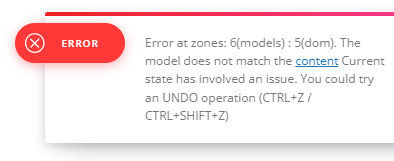
ERROR “Error at rows: 1(models) : 2(dom). The model does not match the content. Current state has involved an issue. You could try an UNDO operation (CTRL+Z / CTRL+SHIFT+Z)”
 gaevega
 Ciao Anamaria,
The php version is 8.3.10
The problem appears when I click on edit page with tagdiv composer
also when I try to edit from Couldtemplate and then on Single Templates.
I don’t have a child theme
Bettina Hello!
Check this guide: https://forum.tagdiv.com/featured-image-or-video/
You should use a cloud single post template in order to be able to edit it with the tagdiv Composer.
The Single Post Featured Image shortcode will display the video as in your screenshot. But the Single Post BG Featured Image shortcode displays the image from the video.
Thank you!
 Gail Langdon
http://www.foundmyjam.com
When I view my website using the computer desktop, everything displays fine. But with using either a tablet or a mobile phone device, the footer does not display. I’ve gone into edit the homepage (using tagDiv composer) and when I click on the mobile version and scroll all the way to the bottom, I see the footer section just fine. I’ve checked the Newspaper Theme Panel and it looks okay to me. I can’t find out why this is happening. Thanks in advance for your help.