
- NewspapertagDiv Composer – Website Manager
- NewspaperWhen tagDiv Composer is Not Working
- NewspapertagDiv Composer Tutorial
- NewspaperScroll Animation
- NewspaperSingle External Shortcode and External Shortcode
- NewspaperCredit System
- NewspaperBookmark – Save For Later
- NewspaperFlex Block Builder and Flex Loop Builder
- NewspaperModules Builder in Newspaper Theme
- NewspaperIntroduction to CPT and ACF with Newspaper Theme
- NewspaperCreate a frontend submission form
- NewspaperHow to Use the Tabbed Content shortcode
- NewspaperCreate a form contact page
- NewspaperFilters and sorting for taxonomies
- NewspaperUser review system
- NewspaperCustom Fields Support
- NewspaperWooCommerce: Happy “Add to Favorites!”
- NewspaperWoo Brands
- NewspaperModal Popup
- NewspaperShortcodes
 FranceGallCollection
Hello
I just updated WordPress to version 6.9, and all images inserted through TagDiv Composer no longer appear. They display correctly in the editor, but they are no longer visible on the front end.
 Calin
Calin Hi,
It will be need to use tagDiv Composer to change the menu – https://forum.tagdiv.com/main-menu/ https://i.imgur.com/BlGDAPu.png https://i.imgur.com/TDLF5iN.png please set it on mobile too – https://i.imgur.com/hHCMMoT.png
Thank you!
Calin Hi,
Unfortunately, this can not be done for social share and for standard social networks from the theme panel. It can be done using tagDiv Composer on pages and cloud templates as in my above example.
Thank you for your understanding!
Calin Hi,
If you need it to link to “Signal” then what can be done is to use tagDiv Composer, add an icon element and set on it the link to “Signal” – https://i.imgur.com/1W1Qlfx.png
I hope this will help you!
Calin Hi Chris Baird,
I think there is a misunderstanding about how the Cloud section for pages is interpreted within the Cloud Templates system. From that section, you can import pages already created with tagDiv Composer, edit them, or duplicate them. However, there is no option to set a page as a global template, unlike other cloud templates.
This is because pages are not meant to be used globally each page can have its own unique design. If you need multiple pages to look the same, you can simply create one page and then duplicate it.
Thank you!
 emerzlyakov
Hello dear developers,
On every page of my website, in the Developer Tools console, I see the following list of errors.
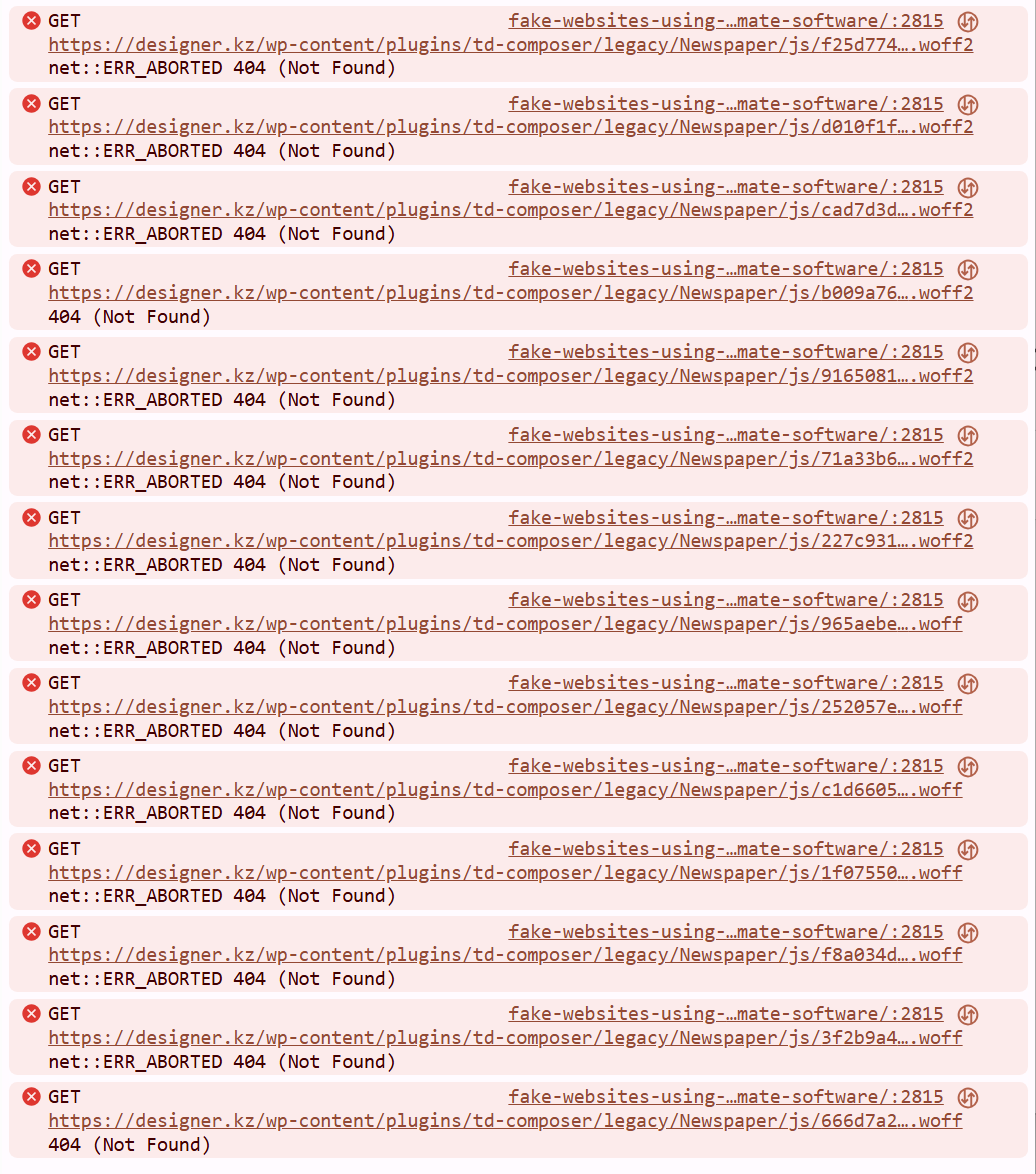
As I understand it, this means that some fonts cannot be loaded?
Here is the full path to one of the files mentioned in the error message:
https://designer.kz/wp-content/plugins/td-composer/legacy/Newspaper/js/9165081d10e1ba601384.woff2
Why is this happening? Does this slow down my website’s loading, and what should I do?
Calin Hi,
Our theme has a translation option in the theme panel for the elements/text that are globally set, if those are individually set, as on homepages where text is set using tagDiv Composer, those need to be edited using the theme builder, select the text and change it.
Calin Hi,
You need to use tagDiv Composer to edit the logo on homepage and the footer – https://i.imgur.com/yGB8e92.png – select teh logo, remove the text logo and svg code – https://i.imgur.com/7KcVSHH.jpeg – https://i.imgur.com/pU6pReT.png
Calin Hi,
You need to use tagDiv Composer, edit the homepage and scroll to the footer there, select the row containing the pink color and check where the color is set (usually is in css tab ) – https://i.imgur.com/022o3hn.png https://i.imgur.com/BttF3CL.png
Calin Hi,
For this you need to edit the pages and cloud template using tagDiv Composer https://i.imgur.com/x2JetIa.png look after a CSS code element and remove this custom css https://i.imgur.com/j5Nqgr7.jpeg. Doing that, the animation from that page will be removed.
Calin Hi Chris Baird, yes, that it is right!
Having a category template that is global will display elements for each category in parts that are related to that category, for example, category image, description articles…
Now if you have a cloud category template, this can be edited with tagDiv Composer and make sure that you use the category elements.
Thank you!
Calin Hi,
Yes, this can be done by setting the page template to Default. Then, edit the page with tagDiv Composer and customize it as you wish. After saving the page in tagDiv Composer, the page title will be displayed automatically as long as you don’t add a Page Title element inside the Composer.
Thank you!
Calin Hi,
You need to use tagDiv Composer https://i.imgur.com/mNAlCzv.png set or select a row https://i.imgur.com/L9sVn7y.png, there you can set the layout and you can stretch the row https://i.imgur.com/thftI7H.png (only on Newsapper the row can be stretched)
 regio-online
I am experiencing a critical issue with the Featured Image display on our Single Post Template.
The image is being cropped at the top and bottom with the Single Post Bg Featured Image, (e.g., faces are cut off) because the container height is fixed and incompatible with the image’s aspect ratio.
Also using Single Post Featured Image with custom CSS (see below) does not contain the image but cuts off below half of image:
.tdb_single_featured_image img.entry-thumb {
object-fit: contain !important;
width: 100% !important;
height: auto !important;
max-width: 100% !important;
}
.tdb_single_featured_image {
max-height: 500px !important;
overflow: hidden;
}
Good to understand that all images are served through the plugin WP Media Folder Cloud add-on from Google Drive, all images are resized offline with XN-Resize, before uploaded in media library folder in WPMF Google Drive, to be constrained to max 1400x600px size. So images have no seperate thumbnails created in Google Drive. The are coded as thumbnails automaticly inside Big Grid and Flex blocks.
Technical Cause and Conflict
Fixed Height Conflict: The core problem lies in the theme block used to display the header image. Specifically, the tdb_single_bg_featured_image block (which was previously used, or its properties are still inherited) has a hard-coded default height value (600px) that cannot be removed or set to ‘auto’ in the TagDiv Composer settings. This fixed height creates an inflexible CSS container.
Rendering Override: The theme’s rendering engine (or the WP Media Folder Cloud Add-on) applies a height constraint via an inline style or theme JavaScript (JS) that executes with the highest priority, forcing the image to fit the limited height while applying overflow: hidden.
CSS Failure: All attempts to override this constraint using standard CSS (Child Theme, Customizer, and direct Block CSS injection) fail to work against the theme’s rendering logic.
Desired Outcome and Required Solution
The required behavior is the precise inverse of the current rendering. The image must behave exactly like the CSS rule object-fit: contain.
Goal: The image must scale down proportionally based on the available width of the column, ensuring the entire image (full height and width) is visible within the container without any cropping. The container’s height must then dynamically adjust (height: auto) to accommodate the image’s resulting proportional height.
I require assistance in disabling the internal hard-coded height constraint (600px) on the Featured Image block within the TagDiv Composer’s source files, as external CSS solutions are being ignored, or have a workaround presented with custom code that can do the job.
Since Single Post Bg Featured Image is a background image this is difficult. The element is placed inside Single Post Featured Image, to be able to show caption. In the Extra Class of CSS of Single Post Featured Image we no have placed remove-image. When showing the image in this element it only shows with setting 485×360 but then doubles in height strangly.
Any help and solution in this would be much appreciated!
 Chris Baird
For creating layouts for Homepage, is it best to Create New Page and then edit layout via Tagdiv Composer or to go to the Cloud Templates > Homepage Templates and design Homepage that way?
Same question for Single Post Layout, Categories, Author – etc.
Also. – to go along with that –
How do you set a featured image for the Homepage? Per individual Category page? For Individual Author page?
 IdentidadyFuturo
When I try to edit the homepage in TagDiv Composer, only the mobile interface appears. What can I do?

Calin Hi,
Please use an FTP or file manager and delete the tagDiv Composer plugin. After that, try to reinstall the tagDiv Composer from Newspaper > Plugins. This should resolve the problem.
Thank you!
 smga
smgaHello!
Today we discovered we couldn’t log into our website’s control panel. We disabled all plugins (renamed the plugins folder) and were able to log in. After that, we started enabling plugins one by one and discovered a problem: when we enabled tagDiv Composer, the same problem reoccurs.
I can’t reinstall the plugin – screenshot
Can you tell me what to do?
Thanks

Calin Hi janabi,
If in wordpress everything is the same set on both websites and the situation is only on one of them, I will recommend checking the DNS settings on the host to see if the settings are similar or not.
Related to registration, our theme provides 2 options, for this, one is the element “Header login” that can be set with tagDiv Composer in the header zone, and it will pop up the login modal from where you can choose to register.
The other method is when tagDiv Opt-in builder is enabled, then you can create a page for login/register using teh theme elements “Page login/register” – https://i.imgur.com/3wPEkAs.png
Another solution is to use teh wordpress settings (those from domain/wp-login.php)
Thank you!
 damirvujinovic
 Thank you for your answer, this time was cause none of above, I suspect that cause is raletad to Neespaper theme and visual composer theme. So, It would be good if you took a look. Thank you.
Calin Hi,
I think that you want to add the excerpt inside the post, if is so, then you need to use a shortcode since this element doesn’t exist in our builder:
The shortcode can be get from here:
– https://wordpress.stackexchange.com/questions/336420/retrieving-post-excerpt-as-a-shortcode
add_shortcode( 'output_post_excerpt', 'get_the_excerpt' );
And it can be set in a child theme in functions.php the use the shortcode [output_post_excerpt]
to display the excerpt, this can be set on the single post template using tagDiv Composer in “Single External Shortcode” or text with title/column text elements.
I just tested and is working – https://i.imgur.com/qz1Zi42.png – https://i.imgur.com/7StOLec.png – https://i.imgur.com/Gtb8EdI.png”
Thank you!
Calin Hi,
By default, there is no option to filter only the featured video, but if you have set a specific category or tag, then you can filter your block after that category/tag.
Now, in case you have a single post template from the cloud, then you can use tagDiv Composer to create the sidebar https://forum.tagdiv.com/sidebars-tutorial/
For the standard template, you must use widgets (you can use a block widget).
Thank you!
 jjgoi
jjgoiHi,
Not sure why but recently I noticed my pages content can no longer be edited with the tagDiv composer’s column text > edit content button.
It just does not show up at all inside the content, and editing the content does not appear to change anything.
It’s quite buggy I would say. I didn’t do anything else. This is purely a tagDiv forest beat template – was just editing the pages.
Previously it did show up, so not sure what happened here.
 simchris
 Probably want to migrate site to new hosting first using any of the modern host-provided move tools. Once moved, you’d then probably look at using something like the newsmag theme. You will need to install the new theme, disable existing plugins, back up working site on new server including server dbase, then activate new theme, then activate new copy of td-composer included with newsmag, then you will need to go in and change settings to preferred default templates for posts, archives; then make a new home page layout using the theme builder.
Calin Hi,
You need to use tagDiv Composer ro edit the page, after that select the column and in css tab replace the image – https://i.imgur.com/8MYZ6iD.png



