
- NewspapertagDiv Composer – Website Manager
- NewspaperWhen tagDiv Composer is Not Working
- NewspapertagDiv Composer Tutorial
- NewspaperScroll Animation
- NewspaperSingle External Shortcode and External Shortcode
- NewspaperCredit System
- NewspaperBookmark – Save For Later
- NewspaperFlex Block Builder and Flex Loop Builder
- NewspaperModules Builder in Newspaper Theme
- NewspaperIntroduction to CPT and ACF with Newspaper Theme
- NewspaperCreate a frontend submission form
- NewspaperHow to Use the Tabbed Content shortcode
- NewspaperCreate a form contact page
- NewspaperFilters and sorting for taxonomies
- NewspaperUser review system
- NewspaperCustom Fields Support
- NewspaperWooCommerce: Happy “Add to Favorites!”
- NewspaperWoo Brands
- NewspaperModal Popup
- NewspaperShortcodes
 Vlad S
 Hello!
As you can see here now the cart is an element which can be added using tagDiv Composer: https://www.screencast.com/t/50RiFOFtH You can set it anywhere on your page if you are using a PRO demo or a cloud library template.
Thank you!
Vlad S Hello!
Let us know what you want to change, PRO demos are fully editable using tagDiv Composer. You can take a look at our video guides here to find some inspiration on how some elements work: https://www.youtube.com/user/tagdiv
Thank you!
 Bettina
 Hello!
Yes, that’s true. In order to edit a page with TagDiv Composer you need to use a PRO/cloud template and not a default one. For more information about TagDiv Composer, please check our documentation here: https://forum.tagdiv.com/tagdiv-composer-tutorial/
Thank you!
Bettina Hello!
Try to do these steps:
1. disable TagDiv Composer
2. uninstall(delete) TagDiv Composer
3. clear cache (if cache plugin exists)
4. install TagDiv Composer
5. activate TagDiv Composer
6. clear cache (if cache plugin exists)
Also, please make sure that all the requirements are met as you can see here: https://forum.tagdiv.com/requirements-for-newspaper/
Please start looking for a plugin conflict, deactivate ALL plugins except tagDiv ones, also if you are using child theme or cache plugin, deactivate them, clear all cache(also from your browser) and try again.
Thank you!
Bettina Hello!
In order to edit a page with TagDiv Composer you need to use a PRO/cloud template and not a default one. For more information about TagDiv Composer, please check our documentation here: https://forum.tagdiv.com/tagdiv-composer-tutorial/
By editing a page with TagDiv Composer you could delete elements but also the row called “Empty column”.
You could try to delete it like this: select the row, press the button delete from your keyboard, then with your mouse select “YES”.
Also you have another option too, check this: https://www.screencast.com/t/pxuOzYIIpcG
Thank you!
Vlad S Hello!
The About us and About me are pages not posts. You can find them in Dashboard – Pages. For the footer logo you are able to remove it using tagDiv Composer, Simply open tagdiv composer on any page, scroll to the bottom, right click on the element and delete it: https://www.screencast.com/t/yR5wA9ZaCNLx
Thank you!
Bettina Hello!
This issue has been discussed already here: https://forum.tagdiv.com/topic/i-am-unable-to-activate-my-themes/
Also, try to do these steps:
1. disable TagDiv Composer
2. uninstall(delete) TagDiv Composer
3. clear cache (if cache plugin exists)
4. install TagDiv Composer
5. activate TagDiv Composer
6. clear cache (if cache plugin exists)
Thank you!
Vlad S Hello!
First please reinstall the tagDiv Composer plugin, usually this may occur due to broken links. If this does not works, You will have to start looking for a plugin conflict. please deactivate ALL plugins except tagDiv ones, also if you are using child theme or cache plugin, deactivate them, clear all cache and try again.
Let us know the result!
Thank you!
Bettina Hello!
Edit the homepage with TagDiv Composer, click on the mobile viewport: https://www.screencast.com/t/XDQJedlggSB ; there you can see your mobile version and you can edit the elements there.
Hope that helps you!
Thank you!
Bettina Hello!
If you have a cloud/PRO template, but you can’t edit the footer, then edit your homepage with TagDiv Composer, scroll till footer, click on footer zone and you can edit/delete the elements there.
Thank you!
Bettina Hello!
First of all, please make sure you have a backup done and then you can update the theme and the TagDiv plugins also.
Please take a look for this advice before updating: https://forum.tagdiv.com/topic/action-required-please-read-how-to-update-to-the-newspaper-theme-v-10/
I recommend you to make a backup and update plugins and the theme via file transfer, so that you don’t face any error: https://forum.tagdiv.com/how-to-update-the-theme-2/
Mobile theme and AMP works great together and has a similar design, but if you do not want to use AMP, there is a setting to choose only mobile theme without AMP.
Unfortunately, this feature is available in Tagdiv Composer plugin, and you can not edit the mobile theme pages with this plugin. This feature works great on mobile pages: https://tagdiv.com/newspaper-10-3-7-update-brings-customizable-and-fast-mobile-pages/ and in a responsive version(a responsive version of your website is looking similar like on desktop, edit the page with TagDiv Composer, click on the mobile viewport: https://www.screencast.com/t/XDQJedlggSB ; there you can see your mobile version and you can edit the elements there.)
Thank you!
Bettina Hello!
Please try to use the element called “Homepage post” when you edit your homepage with TagDiv Composer.
Hope that helps you!
Thank you!
 embarcado
 Hello Vlad,
Thanks but suggestion didn’t work. Removed and reinstalled AMP plugin w/o success. It still shows the same error:
Notice: amp_has_paired_endpoint was called incorrectly. Function called while AMP is disabled via ‘amp_is_enabled’ filter. The service ID “paired_routing” is not recognized and cannot be retrieved. Please see Debugging in WordPress for more information. (This message was added in version 2.1.1.) in /home2/adepton/public_html/wp-includes/functions.php on line 5171
Note that when reinstalling, it showed the following error and then it looked like the system got it fixed:
Notice: Undefined property: Vc_Updater::$title in /home2/adepton/public_html/wp-content/plugins/js_composer/include/classes/updaters/class-vc-updating-manager.php on line 99
 adminsensei
Hi, my website broke after trying to install the newest version 11, and now is back to 10.4 but the tagdiv composer can’t be installed at all.
I open the help page/read forum here, some says to upload tagdiv composer manually but I could not find any button/field to upload the zip file, can you help guide me? I did workaround for 1 day already but not find the result.
 seanmccaughan
I’m not able to drag and drop to delete in the tagDev Composer. There’s also no red zone to drag things to.
My site is thebigbubblemiami.com
I’m running Chrome and Newspaper 11
 Alex
AlexHi, I have a problem with the H1 of the Homepage. I have a logo and if I do a check it says “H1 duplicate”. If I go with “composer” to click on “disable H1” with a check it tells me “H1 is missing”. How can I manage a unique H1 on my homepage? I would like the logo not to be an H1 and set an H1 by deciding the content of the words. I would therefore like a single H1. How do I set my handwritten H1 on the Home page?
This I am asking you is very important because we are investing a lot on SEO and having a missing or duplicated H1 has devastating effects on SEO and consequently on Authority and site traffic in the eyes of Google.
Thanks in advance for your response and support.
my site is: https://www.moviemag.it
 mattinodiverona
Hello Guys! I Have a problem with right click in TD composer…when I click nothing happen…
Can you help me?
 lyon
lyonHello, We are using Newspaper Theme version 10.4 on our multisite network, with WordPress 5.7.2. Ever since updating to 10.4, we’ve had an issue that affects just two of our sites on the network, one of which is the main site. All the other sites have no issue.
What happens is when we build a page with a sidebar in TD Composer, and leave the page template set to default, we are seeing a strange overlapping sidebar:
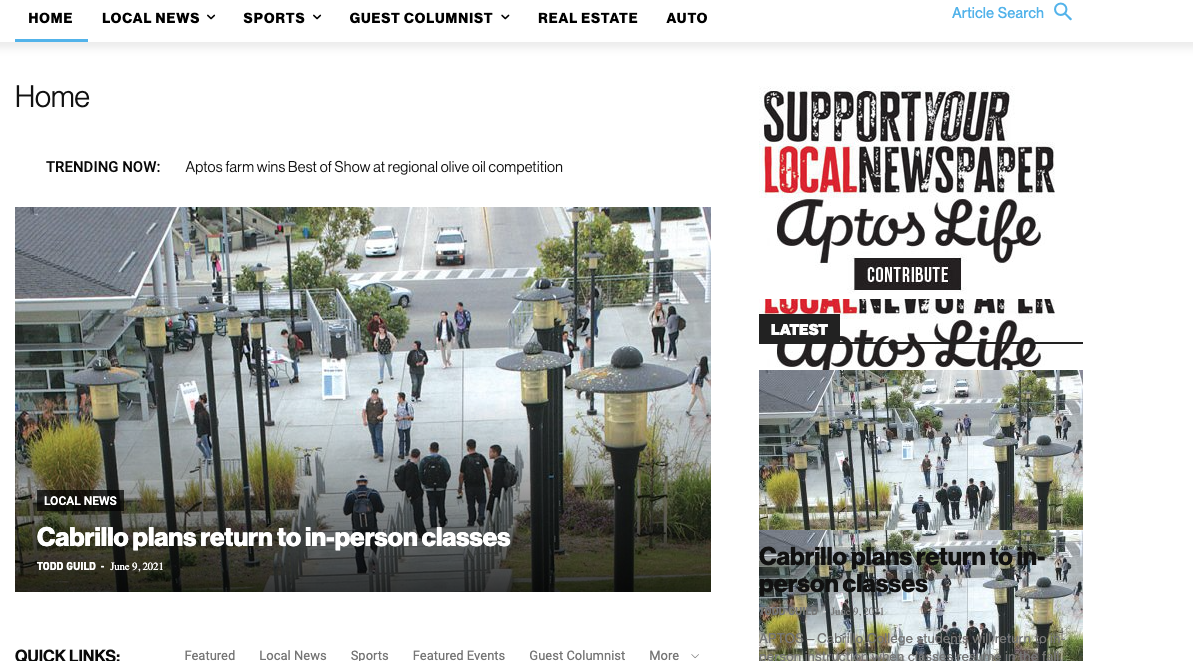
This is how we have the sidebar set in TD Composer:
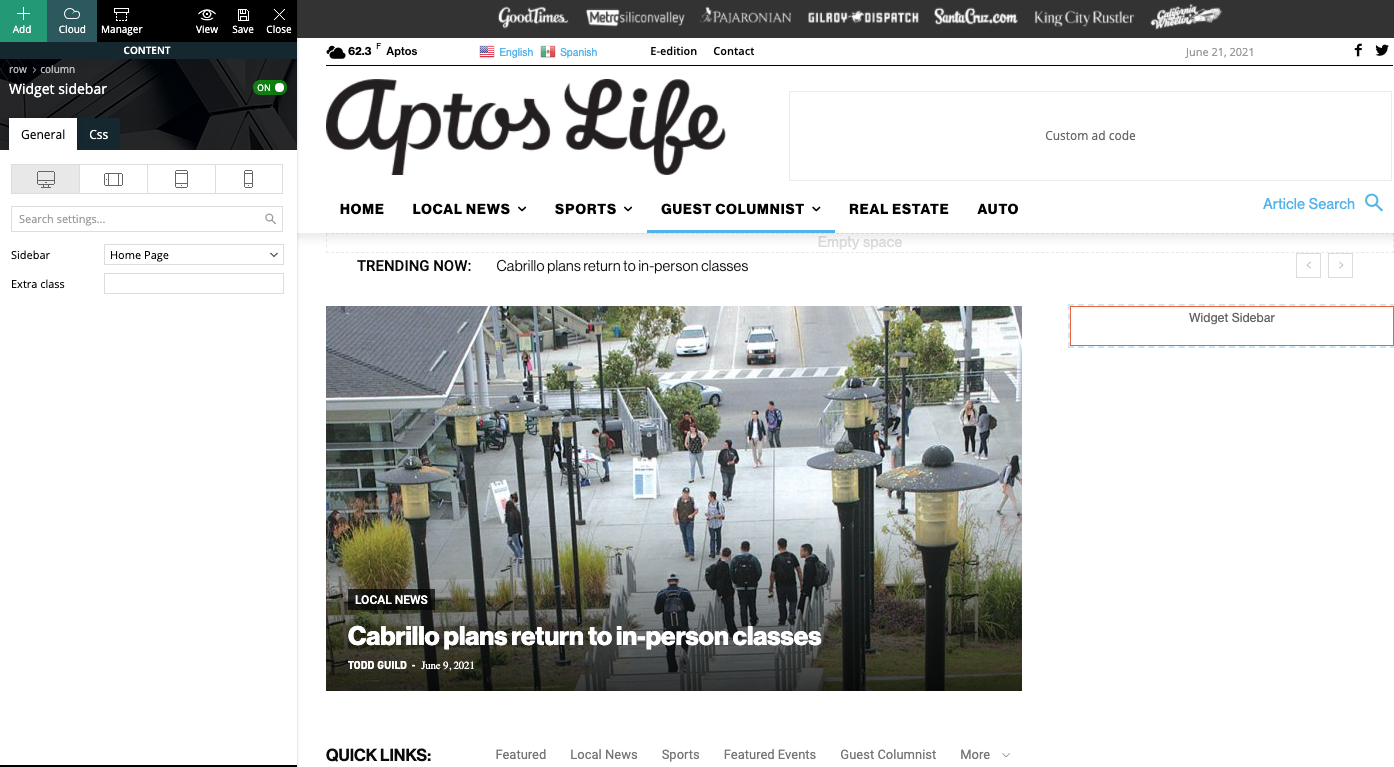
As a temporary workaround we can set the page template to Pagebuilder + latest articles + pagination, but this opens up a whole new set of problems. For example, if we try to change or hide the sidebar in the “Homepage latest articles” settings, no changes occur. Even something such as changing the title on the post loop won’t take affect.
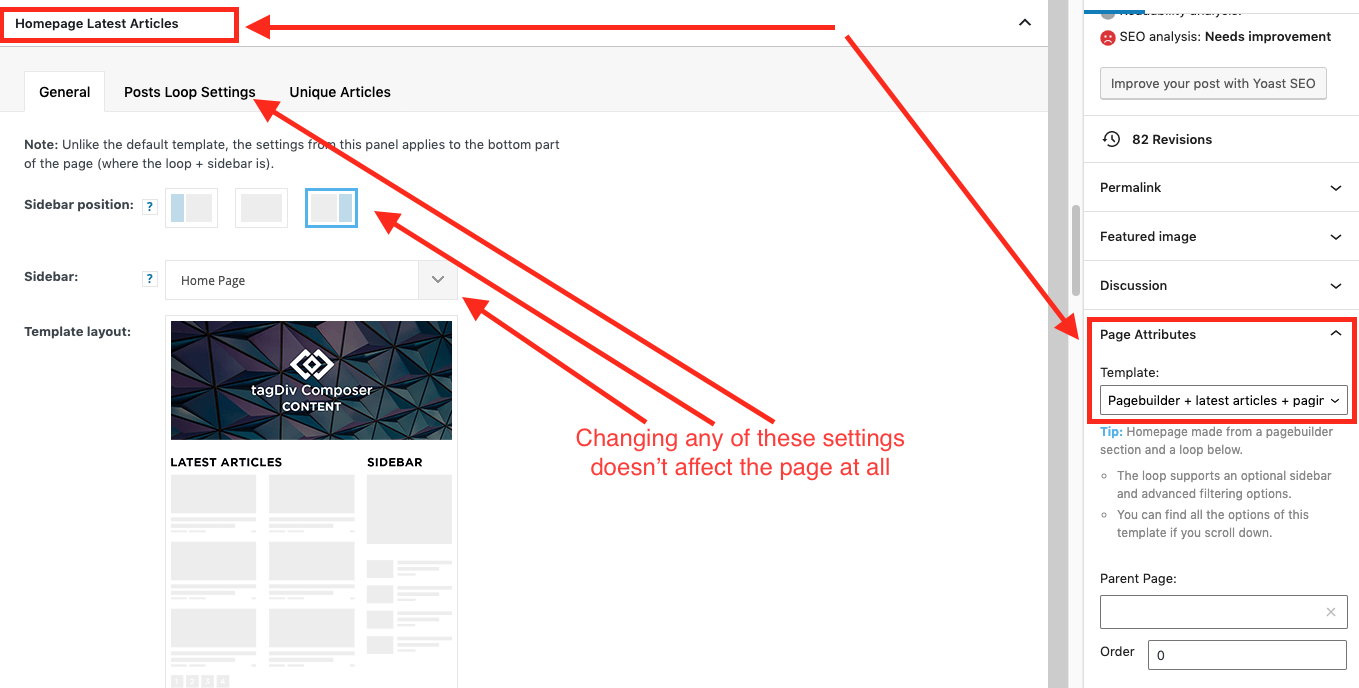
As a result, instead of two overlapping sidebars, we now have two duplicate sidebars stacked on top of each other:
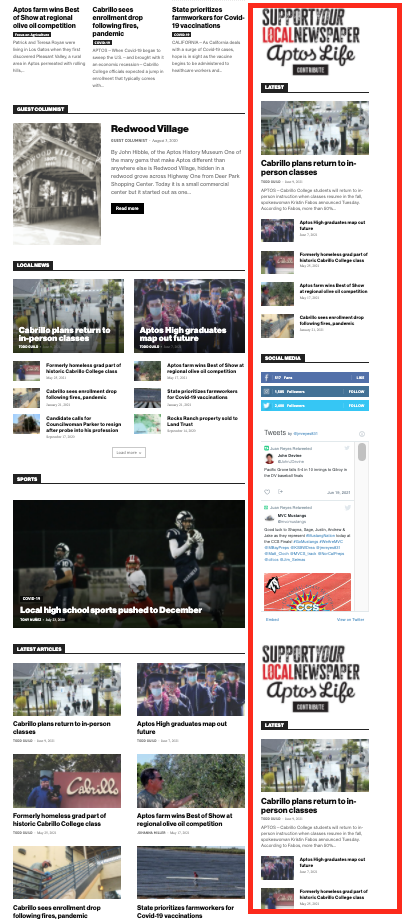
Is there any way to fix these issues? Ideally we would like to leave the page template set to default, with the overlapping sidebars eliminated.
We’ve already tried disabling all our plugins to check for conflicts. Here is some more info from the System Status panel:
Theme name Newspaper
Theme version 10.4
Theme database version 10.4
HTTP channel test wordpress
Installed demo Default – demo ID: default | install type: full
Theme Mobile Newspaper mobile version
php.ini configuration
Server software Apache/2.4.38 (Debian)
PHP Version 7.3.19-1~deb10u1
post_max_size 32M – You cannot upload images, themes and plugins that have a size bigger than this value. To see how you can change this please check our guide here.
max_execution_time 120
max_input_vars 3000
SUHOSIN installed false
PHP extensions
mbstring available
GD library available
WordPress and plugins
WP Home URL https://aptoslife.com
WP Site URL https://aptoslife.com
WP version 5.7.2
WP multisite enabled Yes
WP Language en_US
WP Memory Limit 1 GB/request
WP_DEBUG False
Caching plugin No caching plugin detected – for best performance we recommend using WP Super Cache
 cheryldimof
Hi,
I’m really happy that version 11 added support in composer/Cloud library for WooCommerce shop page customization, etc. However, I was using a plugin that added Quickview and product badges to WooCommerce products and I’m finding this doesn’t work on shop pages and products on which I use the tagDiv composer. I’ve also tried other plugins which offer the same feature. Do you know of any plugins which WILL work with Tagdiv for quickview or product badge features in Woo? Or would you consider compatibility with such plugins in future versions?
Thanks
Cheryl
adminsensei Hi Anamaria,
I have the same problem and could not install the Tagdiv composer, it says that the folder exists and plugin installation failed. Our website is seitimes.com, I do not know how to do workaround now.
 fullofbeauty
 Bezukhof
Some posts using the same global template have very small fonts, even though when I edit it with the TagDiv Composer the font’s are showing larger.
Example page with small font:
Example page with appropriate font size:
https://nichefacts.com/wordpress-affiliate-program/
Demonstration of issues:
https://www.awesomescreenshot.com/video/4207926?key=e4a8ae82f33f13635f761d456b241d1d
Bettina Hello!
Please check our tutorial here: https://forum.tagdiv.com/tagdiv-composer-tutorial/
Thank you!
Bettina Hello!
Try to do these steps:
1. disable TagDiv Composer
2. uninstall(delete) TagDiv Composer
3. clear cache (if cache plugin exists)
4. install TagDiv Composer
5. activate TagDiv Composer
6. clear cache (if cache plugin exists)
Also, please make sure that all the requirements are met as you can see here: https://forum.tagdiv.com/requirements-for-newspaper/
Let me know the results!
Thank you!
Bettina Hello!
Edit the page with TagDiv Composer, click on the mobile viewport: https://www.screencast.com/t/XDQJedlggSB ; there you can see your mobile version and you can edit the elements there.
Let me know the results!
Thank you!
