
- NewspapertagDiv Composer – Website Manager
- NewspaperWhen tagDiv Composer is Not Working
- NewspapertagDiv Composer Tutorial
- NewspaperScroll Animation
- NewspaperSingle External Shortcode and External Shortcode
- NewspaperCredit System
- NewspaperBookmark – Save For Later
- NewspaperFlex Block Builder and Flex Loop Builder
- NewspaperModules Builder in Newspaper Theme
- NewspaperIntroduction to CPT and ACF with Newspaper Theme
- NewspaperCreate a frontend submission form
- NewspaperHow to Use the Tabbed Content shortcode
- NewspaperCreate a form contact page
- NewspaperFilters and sorting for taxonomies
- NewspaperUser review system
- NewspaperCustom Fields Support
- NewspaperWooCommerce: Happy “Add to Favorites!”
- NewspaperWoo Brands
- NewspaperModal Popup
- NewspaperShortcodes
 Bettina
 Hello!
If it works okay in the tagdiv Composer, it could be from an extra plugin you are using. Please make a test and deactivate ALL plugins except tagDiv ones. Also, if you are using a cache plugin, deactivate it, clear all cache, and try again.
Let me know the results!
Thank you!
 FBM
FBM Hey,
yes, in the composer it works perfect. But in the frontend search it does not apply the correct header.
The issue only applies with the search cloud templates for CPTs.
We also dont have any caching active on the site.
Bettina Hello!
Did you check which header template is assigned on those pages? You can see it in the Website Manager: https://forum.tagdiv.com/tagdiv-composer-website-manager/
Thank you!
FBM Hey Bettina,
yes the search is displaying the post type indicated by me.
BUT: It is not assigning the correct header template to the correct search template.
This is how it should look like:
Search Template Global: Header 1
Search Template CPT: Header 2
But it does this:
Search Template Global: Header 1
Search Template CPT: Header 1
Even though the Search Template CPT in TagDiv Composer displays the correct header template.
FBMHi,
Situation:
I have a CPT and created a search result template with CloudTemplates.
The results show up and work.
Unfortunately the Cloud Template ignores the in Tagdiv Composer assigned header but uses the header of the global search template. The header does load correctly when I build the template, but when I use the CPT search it falls back to the header of the search template (global).
Is that a known issue?
Thank you for any hints.
Bettina Hello!
Can you see the issue while you edit the homepage with the tagdiv Composer? If not, then it could be a browser glitch.
Thank you!
Bettina Hello!
Please check this guide: https://forum.tagdiv.com/theme-colors-introduction/
Make sure you use the default templates and that the issue is not caused by a caching tool.
Please check the differences between the cloud vs default templates from our guides:
– https://forum.tagdiv.com/design-post-pages-using-cloud-library-templates/
– https://forum.tagdiv.com/design-post-pages-using-default-templates/
All the cloud templates can be found and edited with the tagdiv Composer from the Dashboard -> Cloud Templates.
Thank you!
Bettina Hello!
First, make a test and deactivate ALL plugins except tagDiv ones. Also, if you are using a cache plugin, deactivate it, clear all cache, and try again. Please deactivate and delete the tagdiv Composer plugin, clear the cache, and install it again.
If the problem is still there, then please get in touch with us via email at contact@tagdiv.com and provide the following:
– admin URL and credentials
– cPanel URL and credentials
– a link to this topic to identify you
We’ll check and try to help you as soon as possible!
Thank you!
Bettina Hello!
A workaround could be to use two shortcodes with different settings and hide the mobile one on desktop and tablet. Check this guide to activate the option to see the hidden elements: https://forum.tagdiv.com/tagdiv-composer-website-manager/
Thank you!
 Simion C.
 From what I see there is very little space there. Normally there is more space between the elements by default, but I see there is a negative margin on that row https://prnt.sc/k-zw4DIAQyFS I would say to set a bigger margin on mobile but since you cannot use the mobile viewport in the composer it can’t be done. That issue will have to be investigated first, to see why the mobile viewport doesn’t appear in the composer. I can check it as soon as you send us the email with the website login (user pass) and login URL if you use a custom one instead of wp-admin. Let me know.
Thank you!
 fnewsmag
Molongui Co-Authors plugin seems to work great for co-authors except for this one critical glitch –
when using the tdb_module_author_name block inside of a custom module, it seems like my admin author is always listed instead of the correct author name. Curiously though, it does seem to link the href to the correct author page. Therefore, on category pages such as fnewsmagazine.com/category/news where i’m using the module template, the author is always fnewsmagazine, although when clicked it does bring you to the correct author. This can also be seen on our homepage and the date archive page. It just says F Newsmagazine as the author rather than the actual authors and co-authors.
In contrast, it works properly (including the multiple authors) on the author page we’ve created, which is using the Flex Block 1 element – td_flex_block_1
shown here: https://fnewsmagazine.com/wp62/author/d-l-adams/
One other curious element of this – when i load the module template editor, it lists the admin author in the box, but when i place a new author name module block in the composer, it does correctly get the name of the author, however when i save and reload the template, it seems to load the admin author name again instead of the correct author.
Disabling the Molongui plugin stops this behavior. I’m using the latest versions of TagDiv and Molongui
Thanks for your time in looking into this!
In the meantime, i’m curious if I can just add a shortcode that molongui provided in this link explaining the integration issues with TagDiv in place of the author module name. The link says to just add a text element with [[molongui_byline]] shortcode in it, however it seems like when I add an inline text with the shortcode as the content, it just shows the shortcode code and doesn’t actually display the data. Let me know if you have any guidance on this as well.
Thanks for your time!
FBMWe discovered that tagDiv automatically injects a BreadcrumbList schema into pages (not posts), even when breadcrumbs are disabled.
This creates a significant issue for us:
- Our Google Programmable Search Engine (PSE) does not properly index or display these pages.
- Google sees the page type as a BreadcrumbList, not a Page.
As a result, these pages do not appear correctly in search results.
We have deactivated the article schema generation in the theme settings, because we are using Yoast SEO for structured data management.
The BreadcrumbList schema is still being added by this file:
wp-content/plugins/td-composer/legacy/common/wp_booster/td_page_generator.php
Normally, you can control the breadcrumb output via the theme settings, but only if the Standard Pack is activated.
However, the Standard Pack is usually optional and not required for basic functionality.
We found a (somewhat hacky) method to disable the unwanted schema:
- Activate the Standard Pack.
- Turn Breadcrumbs off in the theme settings.
- Deactivate the Standard Pack again.
This prevents the schema injection – at least temporarily.
Isn’t thia a Bug?
- Breadcrumbs should not be output when they are globally disabled, regardless of the Standard Pack status.
- Structured data should not be injected at all if users have explicitly disabled the theme’s schema output (especially when an SEO plugin like Yoast is handling it).
- Forcing users to install/activate an optional pack just to disable something is not clean behavior.
Bettina Hello!
This issue with the error from Composer has also been discussed here: https://forum.tagdiv.com/topic/errors-at-columns-elements-5/.
Please make sure you did all the steps that I mentioned here: https://forum.tagdiv.com/topic/errors-at-columns-1models-0dom-the-model-does-not-match-the-content-curr/
If the problem is still there, then please get in touch with us via email at contact@tagdiv.com and provide the following:
– admin URL and credentials
– cPanel URL and credentials
– a link to this topic to identify you
We’ll check and try to help you as soon as possible!
Thank you!
Bettina Hello!
Make a test and deactivate ALL plugins except the tagDiv ones. Also, if you are using a cache plugin, deactivate it, clear all cache, and try again.
For more customizations, please import a header cloud template.
We recommend using cloud/PRO templates to have the possibility to edit them with the TagDiv Composer, which contains a lot of functions and features; please check our tutorial here: https://forum.tagdiv.com/tagdiv-composer-tutorial/
More documentation about the cloud templates is here:
– https://forum.tagdiv.com/cloud-library-templates/
– https://forum.tagdiv.com/design-post-pages-using-cloud-library-templates/
– https://forum.tagdiv.com/cloud-library-category-templates/
About pages here: https://forum.tagdiv.com/page-templates-2/ -> https://forum.tagdiv.com/homepage-how-to-build-and-set-it/
Check out this video about how to create a website from scratch: https://www.youtube.com/watch?v=SoGQ0d5kIBg
Thank you!
Bettina Hello!
Please check the differences between the cloud vs default templates from our guides:
– https://forum.tagdiv.com/design-post-pages-using-cloud-library-templates/
– https://forum.tagdiv.com/design-post-pages-using-default-templates/
All the cloud templates can be found and edited with the tagdiv Composer from the Dashboard -> Cloud Templates.
Thank you!
Bettina Hello!
Which mobile version do you use?
We have three options available for mobile versions that you can use:
1. Responsive version: A responsive version of your website looks similar to the desktop version. TagDiv Composer is used to edit the page. Click on the mobile viewport: https://www.screencast.com/t/XDQJedlggSB. You can see your mobile version there and edit or adjust the elements to look better.
2. Mobile pages: https://tagdiv.com/newspaper-10-3-7-update-brings-customizable-and-fast-mobile-pages
3. Mobile theme plugin: The Mobile Theme is a performance-optimized theme included in the main Newspaper theme that only loads on mobile devices. It comes with its own templates and designs for pages, posts, categories, etc., so your current templates from the desktop theme will get converted to the mobile theme layout. Please see https://forum.tagdiv.com/the-mobile-theme/ and https://forum.tagdiv.com/mobile-theme-introduction/ for more information.
A full explanation is here: https://www.youtube.com/watch?v=SpGkOnJeNZY
If you need to use mobile version 1 or 2, then you need to uninstall the Mobile Theme plugin and AMP.
Thank you!
Bettina Hello!
This issue with the error from Composer has also been discussed here: https://forum.tagdiv.com/topic/errors-at-columns-elements-5/.
Please make sure you did all the steps that I mentioned here: https://forum.tagdiv.com/topic/errors-at-columns-1models-0dom-the-model-does-not-match-the-content-curr/
If the problem is still there, then please get in touch with us via email at contact@tagdiv.com and provide the following:
– admin URL and credentials
– cPanel URL and credentials
– a link to this topic to identify you
We’ll check and try to help you as soon as possible!
Thank you!
Bettina Hello!
Could you make sure you have no redirects on your server as well? Also, permissions for the theme’s folder are enabled.
Check this out: https://forum.tagdiv.com/general-options-may-interfere-newspaper-theme/ and https://forum.tagdiv.com/tagdiv-composer-not-working/
Let the host provider know about your issue; they may have an idea too.
Thank you!
Bettina Hello!
Edit the page with the tagdiv Composer, click on those ads, and see an image ad. You can remove it and add it yours.
Thank you!
Bettina Hello!
Please edit the post with the tagdiv Composer, and check the row/column/element to see if the sticky option is enabled.
Thank you!
 emailwie
 Hello….
If I want to change this Thumb image using Child theme.
So what will be the path of child theme for
https://autoarabia.me/wp-content/plugins/td-composer/legacy/Newspaper/assets/images/no-thumb/td_696x0
 KatyBee
I’d like to format part of my website as a traditional blog where you can scroll through full posts, as the posts will be quite short, so just linking to them wouldn’t make sense.
It also seems like it would be a cool way to make a feed on a specific subject with updates etc.
However I don’t know how to do this as the theme seems to only show excerpts in every block I’ve found.
Does one of the templates allow this or can it be achieved? It’s such a basic feature of many websites and possible with every other theme I’ve had that I assume it must be possible.
I typically use TagDiv composer to create templates but I don’t mind adding code to WordPress files if need be.
 detlev
Hello dear support team,
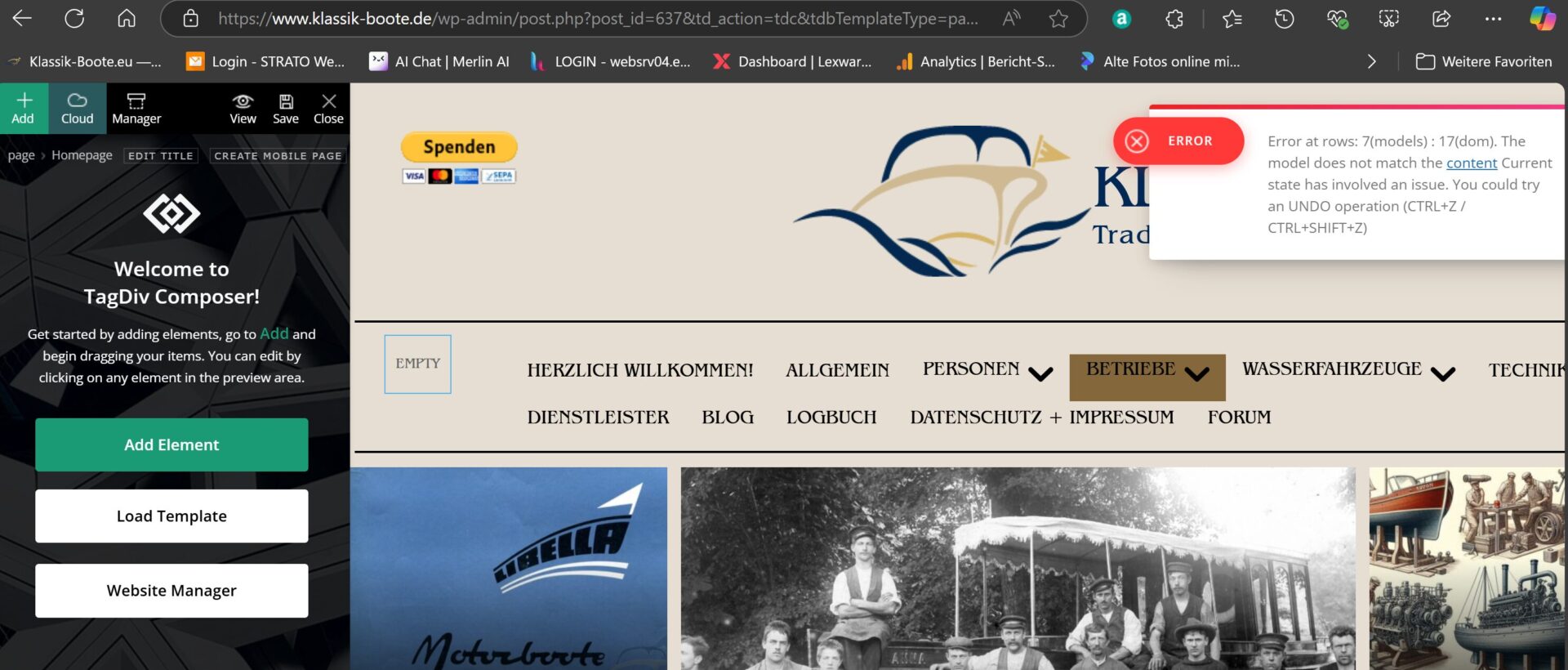
I urgently need your support. I suddenly get an error on the homepage without having changed this page. Can you see the mistake? Unfortunately, I can’t edit the page with the tagDIV composer either. The error message is:
Error at rows: 7(models) : 17(dom). The model does not match the content Current state has involved an issue. You could try an UNDO operation (CTRL+Z / CTRL+SHIFT+Z)
Would you please help me? Thank you for your great work.
Kind regards Detlev
 rdprasad.ravi@gmail.com
 Hey,
I am not using any redirection plugin even not using any cache plugin. I have diactivated all plugin and activated only tagdiv Composer, but after that it’s also not working.
How we can do this?
Bettina Hello!
Please edit the homepage with the tagdiv Composer, access the mobile version, and edit the page from that modal: https://app.screencast.com/rX6iLJpheqPNg -> click on the blue button tagdiv Composer and customize the page as you want: https://app.screencast.com/oPm0o4UUzsj8s
Thank you!
