- NewsmagHomepage – How to build and set it
- NewspaperHomepage – How to build and set it
- NewspaperHow to edit modules for Flex Block X
- NewspaperGeneral Options that May Interfere with the Newspaper Theme
- NewspaperThe Newspaper Mobile Theme: Introduction
- NewspaperHow to Add a Logo in Newspaper
- NewspapertagDiv Shop
- NewspaperHow to Use tagDiv Cloud Library
- NewspaperDesign your Post Pages using the Cloud Library Templates
- NewspaperHeader Builder
- NewspapertagDiv Cloud Library Plugin
- NewsmagtagDiv Composer Tutorial
- TutorialsFrom WPBakery to tagDiv Composer
- NewspapertagDiv Composer Tutorial
- NewspaperNewspaper theme documentation
- NewspaperThe Mobile Theme
- NewsmagNewsmag documentation
- NewsmagMain menu
- NewsmagLogo & Favicon
- NewsmagPage templates
 Bettina
 Hello!
We recommend to use cloud/PRO templates in order to have the possibility to edit them with the TagDiv Composer which contains a lot of functions and features, please check our tutorial here: https://forum.tagdiv.com/tagdiv-composer-tutorial/
More documentation about the cloud templates is here:
– https://forum.tagdiv.com/cloud-library-templates/
– https://forum.tagdiv.com/design-post-pages-using-cloud-library-templates/
– https://forum.tagdiv.com/cloud-library-category-templates/
– https://forum.tagdiv.com/homepage-how-to-build-and-set-it/
“Column text” and “text with title” elements have a button called “edit content” and if you click on that button, the WP Editor will open, and you can add some text/code/shortcode there. Close the WP Editor from X, save the changes from Composer and view the page to see the changes.
2. Edit it with Gutenberg and uncheck this option: https://app.screencast.com/zVJ9NpoVWbnMg
Choose the default option.
Thank you!
 hospitality-school
Please visit my site from Desktop or laptop: https://www.hospitality-school.com/
I am facing 2 major issues in Homepage:
1 – Look at the pagination. There is no content after page 1. I cannot show any blog posts like homepage in other pages.
2- How to Delete Leave a Reply part form the homepage. Can’t remove it.
 danna
dannaHello,
For some time now, shortcodes (such as Advanced Ads) have not been working on this homepage: https://raiffeisenzeitung.at/. I have always inserted the shortcode with the tagdiv composer block “Text with title”, but it no longer displays anything.
All the best,
Daniel
 ethosmedia.eu
Hi,
I’m working on v2.insuranceworld.gr building the website using cloud templates. Although it works perfectly with all templates (Homepage, Single, Header, Footer, etc), I cannot make it work with Page template. Do I have to set the usage of Page template somewhere in a new page?
George
 tinegregory
Good morning,
I’m having a problem with the mobile template of the homepage template in the cloud template. Indeed, I downloaded and set up the following 3 plugins: yoast seo, Wordfence and LiteSpeed Cache. And following this, the mobile template version of the home page template disappeared. Is it related to plugins? How can I recover the version prior to the modifications? THANKS
 Anamaria
 Hello,
1. Yes, you can add the logo more near to the menu, but you need to set the row layout like this -> https://i.imgur.com/DMqn02Y.jpeg and stretch row https://i.imgur.com/29Aet0y.jpeg You can not delete the empty column, only the row that contains empty columns.
If you want to delete a row, you can delete a row with the empty column using the right click on the row icon -> https://i.imgur.com/JodWvlW.png -> https://i.imgur.com/e6bb8U5.png or using the drag and drop or you can simply click on the row and press the delete button from your keyboard -> https://www.screencast.com/t/Mai7iyEG The same steps are to delete the elements.
2. Please disable the mobile theme and amp plugins.
Using our theme, you can choose from 3 mobile versions
-> mobile responsive => https://www.screencast.com/t/oJ2ShOp47
-> mobile theme plugin => https://forum.tagdiv.com/the-mobile-theme/
-> mobile page => https://tagdiv.com/newspaper-10-3-7-update-brings-customizable-and-fast-mobile-pages/ The option that you need to use.
Suppose you created the mobile pages with tagDiv Composer. In that case, when you install the Mobile Theme plugin, your pages will be overwritten by the plugin (the mobile theme comes with its templates for page, post, category, etc, so your current templates from the desktop theme will get converted to the mobile theme layout, the page content is made without builders in mobile editor => https://www.screencast.com/t/xbgZG8kH also, the options that are provided to edit the mobile theme version are limited (this keeps the things simple)).
This is a video about Responsive Newspaper Theme, AMP & Mobile Theme, Mobile Pages & Templates -> https://www.youtube.com/watch?v=SpGkOnJeNZY.
So, the mobile responsive is what you see when that you select the viewport on phone => https://www.screencast.com/t/matV17hH, so some settings may apply for each viewport(where is the border blue), and others are not(where the border is black).
The mobile page has the mobile templates from Cloud Library => https://www.screencast.com/t/YCcZ8rL8
The Mobile responsive version of the theme and the mobile page editor can be edit with tagDiv Composer, the mobile theme plugin cannot.
For example, you can have the mobile theme plugin activated and use the mobile page/mobile responsive version for the homepage/pages, but for the categories pages/404 page, you can’t use the mobile page/mobile responsive version if you have the mobile theme plugin activated.
So, if you want to design the pages with tagDiv Composer, you can use the mobile page or mobile responsive version.
3. Format need to be MP4, File size for embedded video should ideally be 500KB, as the ideal page size from Google’s standpoint is <1MB. File size of 1-2MB is acceptable.
Video duration should be no longer than 25 seconds.
4. You need to use a plugin that provides this option. Please check our guide -> https://forum.tagdiv.com/using-theme-translations-together-wpml/
5. The images are responsive; please let me know what you mean.
6. I recommend using the WP ROCKET plugin.
Also, we don’t recommend to using amp, because it is deprecated -> https://developer.bigcommerce.com/docs/storefront/wordpress/platform-integration/enabling-amp
There are many optimization guides provided by our users here in the forum, some made by us; you could check some of them
– https://www.infophilic.com/get-almost-100-pagespeed-newspaper-theme/
– https://forum.tagdiv.com/cache-plugin-install-and-configure/
– https://forum.tagdiv.com/how-to-make-the-site-faster/
– https://forum.tagdiv.com/topic/high-number-of-ajax-request/
– https://forum.tagdiv.com/topic/score-100100-pagespeed-with-newspaper-wordpress-theme/
– https://www.andraware.com/wp-rocket-for-newspaper-theme/
– https://forum.tagdiv.com/topic/page-speed-guide-for-2023-beginners-and-advanced/
– https://forum.tagdiv.com/topic/newspaper-theme-speedify-your-website/
– https://forum.tagdiv.com/topic/tutorial-chriss-custom-optimizations-for-functions-php-etc/
– https://forum.tagdiv.com/cloudflare-cdn/
– https://forum.tagdiv.com/topic/theme-causing-high-cpu-usage-2/
– https://forum.tagdiv.com/topic/sql-querys-high-cpu/
– https://forum.tagdiv.com/topic/newspaper-theme-slow-to-respond/
– https://premium.wpmudev.org/blog/optimizing-your-wordpress-database-a-complete-guide/
– https://underconstructionpage.com/optimize-wordpress-database/
– https://crunchify.com/better-optimize-wordpress-database-all-in-one-guide/
7. I recommend using Duplicator plugin, but you can try other plugins from this list -> https://www.bluehost.com/blog/best-wordpress-backup-plugins/
8. Usually, the color and image are set on the row, so please edit with tagDiv Composer and select the row and go in the tab CSS, and there you can set it https://i.imgur.com/IkbGWUS.png -> https://forum.tagdiv.com/topic/background-color-of-the-main-menu-be-changed/
Thank you!
Anamaria Hi,
Please check the console when you hit the save button and see if there is an error. With right-click -> inspect -> console -> select the error in the tab network -> preview, you can see the cause.
Please check this topic https://forum.tagdiv.com/topic/tagdiv-composer-does-not-save-only-content-of-homepage/
Thank you!
 kanosam11
Hi,
when i upload my image Ad to:
all devices
tablet landscape
tablet portrait
phone
i then put my affiliate link in “Ad url”
i then “save all”
refresh the page
But when i click on the Ad, it is linked to my homepage and is not the url which i entered.
what is causing this?
 IdentidadyFuturo
In my SEO analysis, the H1 appears duplicated on the homepage.
I disabled the H1 option of the logo in tagdiv composer, solving the problem, that is, now there is only one H1.
But no text appears in the description, it is empty.
Where do I modify this H1 so that the title I need appears?
 ozanguner
 yavuz
yavuzHi,
How can I add a gallery to the sidebar on the homepage?
Sample: https://ibb.co/54Nv8vY
Cannot select “post/cpt Gallery” https://ibb.co/rtc2mgV
Thank you for your help
 Davidpinto
 Hi Bettina,
Thanks a lot! It’s work not totally, I mean in the homepage is work but in the page article for example doesn’t work the menu slide doesn’t appear (also the search slide).
I’ve checked on iPhone with chrome/safari browser.
Thanks
Anamaria Hi,
This usually happens with cache plugins. If the cache plugin does not have mobile support, the mobile theme version can be delivered instead.
Also, please let me know what plugin you use for the cache now.
Using our theme, you can choose from 3 mobile versions
-> mobile responsive => https://www.screencast.com/t/oJ2ShOp47
-> mobile theme plugin => https://forum.tagdiv.com/the-mobile-theme/
-> mobile page => https://tagdiv.com/newspaper-10-3-7-update-brings-customizable-and-fast-mobile-pages/ The option that you need to use.
Suppose you created the mobile pages with tagDiv Composer. In that case, when you install the Mobile Theme plugin, your pages will be overwritten by the plugin (the mobile theme comes with its templates for page, post, category, etc, so your current templates from the desktop theme will get converted to the mobile theme layout, the page content is made without builders in mobile editor => https://www.screencast.com/t/xbgZG8kH also, the options that are provided to edit the mobile theme version are limited (this keeps the things simple)).
This is a video about Responsive Newspaper Theme, AMP & Mobile Theme, Mobile Pages & Templates -> https://www.youtube.com/watch?v=SpGkOnJeNZY.
So, the mobile responsive is what you see when that you select the viewport on phone => https://www.screencast.com/t/matV17hH, so some settings may apply for each viewport(where is the border blue), and others are not(where the border is black).
The mobile page has the mobile templates from Cloud Library => https://www.screencast.com/t/YCcZ8rL8
The Mobile responsive version of the theme and the mobile page editor can be edit with tagDiv Composer, the mobile theme plugin cannot.
For example, you can have the mobile theme plugin activated and use the mobile page/mobile responsive version for the homepage/pages, but for the categories pages/404 page, you can’t use the mobile page/mobile responsive version if you have the mobile theme plugin activated.
@henryekeocha108 You need to add the Single Post Comments element in the single post template, and also, you have set to allow the comments on the posts, edit the post and in a post is a setting -> Discussion => https://www.screencast.com/t/EZhoy8Uj -> https://i.imgur.com/IgNyFa9.png
Thank you!
Anamaria Hi,
From what I see, you don’t have the same header for both, please check here on the homepage and single post template if the global template https://i.imgur.com/jHdV1qX.jpeg
Thank you!
 meks
meks ok i did it but still see two H1 tags for the logo on the homepage.
Can you please help?
meksHello,
We can’t wrap our mind around the multiple H1 tag of the logo in the frontpage : peaufinage.com
we did everything we should by disabling the H1 logo on the header and also on the theme panel but still appearing.
Can you please advise?
 sumitkumarsid@gmail.com
  FBM
FBMHey,
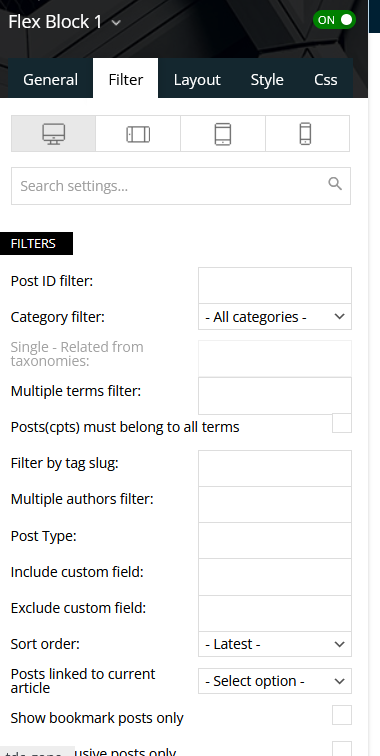
so we use the flexblock 1 in the bottom of our homepage.
Once you press the “load more” button its loading all 6 posts that have been there already again.
Is there a setting to prevent it from loading the same posts?
Limit Post number = 6
Offset is empty
https://www.dertreasurer.de/wp-content/uploads/2024/06/Screenshot-2024-06-04-153812.png
Thanks for your help!
Anamaria Hi,
Using our theme, you can choose from 3 mobile versions
-> mobile responsive => https://www.screencast.com/t/oJ2ShOp47
-> mobile theme plugin => https://forum.tagdiv.com/the-mobile-theme/
-> mobile page => https://tagdiv.com/newspaper-10-3-7-update-brings-customizable-and-fast-mobile-pages/ The option that you need to use.
Suppose you created the mobile pages with tagDiv Composer. In that case, when you install the Mobile Theme plugin, your pages will be overwritten by the plugin (the mobile theme comes with its templates for page, post, category, etc, so your current templates from the desktop theme will get converted to the mobile theme layout, the page content is made without builders in mobile editor => https://www.screencast.com/t/xbgZG8kH also, the options that are provided to edit the mobile theme version are limited (this keeps the things simple)).
This is a video about Responsive Newspaper Theme, AMP & Mobile Theme, Mobile Pages & Templates -> https://www.youtube.com/watch?v=SpGkOnJeNZY.
So, the mobile responsive is what you see when that you select the viewport on phone => https://www.screencast.com/t/matV17hH, so some settings may apply for each viewport(where is the border blue), and others are not(where the border is black).
The mobile page has the mobile templates from Cloud Library => https://www.screencast.com/t/YCcZ8rL8
The Mobile responsive version of the theme and the mobile page editor can be edit with tagDiv Composer, the mobile theme plugin cannot.
For example, you can have the mobile theme plugin activated and use the mobile page/mobile responsive version for the homepage/pages, but for the categories pages/404 page, you can’t use the mobile page/mobile responsive version if you have the mobile theme plugin activated.
Thank you!
Anamaria Hello Patrick,
Please make sure that the header for the homepage and posts is the same and that it is set globally.
Thank you!
 w88agent
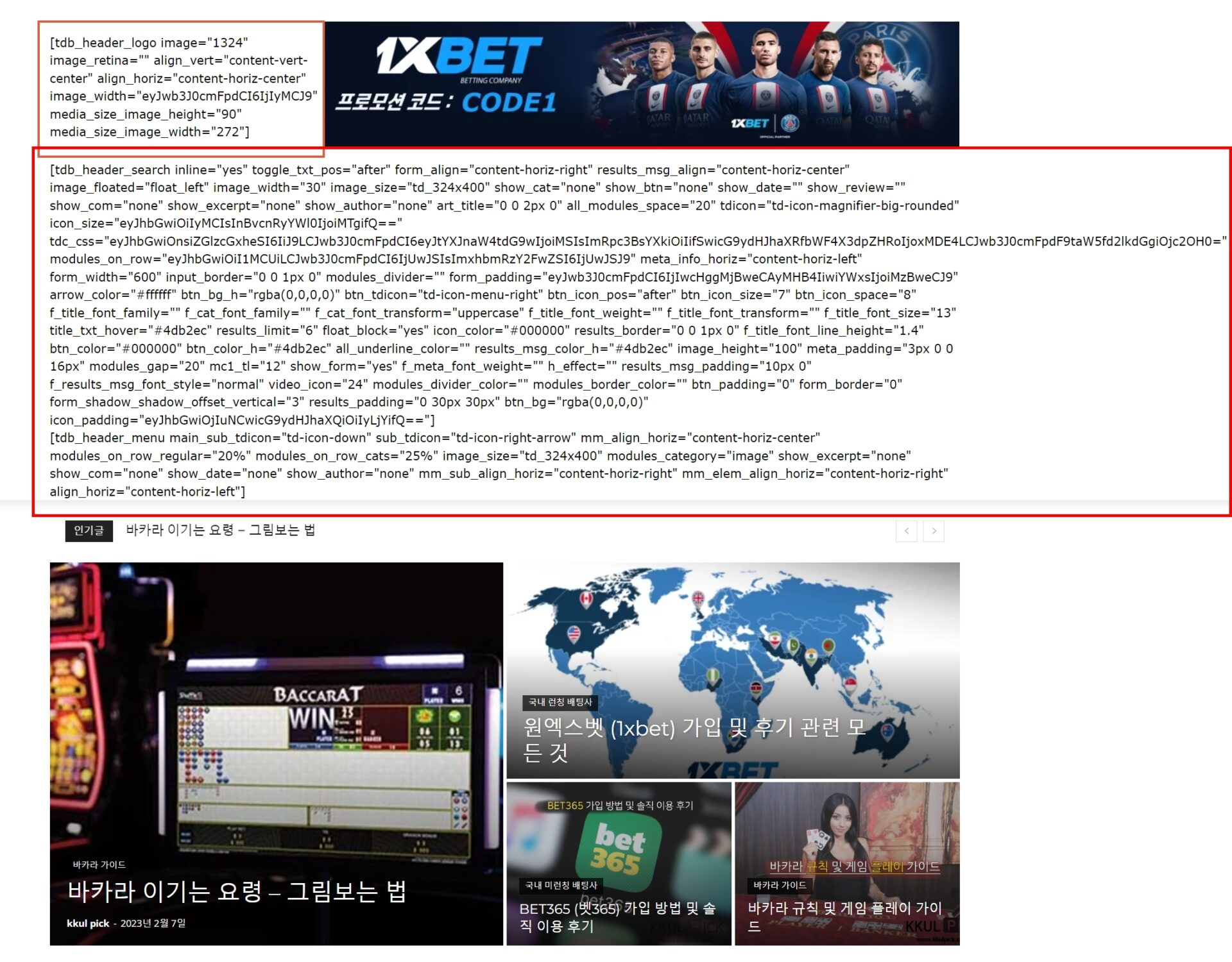
1) The tagDiv Cloud Library template appears normally when logged in, but a problem occurs where it is output in short code form when logged out.
2) My website url adrress : https://kkulpick.com
3) It is displayed in shortcodes form to regular homepage visitors who are logged out (when logged in, it is displayed in normal form)
 naushad
Homepage: https://businessbenchmark.news/
In the homepage, the header and footer templates are also not able to edit.
 Teachy
 I get all that….and it’s totally correct, with one exception: Keep in mind that the mobile theme plugin is disabled.
I created a mobile home page. I also made changes to the individual blog page. Now when I edit the mobile home page and save my changes….the homepage as on desktop version becomes the homepage on mobile. When I then edit the desktop version and make changes, the mobile homepage becomes te desktop version.
Basically what happens is that the last template I change, becomes the new frontpage for desktop and mobile. Even though I delete all page cache.
In the mood for a challenge and want me to send you the login details, let me know 😉
 hfrevolution
Hi! My mobile site at healthfitnessrevolution.com sometimes appears as a mini version of the homepage with carousel, etc. and other times, the traditional mobile site format. If I prefer the mini version of the full site, how can I get it to always load that way? Thank you!
Anamaria Hello,
Yes, it is okay if you have disable the mobile theme.
Using our theme, you can choose from 3 mobile versions
-> mobile responsive => https://www.screencast.com/t/oJ2ShOp47
-> mobile theme plugin => https://forum.tagdiv.com/the-mobile-theme/
-> mobile page => https://tagdiv.com/newspaper-10-3-7-update-brings-customizable-and-fast-mobile-pages/ The option that you need to use.
Suppose you created the mobile pages with tagDiv Composer. In that case, when you install the Mobile Theme plugin, your pages will be overwritten by the plugin (the mobile theme comes with its templates for page, post, category, etc, so your current templates from the desktop theme will get converted to the mobile theme layout, the page content is made without builders in mobile editor => https://www.screencast.com/t/xbgZG8kH also, the options that are provided to edit the mobile theme version are limited (this keeps the things simple)).
This is a video about Responsive Newspaper Theme, AMP & Mobile Theme, Mobile Pages & Templates -> https://www.youtube.com/watch?v=SpGkOnJeNZY.
So, the mobile responsive is what you see when that you select the viewport on phone => https://www.screencast.com/t/matV17hH, so some settings may apply for each viewport(where is the border blue), and others are not(where the border is black).
The mobile page has the mobile templates from Cloud Library => https://www.screencast.com/t/YCcZ8rL8
The Mobile responsive version of the theme and the mobile page editor can be edit with tagDiv Composer, the mobile theme plugin cannot.
For example, you can have the mobile theme plugin activated and use the mobile page/mobile responsive version for the homepage/pages, but for the categories pages/404 page, you can’t use the mobile page/mobile responsive version if you have the mobile theme plugin activated.
Thank you!