
- NewspaperAutoptimize Plugin – install and configuration
- NewspaperCache plugin – install and configure
- NewsmagInstall via WordPress
- NewsmagInstall via FTP
- NewsmagInstalling pre-built websites
- TutorialsHow to install Revolution Slider
- NewspaperInstalling Pre-built Websites
- NewspaperHow to Install Newspaper via FTP
- NewspaperHow to Install Newspaper via WordPress
- TutorialsHow to Install bbPress forum
- NewspaperIntroduction to CPT and ACF with Newspaper Theme
- NewspaperHow to edit modules for Flex Block X
- NewspaperWooCommerce: Happy “Add to Favorites!”
- NewspaperWoo Brands
- NewspaperStripe Setup
- NewspaperModal Popup
- NewspaperPayPal Setup
- NewspaperFlex Block Settings Guide
- NewspaperHow to setup the Contact Page
- NewspaperAdd Cryptocurrency Price Ticker Widget
 Calin
Calin Hi riminisparita,
Unfortunately, the image is no longer available: https://prnt.sc/91koce8oxK_0
Hi Foto Zumstein, normally, after a theme update, the theme plugins are automatically updated as well provided nothing is interfering with the process. During the update, the old plugin versions are disabled and deleted before the new versions are installed. This is necessary because if outdated plugin versions remain active, enabling the site can cause errors, as the plugins may not be compatible with the current theme version.
If something interferes with the theme update process, you will need to manually install the required theme plugins.
 husnaina2
Hello there, I activated the license on my website now i want to remove the license from the old website and install on the new website. Can you tell me how can i remove the ke from first website and assign the new website.
 caasindia
Hello TagDiv Support Team,
I am reporting a confirmed fatal PHP error related to the td-composer plugin on a licensed and fully updated Newspaper theme installation.
Below are the verified technical details:
**Theme & Plugin Details**
* Newspaper Theme Version: **12.7.4 (REGISTERED / Licensed)**
* TagDiv Composer Version: **5.4.3**
* WordPress Version: **6.8.3**
* PHP Version: **8.2.30**
**Hosting Environment**
* Hosting – Shared Hosting
* Server-level staging environment: Not available
* Issue occurs on live traffic
—
### Confirmed Fatal Error (Server-Validated)
The hosting provider has verified repeated fatal PHP crashes with the following error:
`
PHP Fatal error: Uncaught Error: Object of class WP_Error could not be converted to string
File: wp-content/plugins/td-composer/includes/tdc_check_domain.php
Line: 149
`
This error has occurred multiple times on **January 18, 2026**, during live requests, and causes:
* Immediate PHP execution termination
* Frontend request hangs
* Admin-side timeouts
* Cron/background task failures
The hosting provider has confirmed that this is an **application-level fatal error**, not a database or server resource issue.
—
### Important Context
* The theme is **original, licensed, and up to date**
* The update to the latest version completed successfully
* The issue **persists after the update**
* The error appears to be triggered during **domain / license validation logic**, where a WP_Error object is not being handled safely under PHP 8.2
—
### Request
I kindly request your assistance with:
1. **Confirming whether this is a known issue** with the current td-composer version under PHP 8.2.
2. **Providing an official fix or patch**, or confirming if this will be addressed in an upcoming update.
If a permanent fix requires time, I would appreciate it if you could **advise a safe, update-compatible temporary mitigation**, strictly intended to prevent fatal execution crashes until an official resolution is released.
Please note that I am specifically looking for a solution that:
* Does not modify core plugin files permanently
* Does not affect license validity
* Remains fully compatible with future updates
—
Thank you for your support. I look forward to your guidance on resolving this issue safely.
Kind regards,
Team Caas India
Calin Hi,
It appears that not all the plugins used previously were installed after the theme update. Please go to Newspaper > Plugins and install and activate the tagDiv Standard Pack plugin, as this is the one causing the error on your articles. After that, please clear all caches.
Each time you update the theme, make sure to also update all the theme-related plugins you are using. It’s a good practice to check which plugins were active before the theme update and ensure they are updated as well. If needed, you can update them manually one by one from Newspaper > Plugins.
Thank you!
 nbiga samir
Hello,
I recently purchased my **third Newspaper license**, and I’m facing an issue that I’ve never encountered before.
I installed the **Gossip demo**, then added my own articles and categories.
However, when I update the categories in the **Filter** section, it doesn’t work correctly — it displays **“No posts”**, even though there are posts assigned to that category.
Please find screenshot (https://ibb.co/fVKY8JL7) showing the issue.
Thank you in advance for your assistance.
Kind regards,
Samir
Calin Hi,
That is a very old theme version. However, even after updating the theme, the website should look the same. Before making any changes, please ensure you have a full backup.
After updating the theme, it is important to install the Standard Pack plugin: https://i.imgur.com/8heENe0.png This plugin, introduced in Newspaper 10, contains all the old blocks and templates, which are now separated from the main theme. You can find more details in this article: https://tagdiv.com/newspaper-theme-update-standard-pack-or-tagdiv-cloud-templates/
Please also make sure to clear the cache, optimized resources, and Cloudflare cache (if you are using Cloudflare) after updating the theme.
If you are using a child theme, we recommend deactivating it after the update, as it may cause compatibility issues.
Additionally, if you prefer, you can request custom work to update the theme to the latest version. One of our developers will handle the update and ensure everything remains unchanged. To proceed, please send a request to services@tagdiv.com
, and our colleagues will ask for temporary wp-admin access to review the site and assess the changes made. Based on this, they will provide a time and cost estimate for the update.
Let me know if you’d like a more casual or more technical version.
Calin Hi,
Those suggestions seem to be like some sliders, right? Our theme provides the Revolution Slider that can be used to achieve something like that, if you do not need many tabs, you can also use the tabbed option from our theme.
https://forum.tagdiv.com/how-to-install-revolution-slider-v5/
Thank you!
Calin Hi Digital2web,
The Big Grid is added by the tagDiv Standard Pack plugin (it can be installed from Newspaper → Plugins). If you do not already have it installed, we do not recommend installing it, as the plugin loads additional CSS and JavaScript files.
However, if the extra CSS and JS are not a concern for you, then you can go ahead and use it.
Calin Hi,
I’ve just checked the search page, and I noticed that there are two loop elements on it. This could be related to the issue, because when more than one loop is used on a page, the settings can be inherited from the first loop.
Could you please test the page using only the Builder Loop and, if possible, only the theme plugins? I ran some tests on one of my installations, and it seems to work correctly on my end. Your settings also appear to be fine; however, the settings from the Loop Builder may not apply because the settings from the loop element above are being used for both.
If the problem persists even when using only the Builder Loop and only the theme plugins, we’ll need temporary wp-admin access to investigate further. In this case, please contact us via email at contact@tagdiv.com and provide wp-admin access there. Also, include the link to this topic so we can identify your request more quickly.
Thank you!
Calin Hi,
I understand 😊
Yes, WPBakery Page Builder can be used, just need to install it like a normal plugin. It’s included with the theme package and can be found at this path:
Newspaper-tf\code\other_plugins\js_composer.zip
Please note that if you disable the tagDiv Composer, the Newspaper theme will behave like a simple/default WordPress theme and will no longer provide the custom functionality you’re currently using.
Thank you!
 VOP
VOP So, are you not even considering the possibility that the issue might be within your template, and instead suggesting that I should look for a solution on my own — even though this problem theoretically shouldn’t exist at all on a freshly installed, brand-new website? I personally recommended your theme to my client, telling them it’s a high-quality product backed by a solid team and reliable support.
The simplest solution for me would be to just switch to a different pre-built demo site — but then I wouldn’t get the design I was aiming for.
If that’s the only option you’re willing to offer, and you’re not concerned about a potential bug in the ECHOVERSE demo, then I suppose I’ll have to go that route.
Calin Hi,
The reported “vulnerability in tagDiv Cloud Library 3.9” does not apply to our setup. The current installed version is 3.9.2, and as shown in the Patchstack reports, the issue has already been fixed.
However, because the plugin version string includes the text “| built on 12.01.2026 14:31”, some security scanning tools are not interpreting the version number correctly and are flagging it incorrectly.
A theme update will be released soon that removes this extra text from the version field and places it in the description instead, which should resolve the false positives.
If you would like to test this now, an RC version is available under Newspaper → Updates (click Check Updates and look for the RC version). Please ensure this is tested on a staging environment, not on the live site.
Thank you.
 pawelbednarz
Good morning! I would like to ask for help in resolving a problem with the mobile version. For many years everything worked correctly. Currently, just before the update, the mobile site broke (as shown in the attachment). It does not look like it does in the TagDiv preview. In Composer, I installed the Newspaper updates, reinstalled the Mobile plugin, and it still doesn’t work. In Newspaper → Theme Panel → Mobile Theme, I have Mobile + AMP set. In the TagDiv Composer preview everything looks fine (as in the attachment), but it does not load correctly in reality.https://autoelectromoto.pl/zrzut-ekranu-2026-01-12-o-20-31-58_11zon and https://autoelectromoto.pl/img_2598_11zon/
 wertikoo
Hello,
I’d like to greet your wonderful team of developers behind the Newspaper theme. Unfortunately, I have encountered a small issue that I hope you can help me resolve.
I installed the Newspaper theme along with the pre-built website “ECHOVERSE”. In some places, I’m using ready-made blocks from Cloud Templates. Visually, everything looks fine, but when I inspect the HTML, I notice that the headings are rendered with extra CSS coming from the templates.
I’m attaching a screenshot from the browser’s SEO inspection tool, where you can see that the headings are “cluttered” with unnecessary code. I suspect this might be due to unclosed tags in the templates.
Could you please take a look? If you need anything from me, just let me know — I’ll be happy to provide it.
Thank you!
https://kando.md/wp-content/uploads/2026/01/2026-01-12_16-24-17.png” alt=”” />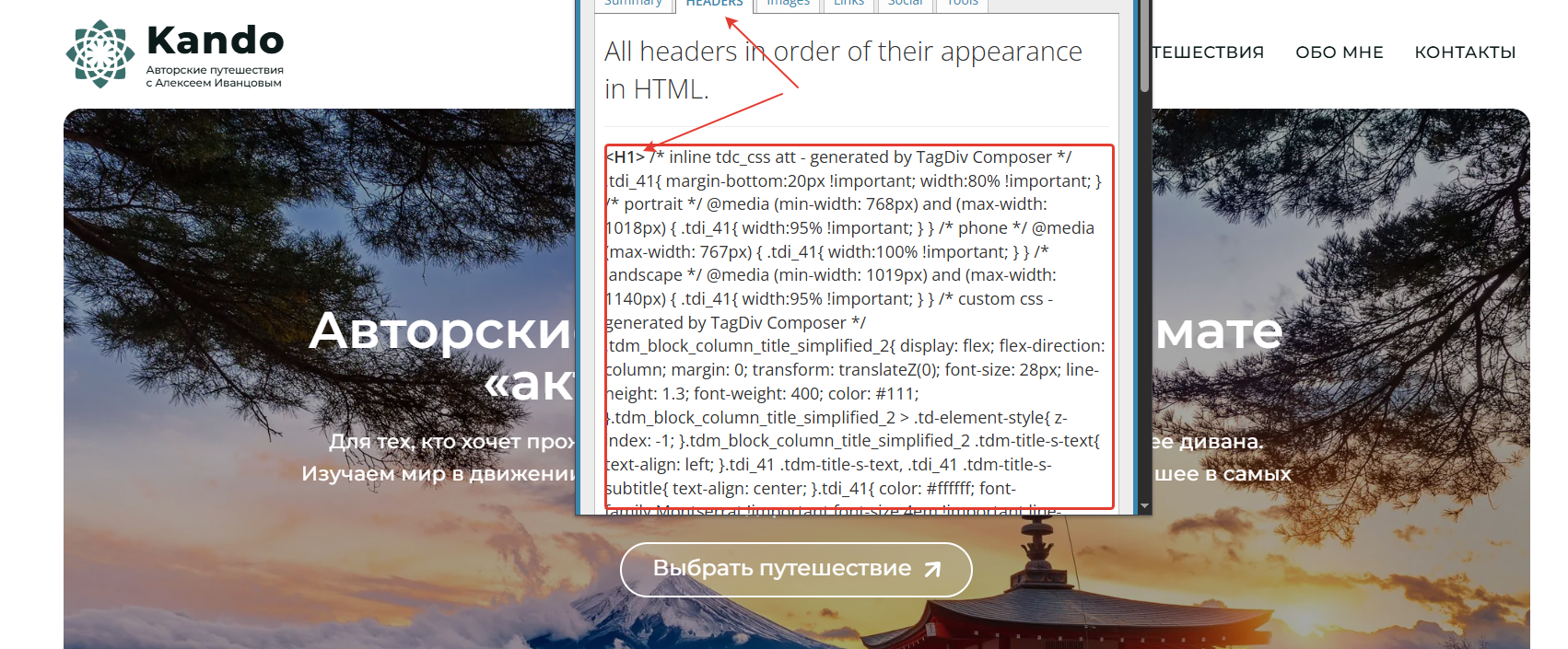
Calin Hi,
That method normally should work, but if is not, please try the method I mentioned, delete the plugins and reinstall them from Newsapper > plugins – https://i.imgur.com/wYk6ELT.png
IN case it is still not working, please contact us via email at contact@tagdiv.com, provide wp-admin access and FTP, and we’ll further investigate it.
Calin Hi djony620,
There will be a need to make the improvements for the list provided on the Pagespeed test.
Also, for speed, if you are using the WP Super Cache plugin, make sure that you also use the Autoptimize plugin and CDN . There are also other cache plugins that can be used to do both caching and optimizing the site, so there is no need to have 2 plugins. For example, one of the best is WP Rocket, but you can also use free plugins like WP Optimizer, Litespeed.
Hi MarcyGaboma, unfortunately, I do not understand the problem you are facing. Could you please provide some more details and maybe some screenshots?
Calin Hi,
Unfortunately, our theme does not have that kind of option. I believe it can be achieved with a custom code or maybe with an extra plugin something like this – https://wordpress.org/plugins/loading-page/#installation
Calin Hi lecker,
To make sure you understand exactly how theme plugins work, I’ll explain it to you as best I can:
Each version of the theme has a unique code, a unique code that is also assigned to the plugins in the theme for that version, so even if the version of a plugin is the same on multiple versions of the theme, it will only work with the version of the theme that has the same identification code. Now if you don’t know if the version you have is the one for the current theme, all you have to do is delete the plugin and reinstall it from the Newspaper > plugins section.
Thank you!
 winipnews
installed and tagdiv editor doesn’t show in the editor screen…
 da zuoshou
As you recommended, I have installed Autoptimize and WP Super Cache, but I am still experiencing an LCP issue! The report is as follows:https://pagespeed.web.dev/analysis/https-www-yigeni-com/g3jt6j0sie?form_factor=mobile
Can you help me?
 MarcyGaboma
 Hello,
When I tried to install the template, it’s not recognizing my code or I paid that. So I need your help to fix it
 thalesbrandao
 PHP Version i 8.3.29
I’m using this version – but I had to request support from our server team to adjust some installations.
 Ion
IonSubject: Technical Issue: tagDiv Composer “Edit” and “Add” buttons not responding (Envato Ref: 4092998)
Message:
Hello tagDiv Support Team,
I am contacting you regarding a critical issue with my Newspaper theme installation for my website, Law & Business. I have already contacted Envato Support (Ticket #4092998), and they have directed me to you for technical assistance.
The Issue: The “Edit with tagDiv Composer” and “Add” buttons are completely unresponsive. When I attempt to edit a page, the visual interface does not load, and in some instances, I am seeing raw shortcodes instead of the graphical editor.
What I have observed:
Clicking the “Edit” button results in no action (the editor doesn’t trigger).
The “Add” element button is frozen/unresponsive.
This prevents me from updating the “Magazine Pro” / “Business @ Law” layout.
System Info:
Theme: Newspaper (Latest version)
Plugin: tagDiv Composer active
Envato Purchase Code: I will provide the purchase code in a private reply
Could you please help me identify if this is a JavaScript conflict, a server memory issue, or a database error, as my publication schedule is currently on hold.
Looking forward to your professional guidance.
Best regards, Tudor Ion
 Shay
Shay Hi Calin,
Copying my email reply here:
Are you going to install the WP staging plugin inside my website and create the staging in my site itself?
Not sure if this is ok because I prefer not to have additional files inserted into my site itself.
How about I send over UpdraftPlus backup files and you can test from your end?
Thank you.
 robinspaul
Hi,
When I try Edit with TagDiv Composer on a page, it shows this error – Error 404 – not found. Could someone please help me?
These are my settings:
Server software Apache
PHP Version 8.3.28
max_execution_time 300
max_input_vars 5000
SUHOSIN installed false
mbstring available
GD library available
WP Memory Limit 256 MB/request
WP_DEBUG False
Caching plugin WP super cache
Thanks



