
- NewspaperAutoptimize Plugin – install and configuration
- NewspaperCache plugin – install and configure
- NewspaperInstalling Pre-built Websites
- NewspaperHow to Install Newspaper via FTP
- NewspaperHow to Install Newspaper via WordPress
- NewspaperIntroduction to CPT and ACF with Newspaper Theme
- NewspaperHow to edit modules for Flex Block X
- NewspaperWooCommerce: Happy “Add to Favorites!”
- NewspaperWoo Brands
- NewspaperStripe Setup
- NewspaperModal Popup
- NewspaperPayPal Setup
- NewspaperFlex Block Settings Guide
- NewspaperHow to setup the Contact Page
- NewspaperAdd Cryptocurrency Price Ticker Widget
- NewspaperInfinite Loading for Single Posts
- NewspaperThe Newspaper Mobile Theme: Introduction
- NewspapertagDiv Social Counter plugin
- NewspapertagDiv Shop
- NewspapertagDiv Opt-In Builder
 lyon
lyonHello, We are using Newspaper Theme version 10.4 on our multisite network, with WordPress 5.7.2. Ever since updating to 10.4, we’ve had an issue that affects just two of our sites on the network, one of which is the main site. All the other sites have no issue.
What happens is when we build a page with a sidebar in TD Composer, and leave the page template set to default, we are seeing a strange overlapping sidebar:
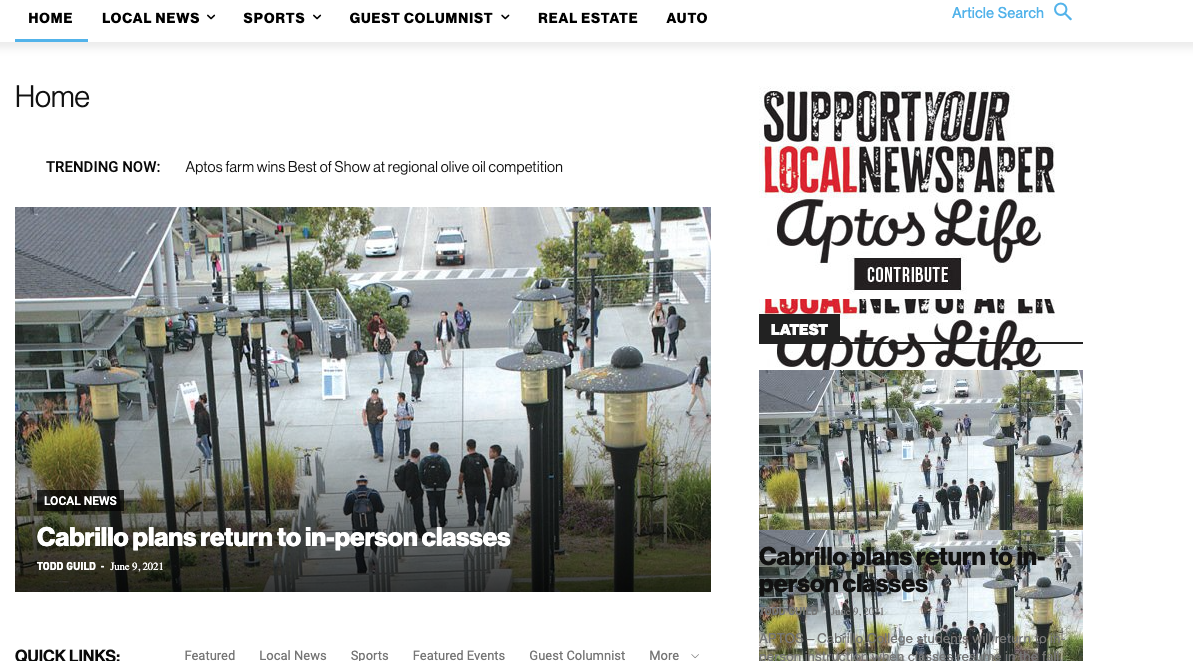
This is how we have the sidebar set in TD Composer:
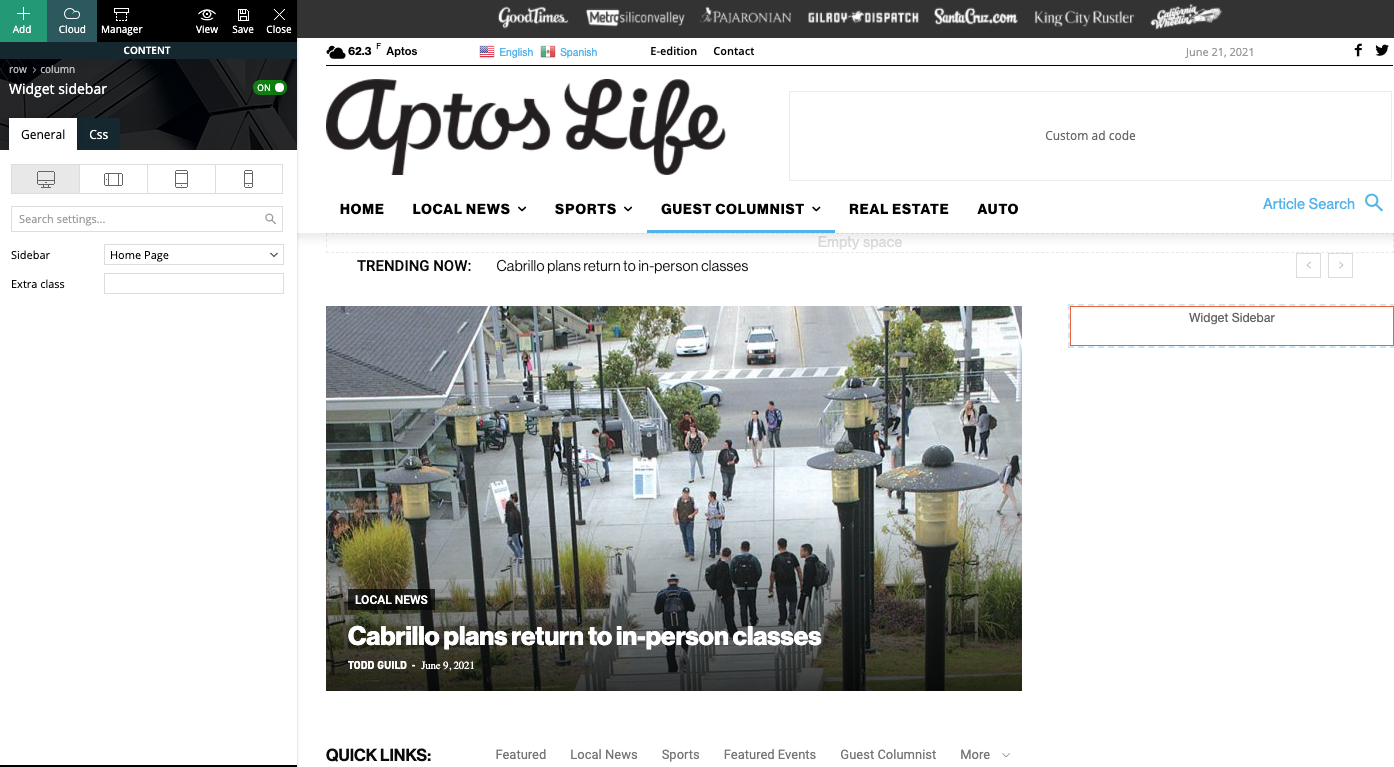
As a temporary workaround we can set the page template to Pagebuilder + latest articles + pagination, but this opens up a whole new set of problems. For example, if we try to change or hide the sidebar in the “Homepage latest articles” settings, no changes occur. Even something such as changing the title on the post loop won’t take affect.
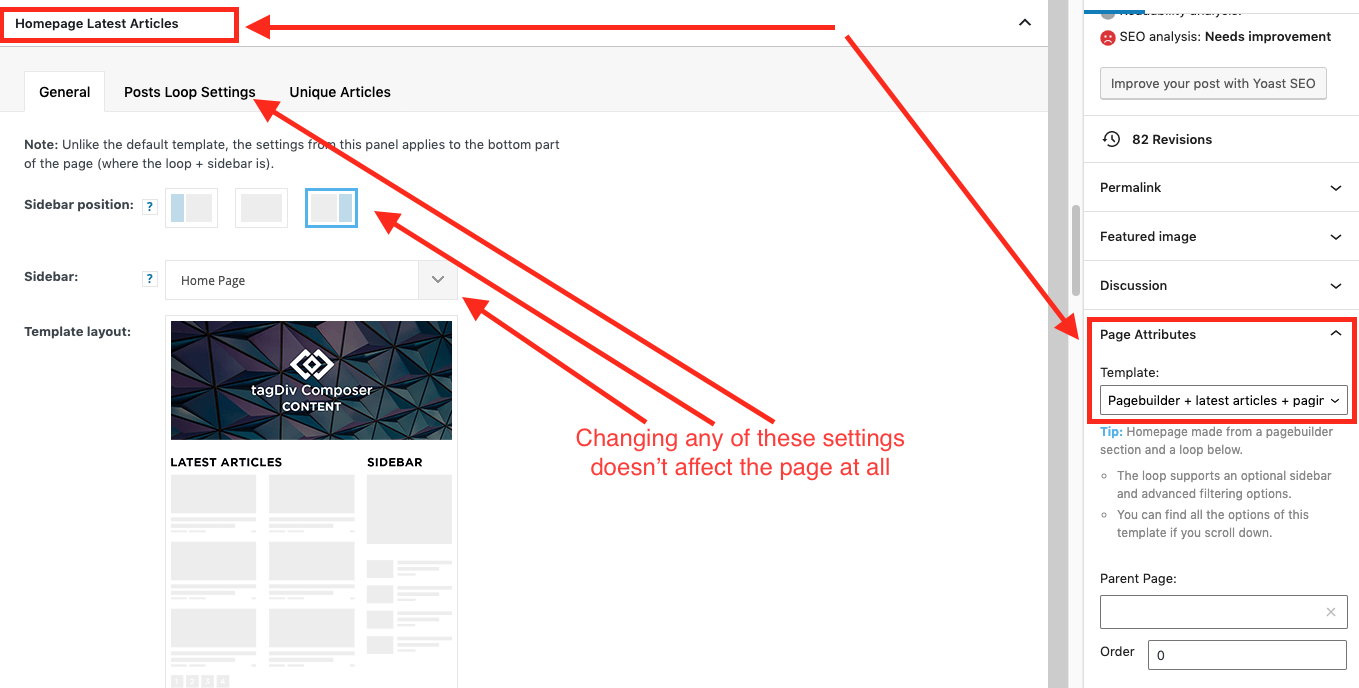
As a result, instead of two overlapping sidebars, we now have two duplicate sidebars stacked on top of each other:
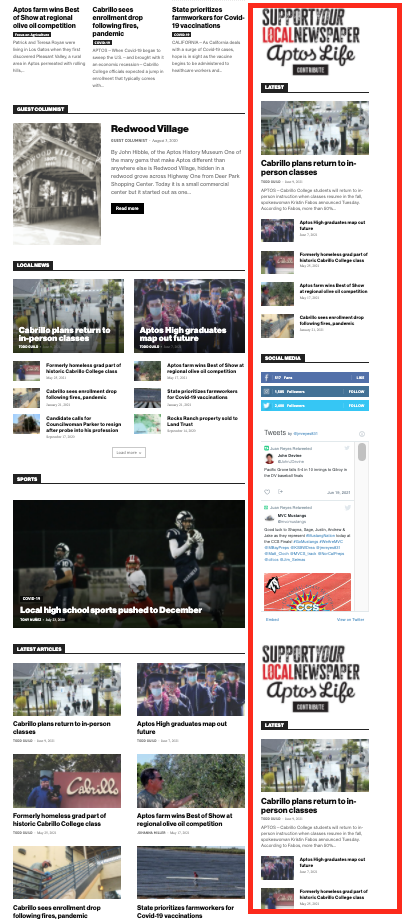
Is there any way to fix these issues? Ideally we would like to leave the page template set to default, with the overlapping sidebars eliminated.
We’ve already tried disabling all our plugins to check for conflicts. Here is some more info from the System Status panel:
Theme name Newspaper
Theme version 10.4
Theme database version 10.4
HTTP channel test wordpress
Installed demo Default – demo ID: default | install type: full
Theme Mobile Newspaper mobile version
php.ini configuration
Server software Apache/2.4.38 (Debian)
PHP Version 7.3.19-1~deb10u1
post_max_size 32M – You cannot upload images, themes and plugins that have a size bigger than this value. To see how you can change this please check our guide here.
max_execution_time 120
max_input_vars 3000
SUHOSIN installed false
PHP extensions
mbstring available
GD library available
WordPress and plugins
WP Home URL https://aptoslife.com
WP Site URL https://aptoslife.com
WP version 5.7.2
WP multisite enabled Yes
WP Language en_US
WP Memory Limit 1 GB/request
WP_DEBUG False
Caching plugin No caching plugin detected – for best performance we recommend using WP Super Cache
 RGV
RGVI have the newsletter theme installed. I am converting http://www.lasteles.com to mulsite with multiple domains. I enter the administration page without problems but when in a secondary website http://www.latelepeliculas.com I see the page blank. Can you help me
 adminsensei
 Hi Anamaria,
I have the same problem and could not install the Tagdiv composer, it says that the folder exists and plugin installation failed. Our website is seitimes.com, I do not know how to do workaround now.
 khubas
 OK fixed, didn’t reinstall tagdiv standard pack. 😉
 Leedr
LeedrHi
We have an issue where the filter set to ‘random posts’ isnt working on this page – https://www.firstcar.co.uk/buying/
This is working on every other page and we’ve now uninstalled and re-installed plugins. Can someone look into this for us?
Thanks
Richard
FirstCar
 Kosowar
 RESOLVED, reinstalled the theme…
 Bettina
 Hello!
Try to do these steps:
1. disable TagDiv Composer
2. uninstall(delete) TagDiv Composer
3. clear cache (if cache plugin exists)
4. install TagDiv Composer
5. activate TagDiv Composer
6. clear cache (if cache plugin exists)
Also, please make sure that all the requirements are met as you can see here: https://forum.tagdiv.com/requirements-for-newspaper/
Let me know the results!
Thank you!
 Kingoferrthang
Hi there,
I have installed the Newspaper on my site (https://richfamouspeople.com) but the mobile version doesn’t seem to work.
Can someone help me, please?
Bettina Hello!
Please make sure you have all required plugins for this feature installed and active.
Thank you!
 emerzlyakov
After upgrading to version 11 my site crashed. How can i to downgrade and rerinstall oder TD plugins?
Bettina Hello!
If you want to use a mobile page, then you need to assign it to your homepage in order to be displayed. For more information about this mobile version please take a look in this article: https://tagdiv.com/newspaper-10-3-7-update-brings-customizable-and-fast-mobile-pages/
We recommend using the WP Super Cache plugin: https://forum.tagdiv.com/cache-plugin-install-and-configure/
Thank you!
 Vlad S
 Hello!
Please remove and reinstall AMP plugin, I have tested on our side and the plugin is working.
Let us know the results!
Thank you!
Vlad S Hello!
1. How exactly was the plugin broke ? If it displays shortcodes everywhere you will have to simply reinstall it and activate it. This should fix the issue, if not, please let us know what the result is and send us a screenshot of the error.
2. AMP plugin does work with Newspaper theme and the plugins. Please make sure to use the official AMP that comes with the theme: https://www.screencast.com/t/HKHUKosVx
3. Page speed of any website depends on how well the website is optimized. That mean that everything from content, fonts, images, host, caching, plugins, everything has to be adjusted so the performance will be top notch. You can see here examples of websites that are very well optimized: https://forum.tagdiv.com/topic/why-i-cant-pass-google-core-vitals/
I hope this was helpful!
Thank you!
 searkweather
I managed to fix the issues was a database and now i can use the composer but now i can’t get some templates to show edit with Tagdiv composer after doing a fresh install.
 devjaind123
Hi,
My website is Techbenzy.com. When have install Newspaper theme from themeforest, within 4-5 days CLS and LCP errors occurs massively. How to fix it.
URL of website: https://techbenzy.com/
Following are the image that indicates errors:
https://drive.google.com/file/d/18WOO0d7ujsdFDTnDkhgQStkd0qdiBVgj/view?usp=sharing
https://drive.google.com/file/d/1Nmua8lHkvfGkkWB2ksZHG2vial58eRP8/view?usp=sharing
https://drive.google.com/file/d/18dRAc5VGYry1fPDlxJgSFisIAxGsOkQv/view?usp=sharing
 Balint
 I don’t know how it was fixed, but I have the same problem with TagDiv Composer. It broked my site:
There has been a critical error on this website.
WordPress caught an error with one of your plugins, tagDiv Composer.
I deleted the plugin, I downloaded again from ThemeForest, also updated via FTP, nothing, uploaded again via WordPress admin panel, I got the same problem. Deleted all the other TagDiv plugint, installed just the TagDiv Composer, the same problem…
 brasilnft
 Hi!
Can’t make external products works.
1st of all, when I click on the checkout button appears a message saying i can’t buy that item/invalid order.
So I’ve installed the plugin WooCommerce External Product New Tab. For the shop page it works perfectly, but for the single product page gives the message:
Fatal error: Uncaught Error: Call to a member function is_type() on null in /home/storage/d/fc/c8/bemdita2/public_html/brasilnft/wp-content/plugins/wc-external-product-new-tab/wc-external-product-new-tab.php:176 Stack trace: #0 /home/storage/d/fc/c8/bemdita2/public_html/brasilnft/wp-includes/class-wp-hook.php(294): WC_External_Product_New_Tab->external_add_product_link(‘apply_filters(‘add_to_cart() #4 /home/storage/d/fc/c8/bemdita2/public_html/brasilnft/wp-content/plugins/td-woo/shortcodes/td_woo_prod in /home/storage/d/fc/c8/bemdita2/public_html/brasilnft/wp-content/plugins/wc-external-product-new-tab/wc-external-product-new-tab.php on line 176
How can I fix this?
 pinnaclecompass
 Updated theme today. Header and footer options in theme panel disappeared. We now have to recreate our old basic headers that we had to find and download from cloud library. Full width headers don’t look the same as before, even if we choose the ‘basic’ header styles that were there for last 5 years.
We used multipurpose headers with buttons on one of our sites. That option is gone as well.
We are really thinking on restoring the whole site. This is way too much work to rebuild the headers and footers from scratch, especially when alignment is off (ex. ad and main menu is not centered, even though that’s what the downloaded template showed. There isn’t no option for global settings (ex. social links, footer copyright text, etc…) like in the past versions.
This might be fine for new sites where you can just install a demo, but on existing sites this is way too much work.
-
This reply was modified 5 years by
pinnaclecompass.
 mita
mita Hi Betina, I said the post format was set correctly. Everything is set correctly. I need someone from your team to checks if it’s a problem with our installation. Without diagnosing what’s wrong we cannot fix it.
 Anamaria
 Hello,
For the issue with the link to buy the theme, please reinstall the tagDiv Composer from Newspaper plugins => https://www.screencast.com/t/WLy01lbc
Please use the import/export feature from Theme panel: https://forum.tagdiv.com/import-export-theme-settings/ -> https://www.screencast.com/t/1RwsLsKJYH
Thank you!
 cheryldimof
Hi, I have a few posts where I need to toggle AMP off. I use the mobile theme for AMP (and have Newspaper 11 installed and the mobile theme updated to its current version). The AMP plugin (yes, this is the one by Automattic) usually inserts a toggle in screen options for the individual post to toggle AMP on or off for the single post. This is missing now. I switched to a base theme and it reappeared in post settings, so I am sure this is a theme issue. How can I get it back?
I do note that there is a toggle to switch the mobile theme itself off or on for the single post but this doesn’t disable AMP for the post.
Thanks
Cheryl
Anamaria Hello,
You are probably uploading the whole theme package. You have to upload only the theme zip file, not the whole package which contains other items
– https://help.market.envato.com/hc/en-us/articles/202821510-Theme-is-missing-the-style-css-stylesheet-error
Install via WordPress -> https://forum.tagdiv.com/install-via-wordpress/
Install via FTP -> https://forum.tagdiv.com/install-via-ftp/
Requirements for Newspaper => https://forum.tagdiv.com/requirements-for-newspaper/
After installing the theme and activating it you will find in the Prebuilt websites all the theme demos and you can import whatever demo you want => https://www.screencast.com/t/6rf5g0Dxc0K
Thank you!
 immedia
How do I resolve this?
Installing the theme…
The package could not be installed. The theme is missing the style.css stylesheet.
Theme installation failed.
Anamaria Hello,
If I understand correctly, this problem persists with the last theme update(Newspaper 11).
If it is so, please make a fresh install on the staging of WordPress and Newspaper 11 and check again.
Thank you!
Anamaria Hello,
What cache plugin do you use?
Please clean your cache (eve from your browser) and try again.
Also, please ask your host if it has a cache plugin installed.
Thank you!
