
- NewspaperAutoptimize Plugin – install and configuration
- NewspaperCache plugin – install and configure
- NewsmagInstall via WordPress
- NewsmagInstall via FTP
- NewsmagInstalling pre-built websites
- TutorialsHow to install Revolution Slider
- NewspaperInstalling Pre-built Websites
- NewspaperHow to Install Newspaper via FTP
- NewspaperHow to Install Newspaper via WordPress
- TutorialsHow to Install bbPress forum
- NewspaperIntroduction to CPT and ACF with Newspaper Theme
- NewspaperHow to edit modules for Flex Block X
- NewspaperWooCommerce: Happy “Add to Favorites!”
- NewspaperWoo Brands
- NewspaperStripe Setup
- NewspaperModal Popup
- NewspaperPayPal Setup
- NewspaperFlex Block Settings Guide
- NewspaperHow to setup the Contact Page
- NewspaperAdd Cryptocurrency Price Ticker Widget
 Vlad S
 Hello !
You will have to first start looking for a plugin conflict. please deactivate ALL plugins except tagDiv ones, also if you are using child theme or cache plugin, deactivate them, clear all cache and try again.
Also you can try and remove and re-install the tagDiv Composer plugin.
Let us know the results.
Thank you !
Vlad S Hello !
You will have to first start looking for a plugin conflict. please deactivate ALL plugins except tagDiv ones, also if you are using child theme or cache plugin, deactivate them, clear all cache and try again.
Also you can try and remove and re-install the tagDiv Composer plugin.
Let us know the results.
Thank you !
 Calin
Calin Hi, can you please provide some more details about this problem, also some screenshots will help a lot, in this way I will be able to recreate the problem on my install.
Thank you!
Vlad S Hello !
Please send us a screenshot of your System Status Tab and make sure that all the requirements are met as you can see here: https://forum.tagdiv.com/requirements-for-newspaper/ ; You will have to first start looking for a plugin conflict. please deactivate ALL plugins except tagDiv ones, also if you are using child theme or cache plugin, deactivate them, clear all cache and try again.
Also you can try and remove and re-install the tagDiv Composer plugin.
Let us know the results.
Thank you !
Vlad S Hello !
Please send us a screenshot of your System Status Tab and make sure that all the requirements are met as you can see here: https://forum.tagdiv.com/requirements-for-newspaper/ ; You will have to first start looking for a plugin conflict. please deactivate ALL plugins except tagDiv ones, also if you are using child theme or cache plugin, deactivate them, clear all cache and try again.
Also you can try and remove and re-install the tagDiv Composer plugin.
Let us know the results.
Thank you !
Vlad S Hello !
You will have to first start looking for a plugin conflict. please deactivate ALL plugins except tagDiv ones, also if you are using child theme or cache plugin, deactivate them, clear all cache and try again.
Also you can try and remove and re-install the tagDiv Composer plugin.
Let us know the results.
Thank you !
Vlad S Hello !
This happens due to cache. Please follow our guide and make sure that WP Super Cache has been installed properly: https://forum.tagdiv.com/cache-plugin-install-and-configure/
Let us know the result.
Thank you !
 Karachista
I’ve just installed your theme. The look is great but I noticed that it deleted many of our author profile photos. Is there any way to get them back? We weren’t using Gravatar, they were locally uploaded to the site.
 Richard
Hi
Youtube videos are not showing since the latest upgrade of wordpress and newspaper. They play normally in TagDiv composer but are not visible in view or in live site.
I have installed a Youtube API but still the same.
What do you recommend?
 loslunes
Since the last wordpress update that I have just installed, I can´t see thumbs in home page and also the menu is not clickable. I have used jquery migrate helper and issue has been solved but please solve the problem with template compatibility so we don´t have to use one more plugin.
I know downgrading to wordpress 5.5 is another solution. Many thanks.
 Muharrem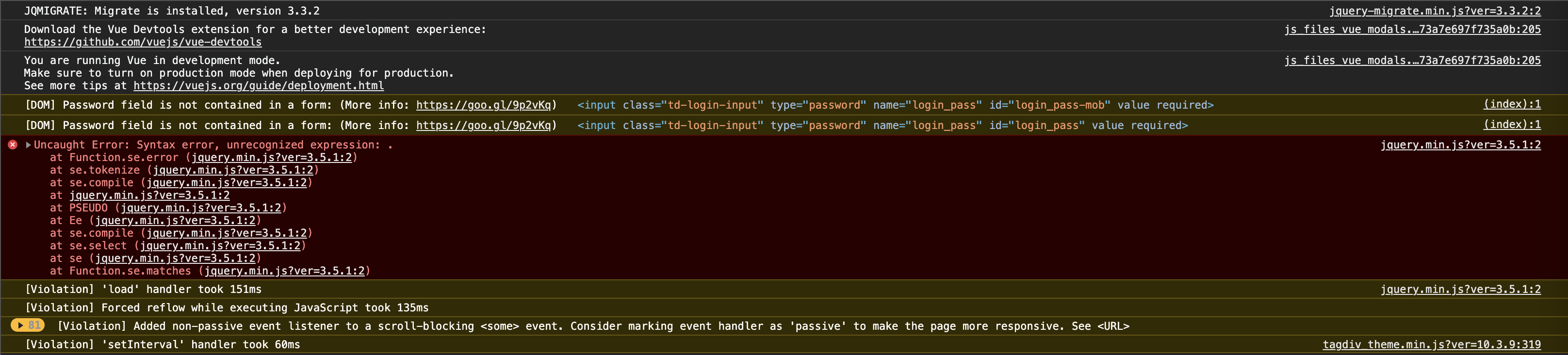
JQMIGRATE: Migrate is installed, version 3.3.2
js_files_vue_modals.min.js?ver=a50385a2d79d6600973a7e697f735a0b:205 Download the Vue Devtools extension for a better development experience:
https://github.com/vuejs/vue-devtools
js_files_vue_modals.min.js?ver=a50385a2d79d6600973a7e697f735a0b:205 You are running Vue in development mode.
Make sure to turn on production mode when deploying for production.
See more tips at https://vuejs.org/guide/deployment.html
(index):1 [DOM] Password field is not contained in a form: (More info: https://goo.gl/9p2vKq) <input class=”td-login-input” type=”password” name=”login_pass” id=”login_pass-mob” value required>
(index):1 [DOM] Password field is not contained in a form: (More info: https://goo.gl/9p2vKq) <input class=”td-login-input” type=”password” name=”login_pass” id=”login_pass” value required>
jquery.min.js?ver=3.5.1:2 Uncaught Error: Syntax error, unrecognized expression: .
at Function.se.error (jquery.min.js?ver=3.5.1:2)
at se.tokenize (jquery.min.js?ver=3.5.1:2)
at se.compile (jquery.min.js?ver=3.5.1:2)
at jquery.min.js?ver=3.5.1:2
at PSEUDO (jquery.min.js?ver=3.5.1:2)
at Ee (jquery.min.js?ver=3.5.1:2)
at se.compile (jquery.min.js?ver=3.5.1:2)
at se.select (jquery.min.js?ver=3.5.1:2)
at se (jquery.min.js?ver=3.5.1:2)
at Function.se.matches (jquery.min.js?ver=3.5.1:2)
se.error @ jquery.min.js?ver=3.5.1:2
se.tokenize @ jquery.min.js?ver=3.5.1:2
se.compile @ jquery.min.js?ver=3.5.1:2
(anonymous) @ jquery.min.js?ver=3.5.1:2
PSEUDO @ jquery.min.js?ver=3.5.1:2
Ee @ jquery.min.js?ver=3.5.1:2
se.compile @ jquery.min.js?ver=3.5.1:2
se.select @ jquery.min.js?ver=3.5.1:2
se @ jquery.min.js?ver=3.5.1:2
se.matches @ jquery.min.js?ver=3.5.1:2
S.filter @ jquery.min.js?ver=3.5.1:2
D @ jquery.min.js?ver=3.5.1:2
not @ jquery.min.js?ver=3.5.1:2
check_for_new_items @ tagdiv_theme.min.js?ver=10.3.9:429
init @ tagdiv_theme.min.js?ver=10.3.9:433
(anonymous) @ tagdiv_theme.min.js?ver=10.3.9:487
dispatch @ jquery.min.js?ver=3.5.1:2
v.handle @ jquery.min.js?ver=3.5.1:2
load (async)
add @ jquery.min.js?ver=3.5.1:2
s.event.add @ jquery-migrate.min.js?ver=3.3.2:2
(anonymous) @ jquery.min.js?ver=3.5.1:2
each @ jquery.min.js?ver=3.5.1:2
each @ jquery.min.js?ver=3.5.1:2
ke @ jquery.min.js?ver=3.5.1:2
on @ jquery.min.js?ver=3.5.1:2
(anonymous) @ tagdiv_theme.min.js?ver=10.3.9:201
jquery.min.js?ver=3.5.1:2 [Violation] ‘load’ handler took 151ms
[Violation] Forced reflow while executing JavaScript took 135ms
81[Violation] Added non-passive event listener to a scroll-blocking <some> event. Consider marking event handler as ‘passive’ to make the page more responsive. See <URL>
-
This reply was modified 5 years by
Muharrem.
MuharremHi,
I installed the demo. but it didn’t work right. jquery gives a ridiculous error. Menu and images are not displayed. In addition, I could not use the theme with any performance. always very slow. can you help me?
domain: izmir10.com
Thanks,
 jonsisk
 Ah, looks like the TagDiv Standard plugin was missing. Not sure if the person who installed the updates did that or the theme update did but we’re back in business.
 bob@mrrogersweborhood.com
Please see screenshots. One of the key reasons we chose Newspaper was the ability to upgrade in place rather than having to remove the previous version of the theme and reinstalling.
https://www.dropbox.com/s/man8tlchww65hcp/Screenshot%202020-12-09%2010.55.12.png?dl=0
https://www.dropbox.com/s/3xso1upavxj6bnx/Screenshot%202020-12-09%2010.55.01.png?dl=0
Can you please assist? Thanks.
 sqrter
I am using the newspaper theme with default pro.
This is my website.
In the mobile view (not AMP and not mobile theme, just mobile view), there is a white side on the right-hand side. And the contents just like shift to the left and out of the container.
No layout and CSS were modified, and no problem before update to the newest version.
Cannot solved even I install the previous version of the plugin and theme.
Thanks!
 Bettina
 Hello!
If you created the mobile pages with TagDiv Composer, then when you install Mobile Theme plugin, your pages will be overwritten by the plugin. That’s why you have these issues over here. More about Mobile Theme you can find here: https://forum.tagdiv.com/the-mobile-theme/ If you want to modify your pages on mobile with TagDiv Composer , then you should consider using mobile pages, instead of Mobile Theme.
Thank you!
 Abdurraheem Olaiya
Hello, I have the lastest Newspaper Theme installed on my website and just today, all the images on my website fails to appear.
I have troubleshooted with my host, my plugins and all seems to be fine. Please help me out on this. I can provide the website URL so that you can view it.
Thanks in advance.
 Clube Escola de Ténis de Oeiras
Hi,
I need support to Install contact Form 7 on my site.
Doens´t work
[contact-form-7 id=”441″ title=”Formulário de contacto 1″]
Kind regards
João Pereira
 rajeshkumar
 Thanks, I have installed the jquery migrate helper plugin, now I can view the images.
Please let me know once fixed the issue
Thanks
 Alin [tagDiv]
 Hi,
We investigate this issue and we will provide a fix as soon as possible.
Until then, please install and activate Enable jQuery Migrate Helper plugin and try this option – https://www.screencast.com/t/WYlKJVLi Clear all the caches (also the browser cache).
Thanks!
 pdamgaard
 Same issue here. I had the plugin Autoptimize installed, and by deactivating the plugin it works here with images.
https://www.19hul.dk/
pdamgaard Same issue here. I had the plugin Autoptimize installed, and by deactivating the plugin it works here with images.
https://www.19hul.dk/
 erhunabbasli
Hello there,
I installed the Newspaper video pro theme but this is not the same one as mentioned on Envato. I was expecting this theme https://demo.tagdiv.com/newspaper_video/ but I got something very different on the WordPress available list, this one https://demo.tagdiv.com/newspaper_video_news_pro/
Please help me find the exact pre-built website on WordPress to install.
Vlad S Hello !
You will have to first start looking for a plugin conflict. please deactivate ALL plugins except tagDiv ones, also if you are using child theme or cache plugin, deactivate them, clear all cache and try again.
Also you can try and remove and re-install the tagDiv Composer plugin.
Let us know the results.
Thank you !
 Robert Turner
Dear Tagdiv
Could you please provide a definitive answer on when this issue will be resolved? We run a big site on the Medical theme and use the standard plugin. Suggesting we change to a pro theme on a live site isn’t a solution unless you are offering to redo pages and pages of different templates we have built.
Our page loads speed nearly trebled after installing 10.3.8 and the new update hasn’t resolved this. It is costing us on Google and I am certain that most of your other customers are facing a similar situation. We now experience page loads of up to 13s on some pages.
If you have an alternative workaround in the meantime that is actually practical, please share it and I don’t mean caching and minifying scripts. It doesn’t impact the issue. Alternatively, I’d like a definitive answer on how long this will take to resolve. Obviously, if you continue selling this product as is, you are selling a defective product to the public, as it will seriously compromise any website that uses your older templates. Lightweight and speedy is all that counts today.
I would also recommend strongly that you send out a notification to all your customers about the issue, rather than leaving them running about in the dark trying to figure out why their sites are suddenly so resource intensive and slow to load.
I look forward to your response.
Regards
Robert Turner, Medika.life


