- NewspaperDesign your Post Pages using the Cloud Library Templates
- NewspaperDesign your post pages using the Default Templates
- NewspaperPage templates
- NewspaperCreate a form contact page
- NewspaperCloud Library Templates
- NewspaperCloud Library – Category Templates
- NewspaperHomepage – How to build and set it
- NewspaperPost templates
- NewspaperDefault post templates
- NewspaperCategory templates
- NewspaperPost template ads
- NewspaperSingle External Shortcode and External Shortcode
- NewspaperWP Rocket and Newspaper Theme: Optimization Guide
- NewspaperSearch setup for custom post type
- NewspapertagDiv Composer – Website Manager
- NewspaperBookmark – Save For Later
- NewspaperFlex Block Builder and Flex Loop Builder
- NewspaperModules Builder in Newspaper Theme
- NewspaperIntroduction to CPT and ACF with Newspaper Theme
- NewspaperCreate a frontend submission form
 jull1ano
 Also, if I disable sidebar for blog and page from template settings, it’s not working:
https://imgur.com/839Cu6p
https://imgur.com/vDvDTLj
 Anamaria
 Hello,
You can create a mobile template with the content, and design it as you want.
To create the mobile page please check this article https://tagdiv.com/newspaper-10-3-7-update-brings-customizable-and-fast-mobile-pages/ -> https://www.youtube.com/watch?v=SpGkOnJeNZY (03:11 – Mobile Templates & Pages)
Thank you!
Anamaria Hi,
You can’t edit the mobile theme. The mobile theme comes with its own templates for page, post, category, etc so your current templates from the desktop theme will get converted to the mobile theme layout, the page content is made without builders in mobile editor => https://www.screencast.com/t/xbgZG8kH also, the options that are provided to edit the mobile theme version are limited (this keeps the things simple)).
So, if you want to use the cloud templates, then you need to disable the mobile theme and AMP plugins, and then use the responsive version.
You can use cloud templates with AMP.
Also, please check this topic where I explained each mobile version -> https://forum.tagdiv.com/topic/mobile-version-not-working-properly-2/ and choose what mobile version you want.
You do not need to change the width, the layout will change for each device and you can only do a few changes to design the layout.
Thank you!
 karlostipo
I’m setting up my website with the Living PRO template, but I see that the mobile templates were not installed. I tried to install them from the tagDiv cloud templates but unfortunately I couldn’t find a mobile template from the Living PRO template (i.e. with that style), do I have to design the mobile templates from scratch? Isn’t there a faster way to make the mobile templates using all the styles of the templates of the pages already created?
If this theme does not have mobile templates, then the truth is honestly that I am a bit disappointed in general with the Newspaper theme… I bought it because I wanted to set up the website quite quickly and because of the special mobile templates, and as far as I can see not all templates have these mobile templates, right?
Thank you in advance for the help.
Best regards,
Carlos
 Bettina
 Hello @tagdivnp!
We recommend to use cloud/PRO templates in order to have the possibility to edit them with the TagDiv Composer which contains a lot of functions and features, please check our tutorial here: https://forum.tagdiv.com/tagdiv-composer-tutorial/
More documentation about the cloud templates is here:
– https://forum.tagdiv.com/homepage-how-to-build-and-set-it/
– https://forum.tagdiv.com/cloud-library-templates/
– https://forum.tagdiv.com/design-post-pages-using-cloud-library-templates/
– https://forum.tagdiv.com/cloud-library-category-templates/
The Standard Pack plugin is useful only if you are using the default templates. Otherwise, you can uninstall it.
Thank you!
Anamaria Hello,
Seems you have the mobile theme and AMP are still activated on the website. Please deactivate those plugins and purge the cache a few times.
Please disable the redirect from the mobile version to amp -> https://i.imgur.com/7Z7V82x.png using that option your visitors will never see the responsive version, only the amp version.
The AMP works better only with the Mobile Theme plugin. From my point of view, if you don’t use the Mobile Theme plugin, then there is no reason or benefit to AMP. Please read all about AMP here: https://forum.tagdiv.com/tagdiv-amp-plugin-tutorial/
It comes with its own templates/design for page, post, category, etc so your current templates from the desktop theme will get converted to the mobile theme layout. Documentation here:
– https://forum.tagdiv.com/the-mobile-theme/
– https://forum.tagdiv.com/mobile-theme-introduction/
Please read all about AMP here: https://forum.tagdiv.com/tagdiv-amp-plugin-tutorial/
Note that you can not customize AMP so much, because it comes with its own design.
There are some settings in the Theme panel -> Mobile Theme and Dashboard -> AMP only.
You can not add a shortcode as in the TagDiv Composer. Please note that you can’t customize the AMP pages with the TagDiv Composer.
Make sure the redirect mobile visitors to amp option is disabled.
Please check this topic where I explained each mobile version -> https://forum.tagdiv.com/topic/mobile-version-not-working-properly-2/
Thank you!
Anamaria Hi,
We do not recommend setting two posts loop on the same page/template, please use a flex block or another block, because most of the settings from the first loop element will be set for the second one.
Thank you!
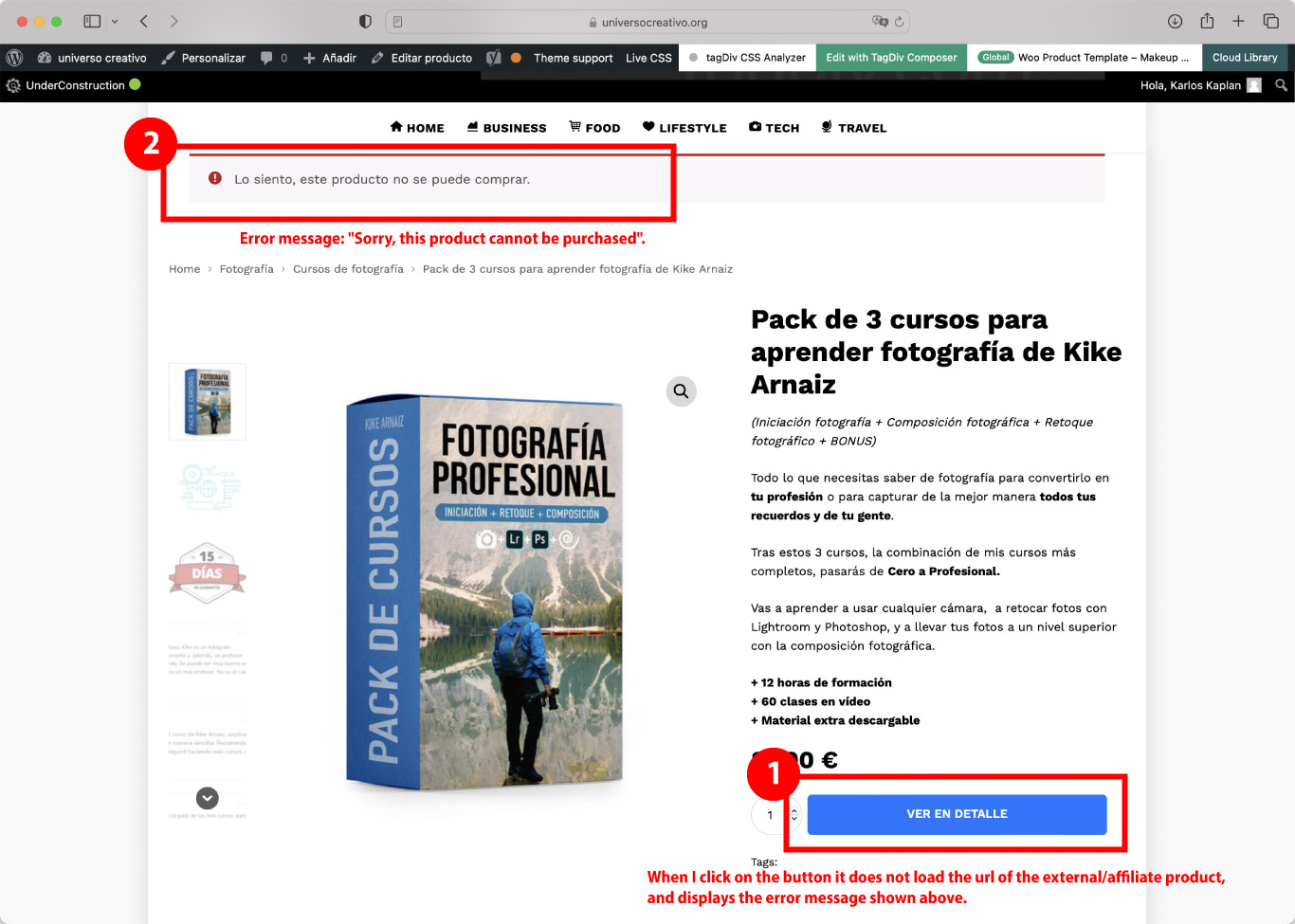
karlostipoWoocommerce, affiliated/external product: Problem on the product page of WooCommerce, when clicking on the buy button (in my case “ver en detalle”) does not open the affiliate URL that has assigned that product. What happens is that an error message comes up at the top that says: “Sorry, this product cannot be purchased”.
After doing a lot of testing and research, I have found that this error only happens when I have a tagDiv template assigned to the product page. If you don’t assign an existing tagDiv template or create a new template it does work correctly, that is if you leave the default WooCommerce style it does work. This is why it is clear that the problem is in the tagDiv Composer… I consider that it is a serious error because in my store there will only be affiliated/external products… (I attach a screenshot of the error here).
Could you please help me with this issue, or could you check this error and update the theme version soon?
My website is under development so to see the error I can provide you with a username and password to access.
Thank you very much in advance for your help.
Best regards,
Carlos
Bettina Hello G3!
We recommend to use cloud/PRO templates in order to have the possibility to edit them with the TagDiv Composer which contains a lot of functions and features, please check our tutorial here: https://forum.tagdiv.com/tagdiv-composer-tutorial/
More documentation about the cloud templates is here:
– https://forum.tagdiv.com/homepage-how-to-build-and-set-it/
– https://forum.tagdiv.com/cloud-library-templates/
– https://forum.tagdiv.com/design-post-pages-using-cloud-library-templates/
– https://forum.tagdiv.com/cloud-library-category-templates/
The Standard Pack plugin is useful only if you are using the default templates.
When you update the theme, make sure you have the latest update of plugins too.
I would gladly recommend you make a backup and update plugins and the theme via file transfer to the latest update: https://forum.tagdiv.com/how-to-update-the-theme-2/
Thank you!
 G3Partners
Hi,
Our website is currently on the Newspaper theme: https://theicon.ist/
When we post on Twitter with a URL of one of our Posts, Twitter does not seem to show a Twitter Card for all posts. For example:
Successful Twitter card would be: https://twitter.com/TheIconistNews/status/1587106668659503104
Unsuccessful Twitter card would be: https://twitter.com/TheIconistNews/status/1587023211144744961
Via Twitter Validator (https://cards-dev.twitter.com/validator) we see the following issue with the unsuccessful posts:
INFO: Page fetched successfully

WARN: No metatags found
We found this error from the logs:
PHP message: PHP Warning: require(/www/wp-content/plugins/td-standard-pack/Newspaper): failed to open stream: No such file or directory in /wordpress/wp-includes/comment-template.php on line 1556
PHP message: PHP Fatal error: require(): Failed opening required '/www/wp-content/plugins/td-standard-pack/Newspaper/' (include_path='.:/usr/share/php') in /wordpress/wp-includes/comment-template.php on line 1556"
The plugin td-standard-pack fails to open stream, which could be the reason the meta tags are not being retrieved properly.
We are currently on Newspaper theme version 11.2, however updating the theme causes the site to crash… is there any way to update the theme without crashing the site?
Many thanks for considering my request.
G3
 chip303
Hi,
I would like to incorporate eastcoast’s pages (and ACF fields) into my page’s design. Unfortunately, I don’t really understand the ACF and don’t know where to put something.
Would it be possible to get the ACF fields of your Eastcoast template so we can have a look at the fields with a template?
I also checked whether I can import the templates from eastcoast. Unfortunately, these are not displayed to me at all, only the complete theme. So “my page” would be overwritten during the import. Is it possible to make the templates accessible individually as well? Including the “submit your venue” check form?
I have a second license of Newspaper Pro on a hidden domain, there I test new things or useful extensions (like in this case, it would be great to be able to present our live music venues like that) and as mentioned above I would like to take over . Unfortunately, I am completely overwhelmed with a “reconstruction” of such a page without a template.
 Calin
Calin Hello,
By default, there is a template that should be applied for all users that are registered on your website.
Now to disable it I believe it can be done with some custom code that can be set in a child theme in functions.php, maybe this article https://wordpress.stackexchange.com/questions/244351/disabling-author-page-only-for-subscribers will help you!
Thank you!
Calin Hello,
Unfortunately, for the moment our theme does not have a system to edit/customize the post user verification email page.
For the moment our theme is using the standard template from emails that WordPress provides.
Thank you!
Anamaria Hello,
Please check the topic and try the steps https://forum.tagdiv.com/topic/error-at-zones-6models-1dom-the-model-does-not-match-the-content-currene/ please use a revision of the page/template.
Thank you!
Anamaria Hello,
Our theme does not have the option to take the first image from the post and set it as a featured image -> https://forum.tagdiv.com/featured-image-or-video/
Also, the settings from Theme Panel are used for the Standard Prebuilt website, so if you have a Pro Prebuilt, you need to edit with tagdiv Composer.
You can delete the element Single Featured image with right-click from the Single post template so that in this mode you won’t have a featured image -> https://i.imgur.com/re1XWKO.jpg or selecting the element and with drag & drop place into the deleting red zone from the bottom right of the page => https://i.imgur.com/vkQVCjn.jpg the same steps to delete another element.
Thank you!
Anamaria Hello,
The tagDiv Composer is a page builder and it can be used for building pages and cloud templates, but not for creating posts. For this, you’ll need to use the Gutenberg or classic editor.
Using tagDiv Composer, you can build/edit the single post template (the layout of the posts).
Here is a video that will show you how to use the builder to create a website from scratch https://www.youtube.com/watch?v=SoGQ0d5kIBg to do this you’ll need to already have the posts.
Also, on our channel https://www.youtube.com/channel/UCOT1RiNysIPCTPSnVZskwtQ, you can find more videos that can help you and documentation https://forum.tagdiv.com/newspaper-theme-documentation/ and you can ask us here on the forum or email if you have any questions.
Also, if you want to have some blocks/elements on a certain post, then you can use a different single template for posts, you can duplicate the template -> https://forum.tagdiv.com/topic/different-logo-in-categorypage/
I hope this will help you!
Thank you!
 tagdivchick
 I was able to figure it out by starting over from a brand new cloud template and also by utilizing the page caches.
However, changes don’t get updated unless you go into each post, and “update” it. Is this a bug?
For example, lets say I modify the single post template. It won’t show for any of the posts until i go into each single post, update it (with no changes) and refresh/clear objects.
This doesn’t seem like the right functionality because if you change something on the single post template, it would be unreasonable to go into each post manually and to do a phantom update by changing nothing and hitting ‘update’.
Does that make sense?
-
This reply was modified 3 years by
tagdivchick.
 Goodspeed Kopolo
Hi, just today, I added my Google AdSense Search Engine Ad Code in theme panel under Analytics Code “<body></body>”.
After saving, I refreshed my home page and discovered my home page broke (screenshot attached).
I then deactivated all plugins except for Newspaper plugin still the problem could not resolve. I then deactivated the td-demo-eastcoast-check-pro plugin and then the home page displayed correctly (screenshot attached) but I cannot use the FLEX BOX X anymore since the home page only displays correctly when I deactivate the td-demo-eastcoast-check-pro plugin.
Second item: I am using the prebuilt theme td-demo-eastcoast-check-pro and I am wondering why it does not show its cloud templates in the cloud templates panel.
Bettina Hello @EmilianoB2T!
We have 3 options for mobile versions that you can use:
1. Responsive version: A responsive version of your website looks similar to the desktop version. Edit the page with TagDiv Composer. Click on the mobile viewport: https://www.screencast.com/t/XDQJedlggSB. There you can see your mobile version and edit or adjust the elements to look better.
2. Mobile pages: https://tagdiv.com/newspaper-10-3-7-update-brings-customizable-and-fast-mobile-pages
3. Mobile theme plugin: The Mobile Theme is a performance-optimized theme included in the main Newspaper theme that only loads on mobile devices. It comes with its own templates and design for pages, posts, categories, etc., so your current templates from the desktop theme will get converted to the mobile theme layout. For more information, please visit https://forum.tagdiv.com/the-mobile-theme/ and https://forum.tagdiv.com/mobile-theme-introduction/.
A full explanation is here: https://www.youtube.com/watch?v=SpGkOnJeNZY
Please disable the Mobile Theme plugin and see the results!
Thank you!
Bettina Hello Ana!
We have 3 options for mobile versions that you can use:
1. Responsive version: A responsive version of your website looks similar to the desktop version. Edit the page with TagDiv Composer. Click on the mobile viewport: https://www.screencast.com/t/XDQJedlggSB. There you can see your mobile version and edit or adjust the elements to look better.
2. Mobile pages: https://tagdiv.com/newspaper-10-3-7-update-brings-customizable-and-fast-mobile-pages
3. Mobile theme plugin: The Mobile Theme is a performance-optimized theme included in the main Newspaper theme that only loads on mobile devices. It comes with its own templates and design for pages, posts, categories, etc., so your current templates from the desktop theme will get converted to the mobile theme layout. For more information, please visit https://forum.tagdiv.com/the-mobile-theme/ and https://forum.tagdiv.com/mobile-theme-introduction/.
A full explanation is here: https://www.youtube.com/watch?v=SpGkOnJeNZY
If you need to use the mobile version 1 or 2, then you need to disable the Mobile Theme plugin.
The Mobile theme has only some settings and can not be customized with the TagDiv Composer. Check this thread where we discussed it: https://forum.tagdiv.com/topic/amp-and-mobile-theme-plugins-issues-with-google-analytics-and-ads-sense/
Thank you!
 sonicstadia
I have been trying to use the Newspaper Mobile Theme for two weeks straight now. At first, the mobile theme wasn’t working, but after changing the Desktop Pages template from the Cloud Library, it worked (only temporarily). Now each time I make the smallest of changes to the site, it goes back to the Desktop site, and I can’t fix it unless I activate another WordPress theme, then switch back to Newspaper. Even creating a blog post resets the theme to the Desktop site every time. This is very frustrating. Somebody, please help.
 DutchReview
Hi TagDiv team,
We are really interested in using the new Directory options. We want to create a paid directory that automatically renews each year.
I’ve been through all the threads and documentation but it seems like explainers on how to create this are really sparse. I’ve seen other people ask this question and get a copy-paste response, but the guides in that response don’t answer my questions.
The website is http://www.dutchreview.com. The directory is in addition to our normal activities (so I can’t import a whole website template as far as I understand).
Can you please answer the following questions:
– What pages do I need to create for one directory (e.g. tax accountants)? (I think I need a directory page, a signup page, a submission form, etc. but I’m confused about how to link all these together).
– How do I create the paid option?
– Can I set a character limit on descriptions for listings?
– Currently when I try to load the Doctors Listings template I get an error saying “Flex Block X” and that the module style does not exist and that I need to reactivate the plug. Which plugin is this referring to?
Thanks in advance for your help.
Best,
Sam
 jern
jern Hi, this is what the CPT & Taxonomy page looks like after installing the Blank CPT template. Thanks.
Anamaria Hello,
You can create a new template if you import the template here -> https://i.imgur.com/EwU8sG6.png, not on a page. You can import some sections and blocks.
Thank you!
 bjpscott
Hello, I run a mma news site bjpenn.com. After upgrading to the cloud templates for single pages (desktop and mobile). It seems that the sidebar is sticky sometimes which is costing us revenue. The sidebar is sticky sometimes and sometimes not. I am tryin to find out if there is some kind of script that is render blocking this sidebar to fully load with stickyness. or some other script that is interfering with the load of themes sidebar. https://www.bjpenn.com/mma-news/exclusive-interviews/max-griffin-says-dana-white-and-mick-maynard-told-him-he-beat-neil-magny-hopes-to-submit-tim-means-at-ufc-vegas-63/. if you go to the home page or article and scroll down you will see the sidebar disappears and you have to scroll up then back down to get it to stick as it is supposed to. please assist.