
- NewspaperUser review system
- NewspaperReviews
- NewspaperCredit System
- NewspaperModules Builder in Newspaper Theme
- NewspaperHow to use the Posts List shortcode
- NewspaperModal Popup
- NewspaperLockers
- NewspaperLeads
- NewspaperFlex Block Settings Guide
- NewspaperSingle Post Shortcodes
- NewspaperDefault Category Settings
- NewspaperCloud Library – Category Templates
- NewspaperBig Grid Flex Settings
- NewspaperMeta Info on Modules and Blocks
- NewspapertagDiv Cloud Library Plugin
- NewspapertagDiv AMP Plugin Tutorial
- NewspapertagDiv Composer Tutorial
- NewspaperNewspaper theme documentation
- NewspaperWeather Shortcode
- NewspaperHow to Add an Icon in Menu
 cloverjim
Hi,
I used the Makeup Shop theme for my store. The description section was easily right-aligned, but the reviews section didn’t become RTL no matter what I tried.
What should I do?
Thank you!
 Calin
Calin Hi,
The stars reviews are stored in the database under wp_postmeta (search after the post id) and look for td_review_key and in td_post_theme_settings will be the complete data for articles (including the number of reviews)
 muterobert
 Thanks Calin, this is very helpful, especially the testing page.
Our current site is running a year’s old version of Newsmag (not Newspaper). Although it has a similar review system, the tester you shared is saying our reviews are not valid for inclusion in Google snippets, even though Google clearly sees that the post type is declared as a “Review”:
https://search.google.com/test/rich-results/result/r%2Freview-snippet?id=cjy4mDcOxaIsAPNu7L2u-Q
We have hundreds of such reviews. Any idea how we can fix this in the meantime, until we get the new version of our site online?
 batto
battoHi,
Which custom post field(s) are the review stored in?
Thanks!
Calin Hi,
Yes, the theme works with review snippets, you can test it using our example review https://demo.tagdiv.com/newspaper_pro/td-post-laptop-with-128-bit-processor-32gb-of-ram-and-24mp-front-camera/and the rich results test – https://i.imgur.com/kVVB0CO.png https://search.google.com/test/rich-results/result/r%2Freview-snippet?id=BHGrsoHRPLzaTHp3R2OC7A
muterobertHi I’m using Newspaper 12.7.1. We review games on our website and plan to use the theme’s built-in review system which allows us to provide a score and a summary.
My question is whether or not the theme’s review system is compatible with Google’s Review Snippets (documentation here: https://developers.google.com/search/docs/appearance/structured-data/review-snippet). I found the Newspaper theme’s documentation on Reviews, but I don’t see any mention of compatibility with Review Snippets, Schema.org, or anything specific to SEO.
It’s important for our site to have compatibility with Google Review snippets. If it is not included by default, is there any way to add it with a plugin or similar, while retaining the use of the theme’s own review system?
Calin Hi,
First of all, thank you so much for being one of our customers — we truly appreciate your support.
Regarding the issue you’ve raised, I’m not sure if it started recently or if it’s been there since you first purchased the theme (which was about a year and a half ago). If it’s been present from the beginning, I’m genuinely surprised it wasn’t addressed earlier, as it’s a fairly general situation that we usually resolve quickly.
On the other hand, if this is a new issue, I do want to mention that your message about leaving a negative review feels a bit unfair, especially considering that your support period expired some time ago. We’re always happy to help where we can, but framing a review as a condition for support can come across as coercive, and we prefer to work through issues in good faith.
That said, we’re here to help however we reasonably can. Let’s see what we can do to get this sorted for you.
Please make sure that all the theme requirements from our guide are properly set: https://forum.tagdiv.com/requirements-for-newspaper/ In particular, double-check this configuration: https://i.imgur.com/Z9zCgkb.png
If that doesn’t resolve the issue, try switching your permalinks to Simple/Plain. Sometimes, depending on the host, you may need to contact them to enable pretty permalinks properly.
Also, could you please test the theme with only the tagDiv plugins active (disable all other plugins temporarily)? This will help us check if there’s a plugin conflict causing the issue.
Let us know what you find. Thank you!
 varunnaagar
I have bought the newspaper theme on 2024 and I tried to installed the TagDiv composer. I tried multiple times to forums and the support team even the email to the support but receive the exact reply from them. When I was click on the “edit with TagDiv” its always showing 404 error. What is that mean and how it works I want the solution. Please help me out. Money wastage on Newspaper theme. I will share the negative review.
Calin Hi Thomas,
I’ve passed a note to our developers to review the code in the file:
td-cloud-library/includes/tdb_functions.php. I hope they’ll be able to take a look at it soon.
In the meantime, I recommend running a quick test: if you’re currently using PHP version 8 or higher, try switching to PHP 7.4 to see if the issue persists. It’s possible that the problem is related to new PHP restrictions that may be affecting the code.
Thank you!
Calin Hi,
I think this is something related to the PHP version. If you have the possibility, please make a test, set PHP 7.4, and see if the situation persists, if no, then it is related to the new restrictions added in php versions 8+. I also informed our developers to check the code for td_review.php
Thank you!
 thebackbenchers
hi this is my installed theme – https://bookreviews.forum/
I am aunable to chage orange colour all over the theme, i want to keep it something else.
Also on mobile screen there is a critical issue, the main header (where the logo is) on left hand side there is an empty white bar, please help me to make it sync with black header, it looks really cheap see screeshot – https://prnt.sc/XNiaBkl1mlPI
thebackbenchersplease see this – https://bookreviews.forum/book-review-the-alchemist-by-paulo-coelho/
there is fearured image but it is not appearing, please help
 SnakeEater
For the longest time we have used Point reviews, and the team has used values such as “6/10”, “8/10” etc.
Newspaper never had an issue with it, as it only showed “6” and “8” in the review box, which is what we wanted.
You could say that adding “/10” was unnecessary on our part, but we always did it that way.
Exploring the debug log, I now see stuff like:
[30-Aug-2025 08:06:54 UTC] PHP Warning: A non-numeric value encountered in /home/s132845/domains/domain.com/public_html/wp-content/plugins/td-composer/legacy/common/wp_booster/td_review.php on line 149
My question is, how should we approach this? SQL Query through all the reviews and get rid of “/10”?
I think it would make more sense for the review box to have a validation phase where the text field only accepts numbers, perhaps.
Any input?
Calin Hi,
If you are using a single post template, you can use the tagDiv Composer to edit the template and relocate the review position to a different location – https://i.imgur.com/rkYfWhQ.png
Or if you want to review via block, then the only way will be to use custom css to change the place or create your module https://forum.tagdiv.com/meta-info-modules-blocks/
Thank you!
 mbrckn
Hello,
How can I change the position of the review system in a single post? I see the review block below the article. How do I access it via the content?
Calin Hi,
Please check the console when you hit the save button and see if there is an error. With right-click -> inspect -> console -> select the error in the tab network -> preview, you can see the cause and check the suggestion from here https://forum.tagdiv.com/topic/newspaper-theme-panel-settings-are-not-being-saved/ -> https://community.godaddy.com/s/question/0D58W00007ggvUDSAY/403-forbidden-error-not-sure-why
Thank you!
Calin Hi,
1. You will need to contact us via email at contact@tagdiv.com and provide us with the license key. We’ll submit a request for review.
2. Please delete the plugin and reinstall it from Newspaper > plugins. This should resolve the situation.
Thank you!
 stemalo
Fehler-Details
==============
Ein Fehler vom Typ E_ERROR wurde in der Zeile 3276 der Datei /home/expomaxt/public_html/gartenwoche_2024/wp-content/plugins/td-subscription/includes/td_subscription.php verursacht. Fehlermeldung: Uncaught TypeError: array_key_exists(): Argument #2 ($array) must be of type array, null given in /home/expomaxt/public_html/gartenwoche_2024/wp-content/plugins/td-subscription/includes/td_subscription.php:3276
Stack trace:
#0 /home/expomaxt/public_html/gartenwoche_2024/wp-includes/class-wp-hook.php(324): td_subscription::td_post_theme_settings_mb_save_filter(NULL, ‘3213’)
#1 /home/expomaxt/public_html/gartenwoche_2024/wp-includes/plugin.php(205): WP_Hook->apply_filters(NULL, Array)
#2 /home/expomaxt/public_html/gartenwoche_2024/wp-content/plugins/td-composer/legacy/common/wp_booster/wp-admin/external/wpalchemy/MetaBox.php(880): apply_filters(‘wpalchemy_filte…’, NULL, ‘3213’)
#3 /home/expomaxt/public_html/gartenwoche_2024/wp-content/plugins/td-composer/legacy/common/wp_booster/wp-admin/external/wpalchemy/MetaBox.php(2081): WPAlchemy_MetaBox->apply_filters(‘save’, NULL, ‘3213’)
#4 /home/expomaxt/public_html/gartenwoche_2024/wp-includes/class-wp-hook.php(326): WPAlchemy_MetaBox->_save(8441)
#5 /home/expomaxt/public_html/gartenwoche_2024/wp-includes/class-wp-hook.php(348): WP_Hook->apply_filters(NULL, Array)
#6 /home/expomaxt/public_html/gartenwoche_2024/wp-includes/plugin.php(517): WP_Hook->do_action(Array)
#7 /home/expomaxt/public_html/gartenwoche_2024/wp-includes/post.php(5110): do_action(‘save_post’, 8441, Object(WP_Post), true)
#8 /home/expomaxt/public_html/gartenwoche_2024/wp-includes/post.php(5212): wp_insert_post(Array, false, true)
#9 /home/expomaxt/public_html/gartenwoche_2024/wp-admin/includes/post.php(2003): wp_update_post(Array)
#10 /home/expomaxt/public_html/gartenwoche_2024/wp-admin/includes/post.php(2104): wp_create_post_autosave(Array)
#11 /home/expomaxt/public_html/gartenwoche_2024/wp-admin/post.php(336): post_preview()
#12 {main}
thrown
 Rankpage
I create a new page with pure Elementor, but it does not show the builder. But when you try to create and save, it able to see the result on preview. How to make the builder show out for my edit convenient?
 jamie@gundigest.com
 Hi Calin,
Thank you for your response. The error did not resolve after following your suggestions. These are the steps I took.
– I verified I am using the latest Newspaper theme 12.7.1.
– I removed the child theme folder from wp-content/themes
– I refreshed the themes page in wp-admin to verify the theme was gone.
– I created Newspaper-child.zip from the theme package.
– I installed Newspaper-child.zip by uploading it into the WordPress admin panel. – WordPress said the installation was successful.
– I went back to the themes page and tried to preview the child theme.
– The same error showed.
2025/08/08 21:18:37 [error] 118#118: *1710 FastCGI sent in stderr: "PHP message: PHP Warning: require_once(/www/kinsta/public/mysite/wp-content/themes/Newspaper-child/blocks/acf-blocks-loader.php): Failed to open stream: No such file or directory in /www/kinsta/public/mysite/wp-content/themes/Newspaper/functions.php on line 644;
It is still looking for the /blocks/ folder in the child theme:
PHP message: PHP Fatal error: Uncaught Error: Failed opening required '/www/kinsta/public/mysite/wp-content/themes/Newspaper-child/blocks/acf-blocks-loader.php' (include_path='.:/usr/share/php') in /www/kinsta/public/mysite/wp-content/themes/Newspaper/functions.php:644
Thank you for any help you can provide.
-
This reply was modified 1 year by
jamie@gundigest.com.
Calin Hi Mahmood,
We completely understand, and we’re really sorry for the inconvenience! Since it’s the holiday season, many of our team members are currently on vacation. We’re doing our best to assist everyone as quickly as possible, but the issue you’re experiencing needs to be reviewed by a developer. Unfortunately, our developers are even more limited at the moment due to the holidays.
Thank you so much for your patience and understanding we truly appreciate it!
Thank you!
 Stoyan
Hello,
I’m using this one:
https://demo.tagdiv.com/newspaper_free_news_pro/
I want to change the length of the text of the posts in the “Recent Posts” section.
I see that in the demo site (from the link above) the text is in three lines.
In my case the texts are longer.
Is there any way to control the length of these texts from the homepage editor or is it only done from the preview taken in WP
Thank you.
thebackbenchers hi i want to remove this https://prnt.sc/0FNyZhh864EX
whole section how to do it? i removed it but a bad white space is coming pease check – https://bookreviews.forum/
here – https://prnt.sc/I0OOTOVtTDQE
-
This reply was modified 1 year by
thebackbenchers.
 Arturooooooo
Hello Team,
I am having issues applying category templates to my pages using tagDiv Composer on my website https://www.anglertest.de
As a starting point I used the aniglobe category template renamed it to koedertest-category and adjusted it to my needs but the changes are not beeing applied.
1) There is no way for me to switch the category in the composer to preview it in the composer
2) When visiting a category the “edit in tagDiv Composer” button is not visible
3) Not a single category template is ever beeing applied to categories. I have set the template as global without success. Changing the template on-the-fly from the frontend did not work. Setting the template from the theme panel category settings did not work either.
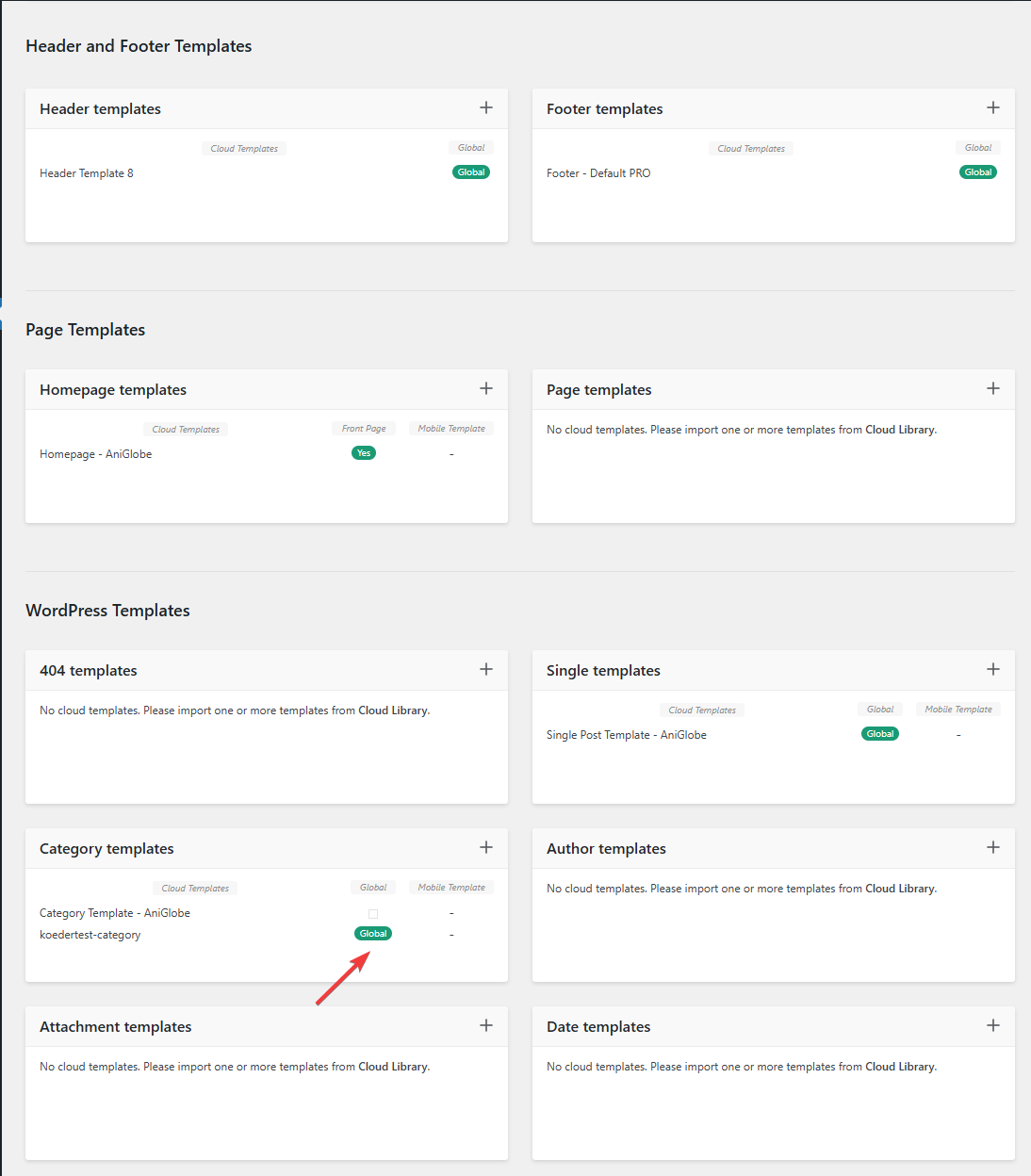
In this picture you can see that my template should be assigned globally
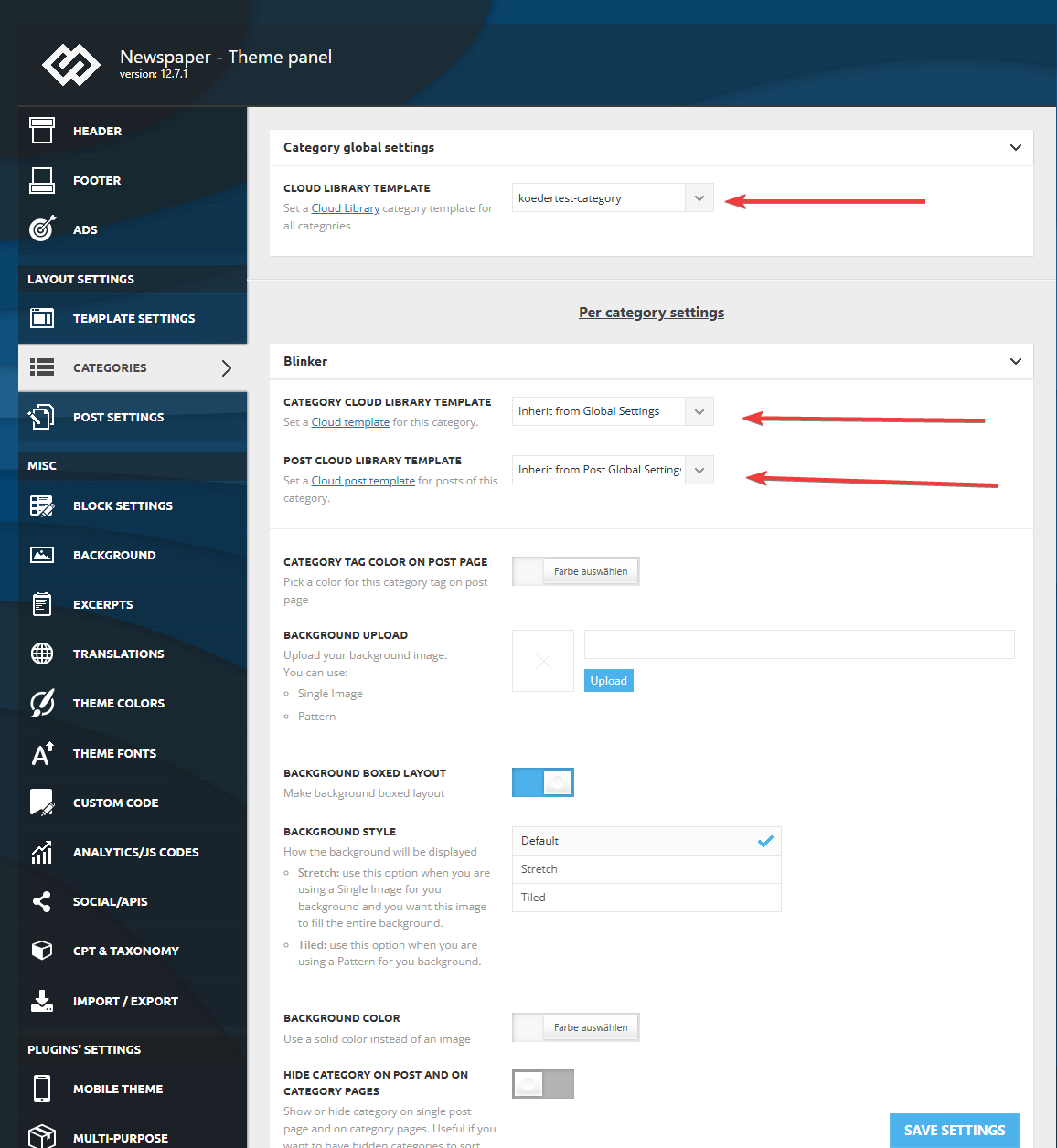
I made sure that in the theme panel under categories that the same template is globally set and checked every category underneath to inherit from global settings.
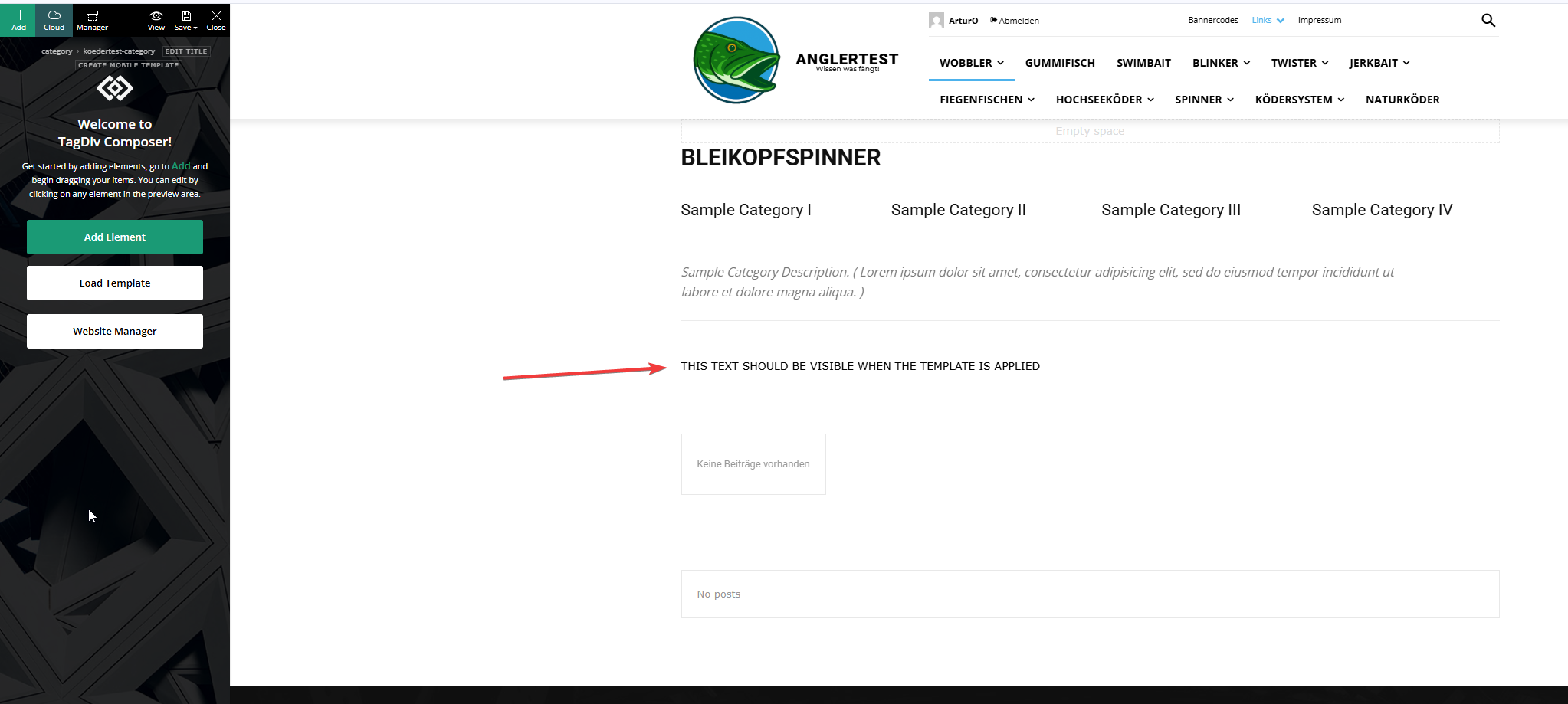
This is the actual template and I added an html block to verify if the template was assigned.
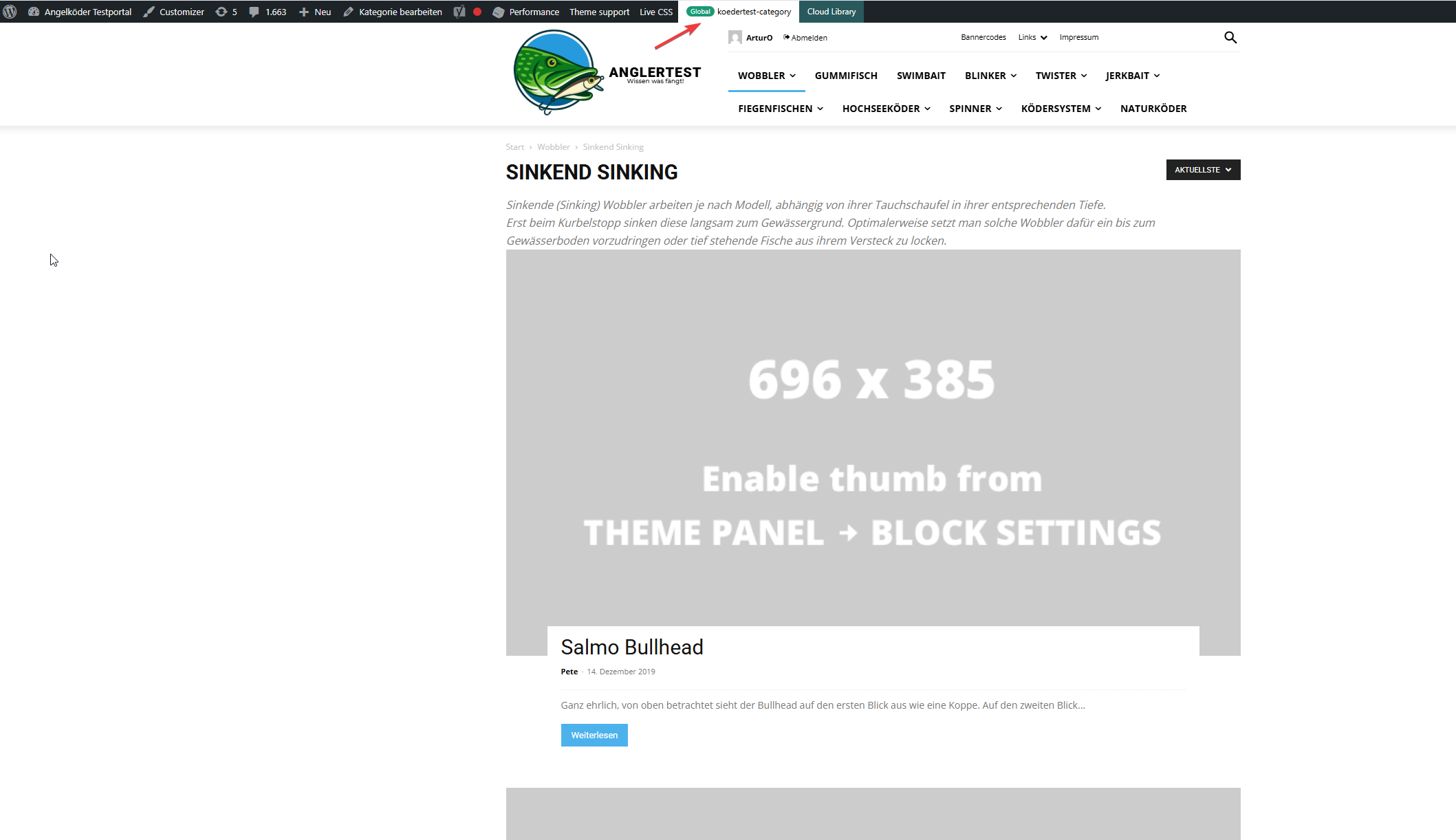
In this picture you can see that the template for the “wobbler” category looks completely different.
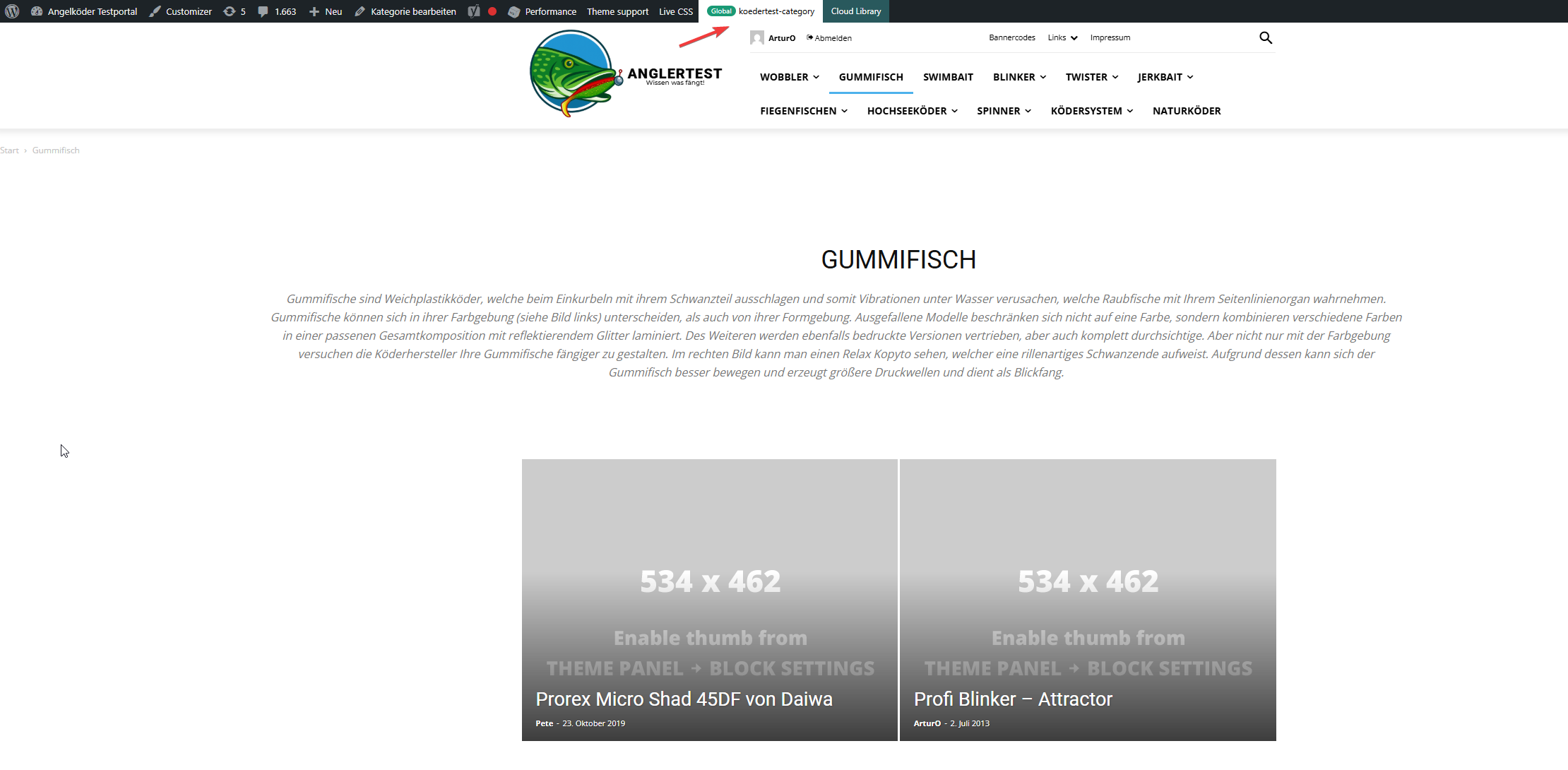
Strange enough, the template for the “gummifisch” category looks slightly different with the same theme applied (see arrow up top), the text I inserted to check was nowhere to be found (not even in source code)
In the very beginning I installed the aniglobe templates intially without demo content, but changed up the templates one-by-one. I did not find any option to disable or uninstall the prebuild website.
In my endless tries with different configurations I was not able to aplly the template, but I found something interesting which might explain the bugs I encounter.
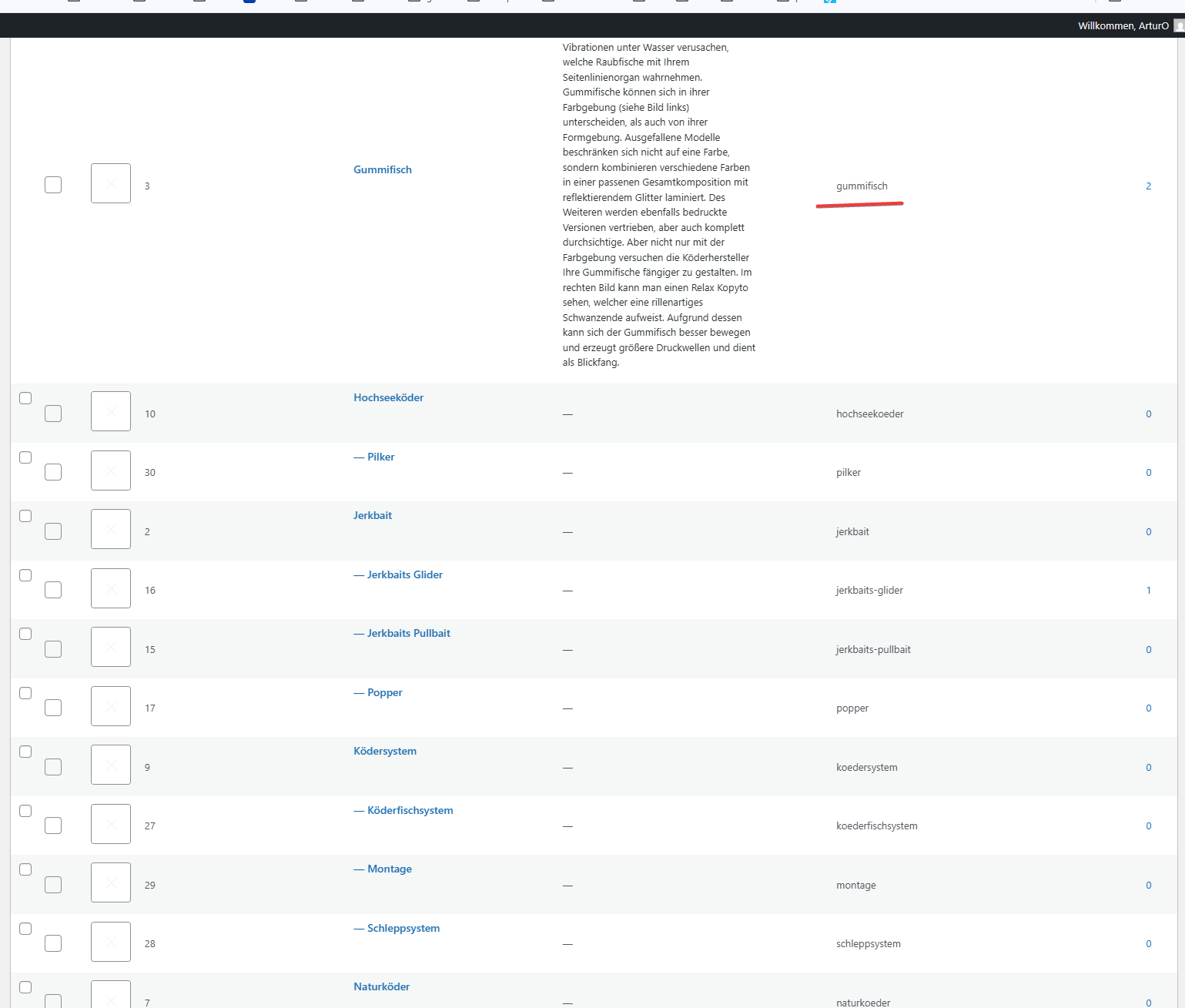
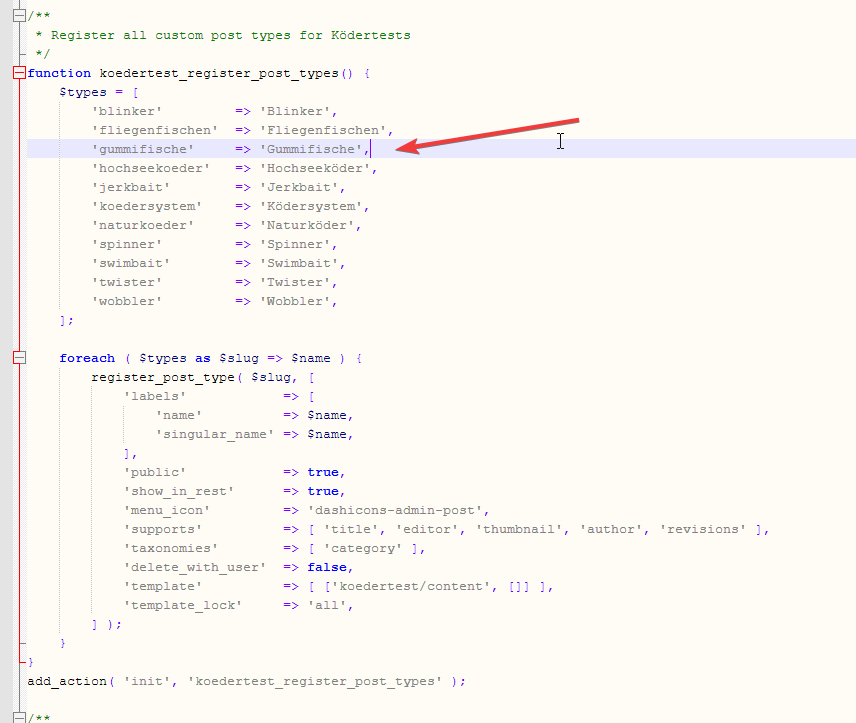
In those pictures you can see the categories I use and the post_types I register. The post_types are using those categories and I make sure that every post of those post_types has at least one category assigned. All post_types share the same categories (native category from wordpress).
The permalink structure is setup like /%category%/%postname%.html for every post_type. Category basis is set to “angelkoeder”.
Every category is named after a post_type. Nested categories are not named after post_types.
The only exception is the category “gummifisch” where post_type “gummifische” articles are categorized under. I might have missed the “e” when I set this up in 2013.
Somehow this category looks different as you can see in the above screenshot.
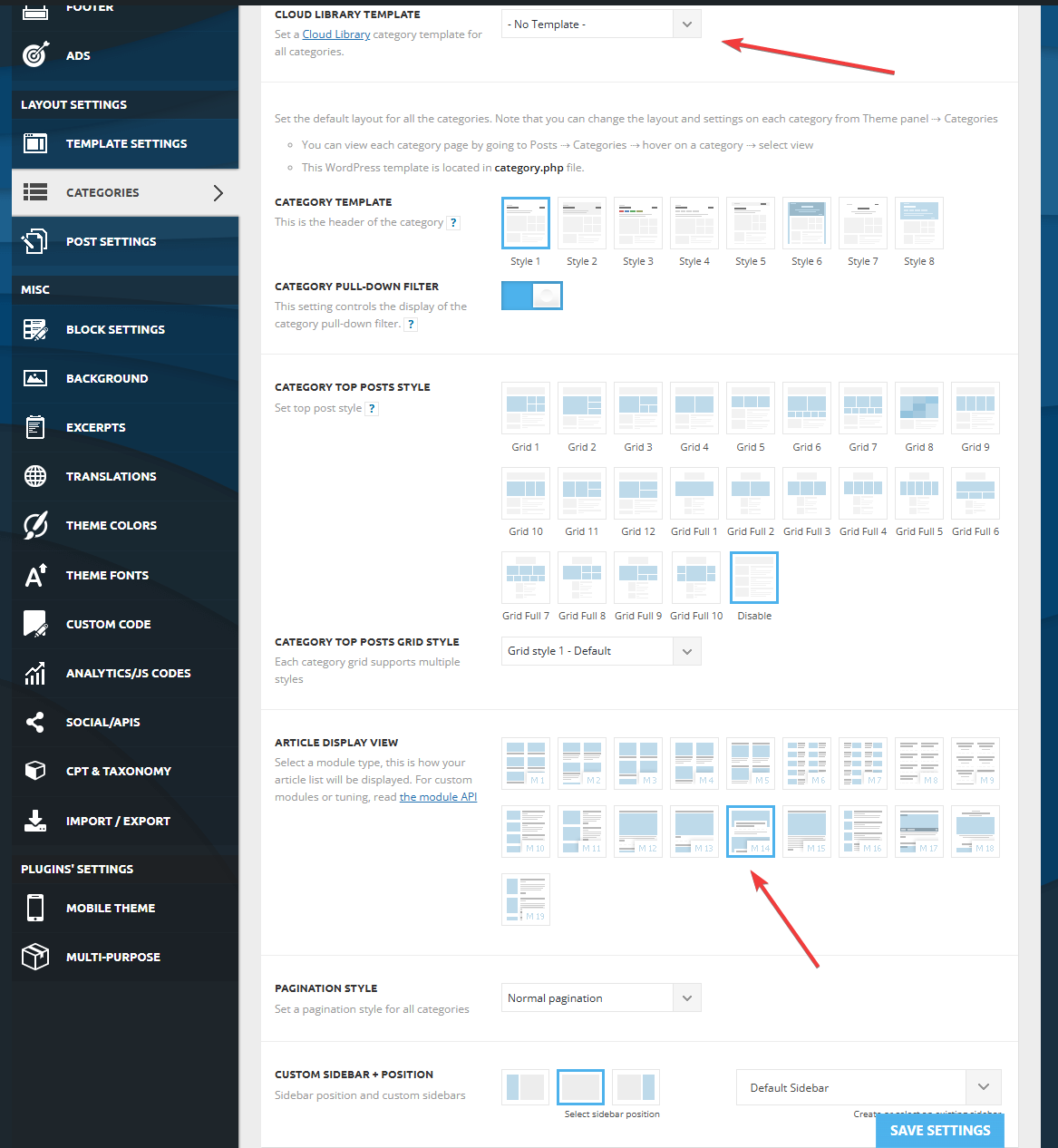
Furthermore I discovered that, when I change the template in the theme panel to “no template” (but do not save those settings) it reveals the settings I made previously with “Module 14” as article display view. You can see in the screenshot above for the “wobbler” category that this is the applied design even though the bar on top suggests my custom “kodertest-category” template is supposed to be applied.
Any help is highly appreciated. If needed I can provide further screenshots.
Thank you for your help.
 franfar
 Good morning, thank you for your reply.
We deleted the row with the Big Grid and added a new one with different type (Big Grid Flex 10) and it seems to be all ok.
Grid Flex 10 builder preview
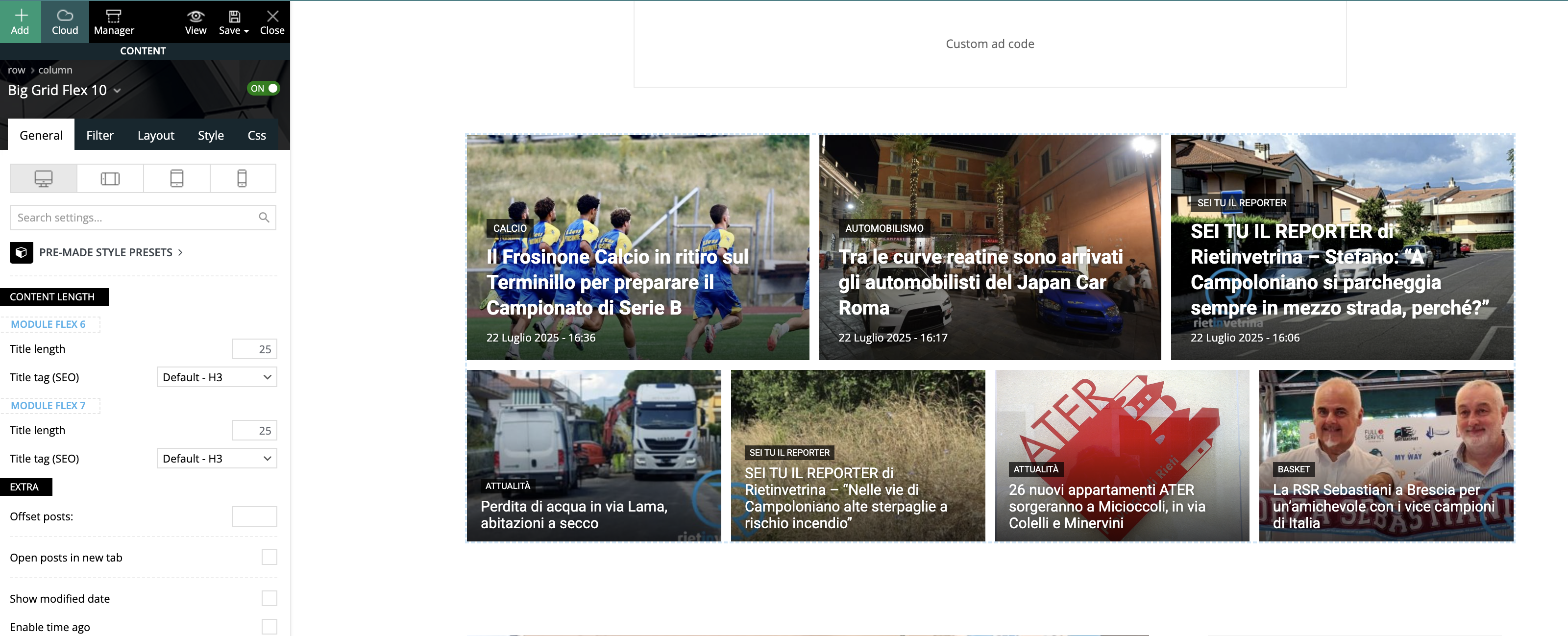
Website view
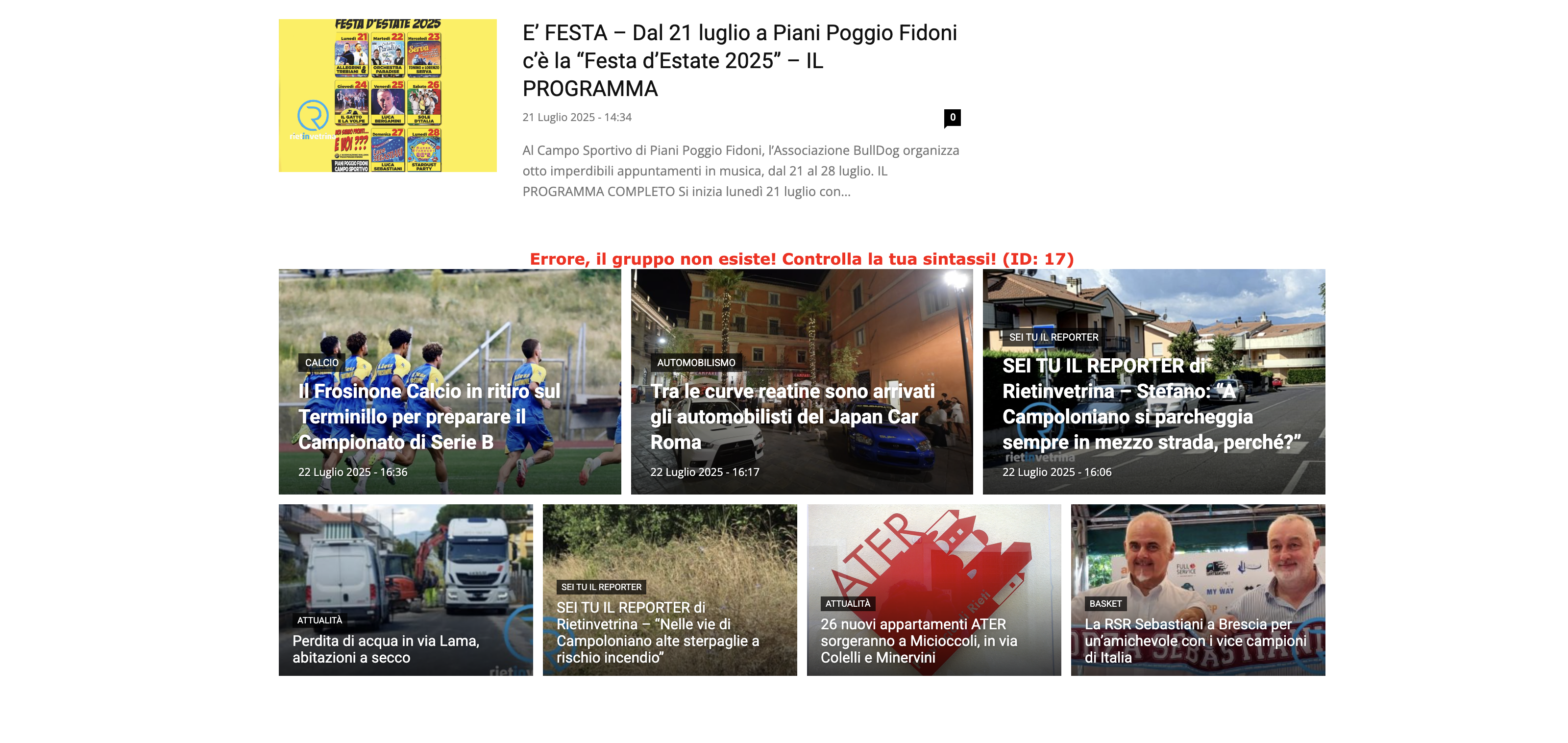
No settings were set.
Changing it again into Flex 1 (3 columns) the problem back again, even if we set it to 2 columns.
If needed, we can provide you with temporary access.



