
- NewspapertagDiv Composer – Website Manager
- NewspaperWhen tagDiv Composer is Not Working
- NewspapertagDiv Composer Tutorial
- NewspaperScroll Animation
- NewspaperSingle External Shortcode and External Shortcode
- NewspaperCredit System
- NewspaperBookmark – Save For Later
- NewspaperFlex Block Builder and Flex Loop Builder
- NewspaperModules Builder in Newspaper Theme
- NewspaperIntroduction to CPT and ACF with Newspaper Theme
- NewspaperCreate a frontend submission form
- NewspaperHow to Use the Tabbed Content shortcode
- NewspaperCreate a form contact page
- NewspaperFilters and sorting for taxonomies
- NewspaperUser review system
- NewspaperCustom Fields Support
- NewspaperWooCommerce: Happy “Add to Favorites!”
- NewspaperWoo Brands
- NewspaperModal Popup
- NewspaperShortcodes
 Bettina
 Hello @sun!
Please edit the 404 page with the TagDiv Composer and change the url link for that button into your homepage and see the results!
Thank you!
 Anamaria
 Hello,
Please edit with tagDiv Composer, select the block and let the offset field empty with no space, no value and see the results: https://www.screencast.com/t/peVbVmUDE.
Thank you!
Bettina Hello @desirevp!
If you use a PRO demo with cloud templates, then you can customize the header from the TagDiv Composer. You can import other templates from the Cloud Templates or build it from scratch.
For more customizations, we recommend to use cloud/PRO templates in order to have the possibility to edit them with the TagDiv Composer which contains a lot of functions and features, please check our tutorial here: https://forum.tagdiv.com/tagdiv-composer-tutorial/
Documentation here:
– https://forum.tagdiv.com/cloud-library-templates/
– https://forum.tagdiv.com/design-post-pages-using-cloud-library-templates/
– https://forum.tagdiv.com/cloud-library-category-templates/
Check also our video tutorials here: https://www.youtube.com/c/tagdivThemes/videos and more theme documentation on the left side: https://forum.tagdiv.com/newspaper-theme-documentation/
Thank you!
 Calin
Calin Hi,
What you ca do is to exclude the files, please try with this one wp-content/themes/Newspaper/Newspaper/font-newspaper.css and wp-content/plugins/td-composer/mobile/style.css (this need to be set in the css section).
Let us know the results!
Anamaria Hello,
1. If you have a global header template, the change will apply for all pages -> https://forum.tagdiv.com/add-logo-newspaper/
2. and 3. You can remove the Single Post Author and Single Post Date select with tagDiv Composer with a right-click you can delete => https://i.imgur.com/GNzcGmJ.jpg , or selecting the element and with drag & drop place into the deleting red zone from the bottom right of the page => https://i.imgur.com/vkQVCjn.jpg
4 and 5 You need to do the same as for 3 and 4 -> https://i.imgur.com/gnPj50q.png -> https://i.imgur.com/d53L8eV.png and after you need to set the layout of the row to 1/1 on the footer -> https://i.imgur.com/UAoIWlj.png and from tab CSS you can remove the background image.
Thank you!
 howmanywon
Theme: Royal pub
Wesbite URL: howmanywon.com
1. Global logo
Using edit with tagdiv composer, if I update the ‘Logo text’ and ‘Logo text tagline’ it only applies to the page on which I edit it. How can I get this to apply to every page?
2. Hide author
E.g. first article ‘Strawberry Daiquiri’, author is showing as ‘Howmanywon@gmail.com’. Can I hide this?
3. Hide post date
Similar to aboe, want to hide the date
4 and 5. remove sections
On the homepage, I would like to remove the entire ‘Video recipes’ section, and the entire ‘Subscribe to our newsletter’ section so that the footer is just the left half of the current footer.
Thank you!
Anamaria Hello Andrea,
You can add the element called Single Post Subtitle -> https://i.imgur.com/2cNrcZ4.png from tagDiv Composer.
Thank you!
Anamaria Hi,
You can set the URL on the logo with tagDiv composer, select the logo and put the URL https://i.imgur.com/2wmUKJD.jpg -> https://www.youtube.com/watch?v=HXQQygkCCJo
Thank you!
Calin Hi,
The layout of pages and cloud templates can be edited using tagDiv Composer, edit the page/cloud and select the element that you ant to edit, if this is an individual element and you want to remove, then use the right click. If is a flex block check it in layout tab -> https://i.imgur.com/7lhioe1.png
Thank you!
Anamaria Hello,
1. To make the menu sticky please check this article and set it on always => https://forum.tagdiv.com/header-manager/ -> https://i.imgur.com/wzzBZu6.jpg
2. You can add more blocks from tagDiv Composer -> https://forum.tagdiv.com/flex-block-settings-guide/ -> https://forum.tagdiv.com/big-grid-flex-settings/ -> https://forum.tagdiv.com/posts-loop/ or you can import from tagDiv Cloud Library https://cloud.tagdiv.com/#/load/Blocks
Thnak you!
Calin Hi kimstipguide,
I think that I know what the problem is, please edit the tag cloud template with tagDiv Composer -> https://i.imgur.com/j8YvKks.png click on the post loop and remove the offset -> https://i.imgur.com/dJ0iFQu.png let that filed empty.
I hope this will help you!
Let me know the results!
Calin Hi,
That message is referring that tagDiv Composer can not find the last changed that was made so it can not set the latest layout settings.
Did you made some custom changes in the theme or plugin files, or in database? Also, it can be a plugin that is interfering. What I suggest is to make a full backup and make a test using only tagDiv plugins and see if the problem persist. If the problem is still there, then please contact us via email at contact@tagdiv.com provide wp-admin and cPanel access. Make sure that you have a full backup and include the link of this topic to can identify you. We’ll check it as soon as possible.
Thank you!
Anamaria Hello,
Yes, we added the support for WOO Tags Template, is the template Woo Archive -> https://i.imgur.com/Ohu90HX.png -> https://i.imgur.com/VND3cM2.png -> https://i.imgur.com/Sc1lI3y.png and you can customize it with tagDiv Composer.
Thank you!
Anamaria Hello,
I’m sorry, but I’m not sure I fully understand what you are trying to achieve.
If you want to have the author on the blocks, please edit with tagDiv Composer, select the block and in the tab called “Layout” is the option to show the author -> https://i.imgur.com/3Zo0njy.png
Thank you!
Calin Hi Themedad,
From the details that you provided is possible that some settings to block the admin-ajax (usually this can be seen in console this is the case one from this guide https://forum.tagdiv.com/tagdiv-composer-not-working/)
If you agree we can take a look at it, for this please contact us via email at contact@tagdiv.com and provide wp-admin and cPanel access. We’ll check it as soon as possible. Also, please include the link of this topic to can identify you.
Thank you!
Calin Hello,
Unfortunately, there is no guide for how to move from Newsmag to Newspaper, but I will try my best to help you.
First, you need to make sure that you have a full backup for your website and database.
Now what you need to know is that during this process some elements, design from your website can be changed, so here are the steps that you need to do:
Right now you have the Newsmag theme activated, what you need to do is to install via WordPress the Newspaper theme, but do not activate it. After the theme is installed, go in plugins and disable all tagDiv plugins you have enabled, after that you need to activate the new theme (Newspaper theme) and make sure that you update and activate tagDiv Composer, tagDiv Standard pack (those plugins should bring back the website look and can be installed from Newspaper > plugins), also enable the rest of tagDiv plugins that you are using -> https://i.imgur.com/MvKx52B.png
I hope this will help you!
Calin Hi,
That page need to be edited using tagDiv Composer -> https://i.imgur.com/snL8oKL.png
Then you’ll be able to edit the layout that you see on the frontend.
Thank you!
Calin Hi kabbolig,
This code that you mentioned is referring to a title from that page, now the title can be from any block, this can be fill using the tagDiv Composer , edit the page and click on the block without title -> https://i.imgur.com/QRoQxJn.png set the custom title and the problem should be solved for that block.
The second code seems to be from an iframe with a player, for this problem you can add the title element for that iframe, here is a guide that can help you -> https://equalizedigital.com/accessibility-checker/iframe-missing-title/
Thank you!
Anamaria Hello,
We have long recommended shifting from WPBakery to tagDiv Composer because there is a conflict between the two and they cannot be used together.
Also, on our channel https://www.youtube.com/channel/UCOT1RiNysIPCTPSnVZskwtQ, you can find more videos that can help you and documentation https://forum.tagdiv.com/newspaper-theme-documentation/ and you can ask us here on the forum if you have any questions.
You can find the WP Bakery in this path Newspaper-tf\code\other_plugins if you want to use it.
Thank you!
Anamaria Hello,
Only the administrator and editor can do changes or import a template with tagDiv Composer and can save it.
The authors can’t import a template and they can only see them https://i.imgur.com/ObiYfPD.png
Thank you!
 akashchopra
tagdiv composer plugin not installing
following errors:
1. Internal Server Error
The server encountered an internal error or misconfiguration and was unable to complete your request.
Please contact the server administrator to inform of the time the error occurred and of anything you might have done that may have caused the error.
More information about this error may be available in the server error log.
Web Server at wci.in
or
2. Destination Folder Already Exists Error
I tried many times deleting entirely also.
 drzac
drzacHi I can’t change mobile version to desktop version for fixing the website.
How can i do it?
 knthdgd
Hi tagDiv.
This is kind of strange, and I it is a bit hard to explain it.
Let me try to explain:
1) This is the live portrait viewport of my website, which is the correct version, and as it should be:

2) Suddenly when working in the Visual Composer, it showed this “Fatal error” in the bottom:

3) I then exited the Visual Composer, and then opened it again. The error was now gone. But now my header on Portrait View in the Composer is suddenly fucked up (but only in Visual Composer, not on the live site):
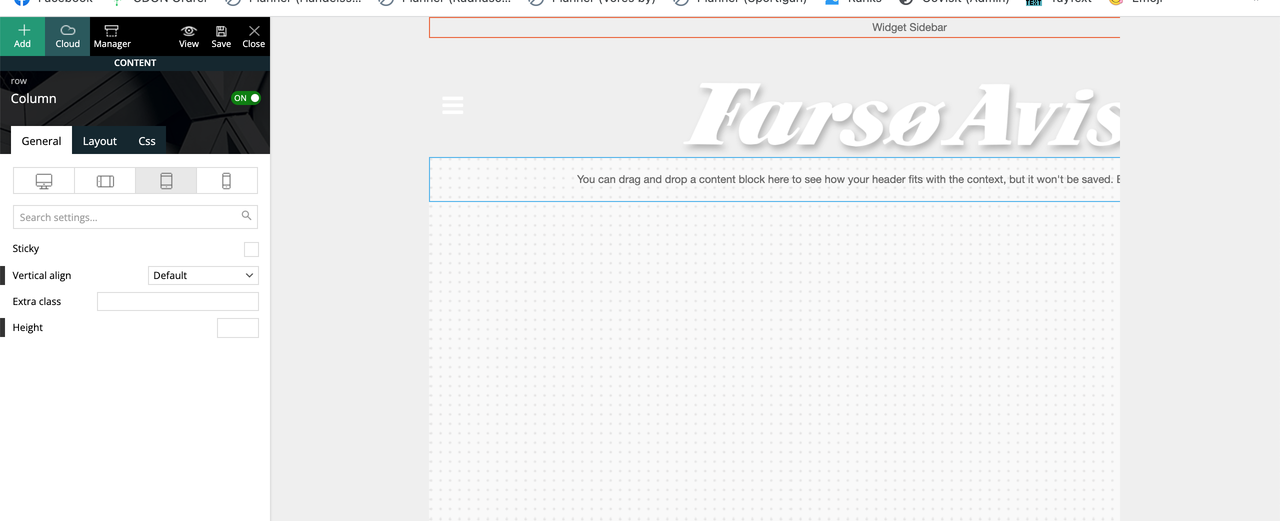
Seems like it suddenly applied/overwritten the header from the “Mobile View” to the “Portrait View”?
 rzrblds
Hi,
when i want to save the page i created with composer i wait for a very long time. There was no such problem before. The registration process is completed, but there is no notification that the page has been saved. the record icon is still spinning.
 Lalit
LalitHi,
Today, I found that Date not showing in the Article meta info across all module (flex block, post loop) on homepage, category pages, tags, author archive pages and so on.
Watch it: https://drive.google.com/file/d/1GqclXZBNnxwR1gbdUCHruLQYjTmKJ4Hz/view?usp=sharing
Is it a bug?
What I have done to find the issue?
1. Deactivated all plugins and reactivated one by one.
2. Switched back to Newspaper parent from the child theme.
3. Deactivated, deleted, and reinstalled only default newspaper plugins – td composer, cloud library, and newsletter.
4. Removed all plugins except the newspaper default.
Please help soon. I am using Newspaper Tech news demo
Regards,



