- NewspapertagDiv Composer – Website Manager
- NewspaperWhen tagDiv Composer is Not Working
- NewsmagtagDiv Composer Tutorial
- TutorialsFrom WPBakery to tagDiv Composer
- NewspapertagDiv Composer Tutorial
- NewsmagHow to use the Visual Composer plugin
- NewspaperScroll Animation
- NewspaperSingle External Shortcode and External Shortcode
- NewspaperCredit System
- NewspaperBookmark – Save For Later
- NewspaperFlex Block Builder and Flex Loop Builder
- NewspaperModules Builder in Newspaper Theme
- NewspaperIntroduction to CPT and ACF with Newspaper Theme
- NewspaperCreate a frontend submission form
- NewspaperHow to Use the Tabbed Content shortcode
- NewspaperCreate a form contact page
- NewspaperFilters and sorting for taxonomies
- NewspaperUser review system
- NewspaperCustom Fields Support
- NewspaperWooCommerce: Happy “Add to Favorites!”
 Calin
Calin Hi,
If I’m right you are referring to infinite loading (the posts that are loading at the end of the accessed post), for this, you’ll need to edit the single post template with tagDiv Composer and disable the infinite loading.
-> https://tagdiv.com/infinite-loading-for-single-posts/ from post -> https://i.imgur.com/yIf6fA3.jpg -> https://i.imgur.com/KeclHLS.jpg -> https://i.imgur.com/4jHIHFY.png
Let me know the results!
Thank you!
 nockeeee
Hi,
the main page of my website https://yapitasarimakademisi.com has multiple H1 tags. One H1 tag is from the title and I can’t find the source of the other one. How can I delete the other one? I have already disabled the H1 tag on the logo from tagDiv composer.
Thanks in advance
 balkhab
Yesterday I transferred my host from WordPress to cpanel and also purchased and activated the ssl certificate. I also installed and activated the really simple ssl plugin. But now my tagDiv composer plugin is disabled. I think the problem is the transfer of hosts and ssl. Because I got the following error message.
This site can’t be reachedThe webpage at https://mysite.com/wp-admin/post.php?post_id=560&td_action=tdc&tdbTemplateType=page&prev_url=%2F%2Fmysite.com%2F might be temporarily down or it may have moved permanently to a new web address.
ERR_HTTP2_PROTOCOL_ERROR
 Bettina
 Hello!
Yes, you can change that like in your video, save the changes in the theme panel and it should change also in front end. When you edit the article with the TagDiv Composer, make sure you’ve added the element Single Post Share. Clear the cache and see the results.
Thank you!
Bettina Hello!
Please edit with tagDiv Composer the woo single post template and add the second button for add to card https://i.imgur.com/rasryAi.png this one is for external/affiliate product.
If this is not helping you, then please provide more information about your issue or a video.
Thank you!
Bettina Hello!
“Column text” and “text with title” elements have a button called “edit content” and if you click on that button, the WP Editor will open and you can add the code there. Close the WP Editor from X, save the changes from Composer and view the page to see the changes: https://www.screencast.com/t/q5O2JyqrF
This problem it can be caused if something interfere there when the WP Editor saves the content you added and the process can not be completed. Please check the steps from here: https://forum.tagdiv.com/topic/unable-to-edit-text-with-title/ and also other possible issue as here: https://forum.tagdiv.com/topic/403-error-on-tagdiv-composer-when-trying-to-use-wp-editor-wpedito-php/
Let me know the results!
Thank you!
 prezla
When I try to add or edit content in “Column Text” nothing happens.
>>> tagDiv Composer, add the element called “Column Text ” -> Edit Content and paste the shortcode in the WP Editor, in the text area. The shortcode is saved automatically.<<<
According to your instructions it should be automatic.
Bettina Hello!
If you have a cloud/PRO template, but you can’t edit the footer, then edit your homepage with the TagDiv Composer, scroll till footer, click on footer zone and you can edit/delete the elements there. Please check this video: https://www.screencast.com/t/fGV2uwNO2I
Thank you!
Bettina Hello!
Edit the post with the TagDiv Composer and you can see those settings: https://www.screencast.com/t/K4V7ya3C45
Thank you!
Bettina Hello!
There are no settings displayed there as other plugins.
Please check our documentation here to find out where are the settings you need:
– https://forum.tagdiv.com/how-use-tagdiv-cloud-library-templates/
– https://forum.tagdiv.com/tagdiv-composer-tutorial/
– https://forum.tagdiv.com/the-mobile-theme/
– https://forum.tagdiv.com/the-newsletter-plugin/
– https://forum.tagdiv.com/tagdiv-opt-in-builder/
– https://forum.tagdiv.com/tagdiv-social-counter-intro/
We recommend to use cloud/PRO templates in order to have the possibility to edit them with the TagDiv Composer which contains a lot of functions and features, please check our tutorial here: https://forum.tagdiv.com/tagdiv-composer-tutorial/
Documentation here:
– https://forum.tagdiv.com/cloud-library-templates/
– https://forum.tagdiv.com/design-post-pages-using-cloud-library-templates/
– https://forum.tagdiv.com/cloud-library-category-templates/
Check also our video tutorials here: https://www.youtube.com/c/tagdivThemes/videos
Hope that helps you!
Thank you!
Bettina Hello!
I’ve checked your website and it seems you haven’t the Mobile Theme plugin or AMP.
Let me explain you which options of mobile versions are:
1. Responsive version: A responsive version of your website is looking similar like on desktop, edit the page with TagDiv Composer, click on the mobile viewport: https://www.screencast.com/t/XDQJedlggSB ; there you can see your mobile version and you can edit the elements there.
2. Mobile pages: https://tagdiv.com/newspaper-10-3-7-update-brings-customizable-and-fast-mobile-pages/
3. Mobile theme plugin: The Mobile Theme is a performance optimized theme included in the Newspaper main theme and it loads only for mobile devices. It comes with its own templates for page, post, category, etc so your current templates from the desktop theme will get converted to the mobile theme layout. For more details, please take a look here: https://forum.tagdiv.com/the-mobile-theme/ ; https://forum.tagdiv.com/mobile-theme-introduction/
A full explanation you can find here: https://www.youtube.com/watch?v=SpGkOnJeNZY
If you’ll use Mobile theme plugin, then you can not edit the pages with TagDiv Composer.
You have only some settings for this layout, which you can find in Theme panel -> Mobile Theme. The same thing for AMP plugin too. Please note that if a page is made by Composer, than the content won’t be displayed on Mobile theme version. You should create the content with the Mobile Editor.
Please provide the link and a screenshot or a video, so I can help you efficiently.
Thank you!
 mauta
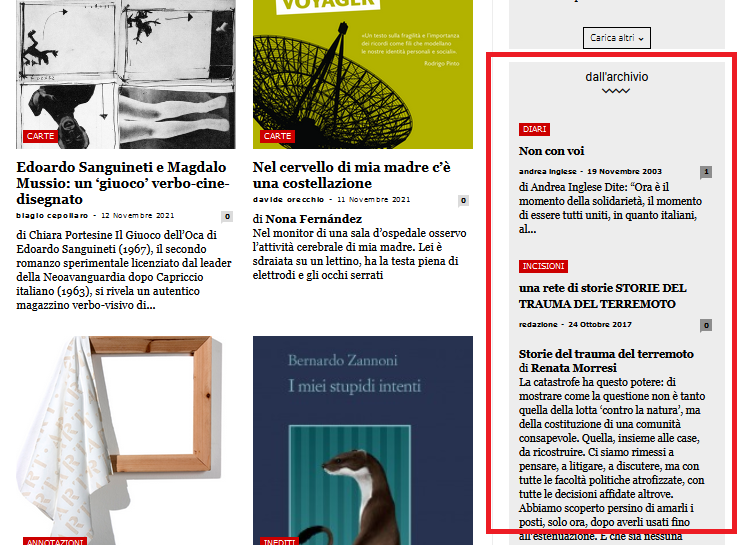
mautaHy, this is our homepage
https://www.nazioneindiana.com/
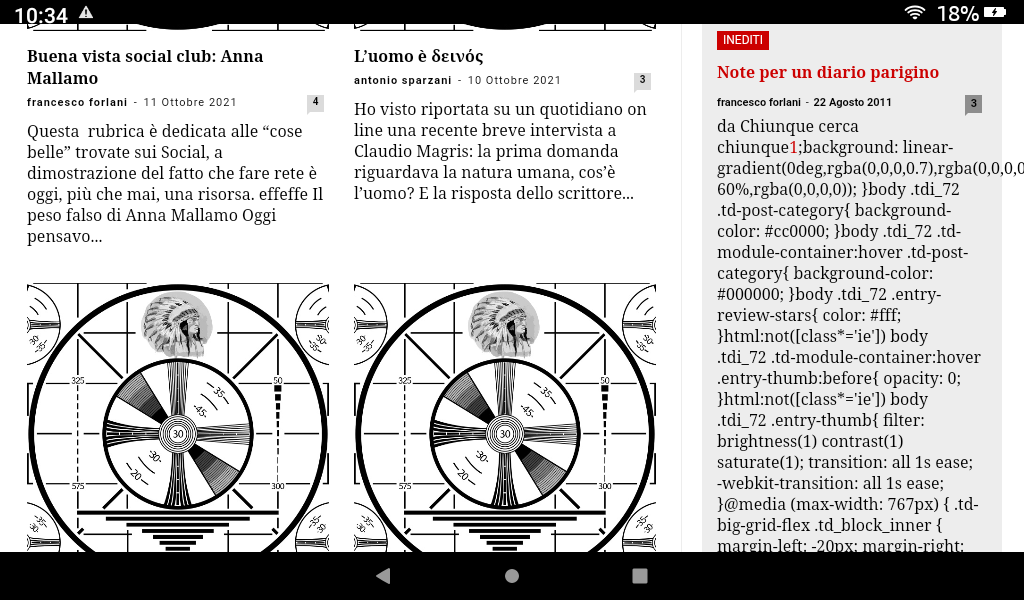
Sometimes when some old posts, not all, are displayed random in archive column on the right in “dall’archivio”
https://www.nazioneindiana.com/wp-content/2021/11/archive-posts.png
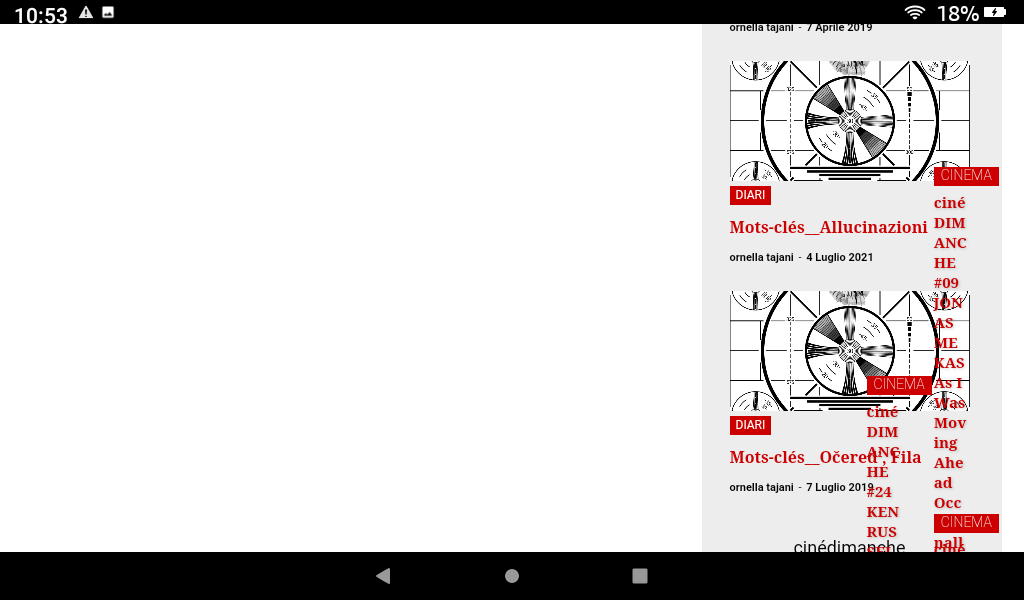
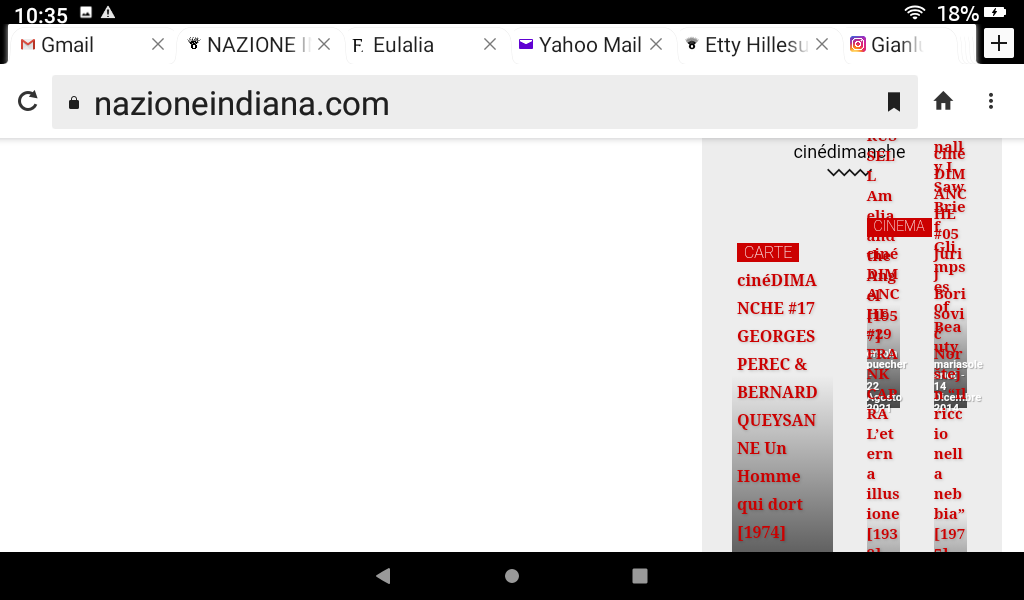
a strange phenomenon happens: parts of code appear in the post, I think of the css, instead the code of the post in “text mode” is normal
and from this post down the rest of the homepage turns white and appears on the right side and completely messy, without images.
Also it is impossible to access tagDiv Composer.
Everything goes back to normal by updating the page.
Why does this happen?
Thanks
Orsola
 Anamaria
 Hello,
You can set the video Background in the row settings, and you can add in that row flex block 1 and you can customize it with tagDiv Composer, or you can import a block => https://cloud.tagdiv.com/#/load/Blocks
Thank you!
Bettina Hello!
By editing a page with TagDiv Composer you could delete elements but also the row called “Empty column”.
You could try to delete it like this: select the row, press the button delete from your keyboard, then with your mouse select “YES”.
Also you have another option too, check this: https://www.screencast.com/t/pxuOzYIIpcG
In order to add your posts from that tag in the tag page, you need to add the element called “Flex block” or “Posts Loop”. Also, add the tag created to your posts. For example, for flex block choose the filter: Current tag in order to display the posts from the current tag. Also, for the category page, you can use a flex block with the filter: Current category in order to display the posts from the current category. Please check the video: https://www.screencast.com/t/dr5rNIts72lj
Hope that helps you!
Thank you!
 tomjose
I can not edit “Footer Template – Default PRO” template using Tag Div Composer. All other pages work well. Can you help me to solve this issue.
Bettina Hello!
I’ve checked your website (desktop and mobile version) and the footer looks great, no extra white space.
Please provide a screenshot or a link where your footer is not working well. Also, make sure that you do not have empty space while editing with the TagDiv Composer if you use a cloud/PRO template.
Thank you!
 Carlos Bello
Hi there,
I was working on this website :
and I made an update of the “required” plugins like TagDiv Composer, And the styles of my header a some went totally wrong, and some elements in my pages were missing.
Do you know what happened? This is a Newspaper website, I cant’t have the fear of “updating” if theme is asking for, and have some “surprises” like this if the website is visited every day. Can you help he?? What am I doing wrong? I can rebuild everything, but what will happen in the future? This is really scary, I hope you could understand my frustration.
Thanks for your help
 Varavina
 U installed all plugins and found that the issue is due to composer plugin.
Any suggestions ?
 viaggindia
 Konichiwa @munemoto !
1. Open your homepage and edit it with tagdiv composer.
2. Left side on top click on Manager, it will open your header/footer manager in center of the screen, then Select Mobile menu.
3. Now click Pulses PRO, and past 東瀛仙人掌.
Hope you can do it as it’s very easy.
-
This reply was modified 4 years by
viaggindia.
 great1212
 I noticed that when I used to add the instagram element in TD Composer, then feeds comes instantly. But, it is not showing in the footer section.
When the next theme update is coming?
 norbiQue
Hello there,
I have been getting this error when saving a page for a while now, please help me solve this problem.
Fatal error: Uncaught Error: Cannot access offset of type string on string
in /home/host/ftp/my_website/wp-content/plugins/td-composer/legacy/common/wp_booster/td_util.php on line 3216
Call stack:
td_util::parse_shortcode_attr()
wp-content/plugins/td-composer/legacy/common/wp_booster/td_util.php:3144
td_util::parse_content()
wp-content/plugins/td-composer/legacy/common/wp_booster/td_util.php:3135
td_util::parse_content()
wp-content/plugins/td-composer/legacy/common/wp_booster/td_util.php:3135
td_util::parse_content()
wp-content/plugins/td-composer/legacy/common/wp_booster/td_util.php:3135
td_util::parse_content()
wp-content/plugins/td-composer/legacy/common/wp_booster/td_util.php:2979
td_util::get_content_google_fonts_ids()
wp-content/plugins/td-composer/legacy/common/wp_booster/td_util.php:2972
td_util::get_required_google_fonts_ids()
wp-content/plugins/td-composer/includes/tdc_ajax.php:174
tdc_on_save_post()
wp-includes/class-wp-hook.php:303
WP_Hook::apply_filters()
wp-includes/class-wp-hook.php:327
WP_Hook::do_action()
wp-includes/plugin.php:470
do_action()
wp-includes/post.php:4468
wp_insert_post()
wp-includes/post.php:4570
wp_update_post()
wp-admin/includes/post.php:423
edit_post()
wp-admin/post.php:227
Bettina Hello!
In order to change the breadcrumbs font and size you need to edit the page with the TagDiv Composer, click on your breadcrumbs and you’ll find these settings: https://www.screencast.com/t/9RQi4vusP
Thank you!
Bettina Hello Mike!
I just see the breadcrumbs are changing, so that’s why I said it is working well.
This is a flex block element and you need to edit the category with TagDiv Composer and change the filter: Current category in order to display the posts from the current category. Also, let the offset field empty with no space, no value : https://www.screencast.com/t/A4fx6DF2
Let me know the results!
Thank you!
 debasishsinha
Installing Plugin: tagDiv Composer
Downloading installation package from https://cloud.tagdiv.com/td_plugins/td-composer/5496ac087ca179a9788dadb779dbc160/td-composer.zip…
Unpacking the package…
Installing the plugin…
Could not create directory. /home/insysdne/public_html/wp-content/plugins/td-composer/
Plugin installation failed.
I am unable to install the plugins again.
 reactbiz
 Hi Bettina,
I don’t understand how you can say everything is working fine, when is not (and your video shows that). Every single link in the the Popular Category in the footer goes to just one same blog which is assigned only to Opportunity category.
For example if you click on Marketing link in the Popular category in the footer. That link has five blogs assigned to it in the (categories of the blog post editor), but it doesn’t show any blogs assigned to marketing. it only shows a blog assigned to Opportunity which is not assigned to marketing or anything else, except opportunity category. And that happens with every link in the Popular Category. In other words all 23 links in the Popular category display only one same blog. The same happens if you click on any category links in the main menu.
I have tried to edit Popular Category in the footer with TagDiv composer and maybe assign blogs there, but there is not facility to do that. Am I missing something?
Regards
Mike