
- NewspaperAutoptimize Plugin – install and configuration
- NewspaperCache plugin – install and configure
- NewsmagInstall via WordPress
- NewsmagInstall via FTP
- NewsmagInstalling pre-built websites
- TutorialsHow to install Revolution Slider
- NewspaperInstalling Pre-built Websites
- NewspaperHow to Install Newspaper via FTP
- NewspaperHow to Install Newspaper via WordPress
- TutorialsHow to Install bbPress forum
- NewspaperIntroduction to CPT and ACF with Newspaper Theme
- NewspaperHow to edit modules for Flex Block X
- NewspaperWooCommerce: Happy “Add to Favorites!”
- NewspaperWoo Brands
- NewspaperStripe Setup
- NewspaperModal Popup
- NewspaperPayPal Setup
- NewspaperFlex Block Settings Guide
- NewspaperHow to setup the Contact Page
- NewspaperAdd Cryptocurrency Price Ticker Widget
 creative@egtmedia.com
My website slows down when I install the theme. How can I fix it?
 androlas
Hello,
About 2 years ago, I activated my license on a 1st domain.
Recently, I created a 2nd domain on which I assigned this same license as on the 1st domain.
On this 2nd domain and from wordpress, if I leave the default permalink type, I can install prebuilt websites and have my license recognized without any problem.
From the moment I change the type of permalink, I can no longer install prebuilt websites, my license is no longer recognized from the “My license” submenu.
Why am I having this problem on this 2nd domain and not on the 1st domain? It seems to me that I can’t automatically update the theme if my license is not recognized, right ? and at the same time, I don’t want to use the default permalink type on this 2nd domain, just to get updates of theme.
On this 2nd domain, I followed the recommendations here, the system status is perfectly OK.
What are your recommendations for my theme to remain stable regardless of the type of permalink selected with an activated license on this 2nd domain ?
Thanks
 Bettina
 Hello @tlonero !
Those links are for the font, and they come from Google Fonts.
Please use this plugin: https://forum.tagdiv.com/autoptimize-install-configuration/
I hope that helps you!
Thank you!
 Anamaria
 Hello,
Please try to import the Homepage template again and check the results.
I think the problem is the process of installing the demo wasn’t finished.
Also, please check this topic https://forum.tagdiv.com/topic/update-required-newspaper-12-1-1-brings-extra-security/.
Thank you!
Anamaria Hi,
Seems you have the Mobile theme plugin activated, and it is disabled for the homepage. When you install and activate the Mobile Theme plugin, your pages will be overwritten by the plugin (the mobile theme comes with its own templates for page, post, category, etc so your current templates from the desktop theme will get converted to the mobile theme layout, the page content is made without builders in mobile editor => https://www.screencast.com/t/xbgZG8kH also, the options that are provided to edit the mobile theme version are limited (this keeps the things simple)).
Better deactivate the plugin and see the results
Also, if you create a mobile page, please make sure you assign it like this https://www.screencast.com/t/lektAhyjd
This is a video about Responsive Newspaper Theme, AMP & Mobile Theme, Mobile Pages & Templates -> https://www.youtube.com/watch?v=SpGkOnJeNZY
Please check this topic where I explained each mobile version -> https://forum.tagdiv.com/topic/mobile-version-not-working-properly-2/ and choose what mobile version you want.
Thank you!
Bettina Hello @tiwariproduction9 !
I’m sorry to hear that your website has been attacked. I can recommend you some tips, please check this topic: https://forum.tagdiv.com/topic/hacking-issues-with-version-11-2/
Also, I recommend you to check and clean your files: https://askwpgirl.com/10-steps-remove-malware-wordpress-site/
Uninstall the advertisements on your website.
After that, you should reinstall everything, starting with the WordPress, theme, plugins so that it will be a clean install.
Thank you!
Bettina Hello @brain4web!
You’ll be able to activate the plugins separately in the next update: https://prnt.sc/LdmzKciTpuDM. In this moment, you can only have it if you have the demo installed and activated with the content.
Thank you!
 Steve36
Hi guys,
Just wondering if you can revert back to how your website looked before a prebuilt website install. Some items removed as a result of the install and disappointed.
 toolrev
Twitter and Pinterest counting YouTube and Facebook not counting. Have uninstalled and reinstalled composer and social counter multiple times, cleared cache etc, reset api key… just paid for support.. is this paid support?
 rosemciversrc
 I finally managed to resolve the issue: I have re-installed the latest version. Hope it can help someone else!
 gabrielnao
I installed the Newspaper theme. Here’s the website.
For the home page, I went to Pages > Home, clicked edit and Tag div and I edited the home page the way I needed it to be. I want to the same thing for Article
Problem: I cannot find any template for an article view that can be edited, anywhere. Here’s an example article view
I want to remove some elements from the right side and customize a bit, turn of the reply and comments.
I already turned it off in the WordPress settings, I searched the entire system, I cannot find a single place where I can edit that page. All options were turned off from both Settings and Newspaper settings
How can I edit the article page using tag div editor?
 Ugo282
 yes they are installed.
Composer, Mobile Theme, Newsletter, Social Counter,
Bettina Hello @Ugo282!
Please install the Standard Pack plugin. It is located in Newspaper -> Plugins.
Try the solution provided above.
Thank you!
Anamaria Hello,
This is a guide on how to install the theme https://forum.tagdiv.com/install-via-wordpress/ and install a prebuilt website https://forum.tagdiv.com/installing-demos/
The tagdiv Cloud Library is a plugin https://forum.tagdiv.com/tagdiv-cloud-library-plugin/
Thank you!
 herbal
I like to know how to install the Newspaper theme from Cloud Library. I could not find this theme from Add WordPress installation. I bought the Newspaper 12 Theme, but I want to use the cloud library theme.
 besmelejack
 That’s the problem anyway, I haven’t installed any plugins other than the plugins that come with the theme.
 MANTEIV
 Thank you for your support.
One more question
i can re active my theme, but in “Prebuilt Websites” tab.
it display “An issue has been encountered while trying to validate your license key”
so i cannot install demo
help me to fix it
Thank you!
 swarkansasnews
My site has been affected like many others using Newsmag. I have my site clean now and have completely deleted and reinstalled Newsmag V5.2.3. When I am logged in I can see my site fine, however my site is not displayed to the public. I just get a white box. I have tried basically everything, even changing PHP Versions
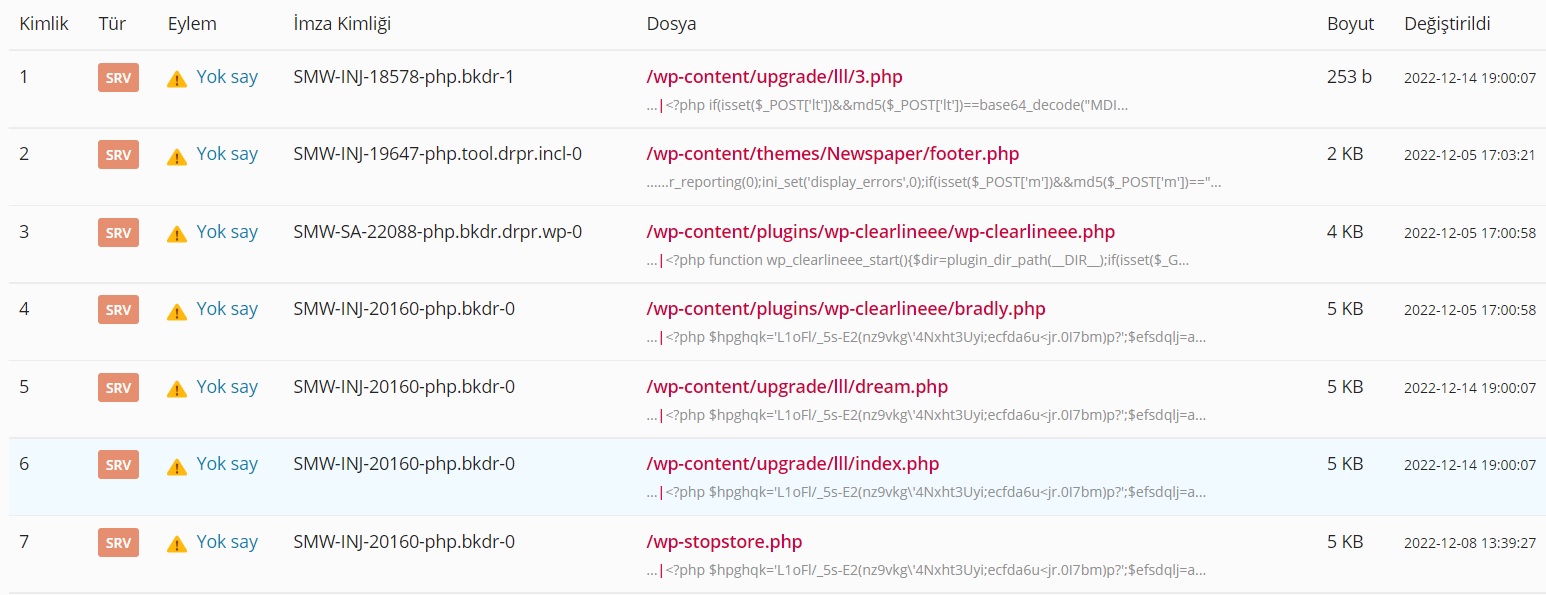
besmelejackHello, easy, Kaspersky gave a trojan warning when I tried to log in to my website, where I installed the theme and did not enter any content. When I scanned my Vds panel with ImunifyAV, it found the viruses in the attachment. I had to delete the website, can you do a detailed review on the subject, is it open in one of the theme or plugins?
Bettina Hello Satheeshraj V!
These setting filters are not available in the Mobile theme. Uninstall the mobile theme plugin and you’ll get the responsive mobile version from Composer.
Thank you!
Anamaria Hello,
The PHP version 8.1 is not tested with the theme. You can try to use 8.0.
This is a guide on how to install the theme https://forum.tagdiv.com/install-via-wordpress/ and install a prebuilt website https://forum.tagdiv.com/installing-demos/
Thank you!
Bettina  ALEXDEANGEL
I have just installed the Newspaper Version: 12.1.1.
My domain PHP version is 7.4.
May I update PHH to 8.1?
Actually I’ve just intalled the theme without any kind of examples. There are no taxt or images.
In general how to manage PHP updates in future? Do you advise customer when needed or possible?
 solomontz
Hi, I used to edit cloud templates very well lately. Recently, it started showing this error, “Invalid Reply From Server Endpoint.” I checked with all required specs such as WP_MEMORY_LIMIT, everything is up to par. Noticed that when I go to the My License section, it’s showing “No domains associated with your license key” but the theme is well registered with an Envato purchase code. I installed it on two domains, https://zimbamusic.co.zw and https://zimbaread.co.zw. On the latter site, cloud templates were working fine. But on the first one, https://zimbamusic.co.zw, I keep getting errors when trying to use cloud templates.
Please note that these two sites are on the same server and have the same configurations. Kindly help!
 Nagarig
 @Bettina, as you said, it wasn’t working. So I reinstalled the theme. And I was asking that question in case something happens in future. So please tell:
if I change the theme demo/ reinstall the whole theme? It will delete that RAW HTML or Now its SYNC with tagDiv Cloud?? I am worried that it gets SYNC and attached to my profile.
I also noticed while reinstalling theme, raw tagdiv code is present there even if theme is deleted. So how to delete it just in case someone wants to delete?
Thank you!
