- NewspaperAutoptimize Plugin – install and configuration
- NewspaperCache plugin – install and configure
- NewspaperInstalling Pre-built Websites
- NewspaperHow to Install Newspaper via FTP
- NewspaperHow to Install Newspaper via WordPress
- NewspaperIntroduction to CPT and ACF with Newspaper Theme
- NewspaperHow to edit modules for Flex Block X
- NewspaperWooCommerce: Happy “Add to Favorites!”
- NewspaperWoo Brands
- NewspaperStripe Setup
- NewspaperModal Popup
- NewspaperPayPal Setup
- NewspaperFlex Block Settings Guide
- NewspaperHow to setup the Contact Page
- NewspaperAdd Cryptocurrency Price Ticker Widget
- NewspaperInfinite Loading for Single Posts
- NewspaperThe Newspaper Mobile Theme: Introduction
- NewspapertagDiv Social Counter plugin
- NewspapertagDiv Shop
- NewspapertagDiv Opt-In Builder
 jimvanwyck
Hi…
I was installing Newspaper on my site at
https://meditate-u.com/
The theme seemed to install ok,
but when I did the automatic install of the plugins,
now I get this message
Parse error: syntax error, unexpected ‘.’, expecting ‘)’ in /home/meditationuni/public_html/wp-content/plugins/td-composer/legacy/common/wp_booster/td_global.php on line 415
And now I cannot access or use anything in the site’s WP dashboard.
Thanks for your help ==>Jim Van Wyck
 Ruffo
Ruffo Hi there,
the issue is related to WP rocket plugin the last version 3.4.2.2. I delete the plugin and to install WP super cache and all is ok now.
Important: Other issue with this plugin was 404 errors. The plugin change all URLs published the last day 30 every month, and publish this URLs again with the day month previous. For this reason errors 404.
I hope someone has help you.
Thank you very much!
 Calin
Calin Hello,
The speed of your website depends on how well your site is optimized too, not only on theme, also your page content is very big -> http://prntscr.com/q5017s, also all the plugins that you have install and activate can slow the page speed, if you follow the steps which are presented in this tutorial here -> https://tagdiv.com/how-to-increase-page-loading-speed/ you’ll be able to increase the speed of your website.
Also you can check this similar topic for more solutions: -> https://forum.tagdiv.com/topic/optimize-script-to-improve-site-speed/
Also we do offer page speed services over a fee, if you want us to increase your page speed you can check our custom services from here -> https://tagdiv.com/premium-customization-services/
Thank you for your understanding!
 tvmix
tvmix Hi
This is a clean installation. No plugins are used.
http://prntscr.com/q4z8kr
As I can see, the problem is on your side.
http://prntscr.com/q4z9r4
body.td-animation-stack-type0 .td-animation-stack .entry-thumb, body.td-animation-stack-type0 .post img {
opacity: 0;
}
Why does your product need patches? I bought it, but I could not use it for 3 days.
 Vlad S
 Hello !
Please make sure that your theme requirements are set as you can see it here:https://forum.tagdiv.com/requirements-for-newspaper/
Also in order to install a demo follow our tutorial here: https://forum.tagdiv.com/installing-demos/
Thank you !
 gumball44
 Hi,
Thank you for your help =), I just have installed Autoptimize, Is possible to get screenshots of your settings Autoptimize in order to fix this problem ?
Kind regards
Calin Hi,
Sorry, for the delay for answers. The Newspaper theme will not work correctly on wordpress.com because this do not allow you to install any plugins -> http://prntscr.com/q4x1j4 -> https://ithemes.com/tutorials/wordpress-com-vs-wordpress-org/
If you want to keep the wordpress.com you’ll not be able to use our theme on it, therefore we will be able to provide a refund for the theme
– https://themeforest.net/refund_requests/new
Sorry for the inconvenience!
Calin Hi ToniLaird,
Maggo explained very well how this plugin is working, the standard pack is for the old customers and for these that want to have and standard demo install, but this will load all the style more that the theme/demo need, so if you create a new website, or you use only cloud elements and flex blocks on your website then you can deactivate the standard pack ( also you can replace the block with flex block ) in this way you’ll achieve a better loading speed, because will be loading only the css style that is need for the elements that you are using.
Thank you!
Vlad S Hello !
We recommend you to first create a back-up of your website and then update wordpress and Newspaper theme.
In order to update please follow the steps found here for wordpress: https://easywpguide.com/wordpress-manual/keeping-your-site-updated/
For Newspaper Theme you simply need to install the new version over the older one. Those are more like a quickfix than a major theme update.
I hope this was helpful !
Thank you !
 jamancheta
Hi there! I’ve updated my Newspaper layout to 10.2 and I’ve placed my ads on the theme panel of the newspaper theme. I’ve also installed the TagDiv Mobile theme plugin for this one. However, when I opened my website (jamonline.ph), the image ads that I’ve placed doesn’t appear on mobile. It only appears on the desktop.
Thanks for the help!
 martialartsexplained
 Hello Calin,
I have the same problem: it’s three days that my G. Analytics dropped to zero. Real time views also are not showing anymore. I created a new Analytics report, installed the code as you instructed, and the Result of Tag Analysis is positive (in Chrome, using the Google plug-in).
I really don’t know how to solve this.
Thank you
 epirusonline
Hello,
Whenever I try to make any changes in a row, or a column in the Composer (whatever change, background, stretching, width, paddings etc.) then the contents of the row stop beeing selectable. Wherever I click the only thing selected is the row and if I save the page then the row disappears. This happens to two sites of mine running the Newspaper theme. I deactivated all the plugins, I even made a clean install on my local computer and the problem is the same.
This is very serious as I have already lost many hours of work due to this bug that caused entire rows to disappear.
 Adeba
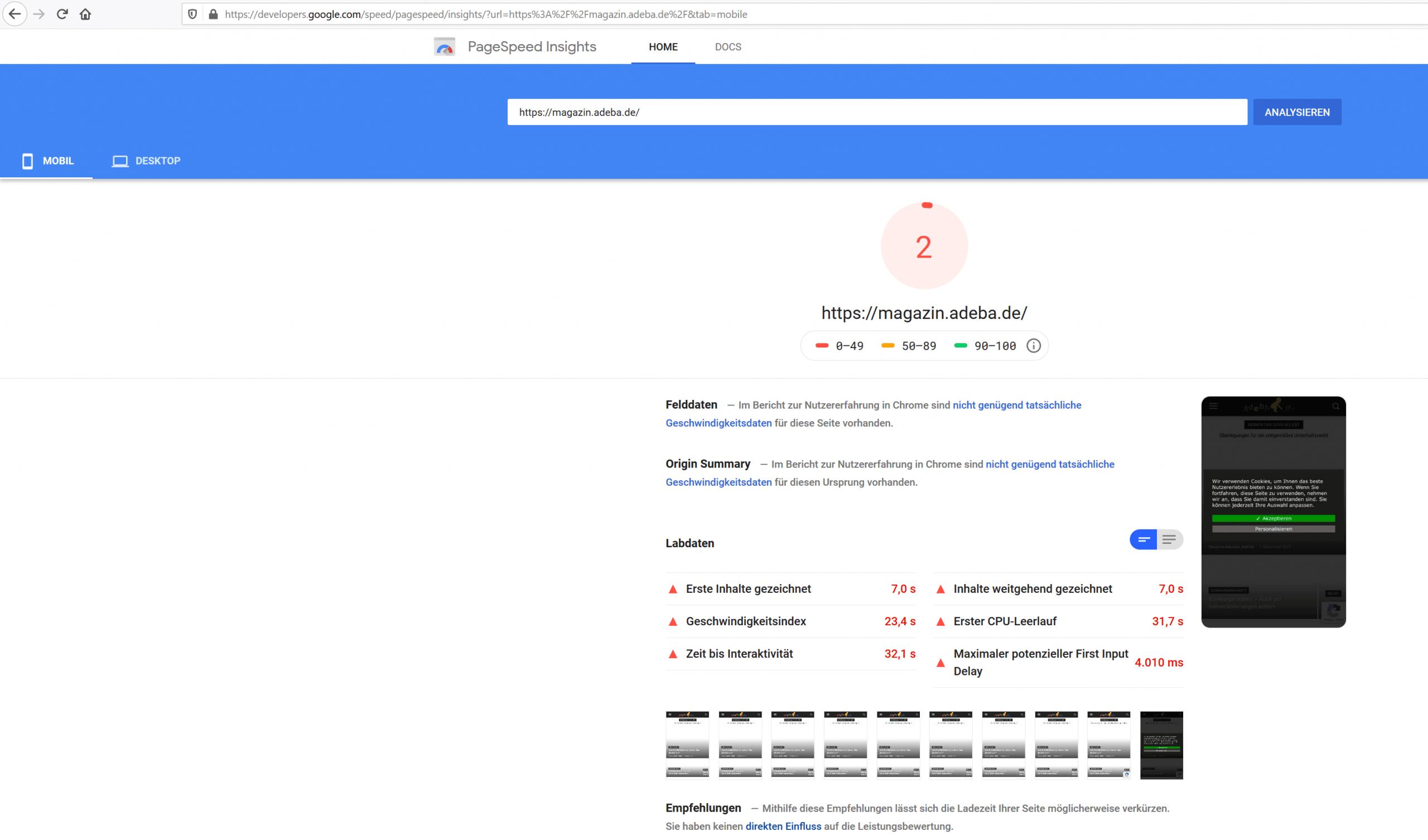
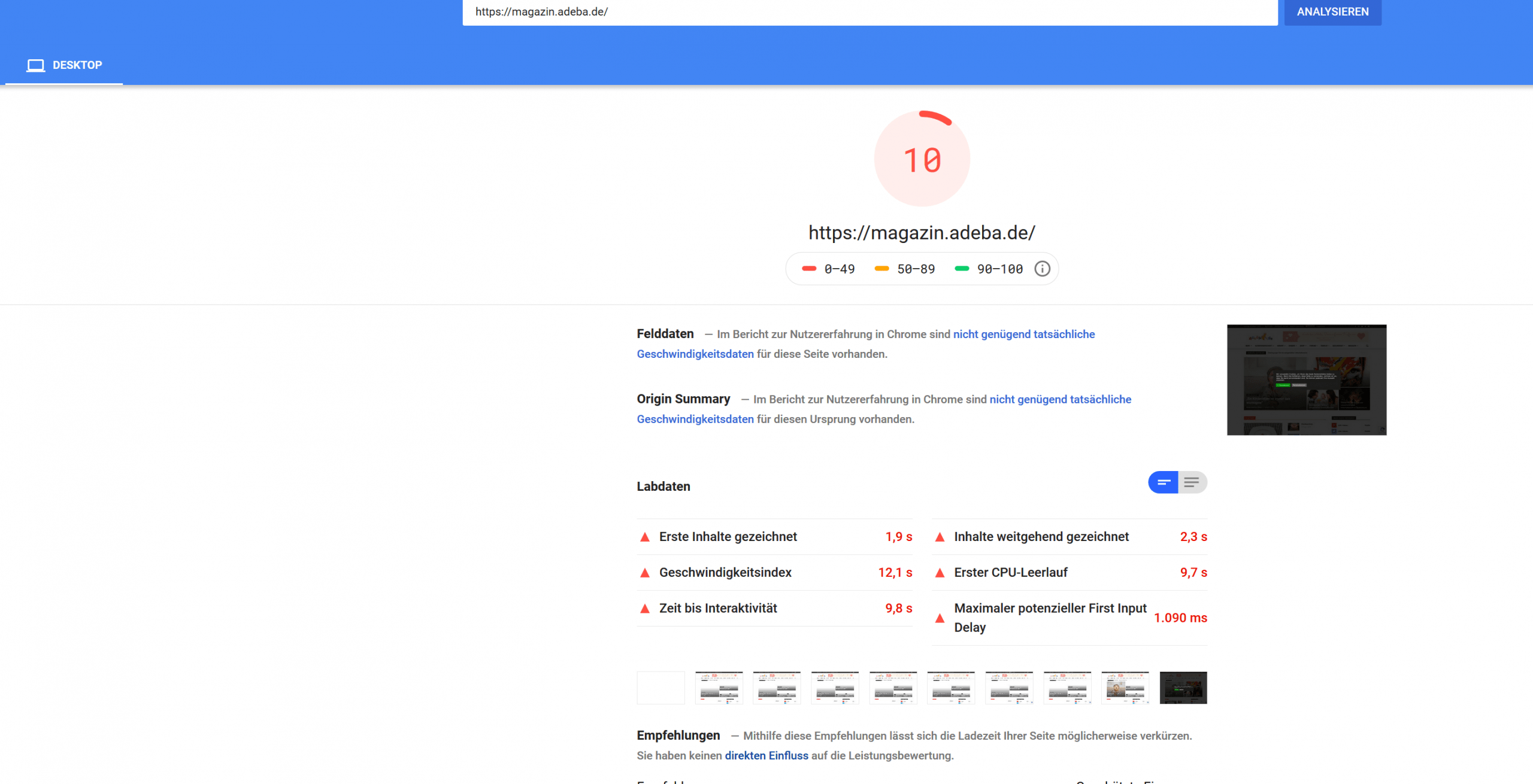
AdebaA new record on my website. After updating to the new design 10.2 and deinstalling Standad Pack I got a new negative speed record.
Sitespeed 2
https://developers.google.com/speed/pagespeed/insights/?url=https%3A%2F%2Fmagazin.adeba.de%2F&tab=mobile
https://magazin.adeba.de/wp-content/uploads/2019/12/2-scaled.png
Sitespeed 10
https://developers.google.com/speed/pagespeed/insights/?url=https%3A%2F%2Fmagazin.adeba.de%2F&tab=desktop
https://magazin.adeba.de/wp-content/uploads/2019/12/1adeba-scaled.png
Even an own server 🙁
So any help is welcome, because things are really getting interesting.
https://tagdiv.com/newspaper-10/
Blazing-Fast Websites
We’ve been working on the idea of making the Newspaper Theme light and fast for a long time. We’re now delighted to give you an excellent way to build a website that is optimized for fast loading speed out-of-the-box.
When you deactivate it, things are starting to get interesting, and your website tends to speed up by itself. ?
 vv2005
 This “Invalid reply from server endpoint error” is really frustrating, and very recently I started facing it. I solved it myself and hence I thought to write a post so that all Newspaper theme users looking on how to solve this “Invalid reply from server endpoint error”, can rectify on their own. It is pretty simple, usually the “Invalid reply from server endpoint error” is caused by insufficient WP_Memory_limit. But in my case, it was a plugin conflict. I disabled all plugins apart from “Tested Plugins”, by the way, tested plugins can be found in Newspaper->Plugins(https://www.yourwebsite.com/wp-admin/admin.php?page=td_theme_support). I tried enabling Untested Plugins one by one and then checking the Cloud Templates->Add New(https://prnt.sc/q4li14). By this testing, I could find the plugin which caused this error. Now the culprit untested plugin was not a new install, but after the recent updates to it, this “Invalid reply from server endpoint error” started throwing up in Cloud Templates. So, that’s how I solved it.
 CARBALUX
I have a problem with TagDiv Composer pluguin, I can’t actívate it, when I did it I must rename pluguins file and start again.
I had 5.3 WordPress and today I changed it to a lower one but doesn’t work.
I have read the tutorials about how install this pluguin and I have done it well but I can’t activate it.
Please, could you help me?
Thanks
 imkimc
I just finished updating to WP 5.3 and Newspaper 10.2 and the theme icons are now missing in some cases.
On my dev site everything worked fine, but on the live site the td-icon class is not showing up. So all social media, search and menu drop-down icons are showing as small squares.
I deleted the theme and re-installed a fresh download of the theme but that did not help.
I also purged our age cache at Cloudflare. That also did not help.
But, here is the weird part. The icons work fine in Safari, just not in Firefox or Chrome.
Any thoughts?
Thanks,
Kim Christiansen
 themoneytools.org
Hello,
I am trying to update the newspaper9 theme. I completed the download step.
“Log into your ThemeForest account, in your Downloads tab look for the Newspaper theme
“Click the Download button next to it and choose to download the Installable WordPress Theme (the WordPress file)”
Now
” Step 1 – Deactivate the current “Newspaper” theme from the Appearance > Themes section by simply activating a different theme. Once you activate a different theme, delete the Newspaper theme. Don’t worry, your content will not be lost.”
I can’t do this step because my doesn’t have the Deactivate button at the corner.
Right now I am running on Child Theme of the Newspaper9. When I log into “apperance”—“themes”—I see 2 themes :parent theme and child theme of the Newspaper9. The child theme is currently activated. And I can’t DEACTIVATE these 2 theme.
 dennisjpitocco
We’ve tried to install each of your Past three (3) Theme Updates, but in each case, we had to reverse course. Our latest effort occurred this morning as we attempted to install Version 10.2. See below.
1) We observed that only when we installed and activated the “Standard Pack” plugin included in their bundle, our website would immediately go down with a “…critical error…” – When we deactivated, the website would again be available.
2) Without the “Standard Pack” plugin, no code (as described) is displayed.
3) Version 10+ changes the display in the front end display as follows:
The website title appears below the header navigation (the title should not display).
The website logo is displayed three times below the header (each of the three same logos on a separate line, one immediately under the other).
The navigation in the header displays as bullet lists.
The font in the header and footer is changed.
The background image for the footer no longer appears.
The setting for Default post template (site-wide) >> DEFAULT SITE POST TEMPLATE gets changed to default (it should be left as is).
Please let us know if you need temporary Admin access, as we’re missing out on your many patches and fixes along with the enhanced functionality included within your last 3 updates. Thank you!
 CianiDead
Hello. Need help installing a theme.
After activating I can see only text of post, and in comment`s place have an error:
Without activated standart pack:

With activated standart pack:

P.S. This is 5th license, and I haven’t any problems before.
 Valli
ValliHi, I am having a problem saving anything in theme panel. Can you please have a look. I have installed the latest update of the theme or 10.2. When I try and save anything, I get the loading wheel constantly. I might be incorrect but I think these are the errors that are coming from this;
TypeError: right-hand side of ‘in’ should be an object, got undefinedace.js:1:256681
s https://www.bjorspjall.com/wp-content/plugins/td-composer/legacy/common/wp_booster/wp-admin/external/ace/ace.js?ver=10.2:1
g https://www.bjorspjall.com/wp-content/plugins/td-composer/legacy/common/wp_booster/wp-admin/external/ace/ace.js?ver=10.2:1
edit https://www.bjorspjall.com/wp-content/plugins/td-composer/legacy/common/wp_booster/wp-admin/external/ace/ace.js?ver=10.2:1
<anonymous> https://www.bjorspjall.com/wp-admin/admin.php?page=td_theme_panel:9521
<anonymous> https://www.bjorspjall.com/wp-admin/admin.php?page=td_theme_panel:9535
 UsmanSwift
 uninstalling or remoding previous demo, may remove my site content post pages etc..
and, installing pro demo will remove my ad codes and other codes and setting in panel section of newspaper theme
Calin Hi,
The WP Super cache have an option for mobile theme -> http://prntscr.com/q3tqlj -> https://forum.tagdiv.com/cache-plugin-install-and-configure/ in this way will prevent to load the cache from mobile on desktop or tablet.
Thank you!
Calin Hi shravan5921,
Please notice that we take in order of time the topics ( time when was post the question ) to answer the question, and if you post/replay again in your topic the time will change and will be move to recent question, therefore the answer will be delay.
Usually this problem is provide by the cache plugins, please deactivate your it and check to see if this will still happen, also we recommend to use WP Super Cache plugin.
Thank you!
 divaspathak
in version 9.7.3 in getting ajax error in installing tagdiv composer and tagdiv cloud library. I have uninstalled all the plugins and then tried to install it, but it’s not working.
Vlad S Hello !
Please make sure that you do the procedure properly according to our documentation here: https://forum.tagdiv.com/how-to-update-the-theme-2/
The best way to update the Newspaper Theme is to delete the current Newspaper Theme version and TagDiv Plugins and after that you can install the new version.
You can find 9.8 version here: https://forum.tagdiv.com/topic/action-required-please-read-how-to-update-to-the-newspaper-theme-v-10/
Also please read my last reply about update on this post: https://forum.tagdiv.com/topic/update-to-newspaper-10/
Overwriting files will cause conflicts.
Thank you !