
- NewspapertagDiv Composer – Website Manager
- NewspaperWhen tagDiv Composer is Not Working
- NewspapertagDiv Composer Tutorial
- NewspaperScroll Animation
- NewspaperSingle External Shortcode and External Shortcode
- NewspaperCredit System
- NewspaperBookmark – Save For Later
- NewspaperFlex Block Builder and Flex Loop Builder
- NewspaperModules Builder in Newspaper Theme
- NewspaperIntroduction to CPT and ACF with Newspaper Theme
- NewspaperCreate a frontend submission form
- NewspaperHow to Use the Tabbed Content shortcode
- NewspaperCreate a form contact page
- NewspaperFilters and sorting for taxonomies
- NewspaperUser review system
- NewspaperCustom Fields Support
- NewspaperWooCommerce: Happy “Add to Favorites!”
- NewspaperWoo Brands
- NewspaperModal Popup
- NewspaperShortcodes
 deborasilvestri
 I updated everything but still not working at all!
I need to use visual composer to build a shop pag es tagdiv composer does not let me add any woocommerce widget!
How can I attach you a screenshoot of how poor is my visual composer interface? thanks
 Vlad S
 Hello !
In order to achieve that you will have to use a single post template, edit it using the tagdiv Composer and add more custom Ads boxes. Please follow the documentation regarding this matter: https://tagdiv.com/ad-box-newspaper-theme/ ; https://forum.tagdiv.com/tagdiv-composer-tutorial/ ; https://tagdiv.com/customize-articles-with-single-post-templates/
I hope you will find this helpfull !
Thank you !
 GregorS
I’ve imported newspaper demo content (news magazine) on our site and started to change it. I’m having some issues on the homepage:
– when the page is still loading, menu and some other elements have an odd style and a second or two later (when loading is finished) these elements revert to our chosen style and switch colors -it’s like two sets of CSS are loaded at different times.
– There is a content that I can’t delete or edit on the homepage. This content was imported and is a part of demo but when using TD Composer I can’t select.
thanks
Vlad S Hello !
In order to change the background you will have to edit it using the tagDiv Composer as you can see here: https://www.screencast.com/t/bN74zo12A7sZ
Simply click on it after you have activated your tagDiv Composer and go to the Style tab.
I hope this was helpfull !
Thank you !
Vlad S Hello !
For informations and tutorials you can take a look here: https://forum.tagdiv.com/newspaper-theme-documentation/ ; The TagDiv Composer is a front-end page builder. The Newspaper Theme Panel does the back-end settings of your page.
Also you can find even more informations and tutorials here: https://tagdiv.com/category/documentation/
I hope this was helpfull !
Thank you !
Vlad S Hello !
In order to use shortcodes you will have to paste the shortcode in the column text element wich can be added using the tagDiv Composer. Make sure to edit it in the text way not the visual.
I hope this was helpfull !
Thank you !
Vlad S Hello !
In order to have those features you will have to go into your Cloud Templates and select a single post template as you want, after you set that up you will be able to edit the template using the composer. Take a look here: https://tagdiv.com/customize-articles-with-single-post-templates/
Thank you !
 IslandJim
 I’am seeing this in my error log:
[10-Jul-2019 05:26:23 UTC] PHP Notice:  Undefined property: WP_Post_Type::$post_type in .../wp-content/plugins/td-composer/includes/shortcodes/vc_row.php on line 397

[10-Jul-2019 05:26:23 UTC] PHP Notice:  Undefined property: WP_Post_Type::$post_type in .../wp-content/plugins/td-composer/includes/shortcodes/vc_row.php on line 404
IslandJim Hi thanks for looking into this.
I created a page Events2 and added the short code much as you have described above and it worked fine. I have deleted and the original “Events” page and removed it from the trash. I then edited the Events2 page to change the Title to “Events” and the slug to “events” and the errors return. I have reverted back to “Events2” for the page title and slug and I get this warning “The current content hasn’t been created by TagDiv Composer!”
It seems I can’t have a page with the title/Slug Events/events…
I should note that I am trying to make this page part of the menu. I’m not sure if that adds a layer to this.
Brad.
-
This reply was modified 7 years by
IslandJim.
 chiuaua
Hello,
I am struggling to design a header in Composer as it looks different on live site than in the composer (logo part). I triple checked I saved the composer and the correct header template is selected:
Composer: https://www.dropbox.com/s/5dww33mrr5wgu8o/Screenshot%202019-07-10%20at%2011.23.48.jpg?dl=0
Live site: https://www.dropbox.com/s/myh3cz81vbbo66e/Screenshot%202019-07-10%20at%2011.23.55.jpg?dl=0
Site URL: https://gizzmo.hu/blog
 nakrajsveta
 I’ve readed and tried all what is here
https://forum.tagdiv.com/topic/how-to-delete-a-td-composer-empty-column/
https://forum.tagdiv.com/topic/how-to-remove-empty-column/
Nothing help.
nakrajsvetaAwesome theme, love to play with, but have one issue which I can’t get rid of even after several days.
1. I delete some element in tagdiv composer by clicking on the cross button
2. The element is deleted, but EMPTY COLUMN rectangle stays there.
3. The EMPTY COLUMN rectangle can’t be deleted. I’ve tried all possible methods.
No X cross on the EMPTY COLUMN.
The EMPTY COLUMN can’t be drag and droped anywhere on the side, also red delete button which usually appear is NOT appearing.
4. Only possible way how to actually HIDE the EMPTY COLUMN is trought css. However this is not the solution as HTML code is still there.
Please help me. Thank you
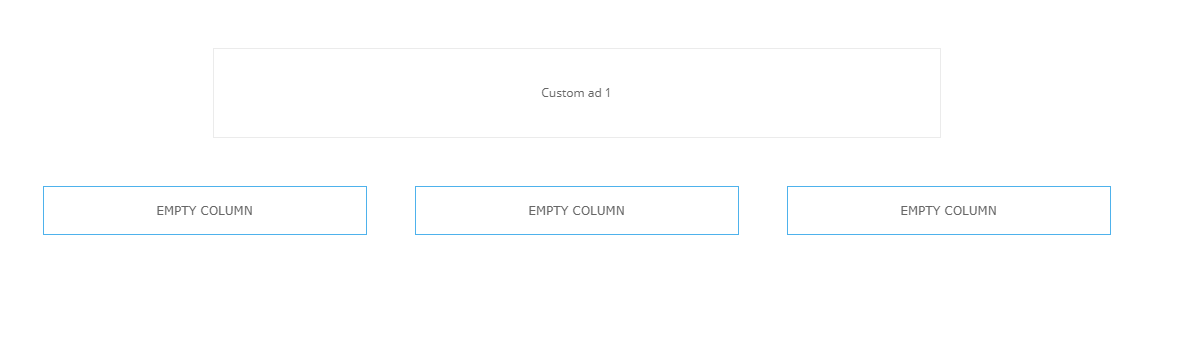

UPDATE 20min after
Recently did several other deletions of elemets and end up with having these EMPTY COLUMNS already 5…

Interesting is that some of the elements can be deleted without leaving EMPTY COLUMN after them, and some not
 Jamison
 I tried to edit, but don’t see it.
Same goes for “Newspaper Theme Panel” and “TagDiv composer”. Are these exclusive of one another, or are the complimentary?
JamisonHi,
I am confused as to what parts of the WP interface I am supposed to be using. It seems like I may have some standard wordpress items across the top, for example with a “click here to create a menu” button and a weather widget, but also some NP component through tagdiv composer as well.
If you can point me to a very elementary tutorial, that would be great. I looked at the YT channel but it is hard to tell what applies. Thank you.
 kalintz
 Hi, I am using “Style 8” under:
layout settings -> post settings -> default site template (site wide) -> Style 8
There is no option for me to edit this template using the TD composer. How can I edit the template? I have tried to go to the post and click on “edit template” from the top menu bar but I get the message:
“Please select tagDiv Builder Template from the theme panel or set a default template. The current page/post uses a template that is not editable.”
Please Help
Thanks
 acionista
Hi, i wanna add a widget (login form and E-GOI NEWSLLETER) in the first page (index). But i´m using TD COMPOSER and it´s doesn´t work. In example i wanna use this shortcode to add a Newslleter Box ([egoi_form_sync_1]) in this space 
How can i use a shortcode in TD COMPOSER?
 Mick Pacholli
 Calin, to do what you ask, only use the TagDiv composer imposes on me rebuilding 26 pages on my very complex and very large newspaper site, http://www.tagg.com.au, is torture.
So confused, I have Gutenberg turned off, I have earlier pplugins that a lot of articles rely upon.
What do I do but reach out to all
Mick Pacholli I understand tagDiv Composer is now the theme editor, but I have 26 very complex pages using WPBakery that came with the theme, that’s cool, I like the live interface much cooler, you have now widgetised sidebar though whicch you may want to add.
FYI…I have another site http://www.stkildawritersweek.com that was still unupdated versions of many plugins, I tested them all with the WPB editor as I updated them and all was cool until I also updated the WordPress to 5.2.2
Then I lost WPB composer functions, so I downloaded and activated TagDiv Composer to see what was happening, I can no longer develop my site
 Calin
Calin Hi,
The mobile version is look like that because you have the mobile theme plugin that provide you a better speed then responsive version of theme, but in order to achieve that speed you’ll need to create a new content for pages because in the most of cases those were made with builders ( tagDiv Composer, WPBakery ) and you need to use only the mobile editor ( you need to set the content for pages in mobile editor and this content will be display on mobile theme)
-> https://www.screencast.com/t/ebUIzt4se
Mobile Theme: Automatic Optimization for Mobile with Newspaper Theme -> https://tagdiv.com/mobile-theme-automatic-optimization-for-mobile-newspaper-theme/
Also for the 3 blocks, you’ll need to have set same feature posts (that have set feature category) -> https://forum.tagdiv.com/featured-posts-2/ -> https://www.screencast.com/t/QsJ6ppY4
If you want the responsive version and amp you should use this opinion -> https://www.screencast.com/t/jZct5ueBqOrb but if you have amp activate on pages you’ll need to create in Mobile editor a content for AMP version of page.
Let me know if you have more questions!
Calin Hi,
The mobile version is look like that because you have the mobile theme plugin that provide you a better speed then responsive version of theme, but in order to achieve that speed you’ll need to create a new content for pages because in the most of cases those were made with builders ( tagDiv Composer, WPBakery ) and you need to use only the mobile editor ( you need to set the content for pages in mobile editor and this content will be display on mobile theme)
-> https://www.screencast.com/t/ebUIzt4se
Mobile Theme: Automatic Optimization for Mobile with Newspaper Theme -> https://tagdiv.com/mobile-theme-automatic-optimization-for-mobile-newspaper-theme/
Also for the 3 blocks, you’ll need to have set same feature posts (that have set feature category) -> https://forum.tagdiv.com/featured-posts-2/ -> https://www.screencast.com/t/QsJ6ppY4
If you want the responsive version and amp you should use this opinion -> https://www.screencast.com/t/jZct5ueBqOrb but if you have amp activate on pages you’ll need to create in Mobile editor a content for AMP version of page.
Let me know if you have more questions!
Calin Hi,
That should fix the problem with single image on tagDiv Composer ( the element should be display ).
If you want we can take a look for you, just send us an email.
Thank you!
 aisakov
AMP plugin is working only on posts.
In pages al, I have created using composer is invisible.
How can I fix it?
Calin Hi,
Replacing the tdc_map.php should remove the condition for the elements that are not show in TagDiv Composer if you are using the WPBakery, please make sure that you’ve clear all cache after you make those changes.
Also if you have the child theme activate the there are some settings that will not apply, those will be set on default.
If there is still a problem, you can send us an email at contact@tagdiv.com and provide admin login, as well as cPanel or FTP if possible. We will take a look. Include a link to this topic in the email.
Thank you!
Calin Hi,
I’ve made some test in this way and the captions on gallery are working just fine -> https://www.screencast.com/t/Ad470BbTL37T -> https://www.screencast.com/t/qoY09qL0HWAZ
tagDiv Slide Gallery -> https://forum.tagdiv.com/gallery-2/
Using the media gallery from Gutenberg editor -> https://www.screencast.com/t/9NS7v2eUk9p -> https://www.screencast.com/t/qxeM4cfGhROF
Please make sure that you do not have a plugin conflict with untested plugins, please deactivate all plugins and child theme ( if you are using ) and let only the tagDiv Composer , clear all cache, deactivate the cache plugin and try again.
If this is not what you mean, please provide some more details and some screenshots or a link where I can inspect the captions from your gallery.
Thank you!
Calin Hi garyjones,
The new plugin differ just a little from the old one, but what you what achieve? maybe this can be achieve using the flex blocks that have more option for customize.
Why You Should Try the New Flexible Big Grids with Newspaper Theme
tagDiv Composer: Big Grid Flex elements
Thank you!


