
- NewspapertagDiv Composer – Website Manager
- NewspaperWhen tagDiv Composer is Not Working
- NewsmagtagDiv Composer Tutorial
- TutorialsFrom WPBakery to tagDiv Composer
- NewspapertagDiv Composer Tutorial
- NewsmagHow to use the Visual Composer plugin
- NewspaperScroll Animation
- NewspaperSingle External Shortcode and External Shortcode
- NewspaperCredit System
- NewspaperBookmark – Save For Later
- NewspaperFlex Block Builder and Flex Loop Builder
- NewspaperModules Builder in Newspaper Theme
- NewspaperIntroduction to CPT and ACF with Newspaper Theme
- NewspaperCreate a frontend submission form
- NewspaperHow to Use the Tabbed Content shortcode
- NewspaperCreate a form contact page
- NewspaperFilters and sorting for taxonomies
- NewspaperUser review system
- NewspaperCustom Fields Support
- NewspaperWooCommerce: Happy “Add to Favorites!”
 metacoach
 OK, for anyone trying to figure this out just don’t bother. Here’s the response I got from support…
Unfortunately, the information from your listing from that plugin cannot be displayed in the cloud CPT template.For that, you need to create some custom elements that are able to pull the listing information from the database and display it. When you unassign the cloud template, then the default version is displayed there. Unfortunately, for the default version, you can not change the header or have more headers on your website.
I have no idea why they aren’t clear on this. Plugin CPTs do not integrate with Tag Div Composer. It’s taken me 6 weeks to finally get this out of them.
 Redlemon
I have previously set some element as hidden in all viewport sizes. I want to completely delete that now from the page. I can see that it is being loaded in the source code of the page, but then applied the display:none; css property. I need a way to select it in the TD Composer and then delete it. How do I do that?
 Bettina
 Hello!
Yes, all seems to be fine. In the cloud templates, you should add the ads when you edit the post with TagDiv Composer in the element called ” Single Post Content ” in the tab ADS. Documentation here: https://forum.tagdiv.com/article-ads/
Or you can use the element called “Ad box” from TagDiv Composer and there you need to add the ads: https://forum.tagdiv.com/ads-adsense-overview/
If you want to use auto ads(are displaying randomly in your website), then they should be placed in the Theme Panel -> Analytics/Js Codes.
Thank you!
 Anamaria
 Hi @infoswell,
Did you reinstall tagDiv composer and tagDiv cloud library? The problem is normally solved https://i.imgur.com/gnQ24qI.png
Thank you!
Bettina Hello Alex!
Edit the article with the TagDiv Composer and add the element called “page title”.
Thank you!
Anamaria Hello
We fixed the problem, please deactivate, delete and reinstall tagDiv Composer from Newspaper plugins => https://www.screencast.com/t/OrzLvR2j and clear all cache.
Thank you!
Anamaria Hello,
Please deactivate the tagDiv Composer and tagDiv Cloud Libra plugins, delete and re-install tehn again from Newspaper plugins => https://www.screencast.com/t/WLy01lbc and after go into the theme files in those paths -> wp-content/plugins/td-cloud-library/state/single/tdb_state_single.php -> wp-content/plugins/td-composer/legacy/common/wp_booster/td_module_single_base.php and uncomment those lines of code -> https://i.imgur.com/ZbzhdAm.png -> https://i.imgur.com/HrqwKjQ.png
Thank you!
Anamaria Hello,
Do I understand that the settings are not saved?
Please check this topic with the same problem -> https://forum.tagdiv.com/topic/tagdiv-composer-does-not-save-only-content-of-homepage/
Thank you!
Anamaria Hello,
You have a cloud header, then you need to edit the page with tagDiv Composer => https://www.screencast.com/t/MIhm17tgIJeX select the logo and disable H1 on the logo => https://www.screencast.com/t/T6pvm7wR9 -> https://www.screencast.com/t/P7DuA9su from header and footer => https://www.screencast.com/t/31zJzmsS also if you use a sticky header.
The H1 must appear only once on the page/post and must be applied to an important element for SEO, usually placed on the logo.
Thank you!
Anamaria Hello Zahid,
Our theme is a frontend theme for most of the elements and changes, you’ll need to use the tagDiv Composer to edit the pages and templates for posts/categories, etc => https://i.imgur.com/I3OUYxr.jpg -> https://i.imgur.com/mMrEufY.jpg from the frontend -> https://www.screencast.com/t/LDdokrHPl
The options from the Theme Panel are for the standard template and we recommend cloud templates in order to have the possibility to edit them with the tagDiv Composer which contains a lot of functions and features, please check our tutorial here: https://forum.tagdiv.com/tagdiv-composer-tutorial/
Documentation here:
– https://forum.tagdiv.com/cloud-library-templates/
– https://forum.tagdiv.com/design-post-pages-using-cloud-library-templates/
– https://forum.tagdiv.com/cloud-library-category-templates/
Check also our video tutorials here: https://www.youtube.com/c/tagdivThemes/videos
Also, if you want to use standard templates, then please activated the tagdiv Standard Pack plugin.
Thank you!
Anamaria Hello,
Please make sure you have the latest version of the theme, 11.5.1
Also, please deactivate, delete and reinstall tagDiv Composer from Newspaper plugins => https://www.screencast.com/t/OrzLvR2j and clear all cache.
Also, please try to deactivate the plugins that you installed and see if the problem persists.
Thank you!
 joel_1017
 tagDiv Composer – I’m having a problem when i install this.
joel_1017Parse error: syntax error, unexpected ‘?’ in /home/admonline/public_html/wp-content/plugins/td-composer/legacy/Newspaper/includes/td_config.php on line 33581
tagDiv Composer
Ajax error
tagDiv Cloud Library
Ajax error
 NickDeBaerdemaeker
Hi,
we are rebuilding our header using the tagdiv composer, something which was long overdue.
For this I have installed the header template default PRO via the tagdiv plugin.
We are having some issues getting it right however
1. there is a shadow between the menu and the body of the page which we would like to remove, and replace it with a thick black line. How can we do this ?
2. in the submenu there we wish to replace the blue colour with the standard red that is used through out the site, however I’m having trouble finding this in the “Header – main menu” style tab.
Any help would be appreciated.

 Clecio
Hi Bettina and Anamarina,
Editing in Composer, I noticed that the arrows if go back to previous configuration (Undo) or advance configuration, are not appearing.
Have they really been removed or is it a problem with my theme ?
https://www.screencast.com/t/uG4hlPLOcE
Regards,
Clecio
Anamaria Hello,
You can use AMP, but we offer support for the mobile version only with mobile theme + AMP plugin and set for AMP -> https://forum.tagdiv.com/tagdiv-amp-plugin-tutorial/ => https://i.imgur.com/1kMs1ds.png and set the AMP for posts => https://i.imgur.com/GLEeeoZ.png, but you can’t customize the layout for AMP with tagDiv Composer.
Also, please check this topic where I explained each mobile version -> https://forum.tagdiv.com/topic/mobile-version-not-working-properly-2/ and choose what mobile version you want.
Also, you can check our documentation here:
-> https://forum.tagdiv.com/tagdiv-amp-plugin-tutorial/ please set the AMP like in our guide.
-> https://forum.tagdiv.com/the-mobile-theme/
This is a video about Responsive Newspaper Theme, AMP & Mobile Theme, Mobile Pages & Templates -> https://www.youtube.com/watch?v=SpGkOnJeNZY
Thank you!
 Carel
CarelHi
I still have the missing “aggregateRating” field in GSC.
I tried to uninstall and reinstall the plugins Tagdiv composer and tag div cloud…but it wont work.
Is there anything to add in the elementor template ?
Thanks
 comms
commsNot sure what went wrong, however before the 11.5* update these were showing up OK. We are having issues with both category and single post templates.
We are using dedicated mobile templates before this, now, it seems whenever I use tagdiv composer to edit a page (desktop mode) I see two more options for mobile views
Example below: (censored some content)
I am editing a Category template (desktop view) – everything looks OK.
However, I see two new options in the panel for tablet/mobile views (which were not in the previous version)
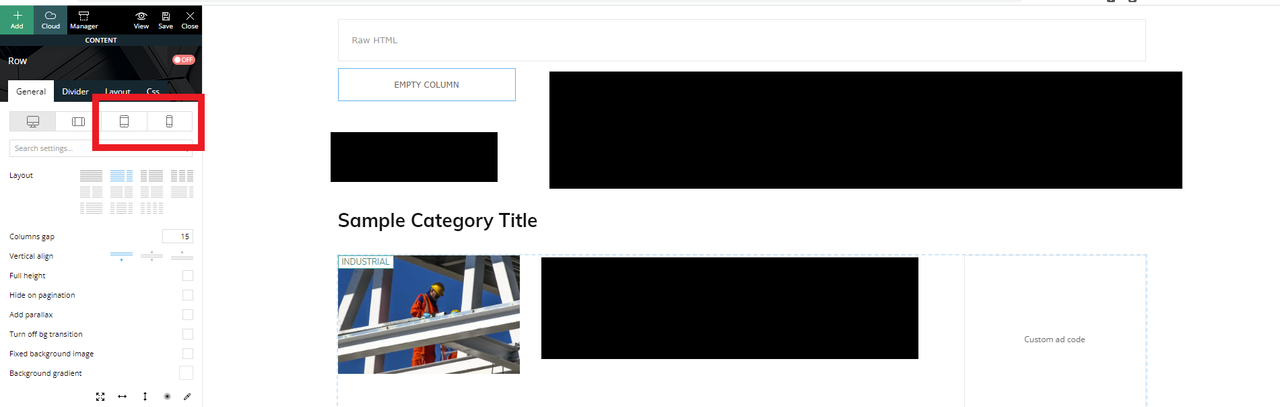
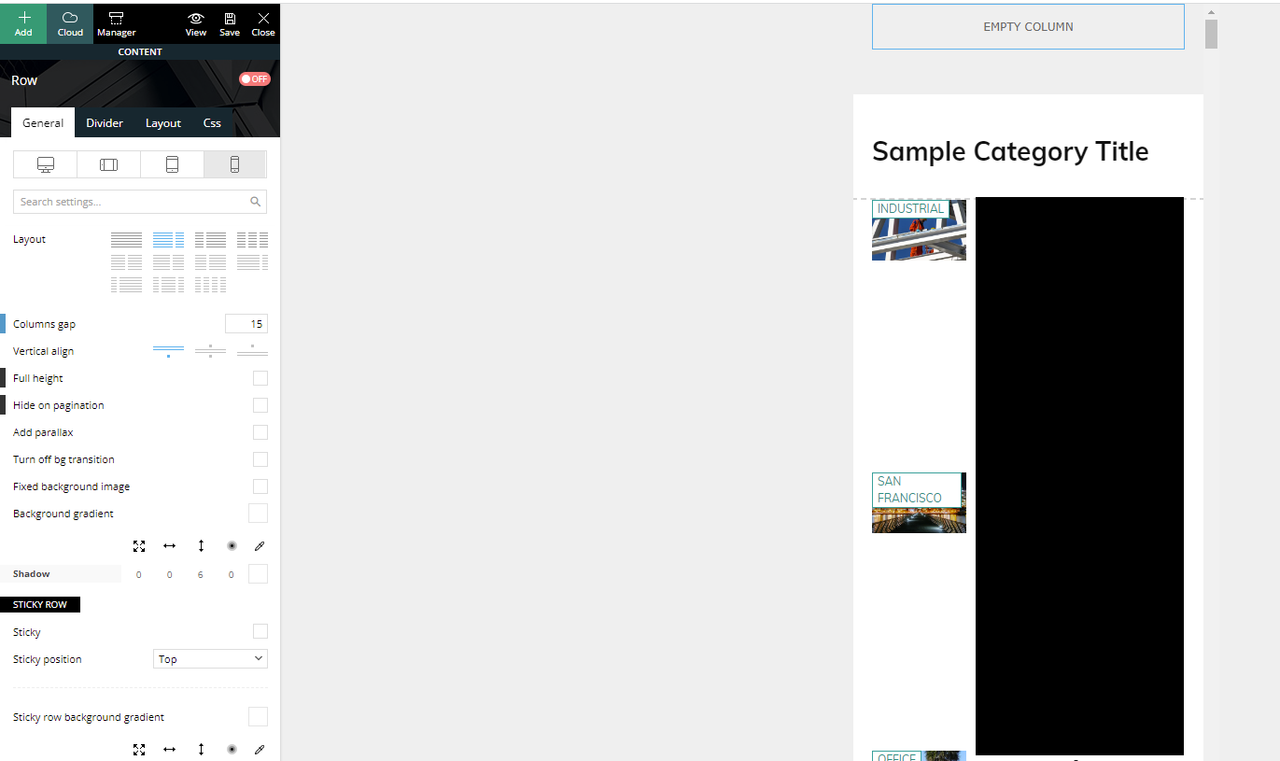
If I click the mobile view, this is what I see and what is actually being displayed if you browse the website in mobile mode.
We have another mobile only template that was created and was working (being displayed) before the update.
If I click on the “Edit the mobile template” from the desktop view takes us to the right mobile template that should have been displayed.
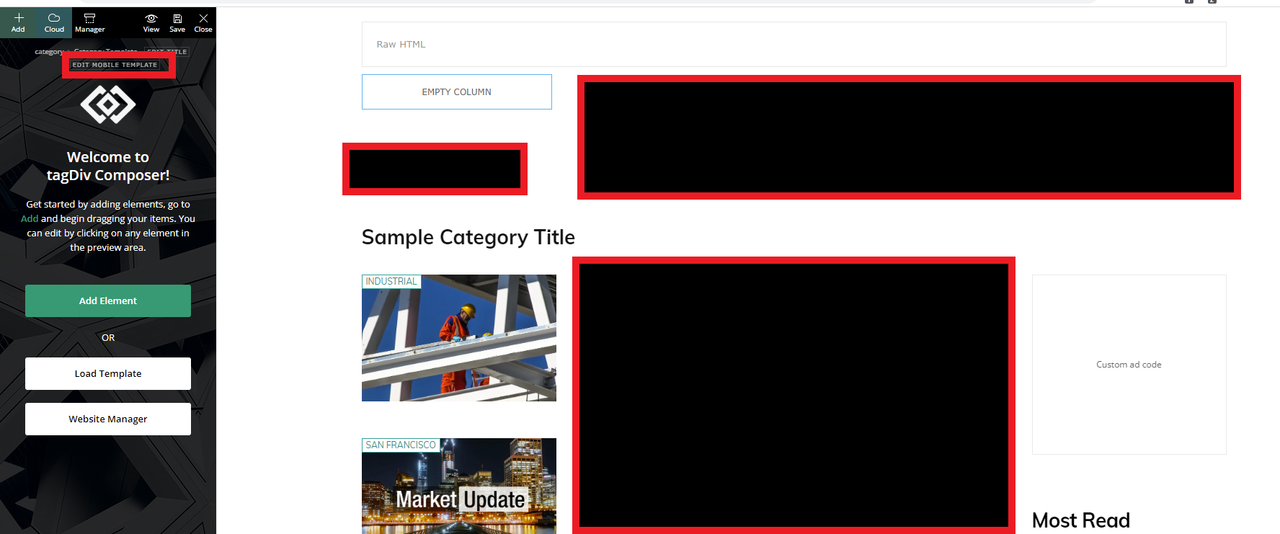
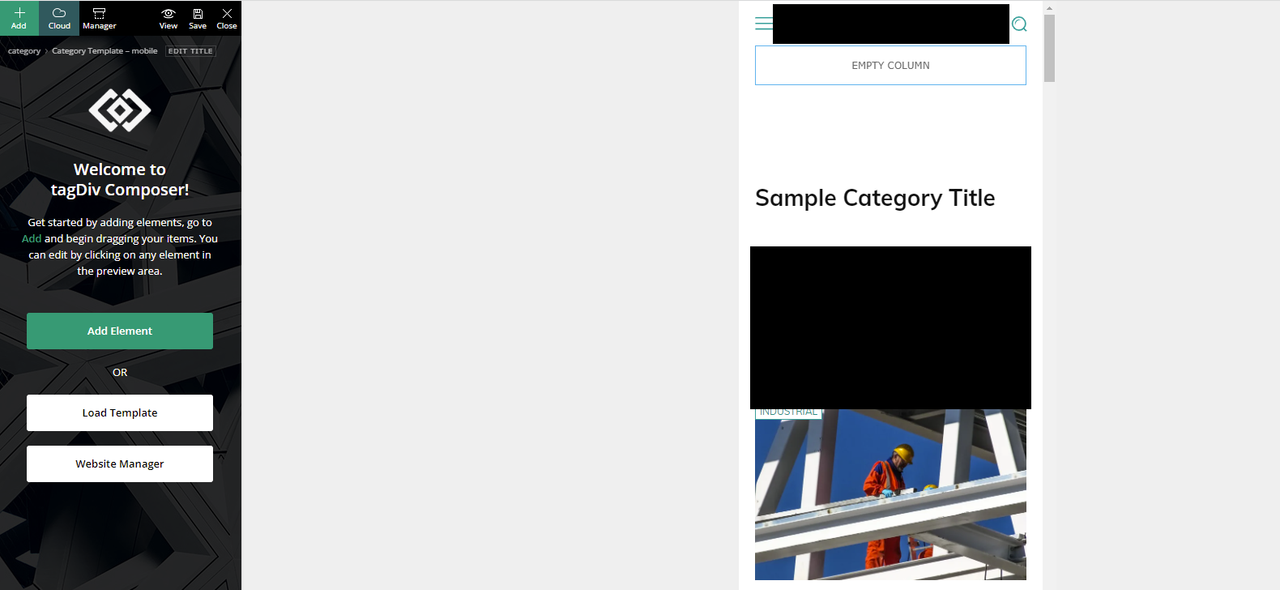
How can we fix this?
Thank you
Anamaria Hello,
Edit the homepage with the TagDiv Composer, click on the row on the header and change or remove the image background: https://prnt.sc/NkaOE7fWzB2
Also, please provide the link to your website.
Thank you!
metacoach It’s never the theme though is it? Can you PLEASE put a bit more effort into your support???
I’m getting this on every other page https://capture.dropbox.com/MXd12VVQlSXc4U7D
On this…
This is a screenshot of CPT enabled as a global element
https://capture.dropbox.com/ndoIIJJN1ijY3k9b
The Tag Div composer is essentially blocking the page content.
Please take some time to look into this. I took the effort to put a video together showing what is happening. Please help me try to find a solution.
-
This reply was modified 4 years by
metacoach.
 webmastermetro
 Hello,
In my cases it is on every page where TD composer is used that it doesn’t load.
https://pasteboard.co/2OmGAWVVALKk.png
Is this here inn the console? WHen I click on save I don’t see any new line appearing.
Thanks,
Bruno
Anamaria Hello,
If you want to use the most popular, then you need only hide it ->
If you have a Single Template from tagDiv Cloud Library, you can try to hide the Single Post Views from the tab called “CSS” -> https://i.imgur.com/IyOYDHq.png for post template from Theme Panel, you need to use a custom code CSS to hide it .td-post-views
{
display: none;
}
If you have Single Post Template, to remove you need to edit with tagDiv Composer, select the element and with a right-click, you can delete => https://www.screencast.com/t/6WnNGq6NFx or select the element with drag & drop place into the deleting red zone from the bottom right of the page.
If you have a standard post template, you need to go in Theme Panel -> Post Settings -> Post and Custom Post Types => https://www.screencast.com/t/TftzSAfTWtC and disable the option comment count.
Thank you!
Bettina Hello!
The ads are added when you edit the post with TagDiv Composer in the element called “Single Post Content” in the tab ADS or in the “Ad Box” element.
Documentation here:
– https://forum.tagdiv.com/article-ads/
– https://forum.tagdiv.com/ads-adsense-overview/
Thank you!
Bettina Hello!
Edit this page with the TagDiv Composer and add an extra class to that element like this: https://prnt.sc/By6whWedsGGu
Add this CSS code in Newspaper -> Theme panel -> Custom code -> Custom CSS:
.flexclass .entry-title a{pointer-events: none!important;}
Thank you!
Bettina Hello!
We recommend to use cloud/PRO templates in order to have the possibility to edit them with the TagDiv Composer which contains a lot of functions and features, please check our tutorial here: https://forum.tagdiv.com/tagdiv-composer-tutorial/
Documentation here:
– https://forum.tagdiv.com/cloud-library-templates/
– https://forum.tagdiv.com/design-post-pages-using-cloud-library-templates/
– https://forum.tagdiv.com/cloud-library-category-templates/
Check also our video tutorials here: https://www.youtube.com/c/tagdivThemes/videos
Thank you!



