
- NewspaperAutoptimize Plugin – install and configuration
- NewspaperCache plugin – install and configure
- NewsmagInstall via WordPress
- NewsmagInstall via FTP
- NewsmagInstalling pre-built websites
- TutorialsHow to install Revolution Slider
- NewspaperInstalling Pre-built Websites
- NewspaperHow to Install Newspaper via FTP
- NewspaperHow to Install Newspaper via WordPress
- TutorialsHow to Install bbPress forum
- NewspaperIntroduction to CPT and ACF with Newspaper Theme
- NewspaperHow to edit modules for Flex Block X
- NewspaperWooCommerce: Happy “Add to Favorites!”
- NewspaperWoo Brands
- NewspaperStripe Setup
- NewspaperModal Popup
- NewspaperPayPal Setup
- NewspaperFlex Block Settings Guide
- NewspaperHow to setup the Contact Page
- NewspaperAdd Cryptocurrency Price Ticker Widget
 Calin
Calin Hi,
Please make sure that all theme requirements are set as in our guide https://forum.tagdiv.com/requirements-for-newspaper/ and also what you can do is to go to Newspaper > plugins and make sure you have installed tagDiv Composer, tagDiv Cloud Library, and tagDiv Opt-in builder, after that try to reinstall the pre-built website.
Thank you!
Calin Hi,
That is a page menu https://forum.tagdiv.com/page-menu/
If you want that page content, you can copy it from here – https://we.tl/t-qe3lAO1iNI and just paste it in a new page on your install, after that edit it with tagdiv composer to set the elements you want on it and use the above guide to set the page as a page menu.
Thank you!
Calin Hi,
If you see only code, is because a demo from the theme has been installed and one of the theme plugins (tagDiv Composer, tagdiv Cloud Library) are disabled now.
The pages and cloud template scan be edited using tagDiv Composer, which is the theme builder and can be used to edit/create pages and templates (not articles)
Calin Hi,
I just checked your website https://3narratives.com/ https://i.imgur.com/9DbcZqT.png and this has a demo installed on it and looks good. The website can be edited using tagDiv Composer https://forum.tagdiv.com/tagdiv-composer-tutorial/
Can you provide some more details and some screenshots of the problem you are facing?
Thank you!
 RENATO
 @Calin Hi, good afternoon. I created three buttons using AI, this one here: https://ibb.co/mVgNZh9x
First, I added the code using the TagDiv Composer’s Raw HTML, and it appeared on every page. This button… Worst of all, TagDiv Composer stopped working and wouldn’t let me delete the code from the buttons. I’ve already uninstalled the plugin and installed it, and TagDiv Composer still won’t work. This error appears: https://ibb.co/vvLV4fPT
How do I add any code to the TagDiv Composer’s Raw HTML? This is “IT WAS NOT supposed to appear on all posts,” the theme owner warns. An update should fix this. If it didn’t appear on all posts, I would delete just that post and that would solve the problem.
I’m having this problem. TagDiv Composer doesn’t work at all, and I can’t delete this code. Look at this. https://app.screencast.com/0b76ym2vOOV26
I need to delete this code from the buttons, and I can’t. The TagDiv Composer still doesn’t work and won’t let me edit or delete the code. I need to delete this code.
 GulfAiMagazine
I add a row and added a Column Text element to it. I also have the WP Quads Ad plugin installed. I copied the ad shortcode and pasted it in the Column Text element. It did not load the ad and no banner. This theme is very difficult I guess.
 3 Narratives News 3 Narratives News
 jamie@gundigest.com
 Hi Calin,
Thank you for your response. The error did not resolve after following your suggestions. These are the steps I took.
– I verified I am using the latest Newspaper theme 12.7.1.
– I removed the child theme folder from wp-content/themes
– I refreshed the themes page in wp-admin to verify the theme was gone.
– I created Newspaper-child.zip from the theme package.
– I installed Newspaper-child.zip by uploading it into the WordPress admin panel. – WordPress said the installation was successful.
– I went back to the themes page and tried to preview the child theme.
– The same error showed.
2025/08/08 21:18:37 [error] 118#118: *1710 FastCGI sent in stderr: "PHP message: PHP Warning: require_once(/www/kinsta/public/mysite/wp-content/themes/Newspaper-child/blocks/acf-blocks-loader.php): Failed to open stream: No such file or directory in /www/kinsta/public/mysite/wp-content/themes/Newspaper/functions.php on line 644;
It is still looking for the /blocks/ folder in the child theme:
PHP message: PHP Fatal error: Uncaught Error: Failed opening required '/www/kinsta/public/mysite/wp-content/themes/Newspaper-child/blocks/acf-blocks-loader.php' (include_path='.:/usr/share/php') in /www/kinsta/public/mysite/wp-content/themes/Newspaper/functions.php:644
Thank you for any help you can provide.
-
This reply was modified 1 year by
jamie@gundigest.com.
Calin Hi,
The problem is related to the mixed content – https://i.imgur.com/OcRFaof.png. Most of the time, this is resolved by installing an SSL plugin.
https://www.wpbeginner.com/plugins/how-to-fix-the-mixed-content-error-in-wordpress-step-by-step/
Thank you!
Calin Hi,
The notification you are receiving means that the theme cannot reach our server and verify the key. The theme performs a check to verify the validity of the key and tries to connect to our database. If something interferes with this check, the theme will display that message. The check is made when accessing the demo install panel, the theme updates panel, or the license panel.
This kind of issue can be caused by plugin conflicts, or conflicts with various security/firewall settings from plugins or from the hosting, or from website restrictions set by the hosting. If something blocks the theme from verifying the key, the respective message is displayed and the theme will have limitations, unfortunately.
The first thing to do would be to check with the hosting if there are any restrictions in place, which would not allow the theme to reach our server and verify the key. I will take a look as well, for this please contact us via email at contact@tagdiv.com, I will need wp-admin login for the respective website and the license key, and also cPanel or a similar server manager. Let me know.
Thanks,
 Seb
SebBonjour,
J’ai installé le template Old Fashioned sur mon site. J’ai personnalisé et travaillé sur le thème pour le personnaliser.
Je suis surpris car lorsque je suis arrivé aux articles de blog, je vois qu’il ne m’est pas proposé de “cloud template”. Je n’ai également pas de template pour la page 404, la page auteur, etc… Est-ce un bug ?
Sinon, comment puis-je faire pour personnaliser les pages concernées ? Exemple, sur les articles de blog, apparait toujours une publicité pour une newsletter qui ne mène à rien. Comment faire pour la retirer ?
Merci à vous.
Calin Hi,
Yes, that one is a standard header. To use a cloud header, you need to have tagDiv Cloud Library installed, and you can edit it using tagDiv Composer.
But what you can do is to enable the boxed version for the website, and this will adjust the ad on your current header https://forum.tagdiv.com/background-introduction/, just set a background color, for example, white.
Thank you!
Calin Hi,
As far as I know, the WP_User_Query is used in a single plugin from the Newspaper theme, which is the tagDiv Cloud Library https://i.imgur.com/cegZL4k.png. The strange thing is that I can not recreate this situation on my install. Could you please contact us via email at contact@tagdiv.com and provide a temporary wp-admin access to investigate this situation?
Thank you!
Calin Hi,
Please do like this:
Go to the child theme in the theme package and zip it (ot will become Newspaper-child.zip), then use WordPress to install a new theme by uploading it and select the child theme. This should resolve the problem.
Notice: If you are using an old theme, the new child theme will not work, and if you use a new theme with an old child theme. Ensure that you have the latest theme version, Newspaper 12.7.1, and that the child theme is the current one provided with the theme when you download it from your ThemeForest account.
Thank you!
 theheritagelab
 Hey @Calin, yes, I did this but it didn’t help but I also read your response to a similar question regarding the author-plugin. Removed Publish Press’ multi author plugin and then re-installed this zip file and it worked. All is good. I have another issue, but will write a new post on it! Thanks for your help 🙂
 nicolaslavado
Hi everyone,
I’m currently using WPBakery Page Builder version 8.4.1 on my website, and I’ve noticed there are security vulnerabilities in this version. I’d like to update it to version 8.6.1, but I’m not sure what the correct procedure is.
I installed the plugin as part of my theme, so I’m not sure if I can update it manually or if I need to wait for a theme update.
Can someone please clarify:
What’s the recommended way to update WPBakery safely?
If it’s bundled with my theme, is there a workaround to update it independently?
Do I need to purchase a separate license to get access to the latest version?
Any help would be greatly appreciated!
Thanks in advance,
Calin Hi theheritagelab, to resolve the problem with _load_textdomain_just_in_time from td-cloud-library, please download and reinstall the plugin from here -> https://cdn.tagdiv.com/wp-content/uploads/2025/07/td-cloud-library.zip
I hope this will help you!
Calin Hello,
Alternative Plugin: WP Ultimate CSV Importer
Steps:
Install & Activate:
– Go to Plugins > Add New, search for “WP Ultimate CSV Importer”, install and activate it.
Prepare Your CSV:
– Have a CSV with columns: post_id, category.
Import Process:
– Go to Ultimate CSV Importer in your dashboard.
– Choose “Existing Items”.
– Upload your CSV and map post_id to “Post ID” and your category column to “Categories”.
– Run the import.
Thank you!
GulfAiMagazineI have WP on a staging url locally. The only additional plugin I installed was the yoast duplicate post which I needed to clone the imported demo pages and configure them. I’m on the landing page with tagDiv editor but if I click the Manager button, the zone manager doesnt open. Clicking it also gives an error in the chrome console:
js_files_for_wrapper.min.js?ver=492e3cf54bd42df3b24a3de8e2307cafx:688 Uncaught TypeError: Cannot read properties of undefined (reading ‘router’)
at HTMLAnchorElement.<anonymous> (js_files_for_wrapper.min.js?ver=492e3cf54bd42df3b24a3de8e2307cafx:688:255)
at HTMLAnchorElement.dispatch (load-scripts.php?c=0&load%5Bchunk_0%5D=jquery-core,jquery-migrate,utils,wp-dom-ready,wp-hooks&ver=6.8.2:2:40035)
at v.handle (load-scripts.php?c=0&load%5Bchunk_0%5D=jquery-core,jquery-migrate,utils,wp-dom-ready,wp-hooks&ver=6.8.2:2:38006)
(anonymous) @ js_files_for_wrapper.min.js?ver=492e3cf54bd42df3b24a3de8e2307cafx:688
dispatch @ load-scripts.php?c=0&load%5Bchunk_0%5D=jquery-core,jquery-migrate,utils,wp-dom-ready,wp-hooks&ver=6.8.2:2
v.handle @ load-scripts.php?c=0&load%5Bchunk_0%5D=jquery-core,jquery-migrate,utils,wp-dom-ready,wp-hooks&ver=6.8.2:2
Calin Hi,
For me, the author box is now displaying correctly, but it appears on some articles or when you move from article to the next one – https://i.imgur.com/b2g6mru.png, but a plugin for authors may have been installed that can add another author box to the single post template. I will recommend using only the author from the theme, and if you have an option from another plugin for the author box, disable it.
Thank you!
 vet
vet Thanks all,
I have found the problem is that the checkout page didn’t use the woocomerce short code so The plugins which I have installed wasn’t changing any thing.
So I have created another page with the woocomerce short code as a checkout page.
 Arturooooooo
Hello Team,
I am having issues applying category templates to my pages using tagDiv Composer on my website https://www.anglertest.de
As a starting point I used the aniglobe category template renamed it to koedertest-category and adjusted it to my needs but the changes are not beeing applied.
1) There is no way for me to switch the category in the composer to preview it in the composer
2) When visiting a category the “edit in tagDiv Composer” button is not visible
3) Not a single category template is ever beeing applied to categories. I have set the template as global without success. Changing the template on-the-fly from the frontend did not work. Setting the template from the theme panel category settings did not work either.
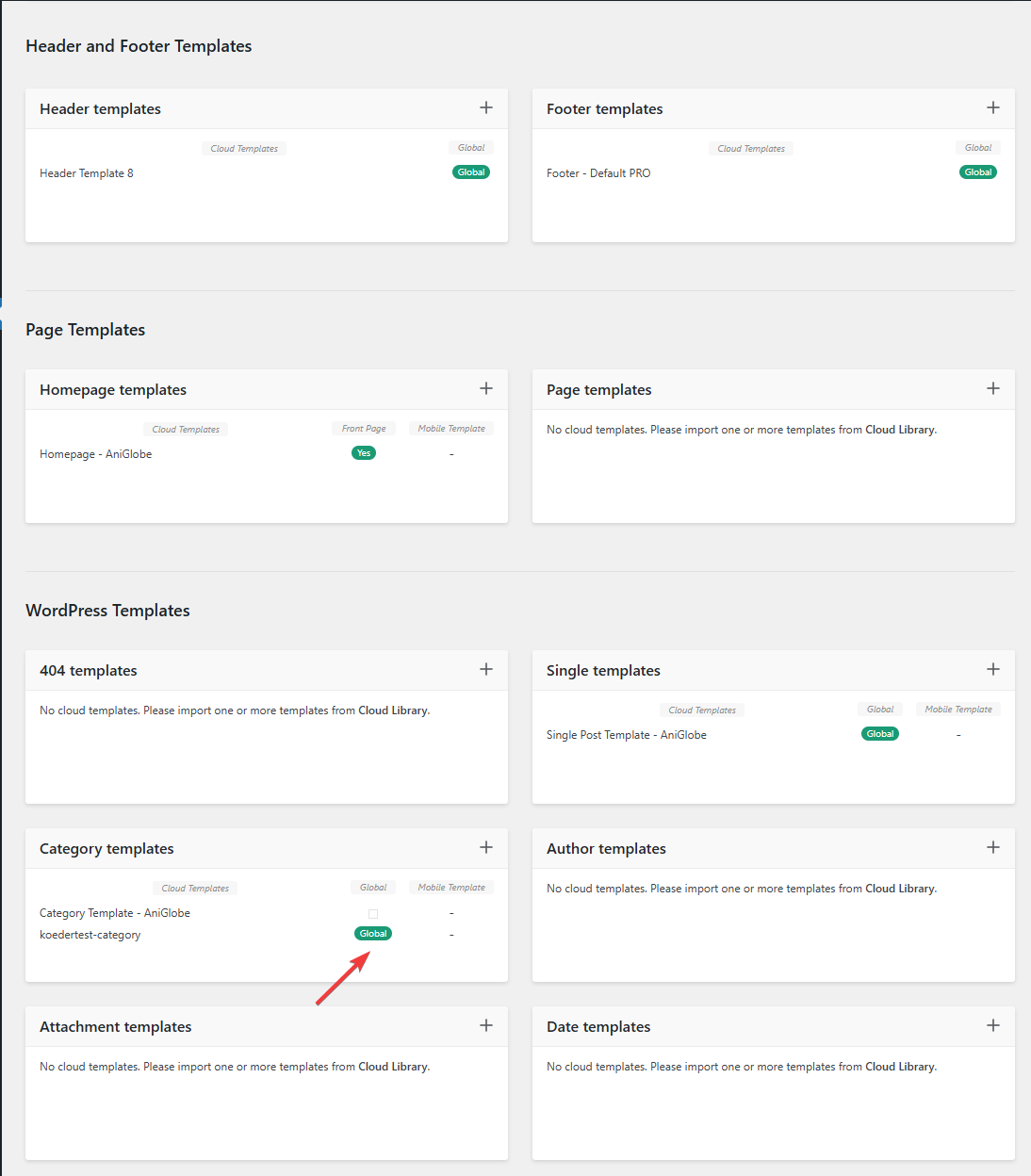
In this picture you can see that my template should be assigned globally
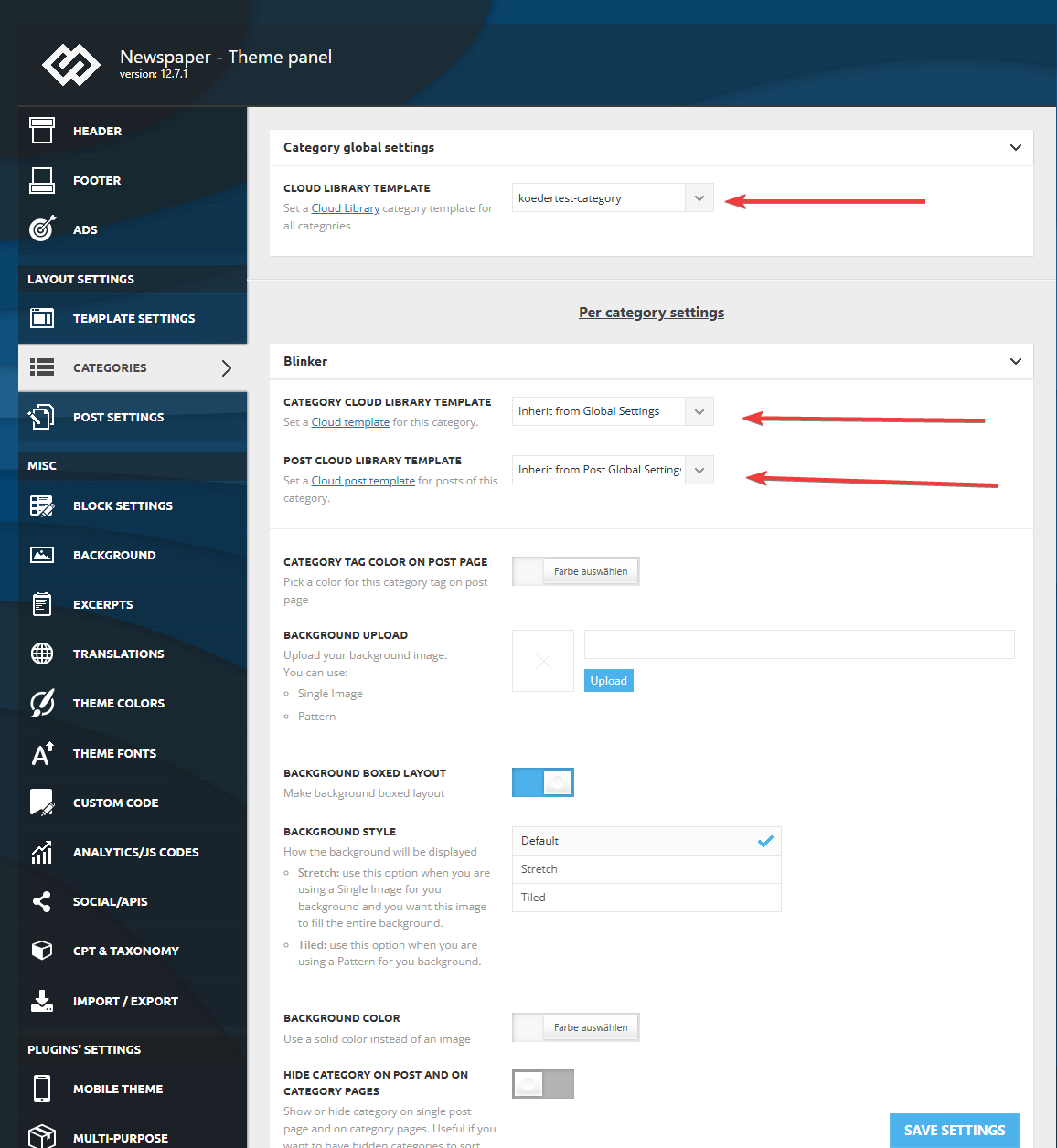
I made sure that in the theme panel under categories that the same template is globally set and checked every category underneath to inherit from global settings.
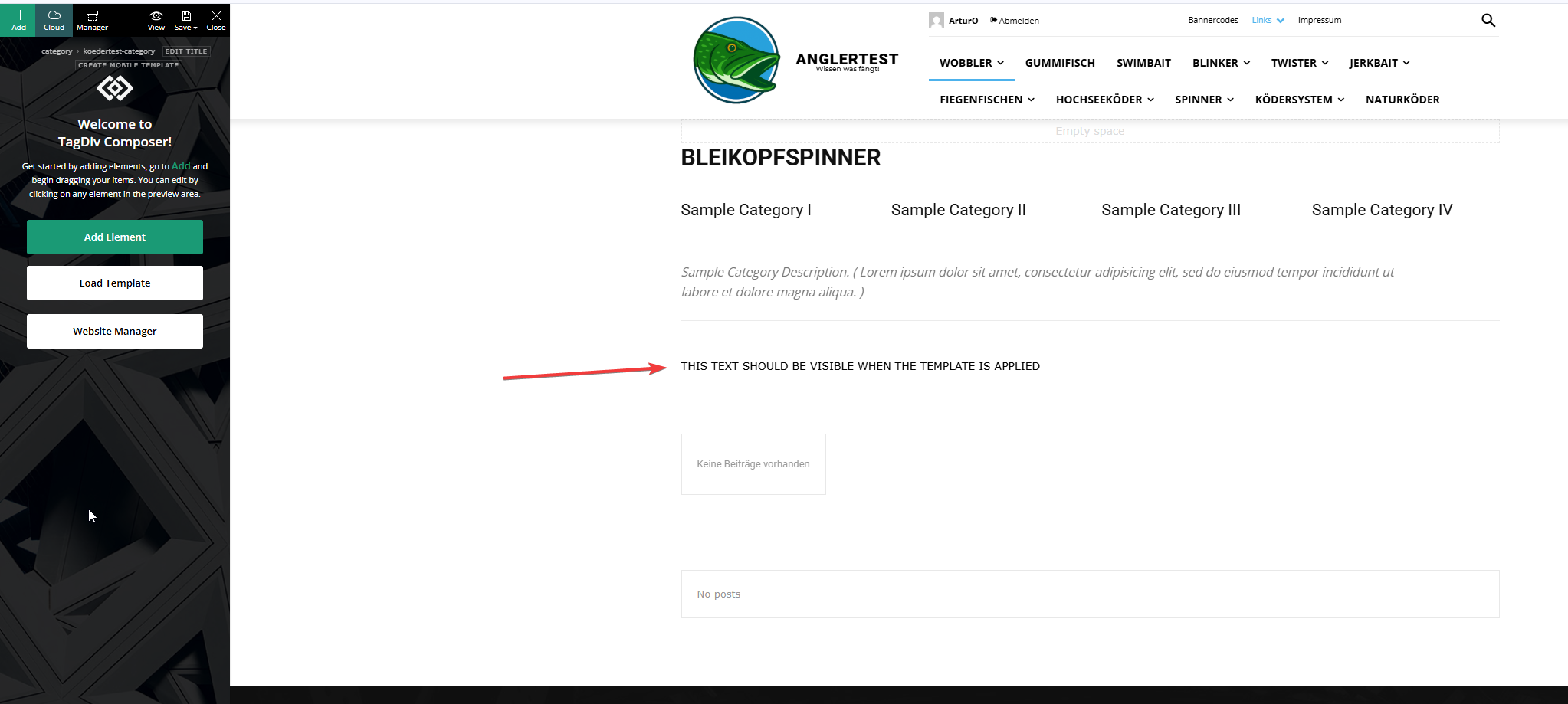
This is the actual template and I added an html block to verify if the template was assigned.
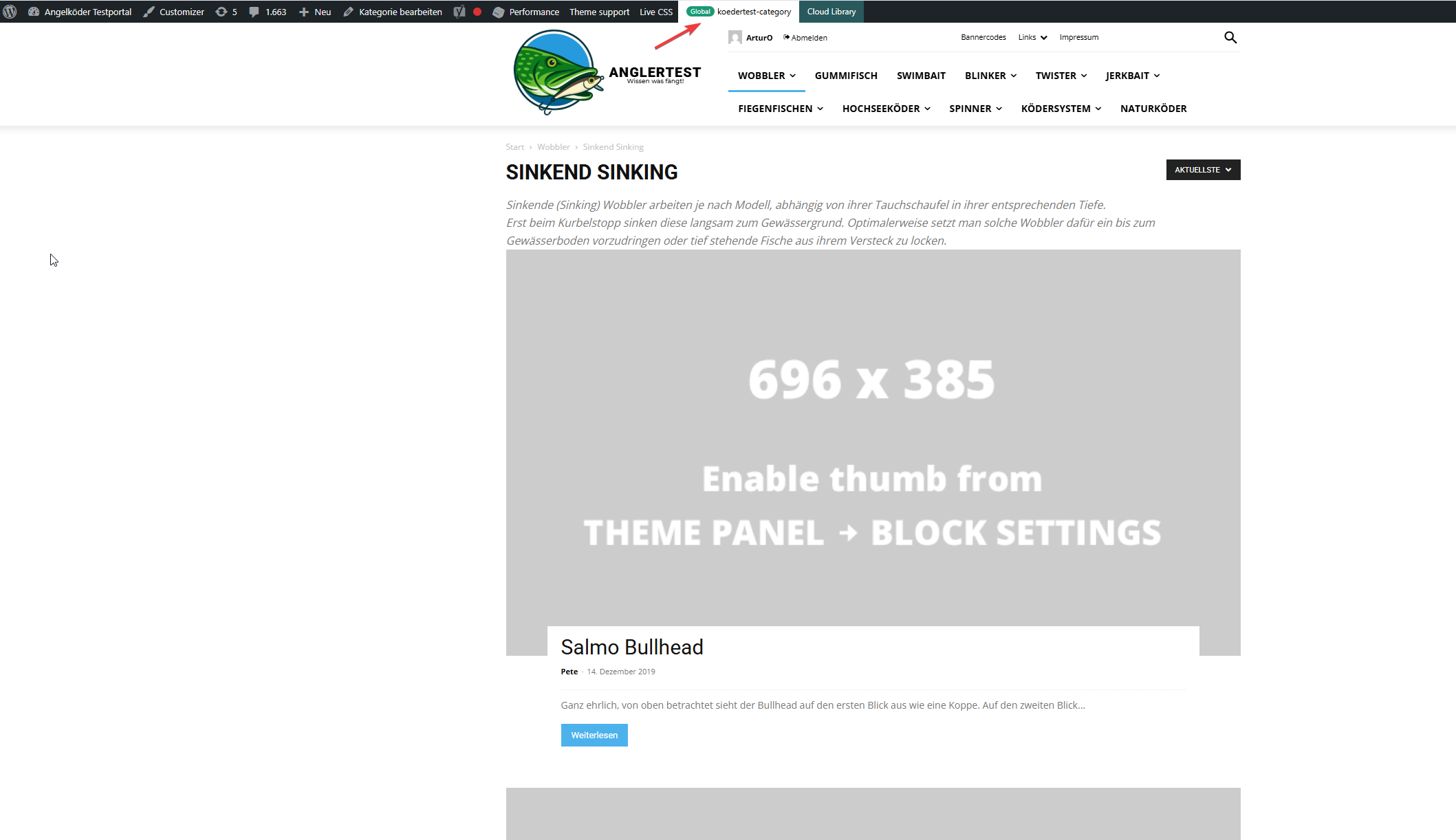
In this picture you can see that the template for the “wobbler” category looks completely different.
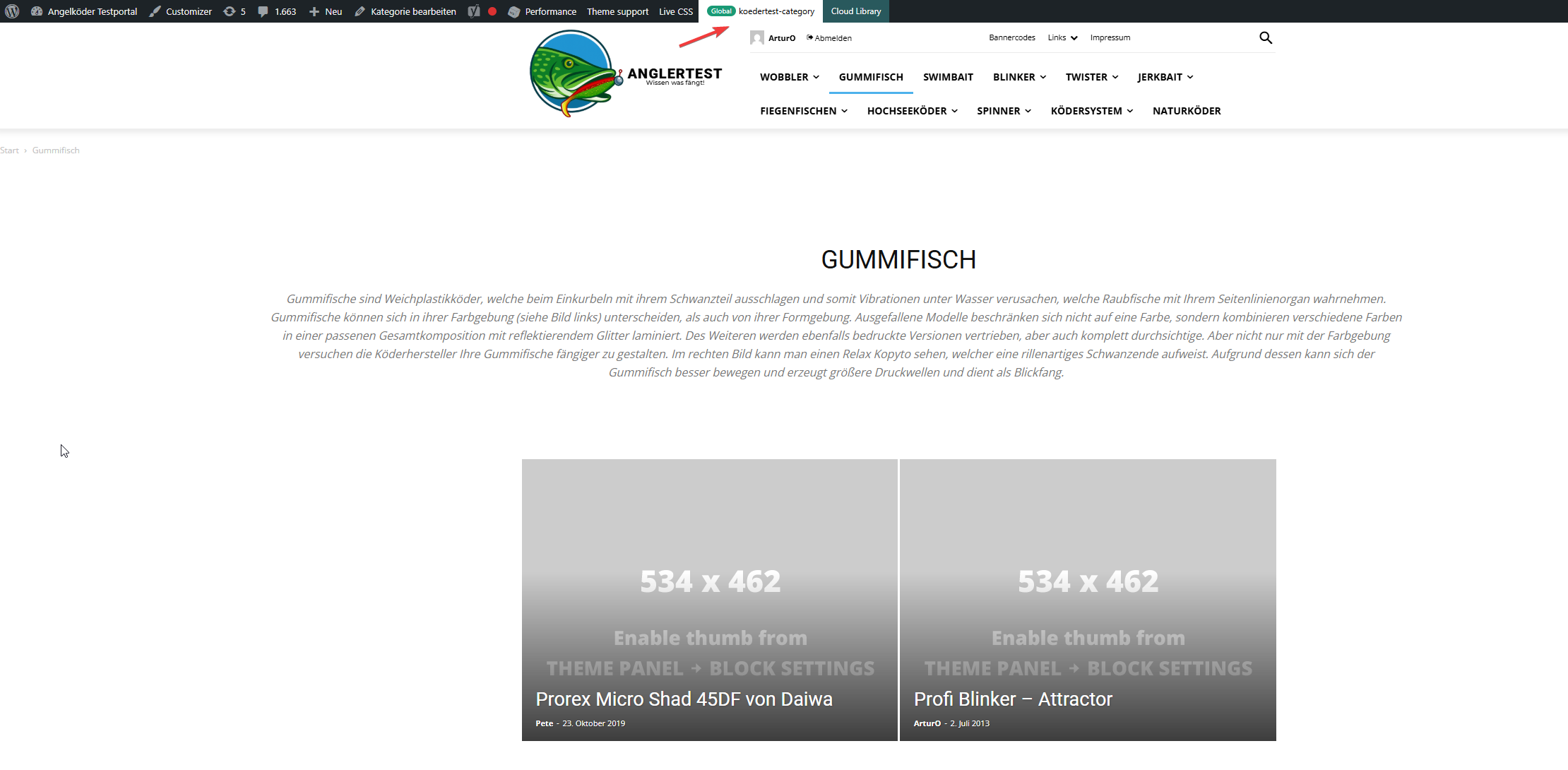
Strange enough, the template for the “gummifisch” category looks slightly different with the same theme applied (see arrow up top), the text I inserted to check was nowhere to be found (not even in source code)
In the very beginning I installed the aniglobe templates intially without demo content, but changed up the templates one-by-one. I did not find any option to disable or uninstall the prebuild website.
In my endless tries with different configurations I was not able to aplly the template, but I found something interesting which might explain the bugs I encounter.
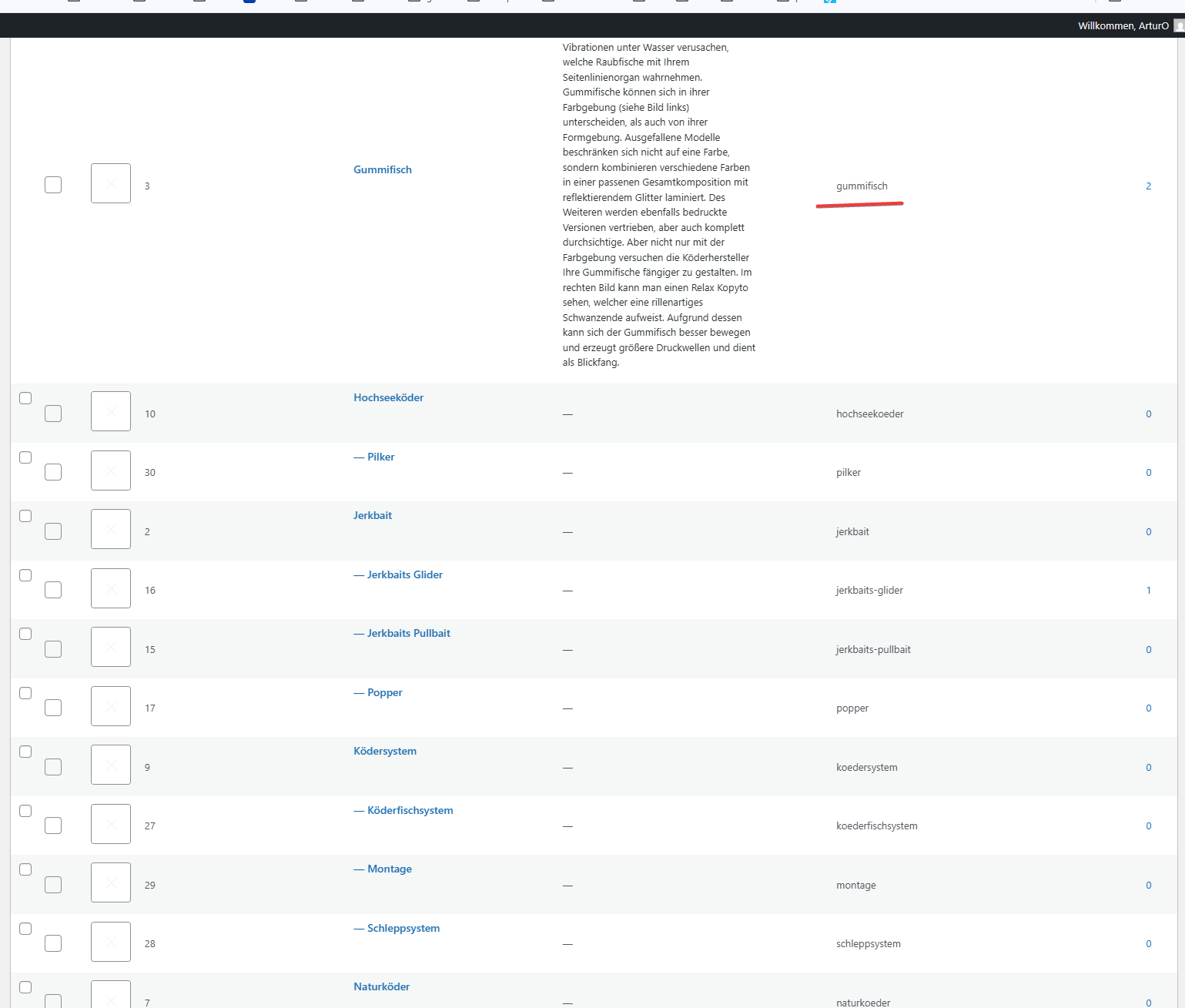
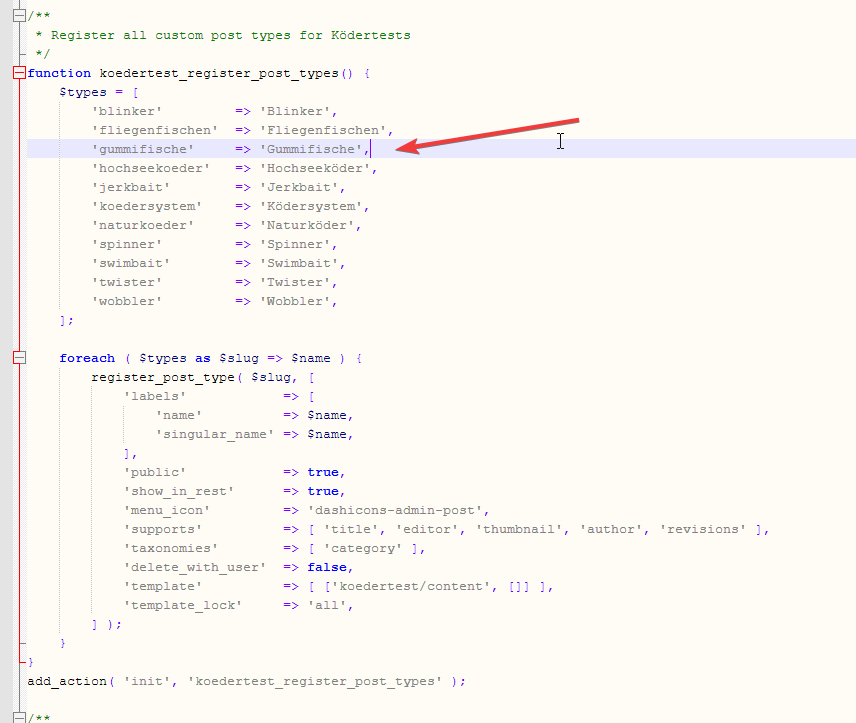
In those pictures you can see the categories I use and the post_types I register. The post_types are using those categories and I make sure that every post of those post_types has at least one category assigned. All post_types share the same categories (native category from wordpress).
The permalink structure is setup like /%category%/%postname%.html for every post_type. Category basis is set to “angelkoeder”.
Every category is named after a post_type. Nested categories are not named after post_types.
The only exception is the category “gummifisch” where post_type “gummifische” articles are categorized under. I might have missed the “e” when I set this up in 2013.
Somehow this category looks different as you can see in the above screenshot.
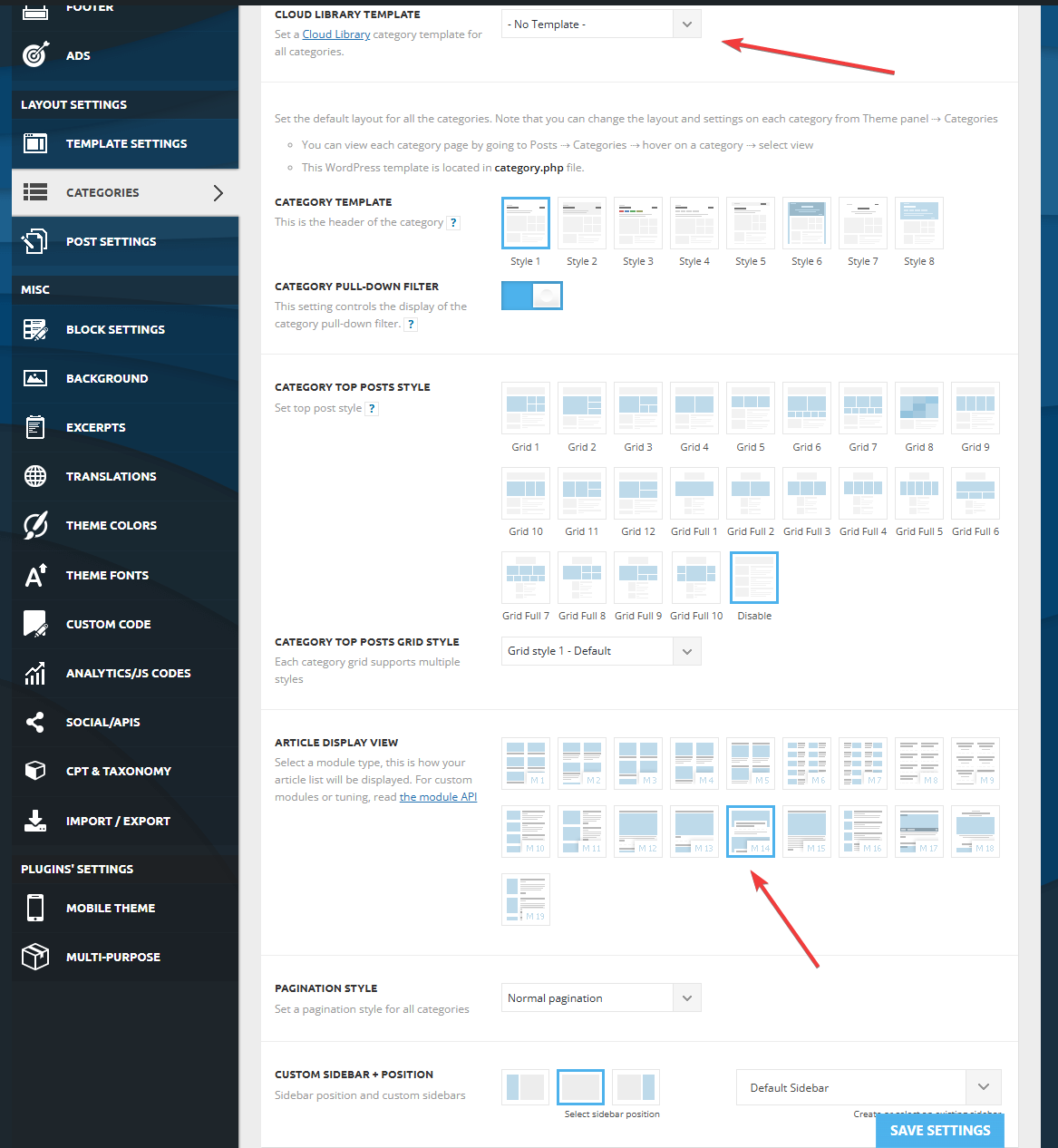
Furthermore I discovered that, when I change the template in the theme panel to “no template” (but do not save those settings) it reveals the settings I made previously with “Module 14” as article display view. You can see in the screenshot above for the “wobbler” category that this is the applied design even though the bar on top suggests my custom “kodertest-category” template is supposed to be applied.
Any help is highly appreciated. If needed I can provide further screenshots.
Thank you for your help.
Calin Hi,
I just made a test on one of my installations and for me it is working normally – https://i.imgur.com/ugpYBgd.png – https://i.imgur.com/Eg8GhIx.jpeg
If you can provide a temporary wp-admin access will help a lot. This can be done via email at contact@tagdiv.com also include the link of this topic to identify you faster.
Thank you!
Calin Hi,
I just tried it on my install – https://i.imgur.com/IL8Df1B.png – https://i.imgur.com/4opQeHt.png – https://i.imgur.com/Dnr7NMT.png
Can you please try again? use the plugin from this link https://cdn.tagdiv.com/wp-content/uploads/2025/07/td-cloud-library.zip



