- NewspaperAutoptimize Plugin – install and configuration
- NewspaperCache plugin – install and configure
- NewspaperInstalling Pre-built Websites
- NewspaperHow to Install Newspaper via FTP
- NewspaperHow to Install Newspaper via WordPress
- NewspaperIntroduction to CPT and ACF with Newspaper Theme
- NewspaperHow to edit modules for Flex Block X
- NewspaperWooCommerce: Happy “Add to Favorites!”
- NewspaperWoo Brands
- NewspaperStripe Setup
- NewspaperModal Popup
- NewspaperPayPal Setup
- NewspaperFlex Block Settings Guide
- NewspaperHow to setup the Contact Page
- NewspaperAdd Cryptocurrency Price Ticker Widget
- NewspaperInfinite Loading for Single Posts
- NewspaperThe Newspaper Mobile Theme: Introduction
- NewspapertagDiv Social Counter plugin
- NewspapertagDiv Shop
- NewspapertagDiv Opt-In Builder
 Bettina
 Hello!
The issue can be from a plugin conflict, that’s why, please deactivate ALL plugins except tagDiv ones, also if you are using child theme or cache plugin, deactivate them, clear all cache and try again.
Please make sure that all theme settings are like in our guide: https://forum.tagdiv.com/requirements-for-newspaper/
and please increase all requirements that are lower, and follow all steps.
We recommend using the WP Super Cache plugin https://forum.tagdiv.com/cache-plugin-install-and-configure/
Thank you!
Bettina Hello!
First of all, try to do these steps as quickly as possible, so your visitors do not notice the process:
1. disable TagDiv Composer
2. uninstall(delete) TagDiv Composer
3. clear cache (if cache plugin exists)
4. install TagDiv Composer
5. activate TagDiv Composer
6. clear cache (if cache plugin exists)
Unfortunately, there is no button to hit and your page speed is very high. You need to try to optimize your website.
If you follow the steps which are presented in this tutorial here: https://tagdiv.com/how-to-increase-page-loading-speed/ you’ll be able to increase the speed of your website.
Also, to increase the page speed you can check these similar topics for more solutions:
– https://forum.tagdiv.com/topic/optimize-script-to-improve-site-speed/
– https://forum.tagdiv.com/topic/a-few-tips-for-newspaper-x-speed-high-cpu-usage-issues/
– https://tagdiv.com/how-to-increase-page-loading-speed/
Please note that page speed is not covered by the support team: https://forum.tagdiv.com/newspaper-theme-support/
Thank you!
Bettina Hello!
Please make sure the Mobile theme plugin is installed and active.
Also, check if that page has Mobile Theme enabled: https://www.screencast.com/t/q3e3R4fFrzKX
Let me know the results!
Thank you!
 Vlad S
 Hello!
You will have to first start looking for a plugin conflict. please deactivate ALL plugins except tagDiv ones, also if you are using child theme or cache plugin, deactivate them, clear all cache and try again.
Also you can try and remove and re-install the tagDiv Composer plugin and please send us a link to your website in order to take a look.
Let us know the result!
Thank you!
 jayaprakashpv
Hi,
I had installed theme in neethimasika server and configured properly. And activated theme also. But “tagDiv Composer” is not working. When I click “Edit with tagDiv Composer” , it is showing “This page isn’t working” . Please guide me how to make it working condition..It is very urgent .. So please guide me as soon as possible…
Site url: http://neethimasika.com/
Thank you,
 Anamaria
 Hello,
If you have tagDiv Standard pack enabled and the styles do not appear, then it means that you have installed a Pro Prebuilt Website and the header and footer design can be edited from the front-end with tagDiv Composer. The templates are from Cloud Library, and these can be edited with tagDiv Composer.
With tagDiv Composer, you can redesign the templates style as you want.
You can check our channel https://www.youtube.com/user/tagdiv that can help you!
Also, if you want to use a standard header/footer, then you need to assign to “No template” => https://www.screencast.com/t/tr7u03NZCqC2
Hope this helps you!
Thank you!
 UkulCool
 I had tried to install WP Super Plugin but not working.
I think my hosting not supporting it, I am using SiteGround Hosting
 siriusday
I have a clean installation with the zodiac demo data installed and I cannot update the logo in the header nor the logo that is on the home page when i add the link(the large logo at the top of the banner).
This was some of the problems i had years ago when i first brought the theme and it’s still here.
 thelastpoet
 I will like to add to this and share my setup.
1. I always start with the foundation, The hosting. I host on Digital Ocean – DO Link it is one of the best VPS hosting and quite affordable. This allows me to control what I install.
I use Nginx rather than Apache for the server since it’s fast and easy to implement http/2, which helps speed up things. Digital Ocean has a handy tool that can help you configure the best Nginx Settings for performance and security. It is available here: https://www.digitalocean.com/community/tools/nginx.
For my setup, I have Ubuntu 20.04, Latest Nginx, Mysql 8, and PHP 7.4. I also add Redis Cache since I am using AMP on my site.
Then make sure the php.ini is set to these values – https://forum.tagdiv.com/system-status-parameters-guide/.
2. WordPress
When it comes to WordPress, I make sure I have the latest version and only install the plugins I need and keep them to the basics.
This is categorized under – Theme specific plugins like Tag div composer, tagDiv Cloud Library, tagDiv Mobile Theme (since I use AMP). I don’t install the others.
Then I get one for security, for speed; I get caching and image compression, SEO, contact form, and user tracking.
I have – Yoast, Ithemes security, Google Sitekit, WP ROCKET, Imagify, Forminator, and Redis Object Cache.
The plan is to use few plugins as much as possible.
3. Theme customization – I follow most of the guides here, but I don’t enable lazyload in theme settings, and I make sure not to load google fonts. (There is a feature in tagDiv composer where you can use only system fonts).
4. WP Rocket – I enable most of the features, and since using the mobile theme, I enable mobile cache. The most important feature is where you can delay Javascript execution; it does wonders.
The rest will depend on your setup. I think the theme has improved, and it is not a challenge to achieve good lab scores.
I am waiting to see how field data will change over time.
*Pardon my English.
 Cryptocontrole
Just some time back i purchased Newspaper but after installing,it is not working as expected.
I have activated tagDiv Standard Pack
My Theme panel is not working as expected i can not see header style and footer style as well not check for other, please take a look and help me.
Vlad S Hello!
We have just tested this and it works on our side. Make sure to have Newspaper Theme installed and Newsmag theme active. Deactivate the tagdiv plugins, Activate Newspaper theme and install and activate the new tagDiv Plugins.
Let us know the result!
Thank you!
 qlecomte
Hello there,
I’ve set up a Typekit Font for my website through Theme Panel. All the pages / page templates have been configurated and are using this font and the website is displaying the font properly on desktop. Nevertheless, on mobile and tablet devices, the font is replaced by a generic font: A serif font on iOS devices and a sans-serif font on android devices.
– Mobile theme has been installed and configured to use the font.
– Google font have been deactivated
I don’t know what I have to do more to be have this specific font displayed on mobile and tablet devices.
My website is the following: https://www.cineshot.be
Thanks in advance for your support.
Vlad S Hello!
For this you will have to use Revolution slider as you can see here: https://forum.tagdiv.com/how-to-install-revolution-slider-v5/ https://forum.tagdiv.com/import-revolution-sliders-on-demos-prebuilt-websites/
Thank you!
Vlad S Hello!
Please try and reinstall and set-up AMP plugin as shown in our guide here: https://forum.tagdiv.com/tagdiv-amp-plugin-tutorial/
Let us know the result!
Thank you!
Anamaria Hello,
Do you use the mobile theme plugin?
Usually, this problem when the mobile theme is displaying on the desktop, then you have a cache conflict, the plugin for the cache that you are using do not recognize the mobile and desktop cache. We recommend using the WP Super Cache plugin https://forum.tagdiv.com/cache-plugin-install-and-configure/
Also, please include the link to your website.
Thank you!
 Sigi
Sigi Thnx for the response.
Yes and that’s not how I would like to show my blog. In settings I’ve made it look like M16 (like it shows at the categories: tinyurl.com/4acnnbpj )
I’ve installed the child theme with the sample child theme. So only style.css and functions.php are in the map. In the functions the only thing I added is:
}
add_action( 'init', function() {
$GLOBALS['wp_rewrite']->pagination_base = 'pagina';
});
So I don’t understand why I can’t change the way it looks on the frontpage…
Vlad S Hello !
You will have to first start looking for a plugin conflict. please deactivate ALL plugins except tagDiv ones, also if you are using child theme or cache plugin, deactivate them, clear all cache and try again.
Also you can try and remove and re-install the tagDiv Composer plugin and please send us a link to your website in order to take a look.
If the method above does not work, Please contact us via email at contact@tagdiv.com and provide the following:
– admin url and credentials
– A link to this topic in order to identify you
Our team will take a look ! Please note that at the moment the support is a bit crowded. Replying may take up to 24 hours.
Thank you !
 RKdium
Dear TagDiv Team,
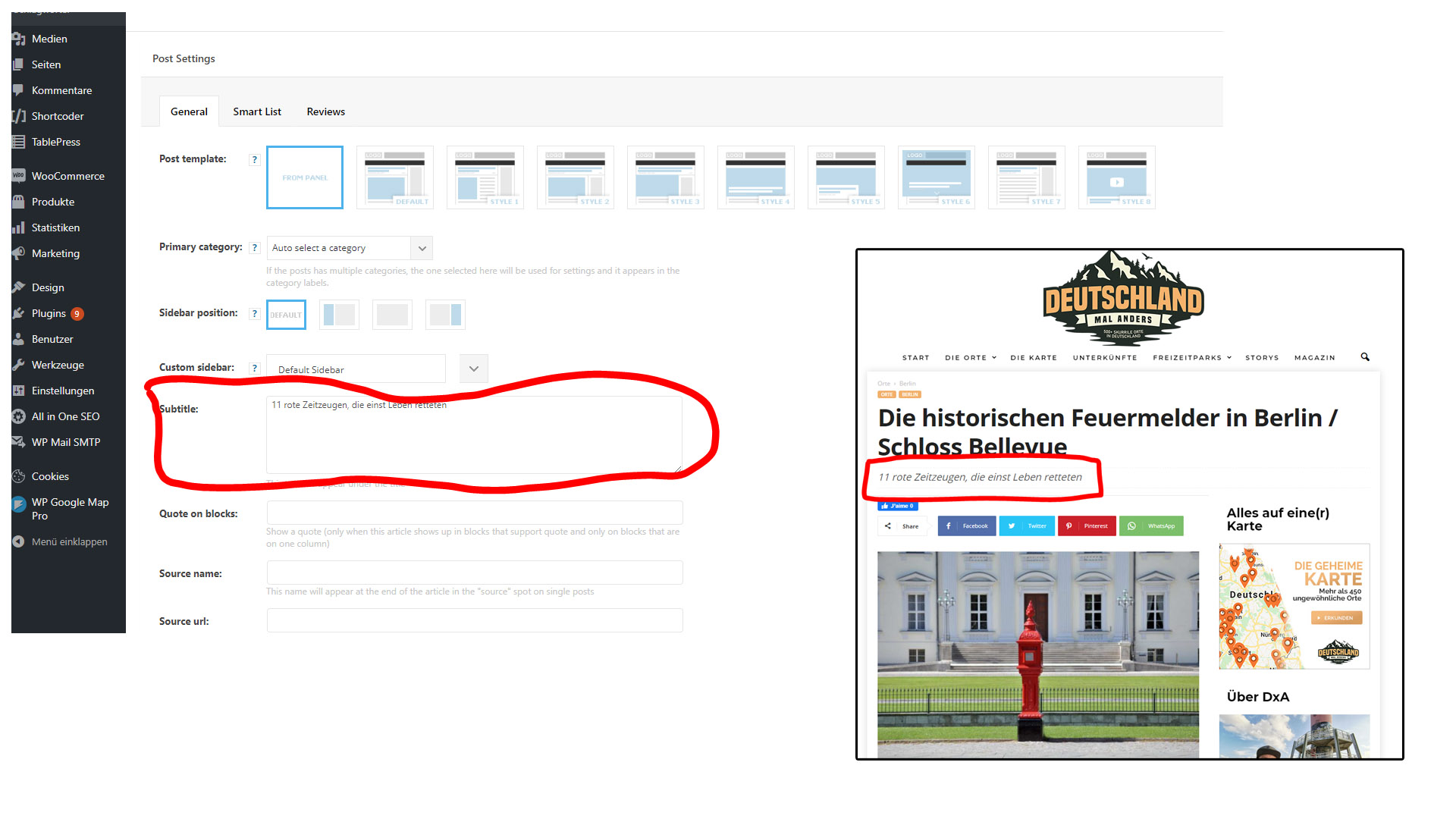
as suggested by your team (thread https://forum.tagdiv.com/topic/transition-from-newsmag-newspaper-subtitle-question/), I have tested an install of Newspaper on my site (currently running Newsmag).
Unfortunately, subtitles as entered in Newsmag (https://www.deutschlandmalanders.com/wp-content/uploads/2021/05/Subtitles.jpg) will not automatically transfer from Newsmag to Newspaper (the subtitle isn’t shown in Newspaper).
With 600+ articles, it’s a pain to do copy-paste…
So my question is: Is there any possibility to transfer these subtitles automatically from Newsmag > Newspaper?
Is there something i can do in the database?
Thanks for your help!
Best,
Roman
 apserver
hello
i install the mobile theme and it works, but on pages (on posts it is ok) it shows only title, no the content on page, no html about content printed, how can i solve this problem?
 winnipegwebguy
Hi.
I’d like to try to set things up so that a newsletter element (subscribe to our newsletter) is on each page. I have installed the newsletter plugin and have it on every page, but when I make a change to the element (colours etc), it doesn’t reflect on every page. So I have to go and edit the newsletter block on each separate page to get the look I want. This seems weird and I don’t see an option to save changes to the element. I know I must be missing something obvious, but if you could explain to me how to do this, it would be appreciated.
Thanks a lot.
-todd
 manideepvtu
I am using Mobile Theme for my website. Mobile theme is Outstanding option. But there is small error mobile theme is displaying in iPad. My design getting broken in ipad or Tab.
This is only on post page.
https://bigstarbio.com/bryce-hall/ (or) https://bigstarbio.com/wilbur-soot/
I have uninstalled all plugins (cache plugin also) and activated on tagdiv plugins, but problem is not solved.
 robink
 Great thanks !
The theme is awesome.
Question, the AMP and AMP mobile theme must be both installed to work properly ?
Or the theme is just an option ?
THE AMP theme is very standard, is it possible to customize it a bit with colors etc ?
Basically it’s just a page template for mobile, with very few elements, right ?
Many thanks
Robin.
Anamaria Hello,
Please try to do these steps
1. disable all tagDiv plugins
2. uninstall all tagDiv plugins
3. clear cache (if cache plugin exists)
4. re-install all tagDiv plugins again from Newspaper plugins => https://www.screencast.com/t/WLy01lbc
5. activate all tagDiv plugins
6. clear cache (if cache plugin exists)
Also, make sure your WordPress and plugins are up to date.
Let me know the results!
Thank you!
Vlad S Hello !
Please send us a screenshot of your System Status Tab and make sure that all the requirements are met as you can see here: https://forum.tagdiv.com/requirements-for-newspaper/ ; You will have to first start looking for a plugin conflict. please deactivate ALL plugins except tagDiv ones, also if you are using child theme or cache plugin, deactivate them, clear all cache and try again.
Also you can try and remove and re-install the tagDiv Composer plugin and please send us a link to your website in order to take a look.
Let us know the results.
Thank you !
Vlad S Hello !
This happens due to cache. Please follow our guide and make sure that WP Super Cache has been installed properly: https://forum.tagdiv.com/cache-plugin-install-and-configure/
Let us know the result.
Thank you !