
- NewspapertagDiv Composer – Website Manager
- NewspaperWhen tagDiv Composer is Not Working
- NewspapertagDiv Composer Tutorial
- NewspaperScroll Animation
- NewspaperSingle External Shortcode and External Shortcode
- NewspaperCredit System
- NewspaperBookmark – Save For Later
- NewspaperFlex Block Builder and Flex Loop Builder
- NewspaperModules Builder in Newspaper Theme
- NewspaperIntroduction to CPT and ACF with Newspaper Theme
- NewspaperCreate a frontend submission form
- NewspaperHow to Use the Tabbed Content shortcode
- NewspaperCreate a form contact page
- NewspaperFilters and sorting for taxonomies
- NewspaperUser review system
- NewspaperCustom Fields Support
- NewspaperWooCommerce: Happy “Add to Favorites!”
- NewspaperWoo Brands
- NewspaperModal Popup
- NewspaperShortcodes
 Anamaria
 Hello,
You need to create the sidebar with tagdiv Composer, please check this guide https://forum.tagdiv.com/sidebars-tutorial/, or you can use the widget sidebar element and add it in the single post template. The option from the theme panel is only for standard templates.
Thank you!
Anamaria Hello,
I just checked, and the slider and menu work. Please check the video https://we.tl/t-OxIHDQuaI5. Also, what browser do you use for scrolling in the composer?
Thank you!
Anamaria Hello,
Please follow the next steps. Normally, you should not lose your settings.
Please update to the latest version 12.6.8
If you want to update the theme, you should download the latest version of it from the Theme Forest account and download it.
I recommend that you update the theme manually https://forum.tagdiv.com/how-to-update-the-theme-2/ via FTP/cPanel/File Manager, also if possible disable extra plugins during the theme update to avoid any problems that may arise and make sure that you have activated the tagDiv Standard pack plugin to keep the website’s look. You can try to update the theme on a staging website.
After you update the theme, you need to update the theme plugins too.
In the worst cases, the settings in the theme panel may be lost (there have been isolated cases), in these cases, after the theme plugins that were previously used are activated, you will have to use a backup for the theme panel -> https://forum.tagdiv.com/import-export-theme-settings/
You could consider reinstalling the WordPress version, and checking for this plugin wp-zexit.php. It might be wise to inspect via FTP if it doesn’t appear in the WordPress -> Plugins. Additionally, using Wordfence to scan the website and remove unknown users would be prudent.
Change admin passwords and delete admin accounts you are not familiar with;
– Delete any weird/unknown plugins;
– Delete the weird/unknown themes;
– Clean unfamiliar Theme Panel injected code (example – https://i.imgur.com/4q70kCv.png);
– Clean WordPress files (example – https://i.imgur.com/stJCqiK.png)
Please block /wp-json/tdw/save_css
If an attacker wants to target this URL /wp-json/tdw/save_css they can do so. Even if the website uses a different theme, the attacker can still try that URL. We could add an option to be able to enable/disable the Live CSS, it will be considered. But for now in order to remove it this can only be done with a modification to the composer plugin. I think that all that removing it requires is to comment this line of code – https://prnt.sc/RtwvL5Nc4ikR -> https://prnt.sc/ymZmhdUfp57U But as I mentioned, the attacker can still try to access the URL.
Thank you!
Anamaria Hello,
You have added in the post two Single Post Content elements, so the content is displayed twice, please remove one Single Post Content you can delete it with right-click.
Thank you!
Anamaria Hi,
Usually the “Invalid reply from server endpoint error” is caused by insufficient WP_Memory_limit, if you’ll set it to 256M, and is still not working, please double it and check the rest of the settings from our guide -> https://forum.tagdiv.com/requirements-for-newspaper/ also make sure that you are using SSL and you have a good bandwidth, the one from our server is 1GB/s and the one that I use at home is 500MB/s, if you have low bandwidth, then you can access parts of the cloud, this can be done from the frontend, for example, if you are on a post -> https://i.imgur.com/4G74M7F.jpg or from tagDiv Composer -> https://i.imgur.com/2F6MhfI.png or from backend -> https://www.screencast.com/t/wekHmc7kJ8J
Thank you!
 Calin
Calin Hello dbrussaard,
If you want to set the vimeo videos with tagDiv Composer – https://i.imgur.com/5YHpEXx.jpeg then you can set only youtube videos and self-hosted URL.
If you want to use a featured video using Vimeo, then make sure that video is public, copy the video link = https://i.imgur.com/7zcaWTt.jpeg and set it as in our guide – https://forum.tagdiv.com/newsmag-featured-image-or-video/ the results should be – https://i.imgur.com/9WZY1GC.png
I hope this will help you!
Thank you!
Anamaria Hi,
You can remove the author name section from Single Post Template, edit with tagDiv Composer => https://www.screencast.com/t/4VoyAOlzgd6, select the element Single Post Comments and with right-click you can delete or selecting the element and with drag & drop place into the deleting red zone from the bottom right of the page.
The same steps for all elements.
You need to drag and drop the elements to move them where you want. Also, do you use a Single Post template or a standard template? Please provide a video.
You can find more details here:
-> https://forum.tagdiv.com/tagdiv-composer-tutorial/
-> https://forum.tagdiv.com/design-post-pages-using-cloud-library-templates/
Thank you!
 victortrongvu
 Using debugger, I found this:
https://<sitedomain>/wp/index.php/wp-json/td-composer/change_template_name?uuid=f0d05349-cf7e-ae57-7475-7e1eb0852247 404 (Not Found)
Why /wp/index.php/wp-json/td-composer/change_template_name is not found? is it because of index.php?
victortrongvuOn my TagDiv Composer, I have this error, do you know what causing it?
AJAX ERROR: Invalid reply from server endpoint.
 thiru
thiru Thanks. First thing, I am not getting alerts when you guys respond to my queries even though I subscribe for alerts.
You can not use flex blocks without the plugin or theme
I dont understand this, I already have installed Newspaper theme and it has installed the required plugins.
The elements from the tagdiv Composer can not be used in the default templates.
Ok, I got this.
Check the settings of the flex blocks: https://forum.tagdiv.com/flex-block-settings-guide/
There are special filters as well and the block knows to filter by the current category for example. You can also copy-paste the block or save it as element and use it in another cloud page
I need more clarity on this, I have used tagdiv composer and used few blocks and created pages. Are you saying I can create a my own elements to be used on Tagdiv composer by using a block, change the settings and save as my own element template for further using on pages?
So you are confirming that there is no provision provided by Newspaper theme/plugins to embed the blocks or posts of specific category or filters on Posts by embedding short codes?
I saw reference to embedding blocks @ https://forum.tagdiv.com/set-block-inside-post-content/ ?
[td_flex_block_1 modules_on_row="" limit="1" hide_audio="yes" show_btn="none" show_excerpt="none" show_review="none" show_com="none" show_date="none" show_author="none" image_floated="float_left" sort="random_posts" image_width="200px" meta_padding="25px 0 0 25px" modules_category="above" modules_category_margin="0 0 10px 0" tdc_css="eyJhbGwiOnsiYm9yZGVyLXRvcC13aWR0aCI6IjEiLCJib3JkZXItYm90dG9tLXdpZHRoIjoiMSIsInBhZGRpbmctdG9wIjoiMTIiLCJwYWRkaW5nLWJvdHRvbSI6IjgiLCJib3JkZXItY29sb3IiOiIjZWFlYWVhIiwiZGlzcGxheSI6IiJ9fQ=="]
-
This reply was modified 2 years by
thiru.
 tiaeaglemag
on my website http://www.eaglemagazine.com – when I try to edit the page with Tagdiv Composer drag and drop ‘Column Text’ widget and select edit content the WP Editor takes forever to load. Can you please provide a solution so that I can edit my site.
 Wriper
Hello, i own 3 copies of your template but i am getting really upset how this theme is moving forward.
I wanted to create our new website with tagdiv composer but when i choose flex blocks i dont have numbers on pagination. Not even infinite scroll is count pages like /page3/ /page/4/ which is good practice for SEO.
When I choose post loop which has available option for numbered pagination on homepage i cant filter specific categories and it shows ALL homepage articles.
So here we go again and i have to activate standard pack plugin with latest articles and template option where i can filter? Which is not updated and according to your words slower? But how can i recreate website with good practices if your blocks have different functions. One dont have numbers on pagination and causing duplication for crawlers another cant filter.
I am really frustrated with this
 FranceGallCollection
Hello. I am currently migrating my website http://www.francegallcollection.fr to a new hosting provider (02switch). During the migration, which is being carried out by the hosting provider, the site crashes with a fatal error.
My hosting provider is asking if there are any dependencies or PHP variables required for your theme to function properly that need to be activated on the server side?
Fatal error: Uncaught Error: Class "tdb_util" not found in /home/mulo9847/francegallcollection.fr/wp-content/plugins/td-composer/legacy/common/wp_booster/td_util.php:4559 Stack trace: #0 /home/mulo9847/francegallcollection.fr/wp-content/plugins/td-composer/includes/tdc_map.php(1741): td_util::get_display_restrictions_atts() #1 /home/mulo9847/francegallcollection.fr/wp-content/plugins/td-composer/includes/tdc_main.php(60): require_once('/home/mulo9847/...') #2 /home/mulo9847/francegallcollection.fr/wp-content/plugins/td-composer/td-composer.php(160): require_once('/home/mulo9847/...') #3 /home/mulo9847/francegallcollection.fr/wp-includes/class-wp-hook.php(324): tdc_plugin_init() #4 /home/mulo9847/francegallcollection.fr/wp-includes/class-wp-hook.php(348): WP_Hook->apply_filters() #5 /home/mulo9847/francegallcollection.fr/wp-includes/plugin.php(517): WP_Hook->do_action() #6 /home/mulo9847/francegallcollection.fr/wp-content/plugins/td-composer/legacy/common/wp_booster/td_wp_booster_functions.php(280): do_action() #7 /home/mulo9847/francegallcollection.fr/wp-content/plugins/td-composer/legacy/Newspaper/functions.php(21): require_once('/home/mulo9847/...') #8 /home/mulo9847/francegallcollection.fr/wp-content/plugins/td-composer/td-composer.php(191): require_once('/home/mulo9847/...') #9 /home/mulo9847/francegallcollection.fr/wp-includes/class-wp-hook.php(324): {closure}() #10 /home/mulo9847/francegallcollection.fr/wp-includes/class-wp-hook.php(348): WP_Hook->apply_filters() #11 /home/mulo9847/francegallcollection.fr/wp-includes/plugin.php(517): WP_Hook->do_action() #12 /home/mulo9847/francegallcollection.fr/wp-content/themes/Newspaper/includes/wp-booster/tagdiv-wp-booster-functions.php(3): do_action() #13 /home/mulo9847/francegallcollection.fr/wp-content/themes/Newspaper/functions.php(19): require_once('/home/mulo9847/...') #14 /home/mulo9847/francegallcollection.fr/wp-settings.php(668): include('/home/mulo9847/...') #15 /home/mulo9847/francegallcollection.fr/wp-config.php(39): require_once('/home/mulo9847/...') #16 /home/mulo9847/francegallcollection.fr/wp-load.php(50): require_once('/home/mulo9847/...') #17 /home/mulo9847/francegallcollection.fr/wp-blog-header.php(13): require_once('/home/mulo9847/...') #18 /home/mulo9847/francegallcollection.fr/index.php(17): require('/home/mulo9847/...') #19 {main} thrown in /home/mulo9847/francegallcollection.fr/wp-content/plugins/td-composer/legacy/common/wp_booster/td_util.php on line 4559

Il y a eu une erreur critique sur ce site.
 highratech
Hi.. Scrolling doesn’t work please have a look I’ll listed the where I faced the errors and please find the images too.
My website name is https://southindianvoice.com/
1. Page doesn’t scroll on edit with tagdiv composer. It works only on side scroll bar on screen scrolling doesn’t work.
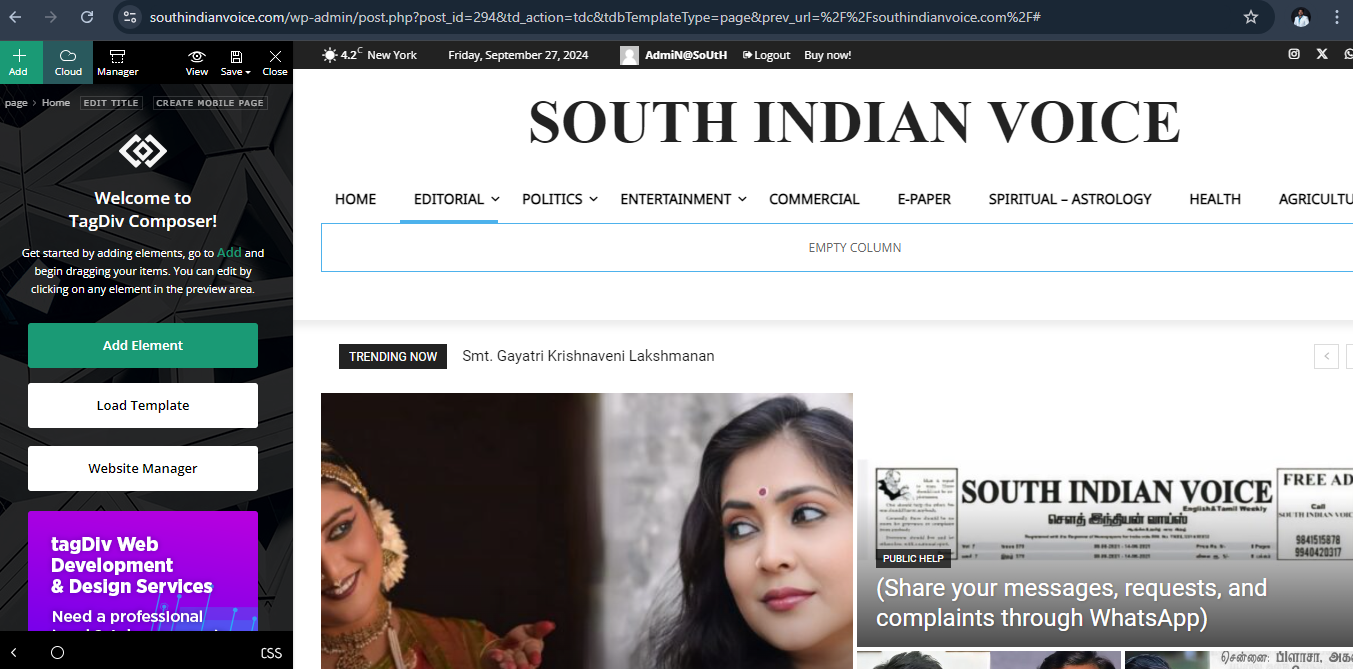
2. Mobile view carousel doesn’t work.
3. Mobile menu doesn’t scroll.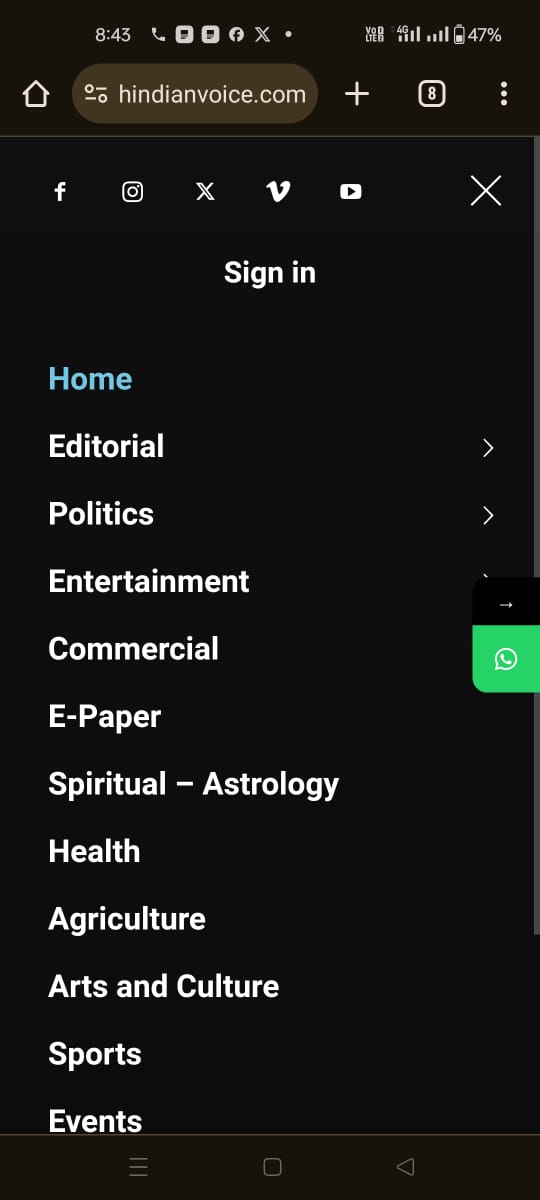
 Bettina
 Hello Jose!
Some are set up in the tagdiv Composer; you need to change that text.
Otherwise, you can try the gTranslate plugin.
Thank you!
Bettina Hello!
You should identify the template you are using on your posts.
We have 3 options available for mobile versions that you can use:
1. Responsive version: A responsive version of your website looks similar to the desktop version. TagDiv Composer is used to edit the page. Click on the mobile viewport: https://www.screencast.com/t/XDQJedlggSB. There, you can see your mobile version and edit or adjust the elements to look better.
2. Mobile pages: https://tagdiv.com/newspaper-10-3-7-update-brings-customizable-and-fast-mobile-pages
3. Mobile theme plugin: The Mobile Theme is a performance-optimized theme included in the main Newspaper theme that only loads on mobile devices. It comes with its own templates and designs for pages, posts, categories, etc., so your current templates from the desktop theme will get converted to the mobile theme layout. Please see https://forum.tagdiv.com/the-mobile-theme/ and https://forum.tagdiv.com/mobile-theme-introduction/ for more information.
A full explanation is here: https://www.youtube.com/watch?v=SpGkOnJeNZY
If you need to use mobile version 1 or 2, then you need to uninstall the Mobile Theme plugin and AMP.
Please note that you need to use cloud templates to edit them with the tagDiv Composer.
We recommend using cloud/PRO templates to have the possibility to edit them with the TagDiv Composer, which contains a lot of functions and features; please check our tutorial here: https://forum.tagdiv.com/tagdiv-composer-tutorial/
More documentation about the cloud templates is here:
– https://forum.tagdiv.com/cloud-library-templates/
– https://forum.tagdiv.com/design-post-pages-using-cloud-library-templates/
– https://forum.tagdiv.com/cloud-library-category-templates/
Thank you!
Bettina Hello!
I recommend using the Gutenberg editor.
You can create a form for that using the tagdiv Composer: https://forum.tagdiv.com/create-frontend-submission-form/
Thank you!
Bettina Hello!
Please note that you need to use cloud templates to edit them with the tagDiv Composer.
We recommend using cloud/PRO templates to have the possibility to edit them with the TagDiv Composer, which contains a lot of functions and features; please check our tutorial here: https://forum.tagdiv.com/tagdiv-composer-tutorial/
More documentation about the cloud templates is here:
– https://forum.tagdiv.com/cloud-library-templates/
– https://forum.tagdiv.com/design-post-pages-using-cloud-library-templates/
– https://forum.tagdiv.com/cloud-library-category-templates/
Thank you!
 rafinhasousasantosrss
olá, estou tentando inserir alguns anuncios no meu site usando o tagdiv composer, porém o link não fica salvo, somente a imagem. quando eu clico em outra parte do site e, logo depois, volto no anuncio, o link ja não está, somente a imagem, mesmo eu tendo clicado em salvar. antes desse problema, não estava aparecendo nem a imagem, ai resolvi desativar o elementor, e logo após apareceu a imagem, porem continua com esse problema de não salvar o link.
 simchris
 Did you read the installation instructions included with theme?
You need the TD Composer plugin included with theme in order to use the page builder. You need to install that from the theme panel, or from the all files download zip, and do via FTP.
You might find this useful: https://forum.tagdiv.com/whats-included/
(I don’t work here.)
-
This reply was modified 2 years by
simchris.
simchris  trisquelmedia
https://www.staging4.empresarioseguro.com/
All plugins are disabled except Tag Div Composer Tag Div Cloud..
Why???
 mixalisandrou
 Thank you Calin, I have changed all the values in the css files from 1140 to 1280 and from 1141 to 1281 but it still gets overridden by something.
I believe its some js code that sets the default viewports that I cannot find. If you can please point me to those files, I think I can solve the problem.
The goal is to have the Desktop breakpoint at 1280 instead of 1140, everywhere (including in the composer preview). If it cannot be changed, then unfortunately the theme will not work for our purpose and all the design work will have to be redone on another theme. 🙁
Calin Hi,
The slide is made like that so you can slide/grad left right on the image using the mouse.
here is a topic with a similar question – https://forum.tagdiv.com/topic/about-tagdiv-composer-slider/
Thank you!
Calin Hi mixalisandrou, If I correctly understand you want to change the breakpoint in the theme files, now this is a little over hand because it will be need to edit many files, you should start with wp-content/themes/Newspaper/style.css continue with wp-content/plugins/td-composer/legacy/Newspaper/assets/css
I believe it will be easier to use cloud template and set the row width you want – https://forum.tagdiv.com/tagdiv-composer-tutorial/ – https://tagdiv.com/how-to-add-delete-and-duplicate-row-newspaper-theme/ – https://tagdiv.com/flexibility-rows-columns-newspaper-theme/



