- NewspapertagDiv Composer – Website Manager
- NewspaperWhen tagDiv Composer is Not Working
- NewsmagtagDiv Composer Tutorial
- TutorialsFrom WPBakery to tagDiv Composer
- NewspapertagDiv Composer Tutorial
- NewsmagHow to use the Visual Composer plugin
- NewspaperScroll Animation
- NewspaperSingle External Shortcode and External Shortcode
- NewspaperCredit System
- NewspaperBookmark – Save For Later
- NewspaperFlex Block Builder and Flex Loop Builder
- NewspaperModules Builder in Newspaper Theme
- NewspaperIntroduction to CPT and ACF with Newspaper Theme
- NewspaperCreate a frontend submission form
- NewspaperHow to Use the Tabbed Content shortcode
- NewspaperCreate a form contact page
- NewspaperFilters and sorting for taxonomies
- NewspaperUser review system
- NewspaperCustom Fields Support
- NewspaperWooCommerce: Happy “Add to Favorites!”
 Bettina
 Hello @tagdivnp!
We recommend to use cloud/PRO templates in order to have the possibility to edit them with the TagDiv Composer which contains a lot of functions and features, please check our tutorial here: https://forum.tagdiv.com/tagdiv-composer-tutorial/
More documentation about the cloud templates is here:
– https://forum.tagdiv.com/homepage-how-to-build-and-set-it/
– https://forum.tagdiv.com/cloud-library-templates/
– https://forum.tagdiv.com/design-post-pages-using-cloud-library-templates/
– https://forum.tagdiv.com/cloud-library-category-templates/
The Standard Pack plugin is useful only if you are using the default templates. Otherwise, you can uninstall it.
Thank you!
 Anamaria
 Hi,
I think that I know what the problem is, please edit the cloud template with tagDiv Composer -> https://i.imgur.com/j8YvKks.png click on the block and remove the offset -> https://i.imgur.com/dJ0iFQu.png let that field empty.
Thank you!
Anamaria Hello,
Seems you have the mobile theme and AMP are still activated on the website. Please deactivate those plugins and purge the cache a few times.
Please disable the redirect from the mobile version to amp -> https://i.imgur.com/7Z7V82x.png using that option your visitors will never see the responsive version, only the amp version.
The AMP works better only with the Mobile Theme plugin. From my point of view, if you don’t use the Mobile Theme plugin, then there is no reason or benefit to AMP. Please read all about AMP here: https://forum.tagdiv.com/tagdiv-amp-plugin-tutorial/
It comes with its own templates/design for page, post, category, etc so your current templates from the desktop theme will get converted to the mobile theme layout. Documentation here:
– https://forum.tagdiv.com/the-mobile-theme/
– https://forum.tagdiv.com/mobile-theme-introduction/
Please read all about AMP here: https://forum.tagdiv.com/tagdiv-amp-plugin-tutorial/
Note that you can not customize AMP so much, because it comes with its own design.
There are some settings in the Theme panel -> Mobile Theme and Dashboard -> AMP only.
You can not add a shortcode as in the TagDiv Composer. Please note that you can’t customize the AMP pages with the TagDiv Composer.
Make sure the redirect mobile visitors to amp option is disabled.
Please check this topic where I explained each mobile version -> https://forum.tagdiv.com/topic/mobile-version-not-working-properly-2/
Thank you!
Anamaria HI,
Unfortunately, you can not use it on the Mobile Theme Plugin because it has its own templates and they can not be editable with the tagDiv Composer. There are no other alternatives.
Thank you for understanding!
 daimpa
Hello, I’ve a Newspaper license, I’m waiting instructions on how to switch it from another account to this one.
I don’t understand that much how should I work with the responsive options, and the mobile theme.
I’ve built an homepage with the tagdiv composer. I set things like “columns width”=50%. Now if I resize the window from PC, on smaller window it looks bad. If I enter from mobile, it loads the mobile them.
In order to have my website work 100% with any screen resolution, screen resize etc., should I edit the options of ALL ROWS/COLUMNS/ELEMENTS for ALL the 4 viewport that appear on the top of the tagdiv composer siderbar?
Thanks.
 ionassi
Hi , I’ve designed my single post template but cannot find how to show “custom label” data (found in post editor under post settings / general). How can I show it in my single post view?
Bettina Hello Andy!
Edit the page with the TagDiv Composer and delete the unwanted elements.
We try to reply as soon as possible.
Support Hours (GMT+2)
Monday – Friday:
8:00 AM – 17:00 PM
Thank you!
Bettina Hello @EricPrin!
“Column text” and “text with title” elements have a button called “edit content” and if you click on that button, the WP Editor will open and you can add some text/code/shortcode there. Close the WP Editor from X, save the changes from Composer and view the page to see the changes.
Thank you!
 serene
Dear support
I set 2 post loop element in one page.
one is post type a and another is post type b.
But both are diaplaying same. both are displaying a and b.
Please tell me how to fix it.
Regards
 karlostipo
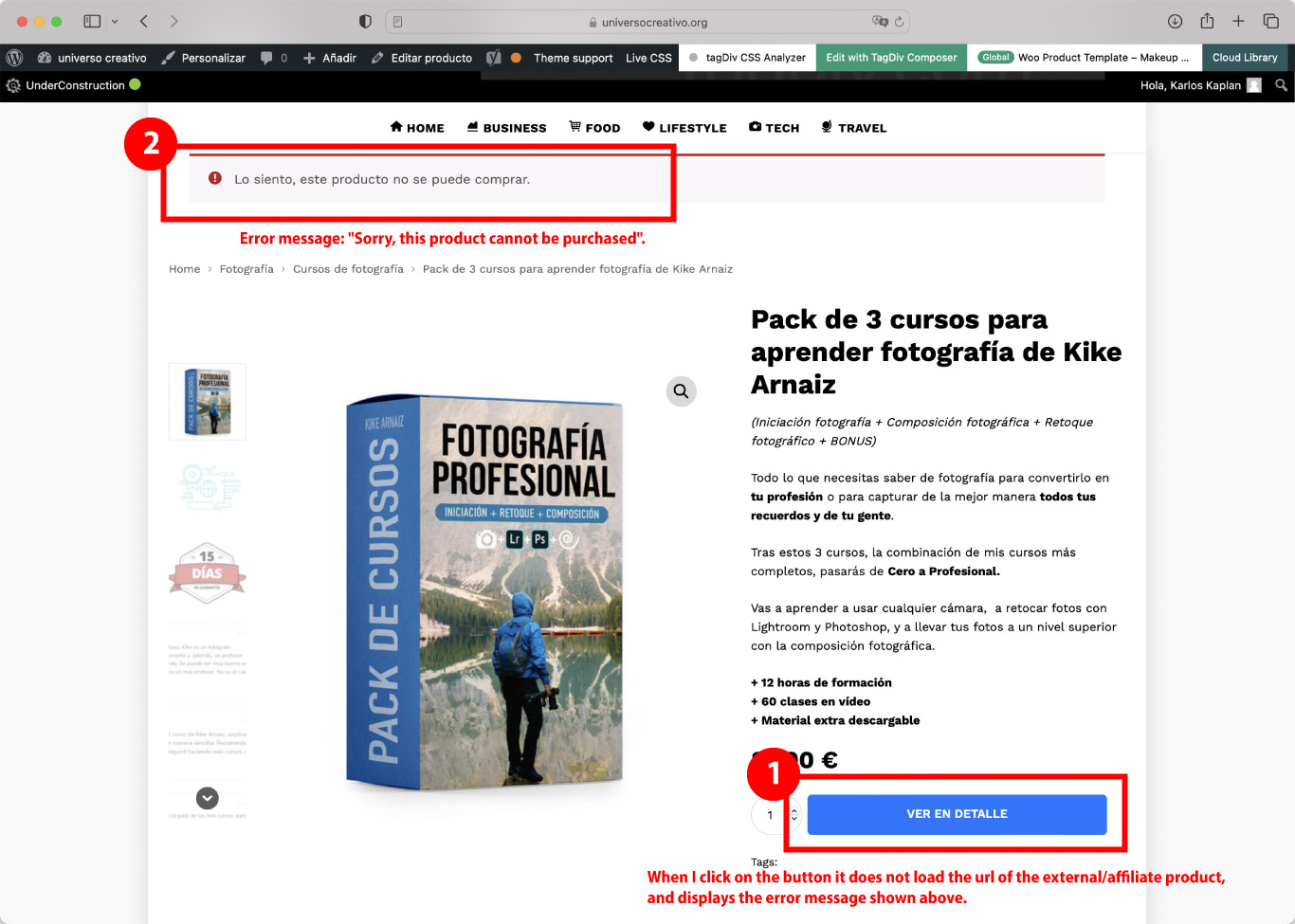
Woocommerce, affiliated/external product: Problem on the product page of WooCommerce, when clicking on the buy button (in my case “ver en detalle”) does not open the affiliate URL that has assigned that product. What happens is that an error message comes up at the top that says: “Sorry, this product cannot be purchased”.
After doing a lot of testing and research, I have found that this error only happens when I have a tagDiv template assigned to the product page. If you don’t assign an existing tagDiv template or create a new template it does work correctly, that is if you leave the default WooCommerce style it does work. This is why it is clear that the problem is in the tagDiv Composer… I consider that it is a serious error because in my store there will only be affiliated/external products… (I attach a screenshot of the error here).
Could you please help me with this issue, or could you check this error and update the theme version soon?
My website is under development so to see the error I can provide you with a username and password to access.
Thank you very much in advance for your help.
Best regards,
Carlos
Bettina Hello G3!
We recommend to use cloud/PRO templates in order to have the possibility to edit them with the TagDiv Composer which contains a lot of functions and features, please check our tutorial here: https://forum.tagdiv.com/tagdiv-composer-tutorial/
More documentation about the cloud templates is here:
– https://forum.tagdiv.com/homepage-how-to-build-and-set-it/
– https://forum.tagdiv.com/cloud-library-templates/
– https://forum.tagdiv.com/design-post-pages-using-cloud-library-templates/
– https://forum.tagdiv.com/cloud-library-category-templates/
The Standard Pack plugin is useful only if you are using the default templates.
When you update the theme, make sure you have the latest update of plugins too.
I would gladly recommend you make a backup and update plugins and the theme via file transfer to the latest update: https://forum.tagdiv.com/how-to-update-the-theme-2/
Thank you!
Anamaria Hello,
You can remove it with right-click -> or selecting the element and with drag & drop place into the deleting red zone from the bottom right of the page => https://i.imgur.com/vkQVCjn.jpg -> https://i.imgur.com/SSxLy2j.png
Thank you!
Anamaria Hello,
I just checked, and if I click on the image the article is open in a new tab, on the title no, so please add the target here -> wp-content/plugins/td-composer/legacy/common/wp_booster/td_module.php and add the code here https://i.imgur.com/mtbsonl.png.
Also, please check this topic https://forum.tagdiv.com/topic/open-all-posts-from-main-loop-in-new-tabwindow/
Thank you!
 Calin
Calin Ok, I understand. However, you have the possibility to add the license to the same forum account -> https://i.imgur.com/DIIC3wu.png -> https://forum.tagdiv.com/newspaper-6-how-to-activate-the-theme/
For the Newspaper theme, you can change the width using tagDiv Composer and stretching the rows -> https://i.imgur.com/CFacOGU.png and all you need is to have set a background image -> https://i.imgur.com/ruXgGdG.png now if you enabled the boxed option -> https://i.imgur.com/MbHgukK.png then all the rows will have the same width and will no longer be stretched.
Therefore, with the Newspaper theme, you can have a boxed version with a background image and you can also have a background image that will not interfere with the content width.
Thank you!
Anamaria Hello,
The tagDiv Composer and tagdiv Cloud Library are the required plugins, so please don’t deactivate them, especially since you are using an element from it; please leave it active, and then this problem will not appear again.
Thank you!
 besthomegear
Our Big Grid flex has failed after installing a plugin (now removed). When I Edit our Home page (only page with Big Grid) using the tagDiv composer, the Big Grid Flex looks fine, but when I turn off the composer, the Big Grid flex only shows the Text, No images, and no layout. I also checked it again, after turning off my WP rocket cache plugin but that hasn’t made a difference. Appreciate your help!
Kevin
Anamaria Hi,
Please disable the CoBlocks, the plugins from the theme are named as tagdiv Composer, and tagdiv Cloud Library.
Thank you!
 smilelondon
 Hi Calin, it is also happening when I am logged in. Also we noticed now, that on Safari only the first slide is showing but not the other ones.
We have checked and emptied caches, but this seems not to help.
It also does not work in incognito mode.
We also completely deactivated WP Rocket our cache plugin but this also did not help
For chrome, the slides were also not showing. But restarting Tag Div Composer (deactivating and reactivating the plugin) did at least make the slides show up again in Chrome.
Many thanks for help
Sven
-
This reply was modified 3 years by
smilelondon.
 alalemanx
I have installed the Newspaper Theme Prebuild Website Reel News, but when I try to edit it with Tagdiv Composer, WordPress crash.
Can you help me?
I attach image with the error displayed.
Calin Hello,
The site is looking like that because some theme plugins are disabled. Please check for tagDiv Composer, tagDiv Cloud Library, and possible tagDiv Standard Pack. Once you identify the plugin that has been disabled, just enable it back and the problem should be resolved!
Let us know the results!
Thank you!
Calin Hi niceguyitachi,
Bettina was referring to the settings that are made on the element from the header that indicates the login/logout element. This one can be edited using the tagDiv Composer -> https://i.imgur.com/2psC6JK.jpg select the header login element and set the text -> https://i.imgur.com/9Mum1zw.png
If this is not what you mean and the problem persists, please provide a few more details and some screenshots.
Thank you!
Calin Hi tenaciously,
I see that you are using standard templates, therefore the links inside the articles will have the access color from the theme panel. Also, another one is the breadcrumb link. For standard templates there are no individual options that will apply only to those elements, so you need to use a custom css or to use a single post template from the cloud, this can be edited using tagDiv Composer.
For CSS you can try this one:
.single .td-crumb-container span, .single .td-crumb-container a, .single a {

color: #de12fe;

}
Just replace the color with the one you like and set the code in the theme panel > custom code> custom css
Thank you!
Anamaria Hi,
First of all, it is not recommended to auto-update any theme or plugin, as there is a possibility that it may cause certain problems with the functionality of the website. Also, it is always advisable to make a backup to all files and databases before updating -> https://forum.tagdiv.com/how-to-update-the-theme-2/ -> https://wordpress.org/support/article/updating-wordpress/
It looks like the tagDiv plugins can’t be installed, like tagDiv Composer and tagDiv Cloud Library, so please check and activated the plugins.
There are also situations where the update does not work properly (due to certain extra plugins that are active, certain restrictions, and server settings), so, please deactivated all extra plugins (if you have WordFence, you need to use the WordFence Assistant to remove it).
Thank you!
 apbforum
 yes, it worked with the tagdiv Composer. Thanks a lot.
Anamaria Hi,
To set the menu on the element, you need to edit with tagDiv Composer, select the viewport on the phone select the mobile menu and set the menu -> https://i.imgur.com/13785vs.png
Thank you!