
- NewspaperAutoptimize Plugin – install and configuration
- NewspaperCache plugin – install and configure
- NewsmagInstall via WordPress
- NewsmagInstall via FTP
- NewsmagInstalling pre-built websites
- TutorialsHow to install Revolution Slider
- NewspaperInstalling Pre-built Websites
- NewspaperHow to Install Newspaper via FTP
- NewspaperHow to Install Newspaper via WordPress
- TutorialsHow to Install bbPress forum
- NewspaperIntroduction to CPT and ACF with Newspaper Theme
- NewspaperHow to edit modules for Flex Block X
- NewspaperWooCommerce: Happy “Add to Favorites!”
- NewspaperWoo Brands
- NewspaperStripe Setup
- NewspaperModal Popup
- NewspaperPayPal Setup
- NewspaperFlex Block Settings Guide
- NewspaperHow to setup the Contact Page
- NewspaperAdd Cryptocurrency Price Ticker Widget
 Simion C.
 Hi,
This could be caused by a plugin maybe, or custom code entered in theme panel or added to the theme files. You could try as a test to disable all your plugins except Visual composer, clear any caching installed and check to see if the problem is fixed. Also go over any custom code you may have used. If you can not find the source of this issue you could try this code for a quick fix – https://www.screencast.com/t/OVgSvguWra9k – https://www.screencast.com/t/enik2Hil8wfs
.td_block_template_9

.td-block-title {

margin-top: 0;

}
Thanks
 Bogdan B.
 Hello,
Thank you for your appreciation.
1) I have tested your site on mac but could not see the line you mention. https://www.screencast.com/t/kHdvVpdbcJUN
2) Our theme has a custom login already which can be accessed on the front-end: https://forum.tagdiv.com/login-how-to-enable-user-registration/ – https://www.screencast.com/t/D0BiMNXRTqyG
3) sorry but there is no gradient color section for the header and footer but you can add a footer background image: https://www.screencast.com/t/rKgVA4TL
For the header it can only be done with custom css.
4) Sorry but only by using the obile theme can you have a separate menu for mobile devices.
5) The quotes can be changed from the fonts option: https://www.screencast.com/t/tcwLRz4daHU
6) and 7) It is ok as there are no restrictions in this regard. It will load all of the elements, yes, but you should not experience drastic loading speed drops. It is recommended to increase your overall loading speed by using this guide: https://forum.tagdiv.com/how-to-make-the-site-faster/ and increase your system status parameters like so: https://forum.tagdiv.com/system-status-parameters-guide/
lease only use wp super cache and these settings: https://forum.tagdiv.com/cache-plugin-install-and-configure/ if you plan on using a cdn server: https://forum.tagdiv.com/cloudflare-cdn/
8) This topic explains how to use speedbooster together with other plugins: https://forum.tagdiv.com/topic/tinymce-advanced-and-other-various-disabling-speed-boster/
9) Please provide an example as the image is not working
10) The validator also provides errors for ALL of the well known sites including google, facebook, Amazon, Yahoo, etc. We have stopped trusting it 🙂
Thanks
 The Irish Place
 Hi,
I have followed your instructions regarding caching and re-installing the settings for Instagram but to no avail. See the example at the following link…
http://www.screencast.com/t/ALhscg95
If you visit the website http://www.theirishplace.com you can sse the issue live.
Regards
Fergus Walsh
Simion C. Hi,
You can enable the weather element to be displayed in the top header menu like this – https://forum.tagdiv.com/weather-widget/ or use it as an widget on your pages and sidebars. If you are trying to use other weather implementations follow the instructions provided along with that plugin or code for the installation. Please note that not all plugins are compatible with the theme, and some may not work properly.
Thanks
 Amit Jain
I have installed latest version of newspaper theme.
1) Trying to install Newspaper Default Demo ‘Only Settings & No Content’ however it installing demo with full content. Tried other demos as well however same thing is happening.
2) Also the Generate Access Token feature on Social Counter Widget is not generating an access token.
Please check at your end and do the needful asap.
 fenomeno0chris
Hello to the whole Newspaper/Newsmag team!
First I want to say, thank you very much for creating such great themes.
After 3 years I decided with my team to change the overall design of my homepage, by buying Newspaper7. The reaction of our readers and users are mostly positive. So thats a good sign.
Of course such a huge change is not that easy to handle and thats why I still have some problems and question, which should be solved.
All problems occur on the latest version of Newspaper 7.8
1) On my MacBook with the default Safari browser, I often get this annoying and bad looking line through the whole header section. How can I solve the problem?
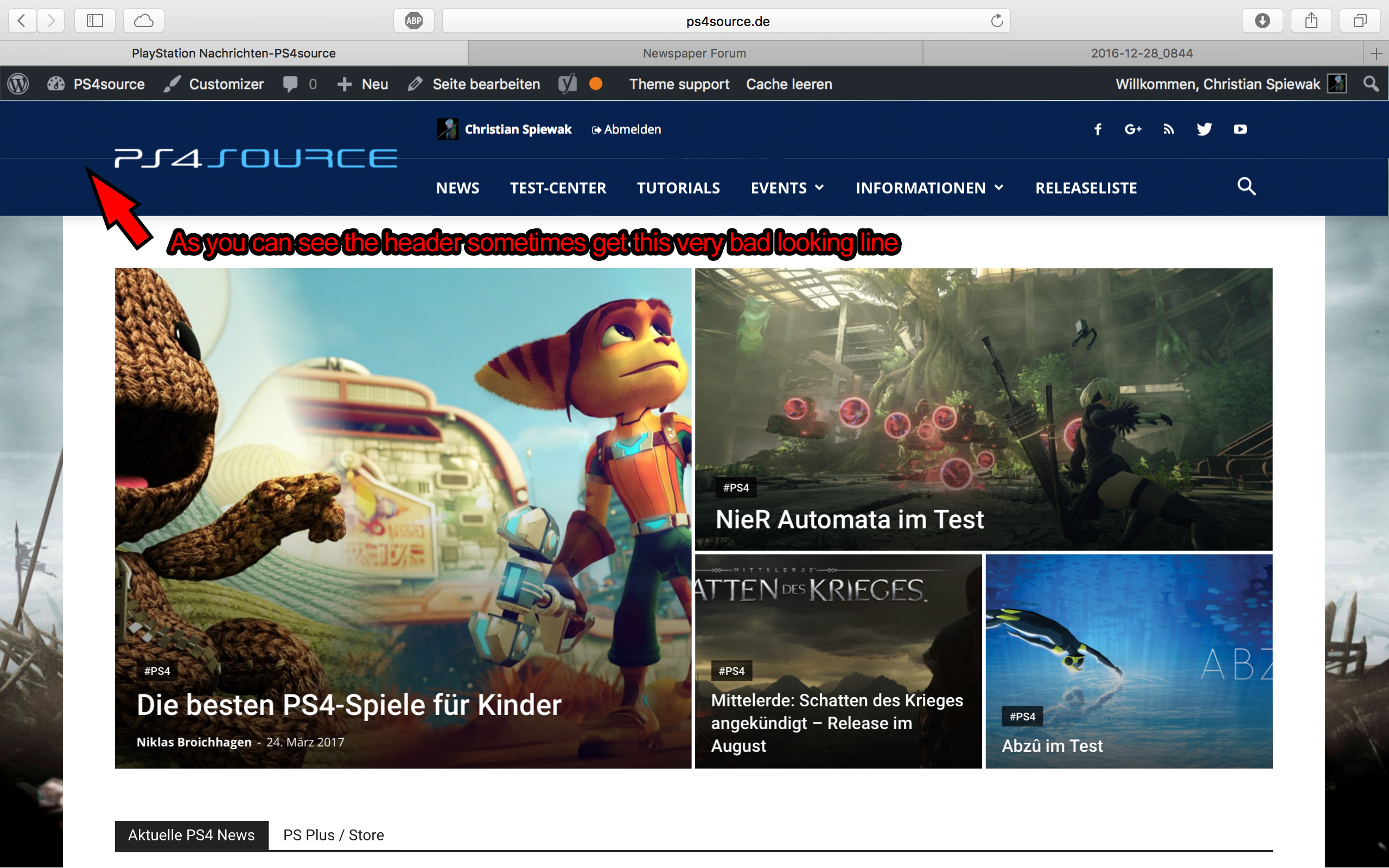
2) Which register plugin should I use? I don’t want to let new users to set a new password on the bad looking interface of WordPress. Im sure you guys know what I mean and have a good recommendation for that. Beside that, what should I use to prevent registrations from bots?
3) Is it possible to have a gradient header and footer, instead of just one color? It looks a bit boring.
4) How can I change the menu just for the mobile page, without using td-mobile-plugin?
5) How can I change the the font style and size of quotes? At default settings it looks way too big (see here)
6) Is it ok too use the responsive options, to create one site with different blocks and grids for mobile and desktop? Im asking cause I don’t know if my site will load much longer, if it has to load information even though there are not displayed. (see details here)
7) My current page speed is a disaster (see here). Why is it so bad, since Im using kraken.io image optimizer and WP Super Cache? How can I improve the score?
8) How can I use td-speed-booster, without uninstalling my plugins? (Disqus Comment System, TablePress, TotalPoll…) I really need those plugins, but I still want to have a fast homepage!
9) If I set [Template Setting->Force Full width->Header Menu] to “No Stretch”, the logo of my site is not at the correct position.

10) validator.w3.org shows, that my page has 33 errors (see here). How can I fix them?
 SpiderSeo
 Hello,
I tried to install two plugins to insert the banners in the center Articles (AD Inserter and WP Simple Adsense Insertion) but, by inserting the shortcode in the article do not work.
Is there any function in the thema that does not allow the use of shortcodes?
Thanks
 bakamann
Hi,
A writer of my website, who has the “Author” role told me that he cannot see the “Post Settings” function of the Newspaper theme.

I have installed the User Role Editor plugin and I have discovered that the function only showed up if they have Publishing post role.


Is there any way to change this, because I don’t want any of my writers to publish prematurely any of unchecked posts.
Thanks.
 Web_Piri
 Dear tagdiv;
I have never install visual composer. İ use only super cache plugin.
I have sent mail to you about login now. You can check my settings. Thank you so much. See you
 triowebdev
 Keeping track of tests on this forum thread in case anyone else encounters embed issues.
1) Tried downgrading the dev site from 7.0 to 5.6 and 5.5. Problem still exists after downgrade.
2) Upon suggestion that the problem may go away if demo content is reinstalled, we reinstalled the demo content and settings on PHP 7.0 with no success. We then downgraded to 5.6 and 5.5 and reinstalled the demo content and settings and the problem still exists.
3) We have installed a fresh WordPress website with a clean install of Newspaper theme. Added posts with embeds and all embeds are currently displaying. This is expected as new posts on the live website also embed all social media posts correctly. We expect that the social media embeds may start to fail within the next day or two.
4) We still don’t know what may be causing this problem or if embedded posts or the_content are filtered via a filter or action or in any way that could cause this issue.
 Catalin
 Hello Web_Piri,
First of all, if you are using some untested plugins, please try to disable all of them, leave just Visual Composer to active, clear all your caches and install only the plugins that come bundled with the theme packet and rule any conflicting plugins.
If the problem is still there after this, please send us an email at contact@tagdiv.com with your log-in information (wp-admin) so we can further inspect it closer your setup page.
Thanks for your understanding!
Simion C. Hi,
If you are trying to make this change to Big grid 5 then all you have to do is comment this line of code from that file – https://www.screencast.com/t/hCcFPQKoQj and remove one of the curly brackets like this – https://www.screencast.com/t/bHaLTEWgVE5Q
Or just replace the entire code from that respective file with the one from Bogdan provided above – https://www.screencast.com/t/ypUo4jyra
Try clearing any caching installed if you have done all these modifications as specified and the results are still the same.
Thanks
Simion C. Hi,
The default theme mega menu implementation without any modifications works properly. In your case I can see that the mega menu is not working as intended at the moment. I suggest you try disabling all your plugins except Visual composer and clear any caching installed, maybe some plugins are causing this issue. If the problem is still there and you ruled out the plugins, it means that modifications to the theme files are the cause. You could try to go over them and check for any mistakes or oversights if you have made any changes to the files.
The last step is to reinstall the theme, use only the plugins bundled with the theme and then everything should be displaying properly.
Thanks
 showaltermt
 Please ask someone else to respond. You clearly aren’t reading this or somehow don’t understand.
1. I do not need help installing the demo content.
2. I have installed the demo content.
3. I have the demo content installed from all your demos.
4. The DEMO CONTENT from your DEFAULT DEMO is MISSING CONTENT.
5. This is a problem on your end, not mine.
6. Go here https://demo.tagdiv.com/newspaper/
7. Click the FEATURES link in the menu.
8. All the content in that drop down and any sub drop down is MISSING IN YOUR DEMO CONTENT.
9. I didn’t do anything wrong. THE CONTENT IS NOT THERE.
I WANT YOU TO GIVE ME THE ENTIRE CONTENT OF THE DEMO AS THAT IS WHAT YOU SAY IT COMES WITH.
I DO NOT NEED HELP. I NEED CONTENT FROM YOU.
Simion C. Hi,
If you still are experiencing problems with the menu, maybe a plugin could be interfering with this process. Try disabling all your plugins except Visual composer, clear the cache and try to see if the issue is still present. If it is you can try as suggested a theme reinstall – https://forum.tagdiv.com/install-via-ftp/ – https://forum.tagdiv.com/install-via-wordpress/ with the latest version and also use only the plugins bundled with the theme package to test this. Also make sure you have the latest version of WordPress installed.
Thanks
Catalin Hello arslankerim,
I have checked your source page and I saw that you are suing some untested plugins which can interact with the theme core files and cause a lot of unknown issues, like bwp-minify, sorry! You should disable all of them, leave just Visual Composer, clear all your caches and install only the plugins that come bundled with the theme core files and rule out any conflicting plugins.
Thanks for your understanding!
Simion C. Hi,
Unfortunately there is no tutorial or documentation for installing the demos that way. The demos are meant to be installed through the theme panel automatically. Trying to install a demo by parts could be more difficult then the one click default installation.
Just to get an idea, inside the demo folders you can find the homepage layout for example – https://www.screencast.com/t/BPtQEcII that can be used in Visual composer, the demo css and less files – https://www.screencast.com/t/NAiSRWIjn or the settings from theme panel – https://www.screencast.com/t/A754eoeyLT that are imported when you install a demo. But there are more elements that can not be added in a different way, only by installation process through the import feature.
Thanks
Catalin Hello oilwire,
If you want to make a new clean install from scratch you should do it via FTP way because this is the surest method in this regard. Check here -> https://forum.tagdiv.com/install-via-ftp/
Thanks for your understanding!
Simion C. Hi,
At the moment I can see that this is the font and font weight that apply to your post titles – https://www.screencast.com/t/AqktlVQCbbYk
Changes to the font can be made like this – https://forum.tagdiv.com/font-customization/
If you make modifications to the font in theme panel then that should display on the elements in question. Maybe it is a caching issue causing these settings not applying, try clearing any caching installed after you make changed to the font.
Thanks
Bogdan B. Hello,
The requests depend on the number of visitors you have and on the number of complex elements on your site. If you have lots of blocks with pagination and ajax filters, the requests could go up. Please make sure you use a caching plugin : https://forum.tagdiv.com/cache-plugin-install-and-configure/ and a cdn server is also recommended: https://forum.tagdiv.com/cloudflare-cdn/
Thank you!
Simion C. Hi,
Usually these kind of issues are solved by disabling problematic plugins and the modifications to the parameters mentioned above. You could try a fresh theme install with the latest version, maybe something went wrong during the installation process – https://forum.tagdiv.com/install-via-ftp/ and use only the Visual composer plugin provided in the theme package, then make some tests to check if this problem occurs. Only after this consider changing servers, too see if this has any effect in this matter.
Thanks
Bogdan B. Hello,
If you cannot install a demo with content as the guide suggests, please contact us via email at contact@tagdiv.com and provide a link to your site and wp-admin so wer can login and investigate
Also please provide a link to this topic so we can identify you.
Thank you!
Simion C. Hi,
Unfortunately the only available background ad currently implemented in the theme is like this – https://forum.tagdiv.com/background-ads/
If you would like to use a different background ad system, please note that you will have to follow the guides or recommendations of that system or plugin on the installation process. You can search here on the forum for different solutions provided by our users related to this.
Thanks
Simion C. Hi,
Please provide more details about this and how you have come to this conclusion, or by what method of testing. Also provide a link to your website so we can inspect it.
Here are some guides to help you improve your page speed – https://forum.tagdiv.com/how-to-make-the-site-faster/ using the speed booster plugin, and WP Super Cache – https://forum.tagdiv.com/cache-plugin-install-and-configure/
Thanks
 Berbi
BerbiHi there,
Can I install the latest visual composer 5.1 ? Is the theme ready for it or shall I wait for an update ?
Thanks in avdanced :).
