- NewspaperAutoptimize Plugin – install and configuration
- NewspaperCache plugin – install and configure
- NewspaperInstalling Pre-built Websites
- NewspaperHow to Install Newspaper via FTP
- NewspaperHow to Install Newspaper via WordPress
- NewspaperIntroduction to CPT and ACF with Newspaper Theme
- NewspaperHow to edit modules for Flex Block X
- NewspaperWooCommerce: Happy “Add to Favorites!”
- NewspaperWoo Brands
- NewspaperStripe Setup
- NewspaperModal Popup
- NewspaperPayPal Setup
- NewspaperFlex Block Settings Guide
- NewspaperHow to setup the Contact Page
- NewspaperAdd Cryptocurrency Price Ticker Widget
- NewspaperInfinite Loading for Single Posts
- NewspaperThe Newspaper Mobile Theme: Introduction
- NewspapertagDiv Social Counter plugin
- NewspapertagDiv Shop
- NewspapertagDiv Opt-In Builder
 Bettina
 Hello!
You can display also the pages with a flex block: https://prnt.sc/VZ2q_GWxZQtk and use the filter ID to show only the ones you need and the author is appearing there if it’s not hidden.
The design of your templates can be imported from the Cloud Templates. When you install a demo, you can choose with content or not.
Documentation here:
– https://forum.tagdiv.com/cloud-library-templates/
– https://forum.tagdiv.com/design-post-pages-using-cloud-library-templates/
– https://forum.tagdiv.com/cloud-library-category-templates/
Check also our video tutorials here: https://www.youtube.com/c/tagdivThemes/videos
Thank you!
 Anamaria
 Hello,
Please notice that we are using bbPress for creating our forum but it was custom made. For more information about how you can create your own forum, please check here -> https://forum.tagdiv.com/how-to-install-bbpress-forum/
Also, this cannot be edited with the tagDiv composer -> https://forum.tagdiv.com/topic/edit-with-tagdiv-composer-not-showing-on-pages/
Thank you!
 llucson
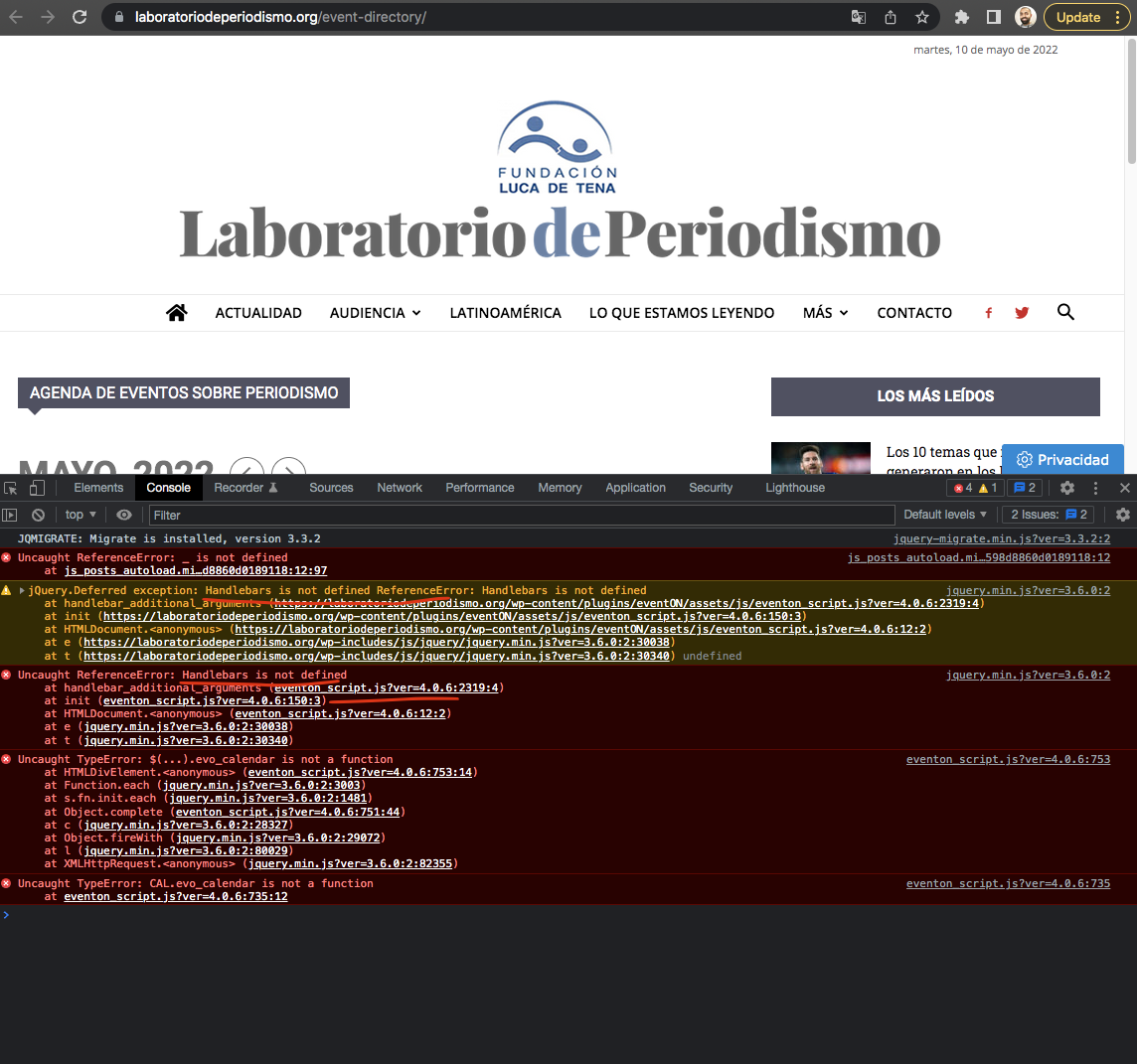
I’ve installed the Eventon Calendar plugin from Envato and it doesn’t work. Eventon support tells me this is a problem of the Newspaper theme, which blocks the handlebar script. Exactly, the Eventon developer says:
“the Newspaper theme is not letting the handlebar script run and eventON need this for it to run”. Here is a pic. https://helpdesk.ashanjay.com/wp-content/uploads/2022/05/Screen-Shot-2022-05-10-at-2.28.20-PM.png
The truth is that if I change Newspaper for another wordpress theme, the problem disappears
How can it be fixed?
 itkhoj
 Please read above, I was already stated that –
Mobile new look/version is seen on desktop (already shared screen shot), but on mobile device it shows old look/version.
I was already cleared all chache from browser, wordpress cache plugin, CDN and from hosting account.
But, If “I deactivate tagDiv Mobile Theme”, then only it shows new changes/look on mobile device.
and When “I activate tagDiv Mobile Theme”, then site shows old version on mobile device.
Pl. Note: I was not created Mobile page with tagDiv Composer and here is the proof of that – https://www.screencast.com/t/RKTEORAy
I was also tried to deactivate all pulgins and activate one by one. Also uninstall Newspaper theme and install it again, but no works.
I also checked on different mobile devices, but it shows old look.
-
This reply was modified 4 years by
itkhoj.
 mytwebsolutions
 Also sometimes getting below errors in footer side
on”],”Please share the reason”:[“Veuillez nous donner la raison”],”Please share which plugin”:[“Veuillez indiquer quelle extension”],”Please try again.”:[“Veuillez r\u00e9essayer.”],”Please upload a file to import”:[“T\u00e9l\u00e9versez un fichier \u00e0 importer”],”Please upload a valid .json file”:[“T\u00e9l\u00e9versez un fichier .json valide”],”Please wait”:[“Veuillez patienter”],”Please wait…”:[“Veuillez patienter\u2026″],”Plugin installed & activated.”:[“Extension install\u00e9e et activ\u00e9e.”],”Poland”:[“Pologne”],”Popular Posts:”:[“Articles populaires\u00a0:”],”Portugal”:[“Portugal”],”Positive”:
Anamaria Hello,
When you install Mobile Theme plugin, your pages will be overwritten by the plugin.
Also, please check this topic where I explained each mobile version -> https://forum.tagdiv.com/topic/mobile-version-not-working-properly-2/
Thank you!
 Simion C.
 Hi,
I believe that what happened there was caused by not deleting the composer plugin provided by the Newsmag theme. The Newspaper theme does use the composer as well, but it is a different version of it.
I was going to delete the composer and install the one provided with the Newspaper theme. I should have suggested you try this, but in case it did not work, I would have continued investigating. However, now that you solved the problem, everything is in order. I see you installed a demo and the website looks and works fine.
Let us know at any time if you need help customizing the demo, or if you have any questions, we will provide assistance.
Thank you!
itkhojRecently I install Prebuilt Website on my site – itkhoj.com, but on mobile device it shows old theme and any update make on this site doesn’t shows on mobile device.
I was already cleared all chache from browser, wordpress cache plugin, CDN and from hosting account.
If I deactivate tagDiv Mobile Theme, then only it shows new changes on mobile device.
 ddigital
 Hi,
Thanks for your reply.
I uninstalled both tagDiv themes and activated another theme.
Then I uninstalled all tagDiv plugins.
I re-uploaded Newspaper and activated it and it worked perfectly.
Some maybe some kind of conflict with NewsMag theme?
It is resolved now though 🙂
 Swann
SwannHello! I am getting an error when trying to install some themes from the Cloud Templates : it states “One of the images failed to upload” and stops installing.
Here’s a screenshot of the error : https://imgur.com/a/Q9Pb4Th
Thanks a lot!
Swann
 pulsonoticias
Hello, since I installed the Molongui Authoring plugin, the Authors teamplate stopped working properly. In the authors template I have a Flex-block 1. With the current Author filter. But it does not work
Is there an alternative? I need to be able to show the entries of each Author
 pixelhead
 So I disabled the mobile plugin and everything looked perfect for a few days and now it has reverted back to the old look with the Romanian news logo. I checked and the mobile and amp plugins are not installed. I am so confused with the Mobil site of this theme. What can I do to at least remove this logo so people are not confused when they get the site on a phone?
Thanks
Chuck
Bettina Hello!
It think this is the Mobile Theme plugin, so you can change the logo from Newspaper -> Theme panel -> Mobile theme -> Header and the copyright text in footer -> subfooter.
You can uninstall this plugin, and it will display the one you created automatically.
Some texts can be translated from Newspaper -> Theme panel -> Translations -> Translations: https://prnt.sc/zSmXIgSMCyCj
Thank you!
Anamaria Hello,
You can use a different template on every article if you use a cloud template. You can duplicate a template, or install a new one and assign on the posts you like or create one from scratch by importing a blank template and build it as you like.
Check this topic: https://forum.tagdiv.com/topic/different-logo-in-categorypage/ ; Here is explained how to duplicate a header correctly and do some changes.
Thank you!
Bettina Hello!
1. It can be found here: https://prnt.sc/zSmXIgSMCyCj . Insert a space in the right side.
2. I can not see it on your website.
3. It should be the category. This element seems to be a flex block. Please check this guide and find out how you can edit the elements there: https://forum.tagdiv.com/flex-block-settings-guide/ Font color settings are in the Style tab of Flex block element. You can remove that 0 from here: https://prnt.sc/kblTZMEOHfOF
4. Make it global from Dashboard -> Cloud Templates.
5. I’ve checked your website and it is working well. Please delete the cache from your browser, uninstall the cache plugin that you use and try again in an incognito window.
Thank you!
Bettina Hello!
You need the Standard Pack plugin if you use the default templates. Otherwise, you can uninstall it.
We do not encourage you to use the Standard Pack plugin with the default template
We recommend to use cloud/PRO templates in order to have the possibility to edit them with the TagDiv Composer which contains a lot of functions and features, please check our tutorial here: https://forum.tagdiv.com/tagdiv-composer-tutorial/
Documentation here:
– https://forum.tagdiv.com/cloud-library-templates/
– https://forum.tagdiv.com/design-post-pages-using-cloud-library-templates/
– https://forum.tagdiv.com/cloud-library-category-templates/
Check also our video tutorials here: https://www.youtube.com/c/tagdivThemes/videos
Anyway, this issue has been discussed already here, please check:
https://forum.tagdiv.com/topic/excessive-css/
Thank you!
 PeterNolan
Hi All,
I have 8 sites running newspaper.
On one I have just installed on the categories it groups the posts into 10, leaved 2 blanks, and then groups the next 10.
I want it to appear like this one where there is no grouping at 10.
https://www.instantbi.com/category/topic/etl/
Can anyone tell me where the setting for 10 as the default number of posts to put into a category and then regroup is?
I can’t remember where it was as I set that years ago on the IBI site I am mentioning.
I have set category template style 3 and disabled top posts on both sites but can’t figure out where that grouping of 10 setting was.
Thanks
Peter
 awomanpresident
Hello, I’ve read the support threads but I wanted to make my own.
I’ve used this theme on several different sites and this is the first site I’ve ever encountered the theme panel not saving. And I’ve used the same hosting company before.
I installed the theme demo of newsmag but without the content, so the design only. Then I am using WPBakery Page Builder. I use the wpbakery page builder on this theme and have never had issues before.
It says there’s a yellow icon and the memory limit is 40 and it suggests 256.
Already deactivated plugins and did suggestion with wordfence, both deactivating it completely and setting it on learning mode.
My questions are:
Is the memory limit the issue? And I need to increase the memory to 256?
If I call the hosting company, what specifically do I ask them to change in regards to this issue?
Thank you.
 terry.bettendorf
Hello –
Thanks so much for your assistance in advance, really appreciate expertise of TagDiv and the community. 🙂
I’m experiencing an issue where the header is overlapping elements (e.g. header text) of the main content area as well as sidebar (e.g. header text) on certain pages. So far, I’ve seen this on Posts pages as well as Search results page. It seems to happen on desktop view only, not mobile.
My WP install and theme should be very clean, have basic plugins and have no customizations or anything else complex.
 idardigital
MY PAGE IS renevicentecasas.com
I have bought it and put the code and it does not activate, and installed and followed all the steps. and to test if it was my wordpress or cpanel and installed other themes and they work perfectly
 samiullah
 Hi,
Thanks for replying but shoetcodes doesn’t work at all in any case after installing and activating theme.
Even it doesn’t work when I create a page witb default wp editor.
Thank you
 artsetsu
 Hellow,
I uninstall the mobile theme plugin and now the like button show.
But i need the mobile theme plugin please suggest the best solution.
 retvly
 the clean installation didn’t help, all issues still exist
the ads code was an example, I need to add my own codes,
my own optimization which fits my needs
If it’s not possible, diable my license and refund my payment
I don’t need this theme anymore
Anamaria Hello,
From what I saw and from the other topic you added code in the theme files, that’s why you get these errors.
I recommend is to do a clean install, without changes in the theme files (to reinstall the theme).
Our theme is a frontend theme for most of the elements and changes, you’ll need to use the tagDiv Composer to edit the pages and templates for posts/categories, etc => https://i.imgur.com/I3OUYxr.jpg -> https://i.imgur.com/mMrEufY.jpg from the frontend, no in the code -> https://www.screencast.com/t/LDdokrHPl
The theme can be used on RTL format in frontend using the tagDiv Composer and cloud templates (not editing the theme files)
For example, to add the code for ads in the header, you need to do it like in this video -> https://www.screencast.com/t/NFYQ9zfkB0Kz
The ad box has 3 sections for ads: using theme panel ads -> https://i.imgur.com/KFa9ibl.png, using images/banners -> https://i.imgur.com/MfAPTaE.png and custom code -> https://i.imgur.com/2rh8SuD.png save it and will appear on the post (you can set a shortcode like a shortcode from adrotate plugin or other plugins)
Also, on our channel https://www.youtube.com/channel/UCOT1RiNysIPCTPSnVZskwtQ, you can find more videos that can help you and documentation https://forum.tagdiv.com/newspaper-theme-documentation/ and you can ask us here on the forum or email if you have any questions.
Thank you!
 justmedde
Hi,
I installed a cloud template on justmed.de but can’t seem to find the option to remove the newsletter modal popup.
Where can I remove it?
Thanks!