- NewspaperAutoptimize Plugin – install and configuration
- NewspaperCache plugin – install and configure
- NewsmagInstall via WordPress
- NewsmagInstall via FTP
- NewsmagInstalling pre-built websites
- TutorialsHow to install Revolution Slider
- NewspaperInstalling Pre-built Websites
- NewspaperHow to Install Newspaper via FTP
- NewspaperHow to Install Newspaper via WordPress
- TutorialsHow to Install bbPress forum
- NewspaperIntroduction to CPT and ACF with Newspaper Theme
- NewspaperHow to edit modules for Flex Block X
- NewspaperWooCommerce: Happy “Add to Favorites!”
- NewspaperWoo Brands
- NewspaperStripe Setup
- NewspaperModal Popup
- NewspaperPayPal Setup
- NewspaperFlex Block Settings Guide
- NewspaperHow to setup the Contact Page
- NewspaperAdd Cryptocurrency Price Ticker Widget
 smga
smga And when we try to install the plugin, we get the following message:
cURL error 28: Failed to connect to cloud.tagdiv.com port 443 after 10002 ms: Timeout was reached
smgaHello!
Today we discovered we couldn’t log into our website’s control panel. We disabled all plugins (renamed the plugins folder) and were able to log in. After that, we started enabling plugins one by one and discovered a problem: when we enabled tagDiv Composer, the same problem reoccurs.
I can’t reinstall the plugin – screenshot
Can you tell me what to do?
Thanks

 Sam
Sam We’ve detected potential vulnerabilities in installed plugins. Please check them and keep them updated.
Plugin: tagDiv Cloud Library
tagDiv Cloud Library [td-cloud-library] < 4.0
[+] CVE-2025-62032
 Calin
Calin Hi jobothanow now simchris explained a bit about what you need to do if you want to migrate; what would be the order and what needs to be done.
What I want to say in addition is that it is possible that the speed problem is also related to the host you are using, the cache plugin and the settings in the theme. As simchris said, the first thing to consider would be to migrate to a much better host, which provides the necessary resources for your site. Step 2 is to check what exactly on the site is loading slowly, to solve that part. Step 3 a very good cache plugin and CDN.
If the above does not work then the last step would be to migrate to another theme, but when you do this you must take into account that everything this theme offers may not be offered by the new theme, plus if you have a demo installed everything that comes with it will no longer be able to be used with another theme, as a result you will have to make certain edits to layouts, menus … after migrating to another theme.
Calin Hi Sim2,
Yes, you can use the old templates; for this, you just need to make sure that the plugin tagDiv Standard Pack is enabled. This can be installed/enabled from Newspaper > plugins https://i.imgur.com/xRM2JwH.png
Then in the theme panel in the header section for cloud, make sure is set the -no template- and choose the header style you need (i think is style 1) – https://i.imgur.com/QFTEkF2.png
Thank you!
 simchris
 Probably want to migrate site to new hosting first using any of the modern host-provided move tools. Once moved, you’d then probably look at using something like the newsmag theme. You will need to install the new theme, disable existing plugins, back up working site on new server including server dbase, then activate new theme, then activate new copy of td-composer included with newsmag, then you will need to go in and change settings to preferred default templates for posts, archives; then make a new home page layout using the theme builder.
 pbase
pbaseI have the Today News theme installed, but the mobile headers are not displaying the headers I’ve indicated in the editor.
Our main site is at ourtimepress.com, and the mobile header is supposed to mimic the desktop header in font and color. The screenshots show what I’m seeing in the mobile theme editor, and what I’m actually seeing on a mobile device. I’ve tried everything I can to correct this problem. Nor can I get the correct author to display on the mobile page. Please advise.
What I’m seeing on the editor: https://ibb.co/hJ2VFmWw
What I’m seeing on a device: https://ibb.co/Pv8YXgyz
Calin Hi,
VERY IMPORTANT! If you have install a pre-built website with content. The pre-built website content added by the pre-built website install (pages, articles, categories, theme panel settings …) will get removed when uninstalling the theme or switching pre-built websites. If you want to keep the content as your own, please create a copy of the page and use the copy as your content. In case you want to install a PRO demo, what you can do is to get the cloud template and sample pages for that demo from the cloud (without installing a new pre-built website) -https://i.imgur.com/JTmrIeu.png
Also, you can use a staging area where you can make those tests so the main website will not be affected.
Thank you!
 projectsab29
Hi tagDiv Support Team,
I purchased the Newspaper theme from ThemeForest.
My old website and domain have expired, and I no longer have access to that installation.
Because of this, I cannot activate the theme on my new WordPress site.
Please reset/unlink my Newspaper theme purchase so I can activate it on the new domain.
ThemeForest Username: projectsab29
Purchase Code: Will share privately if required
Old Domain: Expired
New Domain: http://www.clystronix.com
Thank you!
 thesenegambiao
Hello,
I am using the Newspaper Theme on my domain:
https://thesenegambiaobserver.com
I am facing a major problem:
Whenever I try to edit any page with tagDiv Composer OR open the Cloud Library, it shows a 404 page.
I have tried the following steps already:
1.Regenerated permalinks (saved twice)
2.Deactivated all plugins, only Newspaper Theme plugins kept active
3.Switched to default .htaccess
4.Increased PHP limits:
5.max_input_vars = 5000
6.memory_limit = 256M
7.Cleared CDN and browser cache
8.Disabled RankMath SEO plugin
9.Tried switching to parent theme only
10.Deleted custom code from functions.php
11.Reinstalled tagDiv Composer and Newspaper theme
But the problem continues:
Cloud Library always returns 404. Nothing loads.
Please help me check what is blocking the tagDiv Cloud Library from loading on my site.
If you need:
– System Info
I can provide it.
Thank you.
 UgMedHub
I cant save edits. first tried it in the theme panel, couldn’t save. Also made some edits on the front page but couldn’t save.
PS: This is a new website, just installed yesterday.
Calin Hi,
I see, unfortunately, the theme does not have an element to just drag it and get the article automatically, but this can be done. Use a single post template, edit it with tagDiv Composer, and at the bottom, set a flex block with the layout you want. After that save it. Install ACF plugin and create a custom field for articles (should be type text), then copy the cf name and on the flex block you have set at the bottom of content in the filter tab set the parameter like this {cf_yourCFname} https://i.imgur.com/V6k6ay9.png after taht just set for articles in backend in the acf field the post id and the block will show taht article. Now in case if you do not want to show anything if there is no id set in the fields, then in the block set in front of parameter value 0 and separate them with , like this 0, {cf_yourCFname}
Thank you!
 toursuk
 Hi Calin,
So for weeks now, I have followed the guidance of and troubleshooting using the above article and these Newspaper Docs: https://forum.tagdiv.com/general-options-may-interfere-newspaper-theme/ https://forum.tagdiv.com/tagdiv-composer-not-working/ https://forum.tagdiv.com/requirements-for-newspaper/ https://forum.tagdiv.com/cache-plugin-install-and-configure/ https://forum.tagdiv.com/how-to-make-the-site-faster/ and although I learnt about not loading unused CSS & JS resulting in increased page speeds, the Wp Editor is still hanging :(.
I have updated the /wp-content + /wp-content/plugins .htaccess files accordingly, checked the php.ini file, changed the object cache plugin, checked the apache error logs, ran multiple diagnostic checks on the server configuration and still the WP editor hangs and I am exhausted on this.
Can someone from your team take a look for me please?
Thanks.

 icedge
Hello,
I just saw this article : https://forum.tagdiv.com/adding-multiple-authors-articles/
I have tried to install this free plugin and set two authors for my article and everything is working fine, but i need one adjustment that i hope anyone can help me. I want to have for all authors to have profile picture shows up.
Now only first author picture shows and the second is only the name. I want to show all authors photos.
Please see the screenshot of what i want to achieve : https://www.awesomescreenshot.com/image/57512759?key=c972b54fd868e96efc8183ec2f2289ac
 newspatron
Hello Team,
I’m running a local development environment of my production site newspatron.com using Docker.
The site and database were cloned from the live website.
Theme + required plugins are installed and activated:
Newspaper theme 12.7.3 (active)
Newspaper Child theme
td-composer 5.4.2
td-cloud-library 3.9.2
td-standard-pack 2.7.1
td-social-counter latest
Everything is working except:
❌ “Edit with TagDiv Composer” button is missing
❌ TagDiv frontend editor won’t load
⚠ Editing a page only shows a blank white screen
This happens only on the local site.
The live site works perfectly with the same setup.
Other info:
Local URL: http://newspatron.local
Database cloned from Jetpack backup
wp_debug enabled, no TagDiv-specific errors yet
Capabilities granted using WP-CLI
Request:
👉 Please provide any additional required settings, database flags, or licensing constraints needed to restore the TagDiv Composer button and frontend editor in a local dev environment.
Thanks.
Calin Hi Claudio Souza, how are you?
I believe you are referring to this section – https://i.imgur.com/jhItDSn.png right? I se that there the elements are one under the other and normally should be one beside other. Unfortunately, only changing the page, I do not know exactly what settings are there. If you can contact us via email at contact@tagdiv.com and provide temporary WP-Admin access, we’ll check it and adjust the layout to be displayed nicely.
The child theme is provided with the theme in the theme package – https://forum.tagdiv.com/the-child-theme-support-tutorial/ but can you please let me know for what you’ll like to use it? I’m asking because the pre-built website you have installed can be entirely edited in front-end with tagDiv Composer and is using cloud templates, which can be edited using the builder, without needing to touch the code.
Thank you!
 tbmedia
Hello tagDiv Support Team,
I need to restrict access to Cloud Templates for users with the Editor role on my Newspaper theme website. Currently, editors can still see and edit Cloud Templates in the backend, which I need to prevent.
What I’ve tried:
– Installed “User Role Editor” plugin and adjusted capabilities
– Added custom code to functions.php to remove menu items and capabilities
– None of these solutions have successfully hidden or blocked access to Cloud Templates
What I need:
– Only Administrators should be able to access, view, and edit Cloud Templates
– Editors should be completely blocked from accessing Cloud Templates (both in the admin menu and via direct URL access)
– Editors should still be able to create and edit regular posts and pages
Questions:
1. Is there a built-in setting in Newspaper theme to restrict Cloud Templates access by user role?
2. What is the correct capability or hook to use to prevent editors from accessing the Cloud Templates custom post type (tdb_templates)?
3. Can you provide the recommended code solution to implement this restriction?
Theme Details:
– Theme: Newspaper
– Plugins: tagDiv Composer, tagDiv Cloud Library (both active)
– WordPress Version: 6.8.3
– Theme Version: 12.7.3
Thank you for your assistance!
Best regards
Calin Hi,
There may be a misunderstanding. Changing a template will not delete anything — it will only change the layout and display the elements included in the new template.
However, when you say “template,” you might actually be referring to a demo (a pre-built website). If that’s the case, then the confusion makes sense. A Cloud Template can be applied independently of the demo you’re using, so none of your current content (articles, categories, etc.) will be affected.
But if you want to change the demo itself, then yes, you will lose everything that was installed with that demo.
Thank you!
 developer@idees-digital.gr
Since yesterday, 16/11/2025, my site has been hacked.
My site is a blog with 14,482 articles and 14 page.
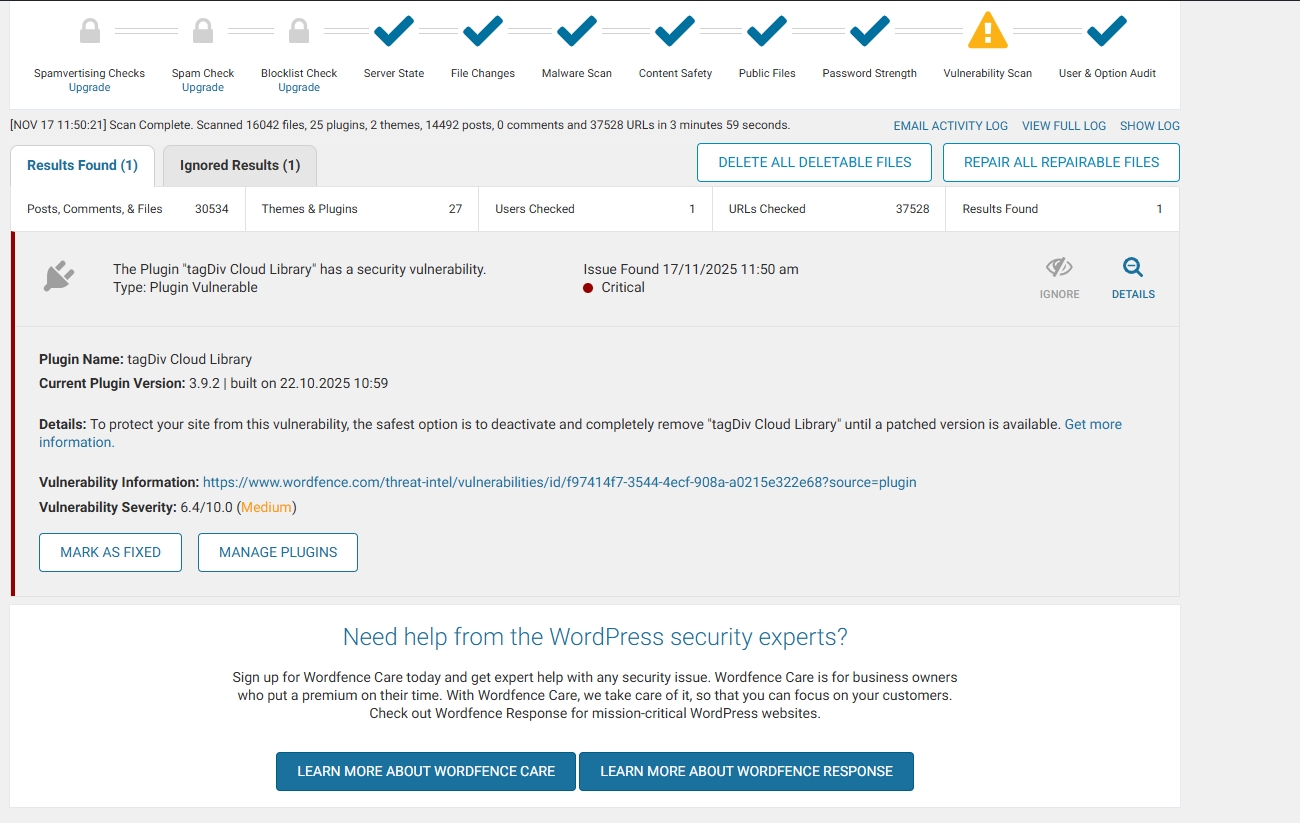
With the help of Wordfence, I have managed to locate all the malicious files and delete or replace them with new ones. The only thing I still cannot address is the tagDiv Cloud Library plugin. Can you help me with this? I have deleted all the files of the Newspaper theme and reinstalled them from scratch, as well as all the WordPress files and the other plugins.
It is very important for me to solve this problem quickly, because the site has very high traffic.
link: https://exostis.gr/wp-content/uploads/2025/11/tagDiv-Cloud-Library.jpg
After scab with Wordfence and the same from malcare
Plugin Name: tagDiv Cloud Library
Current Plugin Version: 3.9.2 | built on 22.10.2025 10:59
Details: To protect your site from this vulnerability, the safest option is to deactivate and completely remove “tagDiv Cloud Library” until a patched version is available. Get more information.(opens in new tab)
Vulnerability Information: https://www.wordfence.com/threat-intel/vulnerabilities/id/f97414f7-3544-4ecf-908a-a0215e322e68?source=plugin(opens in new tab)
Vulnerability Severity: 6.4/10.0 (Medium)
Calin Hi,
I think that you are referring to the fact that you have installed a different pre-built website, right? If so, then all content that has been added with the previous install will be removed https://i.imgur.com/SH6Zg73.png – https://forum.tagdiv.com/installing-demos/
What can be done to keep everything you have and change the website layout is to get only the cloud template you like and keep the current install.
– https://forum.tagdiv.com/tagdiv-cloud-library-plugin/
– https://forum.tagdiv.com/how-use-tagdiv-cloud-library-templates/
Thank you!
 FranceGallCollection
Hello,
I’m reaching out because I’ve been struggling for a while with the integration of my Custom Post Types.
I installed CPT UI on my site and created several post types that will replace the default WordPress categories. I also added multiple taxonomies (Formats, Countries, Years, Labels, etc.) and filled in their corresponding terms.
The filtering works, but only with a full page reload. Like here : LINK
What I’m trying to achieve is dynamic AJAX filtering, without reloading the page, combining several taxonomies at the same time and displaying the results instantly.
So far, I haven’t been able to make this work.
Is there a specific method, option, or configuration flow compatible with TagDiv Composer that allows AJAX filtering for CPT + taxonomies created with CPT UI?
Thank you in advance for your help.

 ruilavrador
Hi, WordPress Manager has been reporting a medium security vulnerability since start of October for tagDiv plugin for the version 5.4.1 or under. WordPress installation is not detecting any updates for the plugin. Has this issue been addressed already? If so, can i update it manually? Thanks.
http://www.infocul.pt / Newspaper 12.7.1 / tagDiv Composer 5.4.1

Calin Hi,
We’re sorry for the issues you’re experiencing. Unfortunately, the MainWP plugin is not officially tested with our theme, so we cannot guarantee full compatibility.
Regarding the problem: in most cases, an AJAX error can occur while installing the theme plugins. When this happens, the website may display shortcodes while you are logged in.
To fix this, please go to Newspaper > Plugins and install the required theme plugins. In about 90% of cases, this resolves the issue you mentioned after updating the theme.
If you need further assistance, feel free to let us know.
Calin Hi,
If the number is the same as before, the only remaining solution is to try disabling, deleting, and reinstalling the theme plugins. This should take no more than five minutes, but if the previous solution didn’t work, it’s possible that this one may not work either.
Thank you!
Calin Hello,
As I understand it, the service you requested is not included in the theme support.
The support includes:
- Guidance on theme features and settings
- Fixing reported bugs / issues
- Product related questions or issues
As mentioned in our support policy – https://forum.tagdiv.com/support-policy-2/
The following issues are not covered by support:
– Server configuration and complex server-side issues
– Customization and installation service
– WordPress general support/how to’s. For this you can search on the wordpress.org forums or check the web for tutorials
– Support for third party software and plug-ins or other issues that are not related to our product
Also, it is not difficult at all to set up the theme on WordPress, activate it and install a demo, it will come as in the presentation. I have already given you the steps above.
Thank you for understanding.
Thank you!