- NewspaperAutoptimize Plugin – install and configuration
- NewspaperCache plugin – install and configure
- NewsmagInstall via WordPress
- NewsmagInstall via FTP
- NewsmagInstalling pre-built websites
- TutorialsHow to install Revolution Slider
- NewspaperInstalling Pre-built Websites
- NewspaperHow to Install Newspaper via FTP
- NewspaperHow to Install Newspaper via WordPress
- TutorialsHow to Install bbPress forum
- NewspaperIntroduction to CPT and ACF with Newspaper Theme
- NewspaperHow to edit modules for Flex Block X
- NewspaperWooCommerce: Happy “Add to Favorites!”
- NewspaperWoo Brands
- NewspaperStripe Setup
- NewspaperModal Popup
- NewspaperPayPal Setup
- NewspaperFlex Block Settings Guide
- NewspaperHow to setup the Contact Page
- NewspaperAdd Cryptocurrency Price Ticker Widget
 Bettina
 Hello!
From what you describe it seems you have installed Mobile theme plugin. If you created the mobile pages with TagDiv Composer, then when you install Mobile Theme plugin, your pages will be overwritten by the plugin.
The Mobile Theme is a performance optimized theme included in the Newspaper main theme and it loads only for mobile devices. It comes with it’s own templates for page, post, category, etc so your current templates from the desktop theme will get converted to the mobile theme layout. For more details, please take a look here: https://forum.tagdiv.com/the-mobile-theme/
Thank you!
 Vlad S
 Hello !
Please send us a screenshot of your System Status Tab and make sure that all the requirements are met as you can see here: https://forum.tagdiv.com/requirements-for-newspaper/ ; You will have to first start looking for a plugin conflict. please deactivate ALL plugins except tagDiv ones, also if you are using child theme or cache plugin, deactivate them, clear all cache and try again.
Also you can try and remove and re-install the tagDiv Composer plugin.
Let us know the results.
Thank you !
 Maten
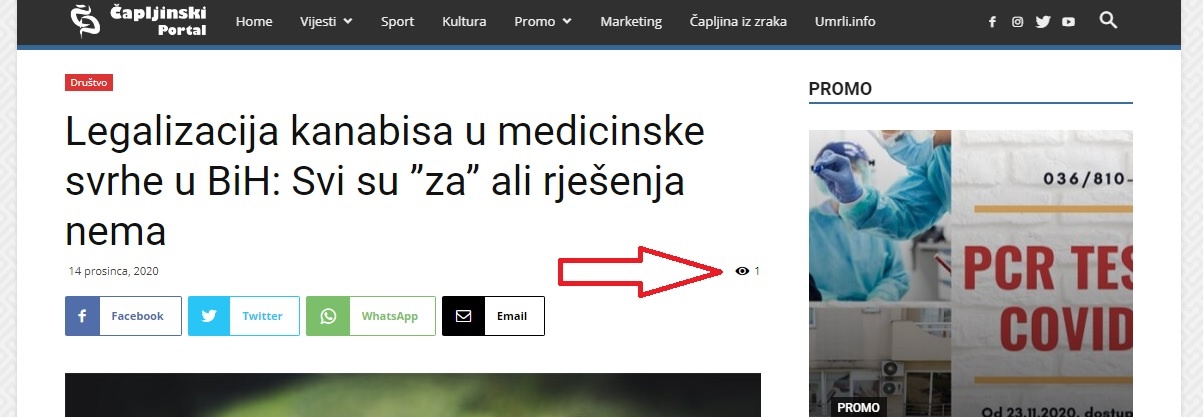
MatenHi, i own your theme Newspaper.
As my website has a large number of visits, I decided to install the WP Super Cache plugin.
However, when I turn on the plugin (WP Super Cache) the article reading counter doesn’t work for me. It always says the same number. (shown in the picture)
http://caportal.net/wp-content/uploads/2020/12/Bez-naslova.jpg
Can this be fixed, when the WP Super Cache plugin is enabled to do my article reading number.
 Calin
Calin Hi SHAM, the pulses pro is a Newspaper demo, not a Newsmag. If you have Newsmag theme, then you can install those demos -> https://i.imgur.com/ZJZXq4c.png
Thank you!
Vlad S Hello !
Please send us a screenshot of your System Status Tab and make sure that all the requirements are met as you can see here: https://forum.tagdiv.com/requirements-for-newspaper/ ; You will have to first start looking for a plugin conflict. please deactivate ALL plugins except tagDiv ones, also if you are using child theme or cache plugin, deactivate them, clear all cache and try again.
Also you can try and remove and re-install the tagDiv Composer plugin.
Let us know the results.
Thank you !
Vlad S Hello !
Please send us a screenshot of your System Status Tab and make sure that all the requirements are met as you can see here: https://forum.tagdiv.com/requirements-for-newspaper/ ; You will have to first start looking for a plugin conflict. please deactivate ALL plugins except tagDiv ones, also if you are using child theme or cache plugin, deactivate them, clear all cache and try again.
Also you can try and remove and re-install the tagDiv Composer plugin.
Let us know the results.
Thank you !
Vlad S Hello !
Please send us a screenshot of your System Status Tab and make sure that all the requirements are met as you can see here: https://forum.tagdiv.com/requirements-for-newspaper/ ; You will have to first start looking for a plugin conflict. please deactivate ALL plugins except tagDiv ones, also if you are using child theme or cache plugin, deactivate them, clear all cache and try again.
Also you can try and remove and re-install the tagDiv Composer plugin.
Let us know the results.
Thank you !
 Robert Turner
After the most recent update and also the previous one, the Composer will not allow us to update any images or change blocks in existing templates. It saves headers and footers but not content. Huge sections are also missing from the block options within the composer, such as the ability to select social media icons for the single post share tool.
I am running the latest WordPress and Newspaper. 512 Meg memory allocated and latest PHP. Tried reinstalling and disabling plugins, no change, tried downgrading WP and Newspaper, no change. We are trying to update templates and remove older blocks to activate a new Pro temple. Hugely frustrating.
 Simone Ferrara
 Hi, me even after the last update the problem was not solved. I also tried uninstalling the social plugin, resetting the instagram key, clearing the cache, etc.
I respect all the requirements of the theme but I still have this problem.
Regards,
Simone
 vanisticz
 In console I’m getting:
Uncaught TypeError: Cannot read property ‘activeEditor’ of undefined
at window.loadIframe (wpeditor.php?wp_path=/home/w….nisti.cz/2021/:167)
at onload (wpeditor.php?wp_path=/home/w….nisti.cz/2021/:270)
Any suggestions? Or should I check by disabling plugins? Tried reinstalling composer, but it didn’t help.
 bravepen_1905
Hello,
Just yesterday after creating a new page with TagDiv, I found out that all the elements created on the new page are displaying on other old pages at the front end. I deleted the new page severally and also uninstalled the Newspaper theme and reinstalled with all the plugins, but the problem persists.
Please guide me on what to do to make sure this problem is ended.
Thank you so much.
 Ranjan001
 I allowed the theme to be installed with the data from the original theme – this must be why all the extra news stories are there. I’ve reinstalled it without the original news stories. Maybe this is why the tweets went out – they automatically go out when new stories are published.
Ranjan001Hi, I just installed a theme and my twitter account has been hacked. Lots of spam tweets that I would never have produced. I have deactivated and reactivated my twitter and the problem seems to have gone away. Not a great beginning! Why did this happen please? Is this normal? What does it say about my security at this stage?
 TobiasForster
Current demo installed: Default
I got two problems with the social media widget which works fine with facebook and twitter to count followers. For my instagram account (https://www.instagram.com/bblprofis.de/) it does not work when i enter the username bblprofis.de. Any ideas for this?
And another question – where can i change the Description of each media behind the logo. For facebook its fans which is ok but for twitter for example it’s “Nachfolger” and that’s because Follower is translated in german language even it’s used as Follower here as well.
Thank you for your help. Kind regards
 IFP News
 Hi @Calin
We need your urgent support.
When in a single post I click on “Edit with tag composer” I see the following error:
Errors at columns elements: 8(models) : 22(dom). The model does not match the content Current state has involved an issue. You could try an UNDO operation (CTRL+Z / CTRL+SHIFT+Z)
I installed a clean WordPress, Added Theme, Imported Pulses Pro Demo (Without Data), imported Post data, added one post for testing (This test post has no description and no tag only has a title)
We don’t have any issue or error regarding Admin-ajax.php
WP_MEMORY_LIMIT is 1000MB
the test post has no description at all, other posts haveing simple text
I tried https://forum.tagdiv.com/tagdiv-composer-not-working/ recommendation none worked
 loslunes
 I had problems with featured images and menu after last wordpress update to 5.6. It was a compatibility problem with the template. Now I have installed new template version 10.3.9.1 and it seems to be working fine again.
 madder
I can’t see the top ‘black admin bar’ with the TagDiv Composer on my homepage. I can see them on other pages though. It gets fixed with I install a prebuilt, but goes missing again when I uninstall the prebuilt. How do I solve this?
loslunes Featured images in home page are shown fine with this last update or still the same problem? Its supposed that new version solve this. It´s true? I don´t want to install, reinstall, downgrade and all this if It doesn´t work…
TobiasForsterHi everyone,
actually i am using a theme and we got lots of visitors on our website. Now we choosed Fast Newspaper theme as our new look and its time to make the change. I just do not want to activate the theme and build the options while visitors are on my site.
Is there a chance to install the new theme and then customize it before activating the design?
Thank you
IFP NewsHi,
When in a single post I click on “Edit with tag composer” I see the following error:
Errors at columns elements: 8(models) : 22(dom). The model does not match the content Current state has involved an issue. You could try an UNDO operation (CTRL+Z / CTRL+SHIFT+Z)
I installed a clean WordPress, Added Theme, Imported Pulses Pro Demo (Without Data), imported Post data, added one post for testing (This test post has no description and no tag only has a title)
We don’t have any issue or error regarding Admin-ajax.php
WP_MEMORY_LIMIT is 1000MB
the test post has no description at all, other posts haveing simple text
I tried https://forum.tagdiv.com/tagdiv-composer-not-working/ recommendation none worked
Calin Hi,
If you are using the mobile theme plugin, you must use the cache settings as in our guide from here -> https://forum.tagdiv.com/cache-plugin-install-and-configure/ also for Autoptimize I do not know the right settings that need to be made to not interfere with the other cache plugin.
Thank you!
 chip303
 Hello and thanks,
I have already found how to install this. For me, if I install my newspaper theme on a hidden, non-public domain (extra domain for test purposes – a maintenance page permanently upstream) for development purposes or if I copy my website to this domain via migration, can I activate it at all? Because there is already an activation for my domain.
Or do I need an extra license for this?
Because many settings are new after all, and one or the other image or advertising banner size may need to be used and installed.
greetings
Thomas
 chazlight1
I have WP Bakery installed and TagDiv Composer deactivated, but on pages in the back-end, it won’t show. Could you help?
Vlad S Hello !
The preview is available here: https://demo.tagdiv.com/newspaper_black_pro/ You can simply install the black demo as you can see here: https://www.screencast.com/t/ernquK1N without the content. you can activate the theme on a staging or development website.
Thank you
Calin Hi chip303, if you want only to see the demo/Prebuilt Site, you can do it by clicking on the one you like from here -> https://i.imgur.com/X0D31Ss.jpg
Also if you want to trey a demo, then it will be better to test it on localhost or subdomain in this way you’ll keep the live website intact. Or if you want to check only some templates, then you can get theme from tagDiv Cloud Library and you can edit all of them with tagDiv Composer.
Hope this will help you!