- NewspaperAutoptimize Plugin – install and configuration
- NewspaperCache plugin – install and configure
- NewspaperInstalling Pre-built Websites
- NewspaperHow to Install Newspaper via FTP
- NewspaperHow to Install Newspaper via WordPress
- NewspaperIntroduction to CPT and ACF with Newspaper Theme
- NewspaperHow to edit modules for Flex Block X
- NewspaperWooCommerce: Happy “Add to Favorites!”
- NewspaperWoo Brands
- NewspaperStripe Setup
- NewspaperModal Popup
- NewspaperPayPal Setup
- NewspaperFlex Block Settings Guide
- NewspaperHow to setup the Contact Page
- NewspaperAdd Cryptocurrency Price Ticker Widget
- NewspaperInfinite Loading for Single Posts
- NewspaperThe Newspaper Mobile Theme: Introduction
- NewspapertagDiv Social Counter plugin
- NewspapertagDiv Shop
- NewspapertagDiv Opt-In Builder
 dennispillai
 Please note, 12 hours passed after email, theme is installed on a live site (not a new site).
 Calin
Calin Hi,
Can you please provide some screenshots? Also please check if tagDiv Composer is enabled, this plugin can be installed from Newsmag > plugins.
Thank you!
 horst
horst1. The design of the mobile menu cannot be modified, its documentation does not explain it well.
2. They fill with options to modify everything and none of them work
3. I need to take the LITTLE I made and install on another domain.
COULD YOU TELL ME HOW TO TAKE WHAT I CONFIGURE TO THE NEW DOMAIN?
I THINK I ALREADY ACTIVATED THE TEMPLATE TO MY CURRENT DOMAIN, WOULD THERE BE A PROBLEM WITH THE LICENSE?
Desktop view, menu
https://prnt.sc/gv-Mhi30fFJS
Internal page mobile version header
https://prnt.sc/AZfCHyTqWh9A
Menu mobile
https://prnt.sc/dTVGa28R9E2S
 Andy White
 Any help with this appreciated. I asked a WordPress expert and he said (since I’d not touched the website config) that the problem was the theme. I can uninstall the tagDiv newspaper theme (here) but it wouldn’t explain why I’m getting 2 menus appearling. I’ve also tried going: Appearance | Themes | Menus – as shown below, but I can’t see any additional menus to remove, only the second one which keeps appearing.
 Gen Fujiwara
It’s been a while. I am suffering from the following problem.
1. Install your favorite cloud template (2 columns)
↓
2. The editing screen of the tag composer is normally 2 columns.
↓
3. I only make simple changes like fonts and colors.
↓
Four. However, when displayed in a browser, it turns into one column for some reason.
* This is exactly the same phenomenon repeated in another two-column template.
* In other words, the sidebar that should be on the right side has moved directly below the post content. why?
I want 2 columns and choose the 2 columns template.
What could be causing this?
 Skincruncher
I have been trying to edit my website with the tagdiv builder after I installed a theme but whenever I click on edit, the page freezes and remains unresponsive for a long tie.
I have tried this for over ten times now. It’s frustrating. I need help urgently.
 karlostipo
I’m setting up my website with the Living PRO template, but I see that the mobile templates were not installed. I tried to install them from the tagDiv cloud templates but unfortunately I couldn’t find a mobile template from the Living PRO template (i.e. with that style), do I have to design the mobile templates from scratch? Isn’t there a faster way to make the mobile templates using all the styles of the templates of the pages already created?
If this theme does not have mobile templates, then the truth is honestly that I am a bit disappointed in general with the Newspaper theme… I bought it because I wanted to set up the website quite quickly and because of the special mobile templates, and as far as I can see not all templates have these mobile templates, right?
Thank you in advance for the help.
Best regards,
Carlos
 Bettina
 Hello @tagdivnp!
We recommend to use cloud/PRO templates in order to have the possibility to edit them with the TagDiv Composer which contains a lot of functions and features, please check our tutorial here: https://forum.tagdiv.com/tagdiv-composer-tutorial/
More documentation about the cloud templates is here:
– https://forum.tagdiv.com/homepage-how-to-build-and-set-it/
– https://forum.tagdiv.com/cloud-library-templates/
– https://forum.tagdiv.com/design-post-pages-using-cloud-library-templates/
– https://forum.tagdiv.com/cloud-library-category-templates/
The Standard Pack plugin is useful only if you are using the default templates. Otherwise, you can uninstall it.
Thank you!
Calin Hi,
When your website has been hacked, then are more steps that need to be done, because most of the times hackers leave a way to can get back on your website.
-> https://www.siteguarding.com/en/what-to-do-if-your-website-has-been-hacked#
To prevent your website to be hacked indeed is not enough only to install the theme, you’ll need to add extra settings and plugins for security. For this you can check this guide:
https://www.hostgator.com/blog/3-easy-steps-that-protect-your-website-from-hackers/
Indeed, Wordfence or other plugins for security are necessary.
I hope this will help you!
 esalinas506@gmail.com
My website originall had tagDiv Mobile Theme & AMP plug in installed. When I would view my website through my mobile phone I was not able to view any pages on the mobile device. I couldn’t figure out the reason behind this, so I decided to deactivate both plug ins & delete them.
When I view the website from the mobile device, the issue is still there. Some of the pages display a “EXIT MOBILE VIEW” and when I select that the Page works. The issue is that I have to click that in order for the page to show.
Some pages don’t display that option, not sure why. I noticed the header menu changes when directed to mobile view, and it shows a LOG IN option even though that option was removed in the settings, and the mobile menu is not there.
Why are the pages not showing on the mobile devices? The plug ins are not installed and deleted, the pages should work.
This is the about us page, the content can’t be viewed on the mobile device & there is no option to exit the mobile view.
https://drive.google.com/file/d/1IxhZa8uGwj4mSdEzuUskhpcn1m_xSv12/view?usp=share_link
This is picture shows the mobile menu, anytime I view a mobile page and I select the menu, I get that page, which is a SIGN IN for WordPress…. this is not something I created.
https://drive.google.com/file/d/1ItOJWxlm7Z96MVXWtJ1jA1Q6lZLlSwcX/view?usp=share_link
This is another page (Privacy Policy) and this page does show the option of “EXIT MOBILE VIEW”
https://drive.google.com/file/d/1J4x4rZXySKByyzC9BsuVbYUtX4SDrtTh/view?usp=share_link
How can I fix this problem?
When I exit mobile view from the browser the URL changes and it ends in /?noamp=mobile#, Keep in mind I don’t have AMP or Mobile Theme plug ins installed, so the links shouldn’t be redirected to anything.
 s_rfe3
I bought a license, install the theme and the child theme on the same domain but it give me ” INACTIVE” massege.
the domain is einnp.net
Andy Whitehttp://www.doogle.com
Couple questions:
– I’ve installed the Newpaper and it worked :- ) I’ve not touched it for a couple of weeks (been busy) but now I get a repeat of the main menu down the page and the rest of the page after it. How do I remove the second (unwanted / repeat) menu?
– Is this forum the best way to raise a case / ticket? I thought a ‘Chat’ widget or similar might be quicker?
NB: Access is provided to the site based on a previous ticket.
Thanks
Andy
Bettina Hello @Youngman !
The issue is probably due to the long contents and stylesheets.
Please note that page speed or optimization is not covered by the support team: https://forum.tagdiv.com/newspaper-theme-support/
I recommend you to use this plugin: https://forum.tagdiv.com/autoptimize-install-configuration/
Thank you!
Calin Hi sonicstadia,
If this is displaying sometimes, but not all the time, then it can be from the cache. Do you have the mobile cache enabled? (https://forum.tagdiv.com/cache-plugin-install-and-configure/ -> https://i.imgur.com/ftWFdTe.png)
Also, if you want we can take a look at this in private via email at contact@tagdiv.com where you can also provide wp-admin access so we can check all the settings and see if there is something that can interfere.
Thank you!
Calin Hi,
The cache plugin is correctly set. I see that you also have the autoptimize plugin, please set it like in our guide -> https://forum.tagdiv.com/autoptimize-install-configuration/
Also, do you use Cloudflare (CDN), if yes, please check it like this -> https://forum.tagdiv.com/cloudflare-cdn/
The wp-rocket can be used too. The users who use it reported a better performance in speed, but this plugin is not free.
Thank you!
 besthomegear
Our Big Grid flex has failed after installing a plugin (now removed). When I Edit our Home page (only page with Big Grid) using the tagDiv composer, the Big Grid Flex looks fine, but when I turn off the composer, the Big Grid flex only shows the Text, No images, and no layout. I also checked it again, after turning off my WP rocket cache plugin but that hasn’t made a difference. Appreciate your help!
Kevin
 sonicstadia
 I checked, all the required plugins are installed and enabled… The issue I’m having right now is just the Mobile Homepage, no matter what I do to fix it, it’s displaying the Desktop site, all other mobile pages are working just fine. I have tried disabling and re-enabling the tagDiv Mobile Theme several times, sometimes it fixes it temporarily, other times it just won’t work. Please help
 smarteheimat
 Hello Anamaria,
I have installed the menu of the Dentist Demo Page, and implemented the anchor links configured as you described.
On the main page, the anchor links work without any problems.
But on some other sides (www.mydomain/blog) the anchor links don’t work and I don’t get redirected back to my main page.
How can this be solved?
Kind regards
Joe
 alalemanx
 Actually all the theme requirements and the system status is ok: https://imgur.com/a/c2ENojO
And I don’t have any plugin other that the ones the theme install:
https://imgur.com/a/mZPW3si
Please help!
alalemanxI have installed the Newspaper Theme Prebuild Website Reel News, but when I try to edit it with Tagdiv Composer, WordPress crash.
Can you help me?
I attach image with the error displayed.
Calin Hello Aditya Goel,
I just checked your website and I see that now you also have the WP-Super-Cache -> https://i.imgur.com/BoGzRih.png please check it to be set like in our guide ->https://forum.tagdiv.com/cache-plugin-install-and-configure/ -> https://i.imgur.com/fBdxPbZ.png
I hope this will help you!
Thank you!
 Anamaria
 Hi,
First of all, it is not recommended to auto-update any theme or plugin, as there is a possibility that it may cause certain problems with the functionality of the website. Also, it is always advisable to make a backup to all files and databases before updating -> https://forum.tagdiv.com/how-to-update-the-theme-2/ -> https://wordpress.org/support/article/updating-wordpress/
It looks like the tagDiv plugins can’t be installed, like tagDiv Composer and tagDiv Cloud Library, so please check and activated the plugins.
There are also situations where the update does not work properly (due to certain extra plugins that are active, certain restrictions, and server settings), so, please deactivated all extra plugins (if you have WordFence, you need to use the WordFence Assistant to remove it).
Thank you!
 Bikul
BikulHello,
when I update the Newspaper theme from 12 to 12.1 (and installing necessary plugins) the website is not as it was before:
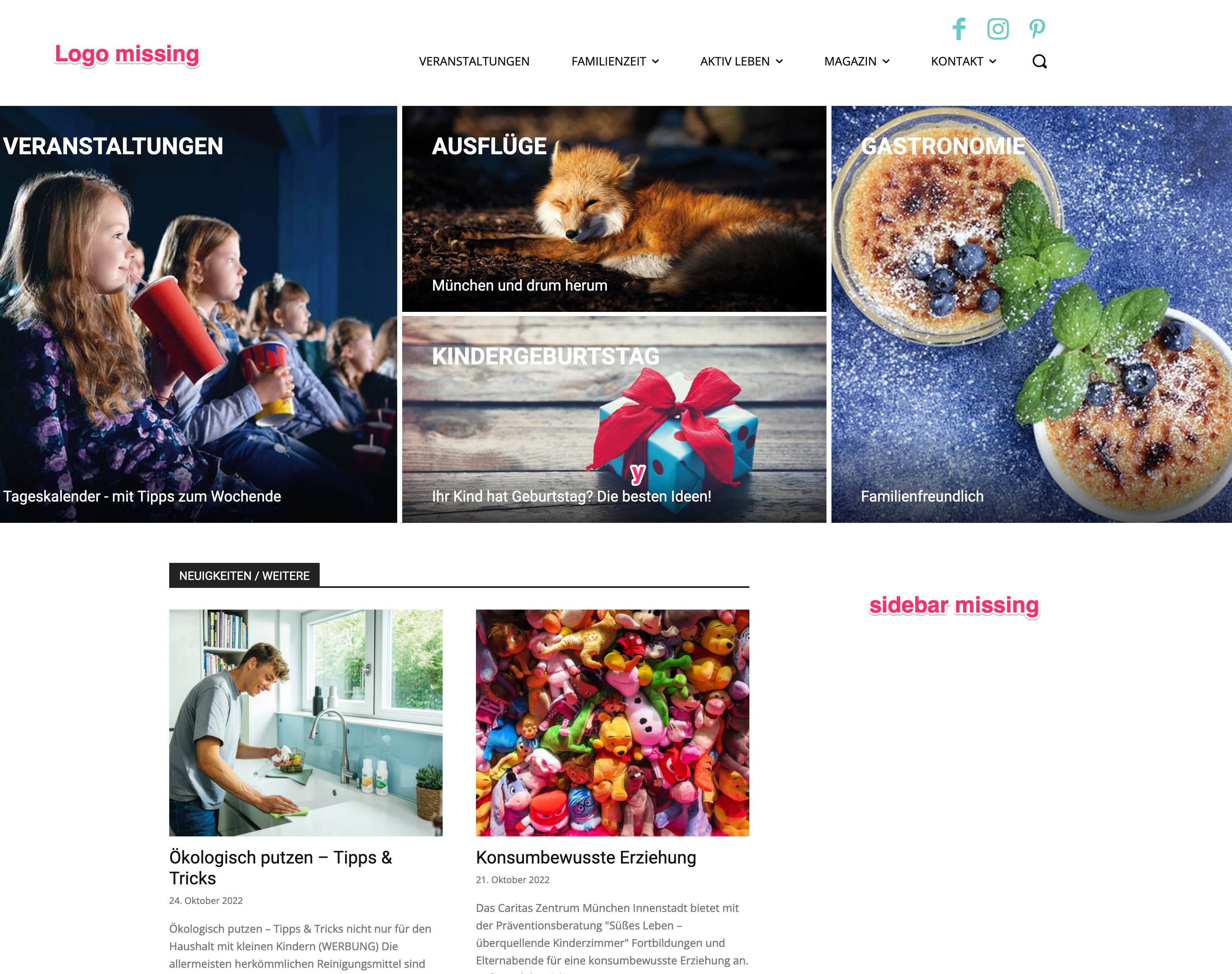
– Logo missing
– Sidebar missing
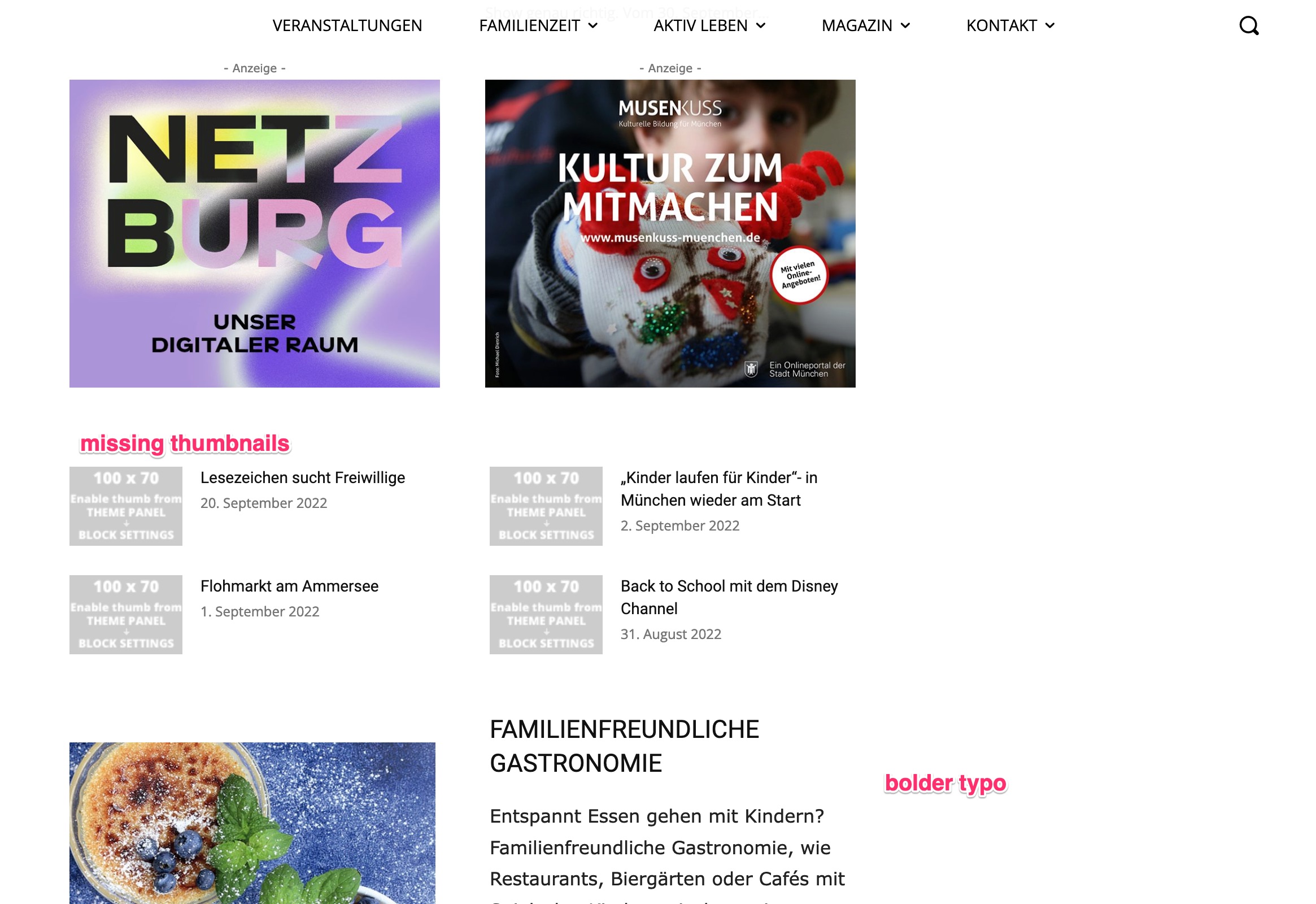
– some thumbnails missing
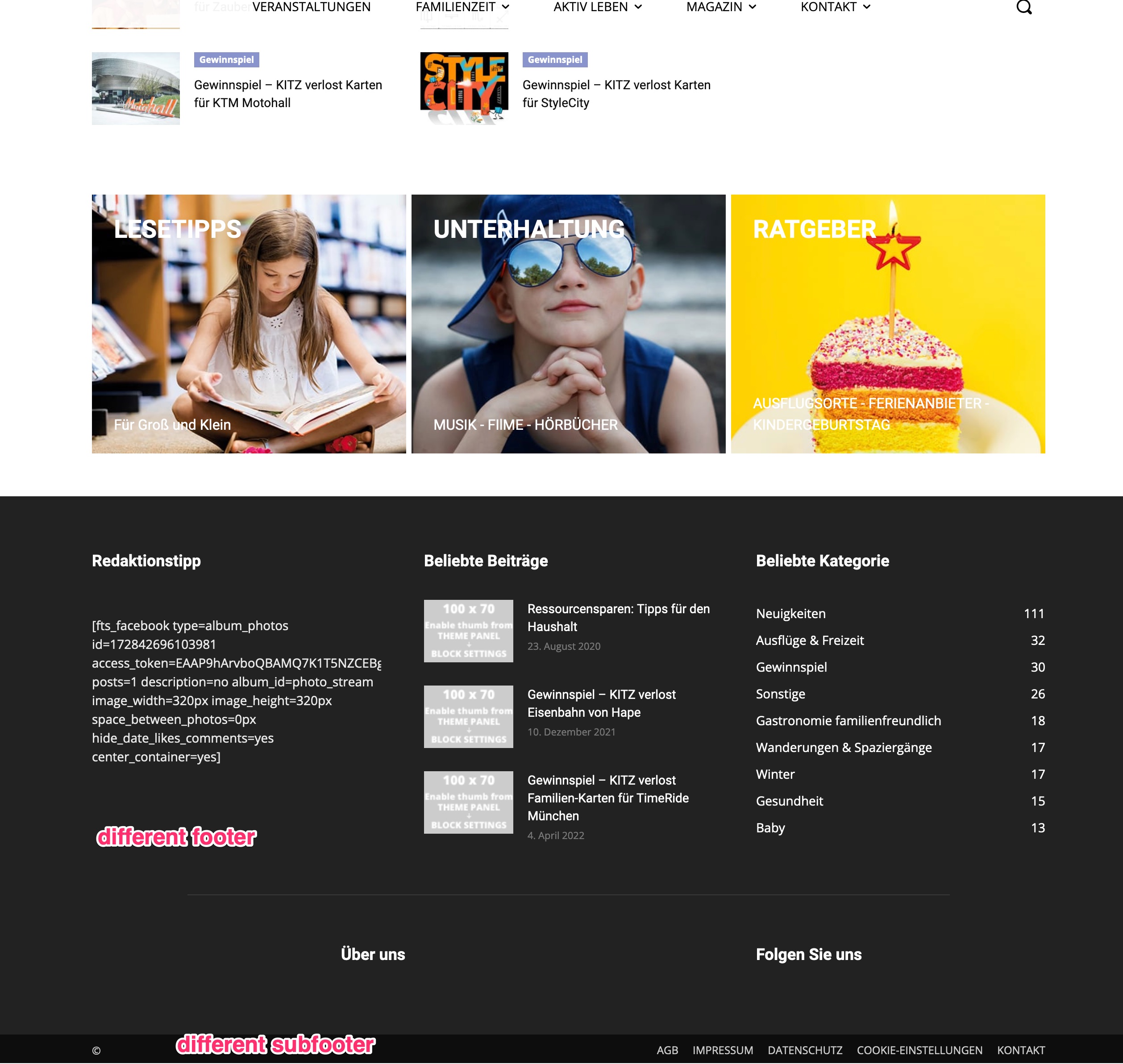
– footer and subfooter are completely different
So I reverted it to my backup-version 12 for now.
What can I do?
Thanks for Help
Bernd
https://kitz-magazin.de/download/12_1_01.jpg
https://kitz-magazin.de/download/12_1_02.jpg
https://kitz-magazin.de/download/12_1_03.jpg
sonicstadia Can’t leave the site looking like that while waiting for help. I have deleted Newspaper theme and re-installed it. The Mobile theme including the problematic homepage is now displaying Desktop site… I think I can work with that until you find a solution for me
Bettina Hello @thasneemklry !
A code in your frontend is appearing only when you have a plugin uninstalled and it should be installed, so instead of the code, it will display the element from that plugin.
Make sure you have the latest update of the theme and plugins too. Check if all the necessary tagdiv plugins are active in the Newspaper -> Plugins. Install the Standard Pack plugin if you use the default templates.
Thank you!