
- NewspapertagDiv Composer – Website Manager
- NewspaperWhen tagDiv Composer is Not Working
- NewspapertagDiv Composer Tutorial
- NewspaperScroll Animation
- NewspaperSingle External Shortcode and External Shortcode
- NewspaperCredit System
- NewspaperBookmark – Save For Later
- NewspaperFlex Block Builder and Flex Loop Builder
- NewspaperModules Builder in Newspaper Theme
- NewspaperIntroduction to CPT and ACF with Newspaper Theme
- NewspaperCreate a frontend submission form
- NewspaperHow to Use the Tabbed Content shortcode
- NewspaperCreate a form contact page
- NewspaperFilters and sorting for taxonomies
- NewspaperUser review system
- NewspaperCustom Fields Support
- NewspaperWooCommerce: Happy “Add to Favorites!”
- NewspaperWoo Brands
- NewspaperModal Popup
- NewspaperShortcodes
 Anamaria
 Hello,
Please edit the page, with tagDiv Composer, select the row on the header main menu and access the tab called CSS where you can change the background color -> https://imgur.com/FZLQPaQ
Thank you!
 Bettina
 Hello!
Please also check the theme panel settings, clear the cache, and observe the results. Make sure you’ve deleted the text or tagline from the TagDiv Composer settings for the logo element.
Thank you!
Bettina Hello!
“Column text” and “text with title” elements have a button called “edit content” and if you click on that button, the WP Editor will open and you can add some text/code/shortcode there. Close the WP Editor from X, save the changes from Composer and view the page to see the changes.
If you did these steps and you can’t see the content on the frontend, then this can be caused if something interfere there when the WP Editor saves the content you added and the process can not be completed. Please check the steps from here: https://forum.tagdiv.com/topic/unable-to-edit-text-with-title/ and also other possible issue as here: https://forum.tagdiv.com/topic/403-error-on-tagdiv-composer-when-trying-to-use-wp-editor-wpedito-php/
Please check your .htaccess file also: https://www.screencast.com/t/MJ78SDZr4Gl -> https://forum.tagdiv.com/general-options-may-interfere-newspaper-theme/
Hope that helps you!
Thank you!
Anamaria Please deactivate, delete and reinstall tagDiv Composer from Newspaper plugins => https://www.screencast.com/t/OrzLvR2j and clear all cache.
Thank you!
Anamaria Hello,
Please make sure you have the latest version of the theme, 11.5.1
Also, please deactivate, delete and reinstall tagDiv Composer from Newspaper plugins => https://www.screencast.com/t/OrzLvR2j and clear all cache.
Thank you!
Anamaria Hi,
Please edit the page normally and change the setting for the page into Template: Default template because I think you have there the setting: Pagebuilder + Latest articles + Pagination and these are not editable by the tagDiv Composer plugin.
The standard pack plugin became deprecated, so I recommend using cloud templates.
Thank you!
Anamaria Hi,
Please try to do the update manually via FTP/cPanel -> https://forum.tagdiv.com/how-to-update-the-theme-2/ and do a full backup of all files and databases before updating.
Also, please try to update the theme without extra plugins activated during the installation, as this may interfere with the installation process.
Also, after the update please make the tagDiv plugins are installed, like tagdiv Standard Pack, tagdiv Composer.
Thank you!
 Calin
Calin Hi samiullah,
I see that you are using the login modal from tagDiv opt-in builder, so you should have 2 pages, one for login and one for registration, do you have them? Also, those link should be display on the bottoms like this -> https://i.imgur.com/J3vvOCX.png yours is like this -> https://i.imgur.com/ZAhuaGX.png (there is no login or register page and only the homepage link). Those pages can be created using tagDiv Composer or you can simple generate one from opt-in builder in subscriptions > pages -> https://i.imgur.com/dpMn7Gg.png
I hope this will help you!
 techwafer
 Hi Team I wanted to try out this new custom post type feature just want to know are these templates or a custom one that I will create through tagdiv composer will be AMP compatible?
Thanks
 Abbaz
AbbazHi,
I’m using a Cloud template for my categories, the problem is, whenever I select a filter on my category template on the composer, it applies to all category pages. I want the same template for all categories but do not want the same content. Here are my categories.https://metaverseunpacked.com/category/metaverse/, https://metaverseunpacked.com/category/nft/
 Zanardi87
Hi to all,
I have newspaper 9. When I go to install some themes and with contents and I click on “Edit with Tag div composer”, it doens’t load the preview I have a white sheet on the right and the menu on the left but I can’t do anything. I have this problem for example with the theme Lifestyle blog and wine aroma, for example. I don’t have this problem if I install the theme “Default demo”.
 zarpe77
when going to edit a post the edit with tagdiv composer is not an option. It is however an option on pages
I believe this may be a reason that my posts are showing up in mobile mode
Can you tell me why this is happening
 denya
denyahttps://imgur.com/a/Q8c7Eq1
Hello. Please, say Me.
How to hide the header ?
or make it unclickable.
in td composer i didn’t find such function.
 metacoach
 I want to give this post a HUGE boost because there is no documentation on here that helps us. PuckWuck – I feel your pain!
I think the majority of us are using a plugin that uses custom post types in one way or another and want to be able to use tag div composer / elements to do things like show ads (among other things) based on on CPT .
I am using an events plugin (Events Manager) and want to be able to serve ads (particularly the header 728×90 placement) to just the events section of my website.
I want it setup so that when I add an event it automatically shows the header Ad that I want to display.
Here’s a video of what I want to achieve.
https://www.dropbox.com/s/7nj4s61e1fxfj8w/cpt-events.mp4?dl=0
Can you please help?
If any other users have found a solution I’m all ears!
 Rhonda
I am getting an error message on my homepage and am unable to edit the content using Tagdiv Composer. The message is:
Errors at columns elements: 3(models) : 6(dom). The model does not match the content Current state has involved an issue. You could try an UNDO operation (CTRL+Z / CTRL+SHIFT+Z)
 cdiver
When editing pages on the my website w/ tagDiv composer – it takes forever for that editor to load. Any recommendations on how to speed this up?
Bettina Hello!
Edit the pages with the TagDiv Composer and check in the Style tab of the elements and you’ll find this option here: https://prnt.sc/fEFZONNgMAgG
Thank you!
Bettina Hello!
We have 3 options for mobile versions that you can use:
1. Responsive version: A responsive version of your website looks similar to the desktop version. Edit the page with TagDiv Composer. Click on the mobile viewport: https://www.screencast.com/t/XDQJedlggSB; there you can see your mobile version and edit or adjust the elements to look better.
2. Mobile pages: https://tagdiv.com/newspaper-10-3-7-update-brings-customizable-and-speedy-mobile-pages/
3. Mobile theme plugin: The Mobile Theme is a performance-optimized theme included in the main Newspaper theme that only loads on mobile devices. It comes with its own templates and design for pages, posts, categories, etc., so your current templates from the desktop theme will get converted to the mobile theme layout. Please see https://forum.tagdiv.com/the-mobile-theme/ and https://forum.tagdiv.com/mobile-theme-introduction/ for more information.
A full explanation you can find here: https://www.youtube.com/watch?v=SpGkOnJeNZY
You can choose to use whichever one is more affordable and useful for you.
If anyone doesn’t fit as you created, then make a test and deactivate ALL plugins except tagDiv ones. Also, if you are using a cache plugin, deactivate it, clear all cache and try again.
Note: If you want to use version 1 or 2, then you need to deactivate the mobile theme plugin and see the results.
Thank you!
Anamaria Hello,
Please provide the link to our website, to inspect it.
Also, please provide screenshots of how it looks in composer.
Thank you!
Anamaria Hello,
Please deactivate, delete and reinstall tagDiv Composer and tagDiv Cloud Library from Newspaper plugins => https://www.screencast.com/t/OrzLvR2j and clear all cache.
Thank you!
 sejpost
Lately, my site is loading more and more slowly. My host investigated and said this:
Using a query analyzer, it’s stating the tagdiv composer plugin the cause of many slow queries. You can email them the following screenshot. When the pages are cached, it loads quite quickly. However, when they are uncached and being loaded for the first time, it takes a long time for the pages to load. Even uncached, it should not be taking that long to load.
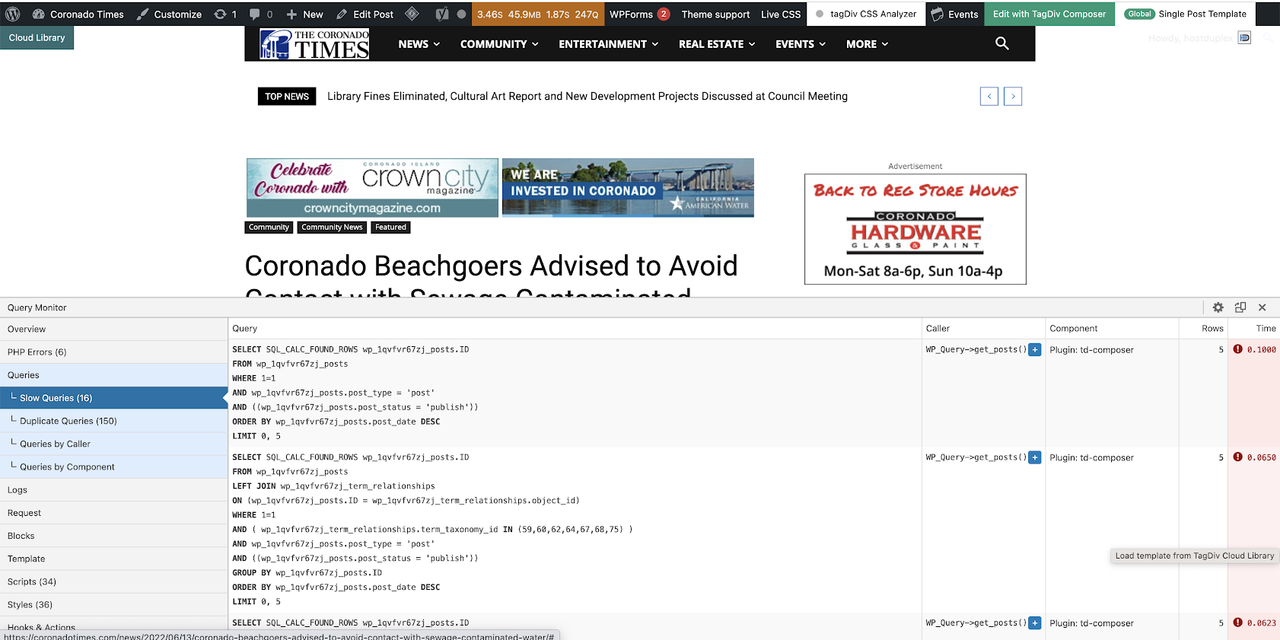
Any help? We have caching plugins to help with speed and we are on Cloudflare as well.
 ian909
 Hi,
I managed to correct the error by adding 1px padding to the left side of the elements that don’t display in the centre but now it looks out in the Tag Div composer but looks ok on mobile. Visually on mobile it seems to have moved more than 1px.
Feels like a quick fix to something that isn’t behaving as it’s supposed too but thanks for the advice.
Bettina Hello!
You can import a cloud template/section for that post or build it from scratch with the TagDiv Composer.
Please read all about it here: https://forum.tagdiv.com/design-post-pages-using-cloud-library-templates/
Thank you!
 umo2net
 It does not happen only when I login. Site visitors also experience same issue.
Right now it’s showing error on the website, but if I disable td composer error will go and site not well displayed.
Please see screenshot https://prnt.sc/9eSxBk6yFbzC
Anamaria Hello,
Please edit the Single Post Template with tagDiv Composer, select the viewport on phone, and after select the element Single Post Featured Image -> https://i.imgur.com/7vIddsf.png and check if the element is set margin or padding in the tab CSS.
Also, please check this topic https://forum.tagdiv.com/topic/mobile-template-spacing/
Thank you!



